Discord
Social NetworkingScreenshots
Analysis by LookedApp · Published · Updated
Discord is a versatile communication application designed for creating customized spaces for group chats, gaming, and community building. It is suitable for individuals looking to connect with friends, participate in gaming sessions, or manage larger communities through voice, video, and text channels.
What is Discord?
Discord is a communication application developed by Discord Inc. The app is available on both Google Play and the App Store, providing users with a platform for various forms of interaction.
On Google Play, the application is listed as 'Discord - Talk, Play, Hang Out' and has a rating of 4.3 based on 6.5M ratings. It falls under the Communication category, received its last update on 2025-11-27, and was released on 2015-05-13. The Google Play listing indicates 6M downloads in the last month.
The App Store also lists the application as 'Discord - Talk, Play, Hang Out', with a rating of 4.7 from 3.6M ratings. It is categorized under Social Networking, was updated on 2026-10-05, and initially released on 2015-05-21. The app requires a minimum iOS version of 16.0 and has a size of 261 MB.
Latest on Discord
Is this the real Discord app?
- Verified publisher infoSame developer on Google Play and the App Store (Discord Inc.), and the developer website discord.com matches the publisher.
- Established since 2015Listed since May 7, 2015, 500,000,000+ installs on Google Play.
| Developer on Google Play | Discord Inc. |
|---|---|
| Developer on the App Store | Discord Inc. |
| Same developer on both stores | Yes |
| Android package name | com.discord |
| iOS bundle ID | com.hammerandchisel.discord |
| On the stores since | May 7, 2015 |
| Installs on Google Play | 500,000,000+ |
| Developer website | discord.com |
| Content rating | Google Play: Teen / App Store: 12+ |
These details come from the public store listings. LookedApp doesn't host downloads: install from the Google Play or App Store buttons on this page.
Key features
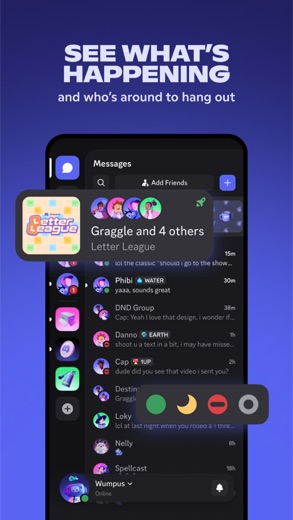
- Users can customize their own spaces to talk, play, and hang out.
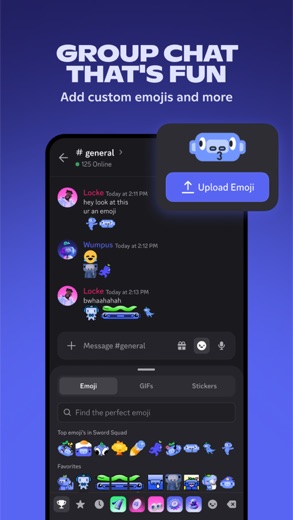
- The application allows for the creation of custom emoji, stickers, and soundboard effects to personalize chat interactions.
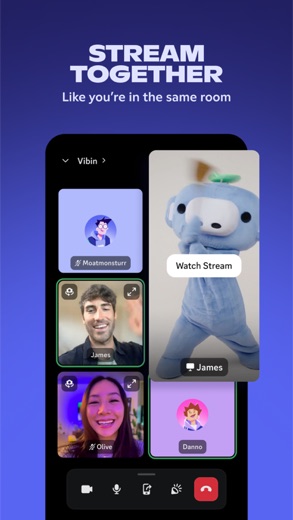
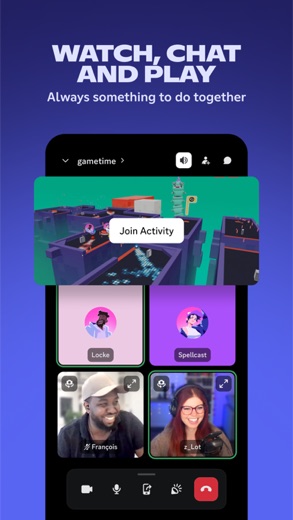
- High-quality and low-latency streaming capabilities facilitate shared activities like gaming or watching content with friends.
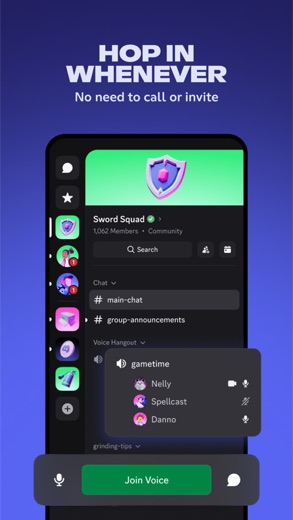
- Voice and text chats can be joined or left easily without the need for direct calls or invitations.
- It provides visibility into friends' activities, including games being played, and allows direct joining of supported games.
- Integrated activities such as watching videos, playing built-in games, and listening to music are available within the app.
More Social & Messaging reviews



More news
- RoundupTop Free Sports Apps for Live Scores and StreamsLookedApp presents a roundup of eight free-to-download sports applications, providing real-time scores, streams, and comprehensive sports content to enthusiasts.
- RoundupLookedApp's Guide to Free Weather Apps: A Side-by-Side ReviewLookedApp explores eight leading weather applications available at no initial cost. This comparison details their features, costs, and target audiences to help users find the ideal tool for their needs.
- RoundupTop News Apps for Following the Headlines: A LookedApp RoundupLookedApp reviews a selection of news applications available at no cost, providing insights into their features, costs, and target audiences for staying informed on daily headlines.


















Privacy and permissions
On Google Play, the Discord application requests access to several permission groups, including Contacts, Photos/Media/Files, Storage, Camera, Microphone, and Wi-Fi connection information. These permissions are typically used to enable various functionalities within the communication platform.
The App Store listing does not explicitly detail the permission groups or specific data settings for the application.
Discord Inc. publishes its privacy policy at discordapp.com.
Discord permissions in plain English
The Google Play listing shows 6 permission groups. Google Play also lists 9 other permissions, such as “view network connections”. That is fewer than most social & messaging apps LookedApp reviews (typical: 9).
- CameraCan take photos and record video
- ContactsCan read your contacts
- MicrophoneCan record audio
- Photos/Media/FilesCan read and change your photos, media and files
- StorageCan read and change files in shared storage
- Wi-Fi connection informationCan see Wi-Fi connection details
The App Store privacy label lists these data types:
- Used to track you: Identifiers
- Linked to you: Purchases, Contact Info, User Content, Search History, Identifiers, Usage Data, Diagnostics
Permission names come from Google Play; the plain-English lines describe what each permission group allows, not how this app uses it.
Discord at a glance
| Developer | Discord Inc. |
|---|---|
| Category | Social Networking |
| Rating on App Store | 4.7 out of 5 (3.6M ratings) |
| Rating on Google Play | 4.3 out of 5 (7.1M ratings) |
| Installs on Google Play | 500M+ |
| Price | Free |
| Age rating | 12+ |
What changed in the latest Discord version
App Store and Google Play · Version 349.0, released Oct 13, 2026; Google Play listing updated Oct 9, 2026
The release notes say:
“We’ve been hard at work making Discord better for you. This includes bug fixes and performance enhancements. For more detailed information, go to your profile in the app and scroll down to “What’s New”.”
Quoted from the store listings' release notes.
Pricing
Discord is available at no cost on Google Play, where its price is listed as $0. The application also includes in-app purchases.
On the App Store, Discord is listed as 'Free', and it also offers in-app purchases.
Discord compared with similar apps




Popular reviews
 textPlus reviewtextPlus is a mobile application that provides users with a real US phone number, enabling them to send text messages…Social & Messaging
 ThingsBook reviewThingsBook is a mobile application tailored for individuals who value long-form writing, deep reflection, and the…Social & Messaging
 Zangi Private Messenger reviewZangi Private Messenger is a communication application developed by Secret Phone, Inc., designed for users prioritizing…Social & Messaging
 YouTube reviewYouTube is a widely used mobile application for watching and sharing video content, provided by Google LLC. It offers a…Streaming, TV & News
 Tubi reviewTubi is a streaming application that offers a broad selection of movies, TV series, and live television channels…Streaming, TV & News
 Canva reviewCanva is a versatile creative platform designed for graphic design, photo editing, and video creation. It offers a…Tools & Utilities
How to get Discord safely
To obtain Discord safely, individuals should only download the application from its listings on Google Play or the App Store. Verifying that the developer is 'Discord Inc.' helps ensure the authenticity of the application.
It is advisable to avoid unofficial sources such as APK mirrors or modified versions of the app, as these may pose security risks. Before completing the installation, users should review the permissions requested by the application to understand what device functionalities it intends to access.
How to install Discord
On Android (Google Play)
- Open the Google Play Store app on your Android phone or tablet.
- Search for Discord, or use the Google Play button on this page to open the listing directly.
- Check that the developer under the app name is Discord Inc..
- Check that your device meets the listing's requirement: Android 7.0 and up.
- Tap Install (or the price, for a paid app) and wait for the download to finish, then open the app from your home screen.
- The listing shows in-app purchases, so review any purchase prompts before you confirm.
On iPhone and iPad (App Store)
- Open the App Store on your iPhone or iPad.
- Search for Discord, or use the App Store button on this page to open the listing directly.
- Check that the developer under the app name is Discord Inc..
- Make sure your device has iOS 16.0 or later and about 240 MB of free space, as the listing states.
- Tap Get (or the price), confirm the download, then open the app from your home screen.
- The listing shows in-app purchases, so review any purchase prompts before you confirm.
Discord version and app details
| Google Play | App Store | |
|---|---|---|
| Latest version | – | 349.0 |
| Last updated | Oct 9, 2026 | Oct 13, 2026 |
| First released | May 7, 2015 | May 21, 2015 |
| Package name | com.discord | – |
| Bundle ID | – | com.hammerandchisel.discord |
| Requires | Android 7.0 and up | iOS 16.0 or later |
| Download size | – | 240 MB |
| Content rating | Teen (Users Interact, In-App Purchases) | 12+ (Infrequent/Mild Profanity or Crude Humor; Infrequent/Mild Cartoon or Fantasy Violence; Infrequent/Mild Medical/Treatment Information; Infrequent/Mild Sexual Content and Nudity; Infrequent/Mild Realistic Violence; Infrequent/Mild Mature/Suggestive Themes; Infrequent/Mild Alcohol, Tobacco, or Drug Use or References; Infrequent/Mild Simulated Gambling) |
| In-app purchases | Yes ($0.99 - $274.94 per item) | Yes |
| Contains ads | No | – |
| Languages | – | 1 (including English) |
| Developer | Discord Inc. | Discord Inc. |
Who Discord is for
Discord is designed for individuals interested in gaming, connecting with friends, and building or joining online communities. The application caters to users who want a dedicated space for group chats that include various interactive elements.
It is also suitable for those who enjoy customizing their chat environments with unique emojis, stickers, and statuses. The platform supports seamless communication across different devices, making it useful for users who switch between PC, phone, or console.
Discord for kids and families
Pros
- Provides a versatile platform for voice, video, and text communication.
- Offers extensive customization options for personal spaces and chat interactions.
- Supports high-quality, low-latency streaming for shared experiences.
- Allows for easy, flexible participation in group chats without formal calls.
- Integrates various activities like gaming, watching videos, and listening to music.
- Available across multiple platforms including PC, phone, and console.
Cons
- The application includes in-app purchases, which may lead to additional costs.
- The content rating of Teen on Google Play and 12+ on the App Store suggests content may not be suitable for all ages without supervision.
- The iOS version has a size of 261 MB, which might be significant for devices with limited storage.
Discord: frequently asked questions
Is Discord free to use?
Yes, Discord is available at no cost on Google Play ($0) and is listed as 'Free' on the App Store. However, it does include in-app purchases.
Which devices can run Discord?
Discord is available on Google Play and the App Store. The App Store listing indicates it requires a minimum iOS version of 16.0. It is also usable on PC and console, according to the developer.
Who is the developer of Discord?
Discord Inc. is the developer of the Discord application.
What are the primary functions of Discord?
Discord's primary functions include enabling group chats, facilitating communication during gaming, and supporting the creation and management of online communities through voice, video, and text channels.
What is the content rating for Discord?
The content rating for Discord is Teen on Google Play and 12+ on the App Store.
When was Discord last updated?
Discord was last updated on Google Play on 2025-11-27, and on the App Store on 2026-10-05.
Discord
- Category
- Social Networking
- Version
- 349.0
Download
Looking for the Discord website or sign-in? Go to discord.com →The developer's website, as given on the store listing.
Discord ratings breakdown
Google Play 4.3 average from 7,072,290 ratings
- 572%
- 410%
- 34%
- 22%
- 112%
App Store 4.7 average from 3,568,571 ratings
- 585%
- 48%
- 33%
- 21%
- 14%
Share of ratings for each star level, as shown on the listings, as of Oct 13, 2026.