YouTube Music
MusicScreenshots
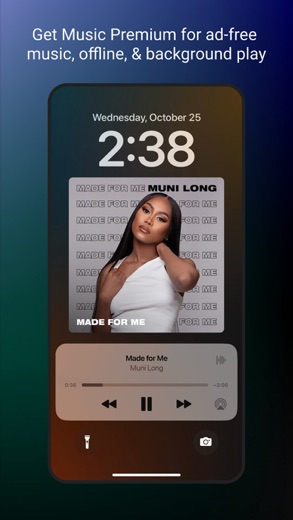
Analysis by LookedApp · Published · Updated
YouTube Music is a music streaming application developed by Google LLC, offering a vast library of music content including unique formats like live performances and remixes. It provides personalized recommendations and curated playlists, making it suitable for users who desire a comprehensive and adaptable music service with video integration. The application supports listening across various devices and platforms.
What is YouTube Music?
YouTube Music is an application designed for music streaming and discovery. It is published by Google LLC on Google Play and by Google on the App Store. The application became available on the App Store on 2015-11-12 and on Google Play on 2016-12-05, and it has received updates as recently as 2026-10-11 on the App Store and 2026-04-10 on Google Play.
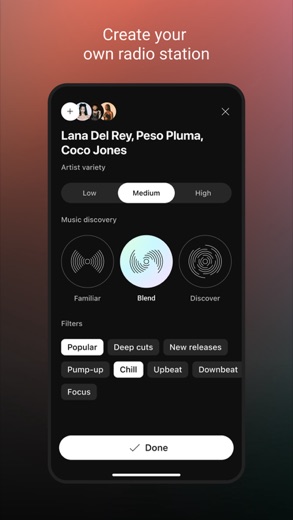
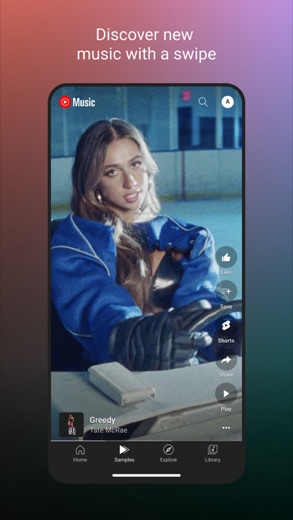
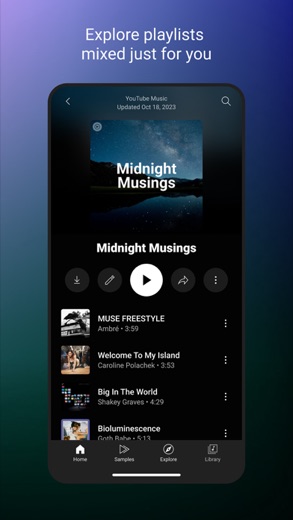
The application connects users to a wide world of music, featuring content such as live performances, covers, remixes, and other music content that may not be easily found elsewhere. It offers thousands of curated playlists spanning many genres and activities, alongside personalized playlists and mixes tailored to individual listening habits. Users can also create their own playlists, either with song suggestions or in collaboration with other music enthusiasts.
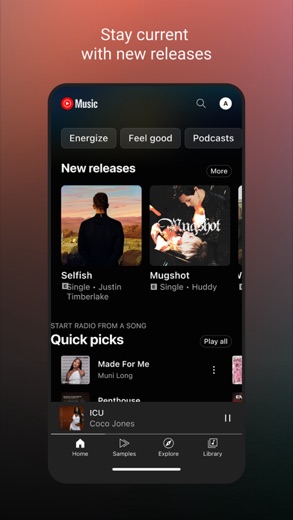
A neatly organized library within the application allows users to view their liked and added songs, created playlists, and subscribed artists. The application also helps users stay current with music trends by providing new release information, and enables discovery of music based on genres like Hip Hop, Pop, Country, and Jazz, or moods such as Chill, Energy Booster, and Workout. Global top charts are also available for exploration.
Latest on YouTube Music





Is this the real YouTube Music app?
- Verified publisher infoSame developer on Google Play and the App Store (Google LLC), and the developer website music.youtube.com matches the publisher.
- Established since 2015Listed since Nov 12, 2015, 5,000,000,000+ installs on Google Play.
| Developer on Google Play | Google LLC |
|---|---|
| Developer on the App Store | |
| Same developer on both stores | Yes |
| Android package name | com.google.android.apps.youtube.music |
| iOS bundle ID | com.google.ios.youtubemusic |
| On the stores since | Nov 12, 2015 |
| Installs on Google Play | 5,000,000,000+ |
| Developer website | music.youtube.com |
| Content rating | Google Play: Teen / App Store: 12+ |
These details come from the public store listings. LookedApp doesn't host downloads: install from the Google Play or App Store buttons on this page.
Key features
- Music content including live performances, covers, and remixes is available.
- Thousands of curated playlists cover various genres and activities.
- Personalized playlists and mixes are provided based on user preferences.
- Users can create playlists with song suggestions or collaborate with others.
- Song lyrics are available for sing-along experiences.
- Compatibility extends to Google Maps, Waze, and Google Assistant.
More Music & Audio reviews



More news
- GuideIn-App Purchases and Subscriptions: Reading the Price LineUnderstanding the different pricing models for mobile applications, from no initial cost to up-front purchases, helps users navigate the digital marketplace effectively. This guide explains how to interpret price lines and pricing sections on app store listings.
- GuideUnderstanding Shopping Apps: Permissions, Payments, and Safe InstallationShopping applications provide convenience, but understanding their permissions, payment structures, and how to install them safely is crucial for user privacy and device security.
- RoundupTop Free Sports Apps for Live Scores and StreamsLookedApp presents a roundup of eight free-to-download sports applications, providing real-time scores, streams, and comprehensive sports content to enthusiasts.


















Privacy and permissions
On Google Play, YouTube Music requires several permission groups, including Identity, Contacts, Location, Photos/Media/Files, Storage, Camera, Microphone, and Wi-Fi connection information. These permissions allow the application to access various functionalities of the user's device.
The App Store description for YouTube Music does not explicitly list the permission groups required by the application. However, a privacy policy is referenced, which can be found at https://www.google.com/policies/privacy. This policy outlines how user data may be handled by the application.
Google publishes its privacy policy at www.google.com.
YouTube Music permissions in plain English
The Google Play listing shows 8 permission groups. Google Play also lists 15 other permissions, such as “view network connections”. That is more than most music & audio apps LookedApp reviews (typical: 5.5).
- CameraCan take photos and record video
- ContactsCan read your contacts
- IdentityCan find accounts on the device
- LocationCan use your precise location
- MicrophoneCan record audio
- Photos/Media/FilesCan read and change your photos, media and files
- StorageCan read and change files in shared storage
- Wi-Fi connection informationCan see Wi-Fi connection details
Permission names come from Google Play; the plain-English lines describe what each permission group allows, not how this app uses it.
YouTube Music at a glance
| Developer | |
|---|---|
| Category | Music |
| Rating on App Store | 4.8 out of 5 (1.5M ratings) |
| Rating on Google Play | 4.5 out of 5 (7.9M ratings) |
| Installs on Google Play | 5B+ |
| Price | Free |
| Age rating | 12+ |
What changed in the latest YouTube Music version
App Store · Version 9.41, released Oct 11, 2026
The release notes are general and don't list specific changes:
“We update our app all the time in order to make your YouTube Music experience better. We polished a few things, fixed bugs, and made some performance improvements.”
Google Play · Listing updated Oct 12, 2026
The release notes say:
“Change up your routine with the new Discover Mix, a personalized playlist with songs you’ll love based on what you listen to the most. With a new set of songs each Wednesday, there is always more to explore.”
Quoted from the store listings' release notes.
Pricing
YouTube Music is available on Google Play with a price of 0, though it includes in-app purchases. On the App Store, the application is listed as 'Free'. Users have the option to upgrade to Music Premium, which is available in select countries and offers an ad-free listening experience, background music playback, and the ability to switch seamlessly between song audio and music videos.
For subscriptions made via iTunes, payment is charged to the iTunes Account upon purchase confirmation. The subscription automatically renews unless auto-renewal is turned off at least 24 hours before the end of the current period. Accounts are charged for renewal within 24 hours prior to the end of the current period at the rate of the selected plan. Subscriptions and auto-renewal can be managed by accessing Account Settings after purchase. The YouTube paid service terms are available at https://www.youtube.com/t/terms_paidservice.
YouTube Music compared with similar apps
| App | Rating | Installs | Price |
|---|---|---|---|
 YouTube Music YouTube Music | 4.5 | 5B+ | Free |
 YouTube YouTube | 3.8 | 10B+ | Free |
 Tubi Tubi | 4.9 | 100M+ | Free |
 Peacock TV Peacock TV | 4.7 | 50M+ | Free |
Popular reviews
 Easy Quran Mp3 Audio Offline reviewThe Easy Quran Mp3 Audio Offline application offers a comprehensive suite of tools for Muslim users, featuring the full…Music & Audio
 Heart Moments reviewHeart Moments is a mobile application developed by Creatunity, designed to help users create personalized audio…Music & Audio
 Mezquite Diatonic Accordion reviewThe Mezquite Diatonic Accordion app provides a comprehensive mobile simulation for learning and practicing the diatonic…Music & Audio
 Podcast Go reviewPodcast Go is a dedicated Android podcast player developed by Sanity Audio Apps. It offers users access to over…Music & Audio
 Radio FM AM Live Radio Station reviewRadio FM AM Live Radio Station is a mobile application developed by AVIRISE LIMITED that provides access to a vast…Music & Audio
 Ringtones for android phones reviewRingtones for Android Phones is an application designed for Android users seeking extensive customization for their…Music & Audio
How to get YouTube Music safely
To ensure a safe experience, it is advisable to obtain YouTube Music exclusively from reputable application marketplaces such as Google Play or the App Store. When installing, users should verify that the developer listed is Google LLC on Google Play or Google on the App Store.
Users should avoid downloading the application from unofficial sources, third-party mirrors, or through modified versions, as these might contain vulnerabilities or unwanted software. Before completing installation, it is recommended to review the permissions requested by the application on Google Play to understand what device functionalities it intends to access.
How to install YouTube Music
On Android (Google Play)
- Open the Google Play Store app on your Android phone or tablet.
- Search for YouTube Music, or use the Google Play button on this page to open the listing directly.
- Check that the developer under the app name is Google LLC.
- Tap Install (or the price, for a paid app) and wait for the download to finish, then open the app from your home screen.
- The listing shows in-app purchases, so review any purchase prompts before you confirm.
On iPhone and iPad (App Store)
- Open the App Store on your iPhone or iPad.
- Search for YouTube Music, or use the App Store button on this page to open the listing directly.
- Check that the developer under the app name is Google.
- Make sure your device has iOS 17.0 or later and about 283 MB of free space, as the listing states.
- Tap Get (or the price), confirm the download, then open the app from your home screen.
- The listing shows in-app purchases, so review any purchase prompts before you confirm.
YouTube Music version and app details
| Google Play | App Store | |
|---|---|---|
| Latest version | – | 9.41 |
| Last updated | Oct 12, 2026 | Oct 11, 2026 |
| First released | Nov 12, 2015 | Nov 12, 2015 |
| Package name | com.google.android.apps.youtube.music | – |
| Bundle ID | – | com.google.ios.youtubemusic |
| Requires | – | iOS 17.0 or later |
| Download size | – | 283 MB |
| Content rating | Teen (Diverse Content: Discretion Advised; In-App Purchases) | 12+ (Infrequent/Mild Cartoon or Fantasy Violence) |
| In-app purchases | Yes ($0.05 - $999.99 per item) | Yes |
| Contains ads | Yes | – |
| Languages | – | 71 (including English) |
| Developer | Google LLC |
Who YouTube Music is for
YouTube Music is intended for individuals who are looking for a diverse music streaming experience that includes not only standard tracks but also unique content like live performances, covers, and remixes. It caters to users who value personalized music recommendations, including custom playlists and mixes based on their listening habits and moods.
The application also suits users who wish to integrate their music experience across multiple devices and platforms, as it is compatible with phones, desktops, smart speakers, smart TVs, cars, and smart watches. Furthermore, it is designed for those who enjoy discovering new music through genre-based exploration, mood-based selections, and global charts.
YouTube Music for kids and families
Pros
- Offers an extensive library with unique content like live performances and remixes.
- Provides strong personalization features, including tailored playlists and mixes.
- Demonstrates broad device and app compatibility, including smart speakers, TVs, and car systems.
- Allows users to upload their personal song files for consolidated listening.
- Available for no upfront cost on both major app stores.
Cons
- The application includes in-app purchases.
- Non-premium users may encounter advertisements.
- Content rating is 'Teen' on Google Play and '12+' on the App Store, indicating potential content not suitable for very young audiences.
- Music Premium members may still see, hear, or experience branding or promotions embedded by creators.
YouTube Music: frequently asked questions
Is YouTube Music free to use?
Yes, the application is available for no upfront cost on Google Play and is listed as 'Free' on the App Store. However, it does include in-app purchases and offers an optional premium subscription for additional benefits.
On which devices can YouTube Music be used?
YouTube Music is available on Google Play for Android devices and on the App Store for iOS devices. It can be listened to on phones, desktops, smart speakers, smart TVs, cars, smart watches, and within compatible applications.
Who is the developer of YouTube Music?
The application is developed by Google LLC for Google Play and by Google for the App Store.
Is there a premium version of YouTube Music?
Yes, Music Premium is available in select countries. This premium subscription offers benefits such as ad-free listening, background music playback, and the ability to seamlessly switch between song audio and music videos.
What kind of music content can be found on YouTube Music?
The application features a wide variety of music content, including live performances, covers, remixes, and other unique music content. It also offers thousands of curated playlists, personalized mixes, and new releases based on genres and moods.
Can users upload their own music to YouTube Music?
Yes, users have the ability to upload songs from their devices to YouTube Music, allowing them to enjoy their personal music collection alongside the application's extensive library.
YouTube Music
- Category
- Music
- Version
- 9.41
Download
Looking for the YouTube Music website or sign-in? Go to music.youtube.com →The developer's website, as given on the store listing.
YouTube Music ratings breakdown
Google Play 4.5 average from 7,856,289 ratings
- 578%
- 49%
- 33%
- 22%
- 18%
App Store 4.8 average from 1,515,826 ratings
- 585%
- 411%
- 32%
- 21%
- 12%
Share of ratings for each star level, as shown on the listings, as of Oct 15, 2026.