Zoom Workplace
BusinessScreenshots


Analysis by LookedApp · Published · Updated
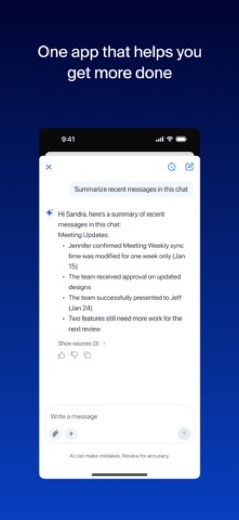
Zoom Workplace serves as a comprehensive communication and collaboration platform, integrating video meetings, chat, phone, and productivity tools into a single application. It is enhanced with AI features designed to streamline daily tasks, such as note-taking, summarization, and content drafting. The app is well-suited for individuals and teams aiming to improve efficiency and foster collaboration across various work-related activities.
What is Zoom Workplace?
Zoom Workplace is an application designed to streamline communication and collaboration by combining multiple tools into one interface. It integrates functionalities such as video meetings, chat, phone services, appointment scheduling, email, and collaborative document editing. The app aims to enhance productivity through its integrated features.
The application is developed by zoom.com for Google Play and Zoom Communications, Inc. for the App Store. It functions as a central hub for various work-related interactions, leveraging AI to assist with a range of tasks from capturing conversations to drafting communications.
Zoom Workplace is available for installation on devices through Google Play and the App Store. Its capabilities are presented as a means to power work with AI and facilitate seamless communication and next-generation collaboration, alongside tools for productivity and organization.
Latest on Zoom Workplace
Is this the real Zoom Workplace app?
- Verified publisher infoSame developer on Google Play and the App Store (zoom.com), and the developer website zoom.us matches the publisher.
- Established since 2012Listed since Aug 15, 2012, 1,000,000,000+ installs on Google Play.
| Developer on Google Play | zoom.com |
|---|---|
| Developer on the App Store | Zoom Communications, Inc. |
| Same developer on both stores | Yes |
| Android package name | us.zoom.videomeetings |
| iOS bundle ID | us.zoom.videomeetings |
| On the stores since | Aug 15, 2012 |
| Installs on Google Play | 1,000,000,000+ |
| Developer website | zoom.us |
| Content rating | Google Play: Everyone / App Store: 4+ |
These details come from the public store listings. LookedApp doesn't host downloads: install from the Google Play or App Store buttons on this page.
Key features
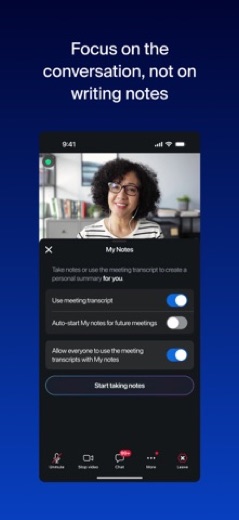
- AI features are built into the app to automatically take notes during meetings and in-person conversations, and to provide instant summaries of calls and chat threads.
- The application allows users to ask AI Companion questions during a meeting, such as 'What did I miss?' or 'Was my name mentioned?', without interrupting the flow.
- It enables the drafting of emails, chat responses, and whiteboard ideas with AI assistance from a simple prompt.
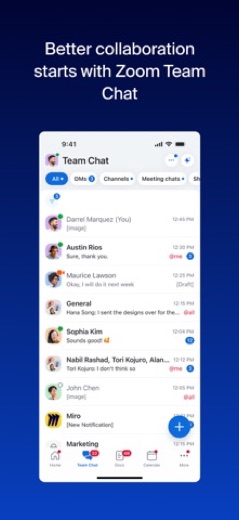
- Users can host or join meetings with video and audio, and engage in individual or group messaging, channel organization, and file sharing via Zoom Chat.
- The app supports real-time drafting, editing, and collaboration on Docs directly within meetings and offers Whiteboard functionality for brainstorming with AI-generated mind maps.
- It provides a unified view for managing email and calendar, allowing users to schedule meetings and check messages without switching applications.
More Productivity & Email reviews




More news
- GuideIn-App Purchases and Subscriptions: Reading the Price LineUnderstanding the different pricing models for mobile applications, from no initial cost to up-front purchases, helps users navigate the digital marketplace effectively. This guide explains how to interpret price lines and pricing sections on app store listings.
- GuideUnderstanding Shopping Apps: Permissions, Payments, and Safe InstallationShopping applications provide convenience, but understanding their permissions, payment structures, and how to install them safely is crucial for user privacy and device security.
- RoundupTop Free Sports Apps for Live Scores and StreamsLookedApp presents a roundup of eight free-to-download sports applications, providing real-time scores, streams, and comprehensive sports content to enthusiasts.


















Privacy and permissions
On Google Play, Zoom Workplace requests access to several permission groups, including Calendar, Contacts, Location, Phone, Photos/Media/Files, Storage, Camera, Microphone, Wi-Fi connection information, and Device ID & call information. These permissions are necessary for the app to function as an integrated communication tool.
The App Store listing for Zoom Workplace provides links to its privacy statement at 'https://www.zoom.com/en/trust/privacy/privacy-statement/' and terms of service at 'https://www.zoom.com/en/trust/terms/'. These resources outline the app's data handling practices and user agreements.
Zoom Communications, Inc. publishes its privacy policy at zoom.us.
Zoom Workplace permissions in plain English
The Google Play listing shows 10 permission groups. Google Play also lists 15 other permissions, such as “view network connections”. That is more than most productivity & email apps LookedApp reviews (typical: 7).
- CalendarCan read or change your calendar
- CameraCan take photos and record video
- ContactsCan read your contacts
- Device ID & call informationCan read your device ID and call status
- LocationCan use your precise location
- MicrophoneCan record audio
- PhoneCan read phone status or make calls
- Photos/Media/FilesCan read and change your photos, media and files
- StorageCan read and change files in shared storage
- Wi-Fi connection informationCan see Wi-Fi connection details
Permission names come from Google Play; the plain-English lines describe what each permission group allows, not how this app uses it.
Zoom Workplace at a glance
| Developer | Zoom Communications, Inc. |
|---|---|
| Category | Business |
| Rating on App Store | 4.7 out of 5 (3.2M ratings) |
| Rating on Google Play | 4.1 out of 5 (4.6M ratings) |
| Installs on Google Play | 1B+ |
| Price | Free |
| Age rating | 4+ |
What changed in the latest Zoom Workplace version
App Store and Google Play · Version 7.2.1, released Sep 28, 2026; Google Play listing updated Sep 21, 2026
The release notes are general and don't list specific changes:
“Bug fixes and improvements”
Quoted from the store listings' release notes.
Pricing
Zoom Workplace is available at no initial cost on both Google Play and the App Store. However, it includes in-app purchases, and a paid 'Zoom Workplace Pro' subscription is offered to unlock additional features and capabilities.
The 'Zoom Workplace Pro' subscription provides access to core AI features, allows hosting unlimited meetings for up to 30 hours each, includes cloud recording storage, and grants co-hosting and scheduling permissions to other users. This subscription automatically renews unless canceled at least 24 hours before the end of the free trial or the billing period. The amount charged to the payment method in an App Store account will vary by the selected plan and country, and the price is displayed before confirming a purchase or starting a free trial. It is also noted that some features may require an additional add-on or paid license for access or to remove usage limitations.
Zoom Workplace compared with similar apps
| App | Rating | Installs | Price |
|---|---|---|---|
 Zoom Workplace Zoom Workplace | 4.1 | 1B+ | Free |
 Canva Canva | 4.8 | 500M+ | Free |
 Yahoo Mail Yahoo Mail | 4.2 | 100M+ | Free |
 Gemini Notebook (NotebookLM) Gemini Notebook (NotebookLM) | 4.7 | 10M+ | Free |
Popular reviews
 Google Authenticator reviewGoogle Authenticator is an application designed to provide an additional layer of security for online accounts by…Productivity & Email
 Google Sheets reviewGoogle Sheets is a productivity application designed for creating, editing, and collaborating on spreadsheets across…Productivity & Email
 Workday reviewThe Workday app serves as a comprehensive mobile solution designed to enhance workplace productivity, offering…Productivity & Email
 UKG Pro reviewThe UKG Pro app functions as a mobile platform designed to provide employees and people managers with access to human…Productivity & Email
 Messenger - SMS Text Messages reviewMessenger, developed by Meta Platforms, Inc., is a comprehensive communication application designed for Android users.…Productivity & Email
 ChatGPT reviewChatGPT for Android brings OpenAI's advanced AI capabilities to mobile devices, enabling users to generate images,…Productivity & Email
How to get Zoom Workplace safely
To install Zoom Workplace safely, users should only obtain the application from reputable sources like Google Play or the App Store. Verifying the developer name is crucial; look for 'zoom.com' on Google Play and 'Zoom Communications, Inc.' on the App Store.
It is advisable to avoid downloading the application from unofficial third-party websites or through modified versions, as these sources may pose security risks. Before completing the installation, users should review the permissions requested by the application to understand what device functionalities and data it intends to access.
How to install Zoom Workplace
On Android (Google Play)
- Open the Google Play Store app on your Android phone or tablet.
- Search for Zoom Workplace, or use the Google Play button on this page to open the listing directly.
- Check that the developer under the app name is zoom.com.
- Check that your device meets the listing's requirement: Android 9 and up.
- Tap Install (or the price, for a paid app) and wait for the download to finish, then open the app from your home screen.
- The listing shows in-app purchases, so review any purchase prompts before you confirm.
On iPhone and iPad (App Store)
- Open the App Store on your iPhone or iPad.
- Search for Zoom Workplace, or use the App Store button on this page to open the listing directly.
- Check that the developer under the app name is Zoom Communications, Inc..
- Make sure your device has iOS 15.0 or later and about 461 MB of free space, as the listing states.
- Tap Get (or the price), confirm the download, then open the app from your home screen.
- The listing shows in-app purchases, so review any purchase prompts before you confirm.
Zoom Workplace version and app details
| Google Play | App Store | |
|---|---|---|
| Latest version | – | 7.2.1 |
| Last updated | Sep 21, 2026 | Sep 28, 2026 |
| First released | Jan 24, 2013 | Aug 15, 2012 |
| Package name | us.zoom.videomeetings | – |
| Bundle ID | – | us.zoom.videomeetings |
| Requires | Android 9 and up | iOS 15.0 or later |
| Download size | – | 461 MB |
| Content rating | Everyone (Users Interact, In-App Purchases) | 4+ |
| In-app purchases | Yes ($10.00 - $169.99 per item) | Yes |
| Contains ads | No | – |
| Languages | – | 16 (including English) |
| Developer | zoom.com | Zoom Communications, Inc. |
Who Zoom Workplace is for
Zoom Workplace is designed for individuals and teams seeking a consolidated platform for their daily communication and collaboration needs. Its integration of meetings, chat, phone, email, and document collaboration makes it suitable for professionals who manage various aspects of their work through digital tools.
The app is particularly beneficial for users who can leverage AI-powered assistance for tasks such as automated note-taking, meeting summaries, and content generation. With a content rating of 'Everyone' on Google Play and '4+' on the App Store, it is broadly accessible to a wide audience engaged in business and professional activities.
Zoom Workplace for kids and families
Pros
- Integrates a wide array of communication and productivity tools, including video meetings, chat, phone, email, and collaborative documents, into a single application.
- Features built-in AI capabilities that enhance productivity through automatic note-taking, meeting summaries, and content drafting.
- Facilitates seamless communication with crystal-clear video and audio, along with robust messaging and file-sharing options.
- Supports real-time collaboration on documents and whiteboards, allowing teams to work together efficiently.
- Maintains high user satisfaction with an average rating of 4.1 on Google Play from 4.6M ratings and 4.7 on the App Store from 3.2M ratings.
Cons
- Requires numerous permissions on Android devices, including access to sensitive areas like Calendar, Contacts, Location, and Microphone.
- Full access to advanced features, such as core AI functionalities, unlimited meeting duration, and cloud recording, necessitates a paid 'Zoom Workplace Pro' subscription or additional licenses.
- Some functionalities may require separate add-ons or paid licenses to remove usage limitations, indicating a tiered feature set.
- The version for Google Play is listed as 'Varies with device', which may lead to inconsistencies in user experience or available features across different Android devices.
Zoom Workplace: frequently asked questions
Is Zoom Workplace available at no cost?
Yes, Zoom Workplace is available at no initial cost on both Google Play and the App Store, though it offers in-app purchases and paid subscriptions for enhanced features.
On which devices can Zoom Workplace be used?
It is available on devices compatible with Google Play and the App Store. For iOS devices, it requires iOS 15.0 or later.
Who develops Zoom Workplace?
Zoom Workplace is developed by zoom.com for Google Play and Zoom Communications, Inc. for the App Store.
What are some of its core functions?
Its core functions include video meetings, chat, phone services, appointment scheduling, email management, and collaborative document editing, all integrated within one application.
Does the app offer AI assistance?
Yes, the app incorporates AI capabilities to assist with tasks such as automatic note-taking, summarizing meetings and chat threads, drafting emails and responses, and generating ideas on whiteboards.
What permissions does the app request on Android?
On Android, the app requests permissions for Calendar, Contacts, Location, Phone, Photos/Media/Files, Storage, Camera, Microphone, Wi-Fi connection information, and Device ID & call information.
Zoom Workplace
- Category
- Business
- Version
- 7.2.1
Download
Looking for the Zoom Workplace website or sign-in? Go to zoom.us →The developer's website, as given on the store listing.
Zoom Workplace ratings breakdown
Google Play 4.1 average from 4,592,447 ratings
- 566%
- 410%
- 36%
- 24%
- 114%
App Store 4.7 average from 3,249,893 ratings
- 584%
- 48%
- 32%
- 21%
- 15%
Share of ratings for each star level, as shown on the listings, as of Oct 1, 2026.