Zillow
LifestyleScreenshots

Analysis by LookedApp · Published · Updated
Zillow is an application designed to assist individuals in their search for homes to buy or rent. It offers a comprehensive set of tools for exploring listings, managing the search process, and connecting with real estate professionals. The application is suitable for anyone navigating the real estate market, from first-time homebuyers to renters.
What is Zillow?
Zillow is an application dedicated to browsing homes for sale and rent, providing users with a wide array of listings and real estate-related features. It is published by Zillow, a well-known entity in the real estate sector, and is widely accessible to the public.
The application is available on multiple platforms. On Google Play, it is listed under the name "Zillow: Homes for Sale & Rent" and is developed by Zillow. For users of Apple devices, it can be found on the App Store as "Zillow Real Estate & Rentals", developed by Zillow.com.
Zillow aims to streamline the process of finding a new home by offering tools that allow users to search, save, and share property listings, as well as interact with real estate experts, all within a single application.
Latest on Zillow
Is this the real Zillow app?
- Verified publisher infoSame developer on Google Play and the App Store (Zillow Group), and the developer website zillow.com matches the publisher.
- Established since 2009Listed since Apr 29, 2009, 50,000,000+ installs on Google Play.
| Developer on Google Play | Zillow Group |
|---|---|
| Developer on the App Store | Zillow.com |
| Same developer on both stores | Yes |
| Android package name | com.zillow.android.zillowmap |
| iOS bundle ID | com.zillow.ZillowMap |
| On the stores since | Apr 29, 2009 |
| Installs on Google Play | 50,000,000+ |
| Developer website | zillow.com |
| Content rating | Google Play: Everyone / App Store: 4+ |
These details come from the public store listings. LookedApp doesn't host downloads: install from the Google Play or App Store buttons on this page.
Key features
- Users can search, plan, and manage their entire home-buying or renting journey directly within the application.
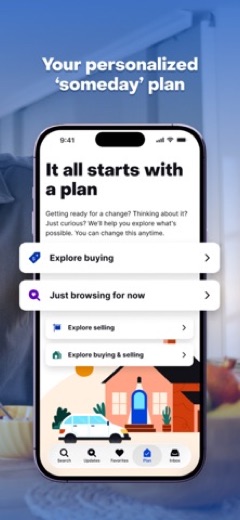
- The application supports creating personalized plans, saving homes in shared collections, and maintaining organization throughout the search process.
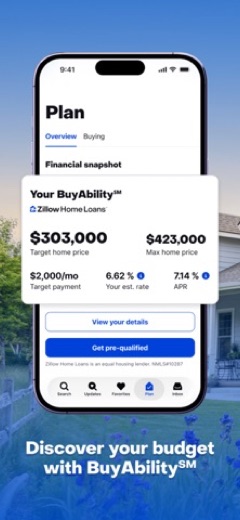
- It offers a BuyAbility℠ score, which provides an estimate of a user's home-buying budget based on their financial information and current interest rates.
- Users can access Zillow Home Loans Verified Pre-approval, helping them understand which homes align with their budget.
- The application facilitates various viewing options, including 3D home tours, and for Showcase listings, Sky Tours that offer different angles and heights.
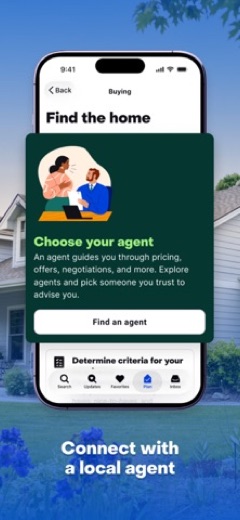
- It provides a way to connect with Zillow Premier Agents, who are local real estate experts meeting Zillow's quality standards for customer service.
More Shopping & Local reviews




More news
- What's newWhat's New in Among Us: The Latest Update and Ghost Crewmate RoleThe social deduction game Among Us has received a new update, introducing a Ghost Crewmate role and seasonal decorations, adding to its gameplay and customization options.
- What's newWhat's New in EA SPORTS FC Soccer Mobile 26: The Latest Season UpdateElectronic Arts has rolled out significant updates for EA SPORTS FC Soccer Mobile 26, introducing new tactical depth, game modes, and enhanced visuals. These changes aim to refresh the mobile soccer experience for players.
- GuideIn-App Purchases and Subscriptions: Reading the Price LineUnderstanding the different pricing models for mobile applications, from no initial cost to up-front purchases, helps users navigate the digital marketplace effectively. This guide explains how to interpret price lines and pricing sections on app store listings.








Privacy and permissions
The Google Play listing for Zillow indicates that the application requests access to several permission groups on a user's device. These include Identity, Contacts, Location, Phone, Photos/Media/Files, Storage, Camera, Microphone, Wi-Fi connection information, and Device ID & call information.
The App Store listing does not explicitly state the specific permission groups or data collection practices of the application. Users can typically review permissions requested by applications through their device's operating system settings after installation.
Zillow.com publishes its privacy policy at www.zillowgroup.com.
Zillow permissions in plain English
The Google Play listing shows 10 permission groups. Google Play also lists 11 other permissions, such as “view network connections”. That is more than most shopping & local apps LookedApp reviews (typical: 5).
- CameraCan take photos and record video
- ContactsCan read your contacts
- Device ID & call informationCan read your device ID and call status
- IdentityCan find accounts on the device
- LocationCan use your precise location
- MicrophoneCan record audio
- PhoneCan read phone status or make calls
- Photos/Media/FilesCan read and change your photos, media and files
- StorageCan read and change files in shared storage
- Wi-Fi connection informationCan see Wi-Fi connection details
Permission names come from Google Play; the plain-English lines describe what each permission group allows, not how this app uses it.
Zillow at a glance
| Developer | Zillow.com |
|---|---|
| Category | Lifestyle |
| Rating on App Store | 4.8 out of 5 (7.2M ratings) |
| Rating on Google Play | 4.8 out of 5 (1.7M ratings) |
| Installs on Google Play | 50M+ |
| Price | Free |
| Age rating | 4+ |
What changed in the latest Zillow version
App Store · Version 2026.74.0, released Oct 6, 2026
The release notes are general and don't list specific changes:
“This week, we fixed some minor issues in the app. We are always working hard on improvements to make finding your next home even easier. Please continue to send your feedback to iphonefeedback@zillow.com. We appreciate it!”
Quoted from the store listings' release notes.
Pricing
The Zillow application is available at no cost to users on both Google Play and the App Store. The Google Play listing specifies a price of 0, indicating it is free to acquire.
Similarly, the App Store listing clearly states that the application's price is "Free", making it accessible without an initial purchase fee for all users.
Zillow compared with similar apps
| App | Rating | Installs | Price |
|---|---|---|---|
 Zillow Zillow | 4.8 | 50M+ | Free |
 Vinted Vinted | 4.9 | 100M+ | Free |
 Great Clips Online Check-in Great Clips Online Check-in | 4.9 | 10M+ | Free |
 Marketplace: Buy & Sell Local Marketplace: Buy & Sell Local | 3.0 | 5M+ | Free |
Popular reviews
 Ring - Always Home reviewThe Ring - Always Home application serves as a central control hub for various Ring smart home security devices,…Shopping & Local
 FlightAware Flight Tracker reviewThe FlightAware Flight Tracker application provides real-time aircraft tracking capabilities for users interested in…Shopping & Local
 Uber reviewUber is a comprehensive mobile application developed by Uber Technologies, Inc. that facilitates a wide array of…Shopping & Local
 Whatnot reviewWhatnot is a live shopping platform that connects buyers and sellers across a wide array of categories. It offers…Shopping & Local
 Poshmark Sell Shop Online reviewThe Poshmark Sell Shop Online app serves as a vibrant marketplace for fashion enthusiasts, enabling users to both…Shopping & Local
 TP-Link Tapo reviewThe TP-Link Tapo app provides a centralized platform for setting up and managing a range of Tapo smart home devices,…Shopping & Local
How to get Zillow safely
To obtain the Zillow application, users should install it exclusively from reputable sources such as the Google Play Store or the App Store. It is crucial to verify that the developer name displayed is "Zillow" on Google Play or "Zillow.com" on the App Store to ensure authenticity.
Users are advised to avoid downloading the application from alternative sources, such as APK mirrors or websites offering modified versions, as these may contain vulnerabilities or unwanted software. Before completing the installation, reviewing the permissions requested by the application can provide insight into the data it might access on a device.
How to install Zillow
On Android (Google Play)
- Open the Google Play Store app on your Android phone or tablet.
- Search for Zillow, or use the Google Play button on this page to open the listing directly.
- Check that the developer under the app name is Zillow Group.
- Check that your device meets the listing's requirement: Android 10 and up.
- Tap Install (or the price, for a paid app) and wait for the download to finish, then open the app from your home screen.
On iPhone and iPad (App Store)
- Open the App Store on your iPhone or iPad.
- Search for Zillow, or use the App Store button on this page to open the listing directly.
- Check that the developer under the app name is Zillow.com.
- Make sure your device has iOS 18.0 or later and about 487 MB of free space, as the listing states.
- Tap Get (or the price), confirm the download, then open the app from your home screen.
Zillow version and app details
| Google Play | App Store | |
|---|---|---|
| Latest version | – | 2026.74.0 |
| Last updated | Oct 12, 2026 | Oct 6, 2026 |
| First released | Mar 17, 2010 | Apr 29, 2009 |
| Package name | com.zillow.android.zillowmap | – |
| Bundle ID | – | com.zillow.ZillowMap |
| Requires | Android 10 and up | iOS 18.0 or later |
| Download size | – | 487 MB |
| Content rating | Everyone (Shares Info) | 4+ |
| In-app purchases | No | – |
| Contains ads | Yes | – |
| Languages | – | 1 (including English) |
| Developer | Zillow Group | Zillow.com |
Who Zillow is for
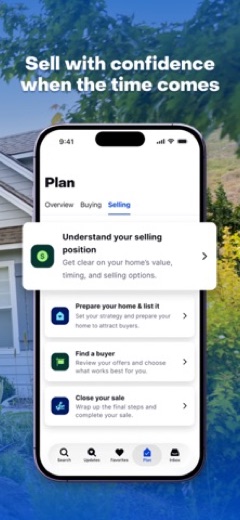
The Zillow application is designed for individuals engaged in the process of buying, selling, or renting real estate. It caters to those who need tools to search for properties, assess their budget, and connect with real estate professionals.
It is also suitable for users interested in tracking property values, utilizing features like the Zestimate®, and exploring neighborhood details. With content ratings of "Everyone" on Google Play and "4+" on the App Store, the application is appropriate for a broad audience seeking real estate information and services.
Zillow for kids and families
Pros
- Offers a vast number of listings for both homes for sale and rental properties.
- Includes valuable financial planning tools such as the BuyAbility℠ score and Zillow Home Loans Verified Pre-approval.
- Provides immersive viewing experiences with 3D home tours and Sky Tours for many listings.
- Facilitates easy connection with local real estate agents through Zillow Premier Agents.
- Supports collaborative home searching with features for shared collections and co-shopping with partners or roommates.
Cons
- The Google Play version requests access to a broad array of device permissions, which might be a consideration for some users.
- The App Store listing does not provide details regarding the specific permissions the application requests.
- The App Store version is relatively large in size, at 511 MB, which could impact device storage.
- The App Store version supports only 1 language, which may limit accessibility for non-English speakers.
Zillow: frequently asked questions
Is the Zillow app available at no cost?
Yes, the Zillow application is available at no cost on both Google Play and the App Store.
On which devices can the Zillow app be used?
The Zillow app is available on devices that support Google Play and the App Store. The App Store version requires iOS 18.0 or later.
Who developed the Zillow app?
The Zillow app was developed by Zillow for Google Play and Zillow.com for the App Store.
What kind of content can be found on the Zillow app?
The Zillow app focuses on homes for sale and rent, offering listings, financial tools, and options to connect with real estate agents.
When was the Zillow app last updated?
The Google Play version was updated on 2026-05-04, and the App Store version was updated on 2026-10-06.
How many ratings does the Zillow app have?
On Google Play, the application has 1.6M ratings, and on the App Store, it has 7.2M ratings.
Zillow
- Category
- Lifestyle
- Version
- 2026.74.0
Download
Looking for the Zillow website or sign-in? Go to zillow.com →The developer's website, as given on the store listing.
Zillow ratings breakdown
Google Play 4.8 average from 1,668,886 ratings
- 583%
- 413%
- 33%
- 20%
- 11%
App Store 4.8 average from 7,238,660 ratings
- 584%
- 412%
- 32%
- 20%
- 10%
Share of ratings for each star level, as shown on the listings, as of Oct 15, 2026.