Tubi
EntertainmentScreenshots
Analysis by LookedApp · Published · Updated
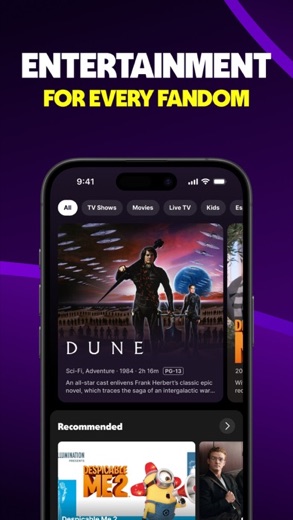
Tubi is a streaming application that offers a broad selection of movies, TV series, and live television channels without any subscription cost. It caters to individuals seeking diverse entertainment options across various genres and languages, all accessible for $0.
What is Tubi?
Tubi is a streaming entertainment application developed by Tubi TV and Tubi, Inc. It provides a library of movies, television series, and live TV content to its users. The application is designed to offer a wide range of content without requiring any payment or subscription.
The application is available for download on both the Google Play Store and the App Store. On Google Play, it is listed under the name "Tubi: Free Movies & Live TV" by developer Tubi TV. On the App Store, it is found as "Tubi: Movies & Live TV" by developer Tubi, Inc.
It aims to be a comprehensive entertainment source, featuring content from major industry names, independent films, and various television series. The platform also includes Tubi Originals, content created exclusively for the application, and specialized sections like Tubi Comic Con(tent) and Tubi Español.
Latest on Tubi






Is this the real Tubi app?
- Verified publisher infoSame developer on Google Play and the App Store (Tubi TV), and the developer website tubitv.com matches the publisher.
- Established since 2014Listed since Jul 24, 2014, 100,000,000+ installs on Google Play.
| Developer on Google Play | Tubi TV |
|---|---|
| Developer on the App Store | Tubi, Inc |
| Same developer on both stores | Yes |
| Android package name | com.tubitv |
| iOS bundle ID | com.adrise.tubitv |
| On the stores since | Jul 24, 2014 |
| Installs on Google Play | 100,000,000+ |
| Developer website | tubitv.com |
| Content rating | Google Play: Teen / App Store: 12+ |
These details come from the public store listings. LookedApp doesn't host downloads: install from the Google Play or App Store buttons on this page.
Key features
- The app provides live TV, including news, weather, sports, and entertainment channels.
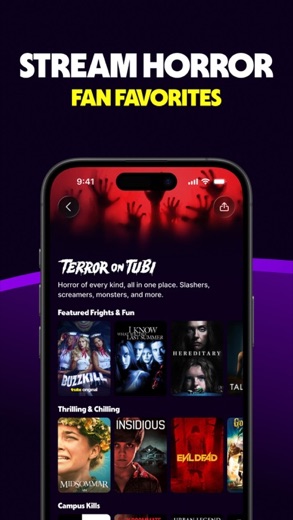
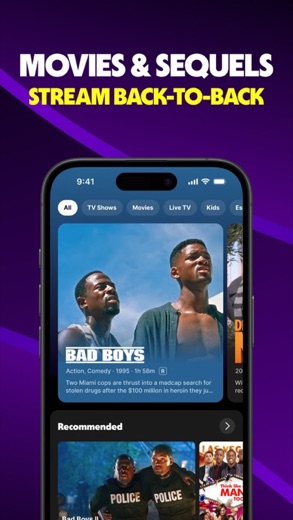
- It offers a vast collection of movies, with new titles added every month across genres like comedy, action, and horror.
- Users can marathon various TV series, from cooking shows to dramas and sitcoms, without any subscription.
- Tubi Originals are available, consisting of series and movies created specifically for the platform.
- A dedicated section called Tubi Comic Con(tent) features comic book-related heroes and caped crusaders.
- Tubi Español offers content in Spanish, including telenovelas and dubbed blockbusters, with no subtitles necessary.
More Streaming, TV & News reviews




More news
- GuideKids' Apps: What Parents Can Check Before InstallingThis guide provides parents with essential information to review a child-directed app's store listing. It covers key aspects such as content ratings, pricing structures, in-app purchases, and privacy practices, using examples from apps LookedApp covers.
- GuideHow to Read App Ratings on Google Play and the App StoreUnderstanding app ratings on Google Play and the App Store can help users make informed decisions. This guide explores how star ratings and rating counts appear and highlights why the same app might show different ratings on each platform.
- GuideUnderstanding Streaming Subscription Costs: What Store Listings RevealMany popular streaming applications, though initially free, generate revenue via in-app purchases and subscription models, as detailed in store listings and LookedApp's reviews.












Privacy and permissions
On Google Play, the Tubi application requests several permission groups, including Location, Photos/Media/Files, Storage, Camera, Microphone, and Wi-Fi connection information. These permissions are requested for various functionalities within the application.
The store listings do not provide detailed information about how user data is handled or a comprehensive privacy policy within the provided description. Users typically review the developer's website or the application's in-app privacy policy for such details.
Tubi, Inc publishes its privacy policy at tubitv.com.
Tubi permissions in plain English
The Google Play listing shows 6 permission groups. Google Play also lists 13 other permissions, such as “view network connections”. That is more than most streaming, tv & news apps LookedApp reviews (typical: 5).
- CameraCan take photos and record video
- LocationCan use your precise location
- MicrophoneCan record audio
- Photos/Media/FilesCan read and change your photos, media and files
- StorageCan read and change files in shared storage
- Wi-Fi connection informationCan see Wi-Fi connection details
The App Store privacy label lists these data types:
- Used to track you: Identifiers, Usage Data
- Linked to you: Contact Info, User Content, Search History, Identifiers, Usage Data, Diagnostics, Other Data
Permission names come from Google Play; the plain-English lines describe what each permission group allows, not how this app uses it.
Tubi at a glance
| Developer | Tubi, Inc |
|---|---|
| Category | Entertainment |
| Rating on App Store | 4.8 out of 5 (1.3M ratings) |
| Rating on Google Play | 4.9 out of 5 (2.6M ratings) |
| Installs on Google Play | 100M+ |
| Price | Free |
| Age rating | 12+ |
What changed in the latest Tubi version
App Store · Version 10.41.0, released Oct 13, 2026
The release notes are general and don't list specific changes:
“Say hello to my little update! It may not be the biggest update, but these bug fixes and performance improvements are here to give you an even better Tubi experience.”
Google Play · Listing updated Oct 14, 2026
The release notes say:
“Tubi is getting a fresh look! It's your same favorite streaming haven, with all the free movies, shows, and live TV you crave, now rocking a brand new outfit! Everything you love is still here: The biggest library of movies & shows in the streaming universe! Award-winning Tubi Originals Catch news, sports, and much more, live!”
Quoted from the store listings' release notes.
Pricing
Tubi is available at no cost. The Google Play listing indicates a price of $0, and the App Store listing states its price as "Free".
The application description emphasizes that there are "zero fees ever" and "zero subscriptions ever," indicating that users will not be asked for a credit card and will pay $0 for content access.
Tubi compared with similar apps
| App | Rating | Installs | Price |
|---|---|---|---|
 Tubi Tubi | 4.9 | 100M+ | Free |
 YouTube YouTube | 3.8 | 10B+ | Free |
 YouTube Music YouTube Music | 4.5 | 5B+ | Free |
 Peacock TV Peacock TV | 4.7 | 50M+ | Free |
Popular reviews
 PBS reviewThe PBS app provides a streaming service for educational, cultural, and public affairs programming, offering access to…Streaming, TV & News
 Yahoo News reviewYahoo News is a news aggregation application developed by Yahoo, providing users with a personalized feed of stories…Streaming, TV & News
 Hulu reviewHulu is a comprehensive streaming application that provides a wide array of TV shows, movies, and exclusive Originals.…Streaming, TV & News
 Disney+ reviewDisney+ is a streaming service developed by Disney, offering a comprehensive collection of movies, series, and…Streaming, TV & News
 The Roku App (Official) reviewThe Roku App (Official) transforms a smartphone or tablet into a versatile remote control for Roku streaming devices…Streaming, TV & News
 Epic Games reviewThe Epic Games app functions as a companion tool for users within the Epic Ecosystem, focusing on communication and…Streaming, TV & News
How to get Tubi safely
To obtain the Tubi application, it is advisable to install it exclusively from reputable application marketplaces such as the Google Play Store or the App Store. Users should verify that the developer name matches "Tubi TV" for Google Play or "Tubi, Inc" for the App Store to ensure authenticity.
It is recommended to avoid unofficial sources like APK mirror sites or modified versions of the application, as these may contain malicious software or compromised functionality. Before installation, reviewing the permissions requested by the application on Google Play, which include Location, Photos/Media/Files, Storage, Camera, Microphone, and Wi-Fi connection information, is a prudent step.
How to install Tubi
On Android (Google Play)
- Open the Google Play Store app on your Android phone or tablet.
- Search for Tubi, or use the Google Play button on this page to open the listing directly.
- Check that the developer under the app name is Tubi TV.
- Tap Install (or the price, for a paid app) and wait for the download to finish, then open the app from your home screen.
On iPhone and iPad (App Store)
- Open the App Store on your iPhone or iPad.
- Search for Tubi, or use the App Store button on this page to open the listing directly.
- Check that the developer under the app name is Tubi, Inc.
- Make sure your device has iOS 16.0 or later and about 165 MB of free space, as the listing states.
- Tap Get (or the price), confirm the download, then open the app from your home screen.
Tubi version and app details
| Google Play | App Store | |
|---|---|---|
| Latest version | – | 10.41.0 |
| Last updated | Oct 14, 2026 | Oct 13, 2026 |
| First released | Sep 19, 2014 | Jul 24, 2014 |
| Package name | com.tubitv | – |
| Bundle ID | – | com.adrise.tubitv |
| Requires | – | iOS 16.0 or later |
| Download size | – | 165 MB |
| Content rating | Teen (Diverse Content: Discretion Advised) | 12+ (Infrequent/Mild Horror/Fear Themes; Infrequent/Mild Mature/Suggestive Themes; Infrequent/Mild Alcohol, Tobacco, or Drug Use or References; Infrequent/Mild Cartoon or Fantasy Violence; Infrequent/Mild Profanity or Crude Humor; Infrequent/Mild Realistic Violence; Infrequent/Mild Sexual Content and Nudity) |
| In-app purchases | No | – |
| Contains ads | Yes | – |
| Languages | – | 3 (including English) |
| Developer | Tubi TV | Tubi, Inc |
Who Tubi is for
Tubi is suitable for individuals who wish to access a wide range of streaming entertainment, including movies, TV series, and live television, without incurring any subscription fees. It targets viewers interested in diverse content, from mainstream Hollywood titles to independent films and international programming.
The application is also for those who appreciate variety, with offerings like Tubi Originals, specialized comic book content, and dedicated sections for Spanish-language (Tubi Español) and other international entertainment such as anime, K-pop, and Bollywood. The content rating of "Teen" on Google Play and "12+" on the App Store suggests it is generally appropriate for adolescent and adult audiences.
Tubi for kids and families
Pros
- The application is completely free, with $0 fees and no subscriptions.
- It offers a large library of movies, TV series, and live TV channels.
- New content is added to the platform every week.
- It supports viewing on more than 30 devices.
- The app features specialized content like Tubi Originals and international entertainment.
- Users can create an account to personalize their experience with watchlists and recommendations.
Cons
- The application includes advertisements, as suggested by the description mentioning "fewer ads than cable."
- On Google Play, the app requests several permissions, including Camera and Microphone access.
- The content rating is "Teen" or "12+", indicating it may not be suitable for very young children.
Tubi: frequently asked questions
Is Tubi free to use?
Yes, Tubi states it has "zero fees ever" and "zero subscriptions ever," making it completely free to watch content.
What kind of content is available on Tubi?
Tubi offers movies, TV series, live TV (news, weather, sports), Tubi Originals, Tubi Comic Con(tent), Tubi Español, and other international entertainment like anime, K-pop, and Bollywood.
Which devices support the Tubi app?
Tubi works on more than 30 devices, allowing users to watch content across various platforms.
Who is the developer of Tubi?
The developer of Tubi is Tubi TV on Google Play and Tubi, Inc on the App Store.
What permissions does Tubi request on Android devices?
On Google Play, Tubi requests permissions for Location, Photos/Media/Files, Storage, Camera, Microphone, and Wi-Fi connection information.
Is an account required to use Tubi?
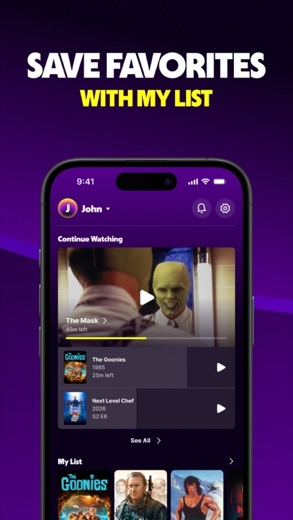
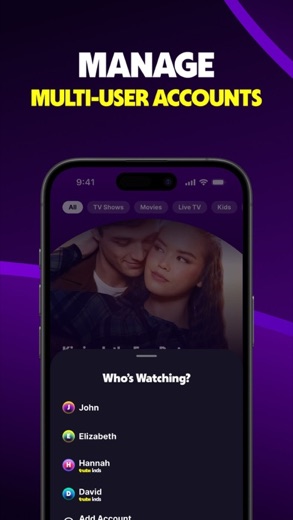
Creating an account is not strictly required but allows users to build watchlists, save watch progress, and receive better content recommendations.
Tubi
- Category
- Entertainment
- Version
- 10.41.0
Download
Looking for the Tubi website or sign-in? Go to tubitv.com →The developer's website, as given on the store listing.
Tubi ratings breakdown
Google Play 4.9 average from 2,614,795 ratings
- 590%
- 47%
- 31%
- 20%
- 11%
App Store 4.8 average from 1,271,452 ratings
- 587%
- 48%
- 32%
- 21%
- 12%
Share of ratings for each star level, as shown on the listings, as of Oct 14, 2026.