Gemini Notebook (NotebookLM)
ProductivityScreenshots
Analysis by LookedApp · Published · Updated
Gemini Notebook, formerly known as NotebookLM, is an application developed by Google designed to transform complex information into clear insights. It leverages artificial intelligence to process various source materials, summarize them, and answer user questions with cited references. The application is suitable for a wide range of users, including students, creators, researchers, professionals, and CEOs, aiming to enhance learning, productivity, and information management.
What is Gemini Notebook (NotebookLM)?
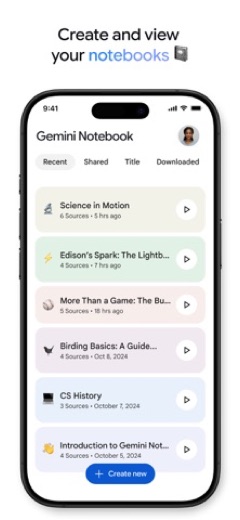
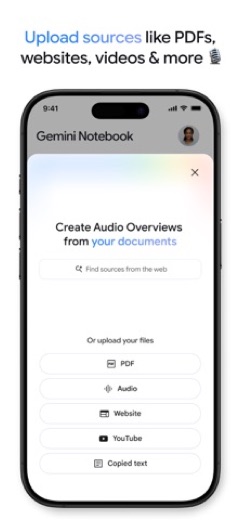
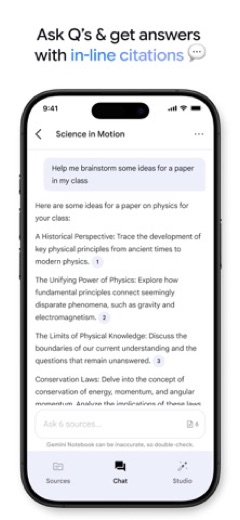
Gemini Notebook is a productivity application developed by Google. It functions as an AI-powered notebook, allowing users to upload diverse source materials such as PDF documents, website content, YouTube videos, and raw text. The application then processes these sources to generate summaries, identify connections, and provide answers to user queries, complete with inline citations.
The application is available for download on both the App Store and Google Play, making it accessible to a broad audience of mobile device users. It has undergone a name change, with the App Store listing id 6737527615 previously titled Google NotebookLM and now identified as Gemini Notebook, reflecting its evolution and branding.
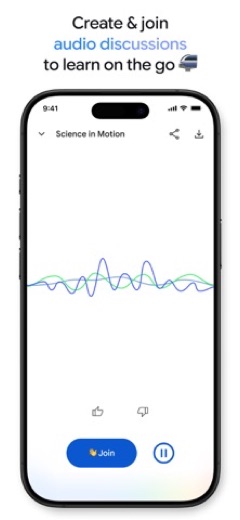
Beyond traditional summarization and question-answering, Gemini Notebook offers innovative learning methods. It can convert uploaded content into podcast-style audio discussions, featuring two engaging AI hosts. Users have the option to participate in these discussions, ask further questions, or guide the conversation in different directions, providing a flexible and interactive way to engage with complex information.
Latest on Gemini Notebook (NotebookLM)
Is this the real Gemini Notebook (NotebookLM) app?
- Verified publisher infoSame developer on Google Play and the App Store (Google LLC), and the developer website notebooklm.google.com matches the publisher.
| Developer on Google Play | Google LLC |
|---|---|
| Developer on the App Store | |
| Same developer on both stores | Yes |
| Android package name | com.google.android.apps.labs.language.tailwind |
| iOS bundle ID | com.google.NotebookLM |
| On the stores since | May 16, 2025 |
| Installs on Google Play | 10,000,000+ |
| Developer website | notebooklm.google.com |
| Content rating | Google Play: Everyone / App Store: 12+ |
These details come from the public store listings. LookedApp doesn't host downloads: install from the Google Play or App Store buttons on this page.
Key features
- Users can upload various sources, including PDFs, websites, YouTube videos, or text, into a notebook for AI processing.
- The application becomes an expert on the provided sources, summarizing them and identifying relevant connections.
- Users can ask the application questions about their sources, and it provides answers with inline citations for trustworthiness.
- Content can be transformed into podcast-style audio discussions featuring two AI hosts.
- Audio overviews support background playback, allowing users to listen while performing other tasks.
- Offline support is available for the podcast-style audio overviews, enabling access without an internet connection.
More Productivity & Email reviews




More news
- GuideKids' Apps: What Parents Can Check Before InstallingThis guide provides parents with essential information to review a child-directed app's store listing. It covers key aspects such as content ratings, pricing structures, in-app purchases, and privacy practices, using examples from apps LookedApp covers.
- GuideHow to Read App Ratings on Google Play and the App StoreUnderstanding app ratings on Google Play and the App Store can help users make informed decisions. This guide explores how star ratings and rating counts appear and highlights why the same app might show different ratings on each platform.
- GuideUnderstanding Streaming Subscription Costs: What Store Listings RevealMany popular streaming applications, though initially free, generate revenue via in-app purchases and subscription models, as detailed in store listings and LookedApp's reviews.


















Privacy and permissions
The App Store listing for Gemini Notebook does not provide specific details regarding the permissions the application requests upon installation. Information about data collection practices, such as what user data is gathered, how it is used, or whether it is shared with third parties, is not explicitly stated in the available store description.
For users interested in understanding the application's approach to user privacy and data handling, it would typically be advisable to consult the developer's privacy policy, which is usually linked from the App Store or Google Play listing, although specific details are not part of the provided description.
Gemini Notebook (NotebookLM) permissions in plain English
The Google Play listing shows 4 permission groups. Google Play also lists 7 other permissions, such as “view network connections”. That is fewer than most productivity & email apps LookedApp reviews (typical: 7).
- CameraCan take photos and record video
- ContactsCan read your contacts
- IdentityCan find accounts on the device
- MicrophoneCan record audio
The App Store privacy label lists these data types:
- Linked to you: Purchases, Location, Contact Info, Contacts, User Content, Identifiers, Usage Data, Diagnostics
- Not linked to you: Diagnostics, Other Data
Permission names come from Google Play; the plain-English lines describe what each permission group allows, not how this app uses it.
Gemini Notebook (NotebookLM) at a glance
| Developer | |
|---|---|
| Category | Productivity |
| Rating on App Store | 4.9 out of 5 (63K ratings) |
| Rating on Google Play | 4.7 out of 5 (339K ratings) |
| Installs on Google Play | 10M+ |
| Price | Free |
| Age rating | 12+ |
What changed in the latest Gemini Notebook (NotebookLM) version
App Store · Version 1.61.7, released Oct 12, 2026
The release notes are general and don't list specific changes:
“Bug fixes and improvements!”
Google Play · Listing updated Oct 12, 2026
The release notes are general and don't list specific changes:
“Bug fixes and performance improvements.”
Quoted from the store listings' release notes.
Pricing
Gemini Notebook is available at no cost. The App Store listing explicitly states the price as 'Free.'
The store description does not indicate the presence of any in-app purchases or subscription models within the application.
Gemini Notebook (NotebookLM) compared with similar apps
| App | Rating | Installs | Price |
|---|---|---|---|
 Gemini Notebook (NotebookLM) Gemini Notebook (NotebookLM) | 4.7 | 10M+ | Free |
 Canva Canva | 4.8 | 500M+ | Free |
 Zoom Workplace Zoom Workplace | 4.1 | 1B+ | Free |
 Yahoo Mail Yahoo Mail | 4.2 | 100M+ | Free |
Popular reviews
 Google Authenticator reviewGoogle Authenticator is an application designed to provide an additional layer of security for online accounts by…Productivity & Email
 Google Sheets reviewGoogle Sheets is a productivity application designed for creating, editing, and collaborating on spreadsheets across…Productivity & Email
 Workday reviewThe Workday app serves as a comprehensive mobile solution designed to enhance workplace productivity, offering…Productivity & Email
 UKG Pro reviewThe UKG Pro app functions as a mobile platform designed to provide employees and people managers with access to human…Productivity & Email
 Messenger - SMS Text Messages reviewMessenger, developed by Meta Platforms, Inc., is a comprehensive communication application designed for Android users.…Productivity & Email
 ChatGPT reviewChatGPT for Android brings OpenAI's advanced AI capabilities to mobile devices, enabling users to generate images,…Productivity & Email
How to get Gemini Notebook (NotebookLM) safely
To obtain Gemini Notebook safely, individuals should only download the application from reputable platforms such as the App Store for iOS devices or Google Play for Android devices. It is crucial to verify that the application is published by 'Google,' the stated developer, to ensure authenticity.
Users should avoid downloading the application from unofficial sources, third-party app stores, or websites offering APK mirrors or modified versions, as these can pose security risks. While the store listing does not detail specific permissions, it is generally prudent to review any requested permissions during installation to understand what access the application requires on a device.
How to install Gemini Notebook (NotebookLM)
On Android (Google Play)
- Open the Google Play Store app on your Android phone or tablet.
- Search for Gemini Notebook (NotebookLM), or use the Google Play button on this page to open the listing directly.
- Check that the developer under the app name is Google LLC.
- Tap Install (or the price, for a paid app) and wait for the download to finish, then open the app from your home screen.
On iPhone and iPad (App Store)
- Open the App Store on your iPhone or iPad.
- Search for Gemini Notebook (NotebookLM), or use the App Store button on this page to open the listing directly.
- Check that the developer under the app name is Google.
- Make sure your device has iOS 17.0 or later and about 211 MB of free space, as the listing states.
- Tap Get (or the price), confirm the download, then open the app from your home screen.
- The listing shows in-app purchases, so review any purchase prompts before you confirm.
Gemini Notebook (NotebookLM) version and app details
| Google Play | App Store | |
|---|---|---|
| Latest version | – | 1.61.7 |
| Last updated | Oct 12, 2026 | Oct 12, 2026 |
| First released | May 16, 2025 | May 19, 2025 |
| Package name | com.google.android.apps.labs.language.tailwind | – |
| Bundle ID | – | com.google.NotebookLM |
| Requires | – | iOS 17.0 or later |
| Download size | – | 211 MB |
| Content rating | Everyone (In-App Purchases) | 12+ (Infrequent/Mild Mature/Suggestive Themes; Infrequent/Mild Horror/Fear Themes; Infrequent/Mild Cartoon or Fantasy Violence; Infrequent/Mild Sexual Content and Nudity; Infrequent/Mild Profanity or Crude Humor; Infrequent/Mild Medical/Treatment Information; Infrequent/Mild Realistic Violence; Infrequent/Mild Alcohol, Tobacco, or Drug Use or References) |
| In-app purchases | No | Yes |
| Contains ads | No | – |
| Languages | – | 63 (including English) |
| Developer | Google LLC |
Who Gemini Notebook (NotebookLM) is for
Gemini Notebook is designed for a diverse audience seeking to manage and understand complex information more efficiently. It caters to students who need to process large volumes of academic material, creators looking to synthesize research for their projects, and researchers aiming to make connections across various studies.
Additionally, professionals and CEOs can benefit from its ability to quickly summarize documents and provide insightful answers, aiding in decision-making and efficient information consumption. Anyone who aims to save time, enhance their learning experience, and gain clarity from intricate sources will find the application useful.
Gemini Notebook (NotebookLM) for kids and families
Pros
- Leverages artificial intelligence to convert complex sources into clear insights.
- Supports uploading a wide array of source materials, including PDFs, websites, and YouTube videos.
- Provides answers to user questions with verifiable inline citations.
- Offers an innovative podcast-style audio overview feature for flexible learning.
- Allows for interactive engagement with AI hosts during audio discussions.
- Available for no cost on both iOS and Android platforms.
Cons
- The application has a content rating of 12+, indicating it may not be suitable for younger users.
- It requires a minimum operating system version of iOS 17.0, potentially excluding users with older devices.
- The application's size is 217 MB, which is substantial and may require significant storage space on devices.
Gemini Notebook (NotebookLM): frequently asked questions
Is Gemini Notebook a free application?
Yes, the App Store listing specifies that Gemini Notebook is available at no cost.
On which platforms is Gemini Notebook available?
Gemini Notebook is available on both the App Store for iOS devices and Google Play for Android devices.
Who is the developer of Gemini Notebook?
Gemini Notebook is developed by Google.
When was Gemini Notebook released?
The application was released on 2025-05-19.
What is the content rating for Gemini Notebook?
The content rating for Gemini Notebook is 12+.
What is the primary function of Gemini Notebook?
Its primary function is to transform complex information from various sources into clear insights, providing summaries, connections, and answers to questions with citations.
Gemini Notebook (NotebookLM)
- Category
- Productivity
- Version
- 1.61.7
Download
Looking for the Gemini Notebook website or sign-in? Go to notebooklm.google.com →The developer's website, as given on the store listing.
Gemini Notebook (NotebookLM) ratings breakdown
Google Play 4.7 average from 338,973 ratings
- 587%
- 47%
- 32%
- 21%
- 13%
App Store 4.9 average from 62,926 ratings
- 593%
- 44%
- 31%
- 20%
- 11%
Share of ratings for each star level, as shown on the listings, as of Oct 15, 2026.