Microsoft Word
ProductivityScreenshots
Analysis by LookedApp · Published
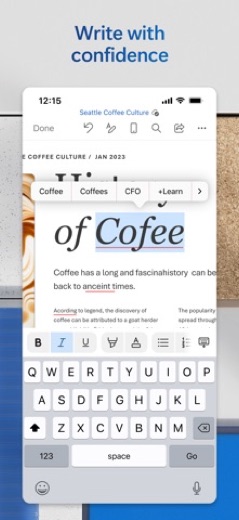
Microsoft Word is a document creation and editing application developed by Microsoft Corporation. It is designed for users who need to draft, edit, and collaborate on documents across various devices, catering to professionals, students, and anyone requiring robust word processing capabilities.
What is Microsoft Word?
Microsoft Word is a widely recognized word-processing application that allows users to create, view, edit, and share documents. The mobile application extends these capabilities to portable devices, enabling productivity on the go.
The application is developed by Microsoft Corporation, a prominent technology company known for its software products. It is available for download on both major mobile platforms.
Users can access Microsoft Word through the Google Play store for Android devices, where it is listed as 'Microsoft Word: Edit Documents'. For iOS users, the application is available on the App Store under the name 'Microsoft Word'.
Latest on Microsoft Word
- GuideHow to Download Genuine Apps Safely from Google Play and the App StoreDiscover how to identify authentic applications and avoid potentially harmful copies by scrutinizing developer names, store listings, and app permissions. This guide helps users make informed decisions when acquiring new software.
- RoundupLookedApp's Guide to Top Free Productivity Apps for Work and SchoolLookedApp provides insights into eight top productivity applications available at no initial cost, suitable for managing tasks, communications, and documents for both academic and professional needs.





Is this the real Microsoft Word app?
- Verified publisher infoSame developer on Google Play and the App Store (Microsoft Corporation), and the developer website office.microsoft.com matches the publisher.
- Established since 2014Listed since Mar 27, 2014, 1,000,000,000+ installs on Google Play.
| Developer on Google Play | Microsoft Corporation |
|---|---|
| Developer on the App Store | Microsoft Corporation |
| Same developer on both stores | Yes |
| Android package name | com.microsoft.office.word |
| iOS bundle ID | com.microsoft.Office.Word |
| On the stores since | Mar 27, 2014 |
| Installs on Google Play | 1,000,000,000+ |
| Developer website | office.microsoft.com |
| Content rating | Google Play: Everyone / App Store: 4+ |
These details come from the public store listings. LookedApp doesn't host downloads: install from the Google Play or App Store buttons on this page.
Key features
- Users can kick-start projects with templates for various document types.
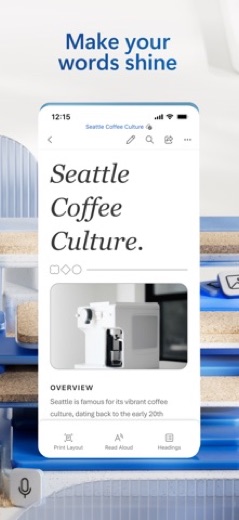
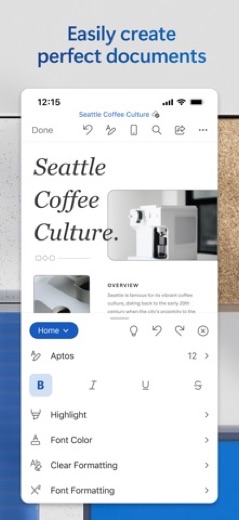
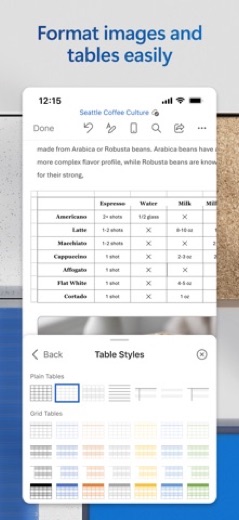
- The app provides robust formatting and layout tools to clearly express ideas.
- It allows users to edit long documents and scripts on their device with familiar writing tools.
- The application includes functionality to convert PDFs to Word for quick editing.
- Users can collaborate with others in real time and track layout or formatting changes.
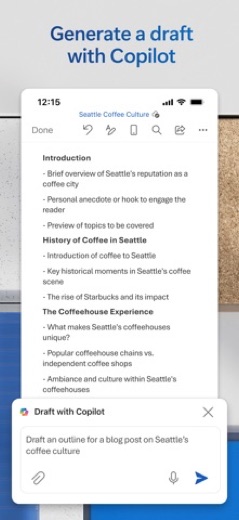
- AI Assistance with Copilot can draft, summarise, refine, and format content instantly when signed in with a Microsoft 365 subscription.
More Productivity & Email reviews




More news
- What's newGoogle Photos Update: Enhanced Search and Smarter Storage ManagementRecent updates to Google Photos bring a more powerful search experience to users and introduce a new tool to manage storage more efficiently, according to recent store listings.
- What's newWells Fargo Mobile: October 2026 Update Enhances Credit Card InsightsThe Wells Fargo Mobile app has received an update in October 2026, focusing on enhanced accessibility for personalized insights within credit card account details. LookedApp examines what this means for users and provides a refresher on the app's comprehensive banking functionalities.
- What's newWhat's New in Microsoft OneDrive: A Look at Recent UpdatesMicrosoft OneDrive has received significant updates across both iOS and Android platforms, enhancing file management, photo organization, and app stability. These changes reflect an ongoing commitment to providing a comprehensive cloud storage solution for users.



Privacy and permissions
On Google Play, Microsoft Word requests access to several permission groups, including Identity, Contacts, Photos/Media/Files, Storage, Camera, Microphone, and Wi-Fi connection information. These permissions are necessary for the app's functionality, such as accessing documents, using the camera for image insertion, or microphone for dictation.
For users of the App Store version, the application is subject to its own privacy statement and terms. Data may be transferred to, stored, and processed in the United States or other regions where Microsoft or its affiliates operate. The store listing does not state specific data collection practices beyond this.
Microsoft Corporation publishes its privacy policy at go.microsoft.com.
Microsoft Word permissions in plain English
The Google Play listing shows 7 permission groups. Google Play also lists 15 other permissions, such as “view network connections”. That is about as many as most productivity & email apps LookedApp reviews (typical: 7).
- CameraCan take photos and record video
- ContactsCan read your contacts
- IdentityCan find accounts on the device
- MicrophoneCan record audio
- Photos/Media/FilesCan read and change your photos, media and files
- StorageCan read and change files in shared storage
- Wi-Fi connection informationCan see Wi-Fi connection details
Permission names come from Google Play; the plain-English lines describe what each permission group allows, not how this app uses it.
Microsoft Word at a glance
| Developer | Microsoft Corporation |
|---|---|
| Category | Productivity |
| Rating on App Store | 4.7 out of 5 (3M ratings) |
| Rating on Google Play | 4.8 out of 5 (18M ratings) |
| Installs on Google Play | 1B+ |
| Price | Free |
| Age rating | 4+ |
What changed in the latest Microsoft Word version
App Store · Version 2.114.5, released Oct 12, 2026
The release notes are general and don't list specific changes:
“General quality and performance enhancements.”
Google Play · Listing updated Oct 7, 2026
The release notes say:
“Thank you for using Word. We regularly release updates to the app, which include great new features, as well as improvements for speed and reliability. Did you know that with a Microsoft 365 subscription, you can unlock the full power of Office across all of your devices? Find special offers in the app.”
Quoted from the store listings' release notes.
Pricing
On Google Play, the Microsoft Word app is listed with a price of $0, indicating it is available to download without an initial cost. However, the app does include in-app purchases, which are necessary to unlock the full Microsoft 365 experience.
Similarly, on the App Store, the application is listed as 'Free'. The full Microsoft 365 experience, including features like Copilot, requires a qualifying Microsoft 365 subscription. Subscriptions purchased within the app are charged to the user's App Store account and automatically renew unless auto-renew is turned off 24 hours before the billing period ends. Users can manage their subscriptions in their App Store account settings, but subscriptions cannot be cancelled during the active period.
Microsoft Word compared with similar apps
| App | Rating | Installs | Price |
|---|---|---|---|
 Microsoft Word Microsoft Word | 4.8 | 1B+ | Free |
 Canva Canva | 4.8 | 500M+ | Free |
 Zoom Workplace Zoom Workplace | 4.1 | 1B+ | Free |
 Yahoo Mail Yahoo Mail | 4.2 | 100M+ | Free |
Popular reviews
 Google Authenticator reviewGoogle Authenticator is an application designed to provide an additional layer of security for online accounts by…Productivity & Email
 Google Sheets reviewGoogle Sheets is a productivity application designed for creating, editing, and collaborating on spreadsheets across…Productivity & Email
 Workday reviewThe Workday app serves as a comprehensive mobile solution designed to enhance workplace productivity, offering…Productivity & Email
 UKG Pro reviewThe UKG Pro app functions as a mobile platform designed to provide employees and people managers with access to human…Productivity & Email
 Messenger - SMS Text Messages reviewMessenger, developed by Meta Platforms, Inc., is a comprehensive communication application designed for Android users.…Productivity & Email
 ChatGPT reviewChatGPT for Android brings OpenAI's advanced AI capabilities to mobile devices, enabling users to generate images,…Productivity & Email
How to get Microsoft Word safely
To acquire Microsoft Word, users should download it exclusively from trusted application marketplaces. For Android devices, this means using Google Play, and for iOS devices, the App Store is the appropriate source. It is important to verify that the developer listed is 'Microsoft Corporation' to ensure authenticity.
Users are advised to avoid downloading the application from alternative sources, such as third-party websites or unofficial app mirrors, as these versions may be modified or contain malicious software. Reviewing the permissions requested by the app, as detailed on the Google Play store listing, can help users understand what the app will access on their device.
How to install Microsoft Word
On Android (Google Play)
- Open the Google Play Store app on your Android phone or tablet.
- Search for Microsoft Word, or use the Google Play button on this page to open the listing directly.
- Check that the developer under the app name is Microsoft Corporation.
- Tap Install (or the price, for a paid app) and wait for the download to finish, then open the app from your home screen.
- The listing shows in-app purchases, so review any purchase prompts before you confirm.
On iPhone and iPad (App Store)
- Open the App Store on your iPhone or iPad.
- Search for Microsoft Word, or use the App Store button on this page to open the listing directly.
- Check that the developer under the app name is Microsoft Corporation.
- Make sure your device has iOS 18.0 or later and about 530 MB of free space, as the listing states.
- Tap Get (or the price), confirm the download, then open the app from your home screen.
- The listing shows in-app purchases, so review any purchase prompts before you confirm.
Microsoft Word version and app details
| Google Play | App Store | |
|---|---|---|
| Latest version | – | 2.114.5 |
| Last updated | Oct 7, 2026 | Oct 12, 2026 |
| First released | Jan 6, 2015 | Mar 27, 2014 |
| Package name | com.microsoft.office.word | – |
| Bundle ID | – | com.microsoft.Office.Word |
| Requires | – | iOS 18.0 or later |
| Download size | – | 530 MB |
| Content rating | Everyone (Users Interact, Digital Purchases) | 4+ |
| In-app purchases | Yes ($0.99 - $199.99 per item) | Yes |
| Contains ads | No | – |
| Languages | – | 32 (including English) |
| Developer | Microsoft Corporation | Microsoft Corporation |
Who Microsoft Word is for
Microsoft Word is suitable for a wide range of individuals who need to work with documents on mobile devices. This includes writers, freelancers, students, and project managers who require robust word-processing tools to create, edit, and manage content.
The app caters to those who need to draft CVs, polish proposals, organize ideas, and enhance their writing, especially with the AI assistance provided by Copilot for Microsoft 365 subscribers. Its collaboration features also make it beneficial for teams or individuals working together on shared documents.
Microsoft Word for kids and families
Pros
- Provides robust formatting and layout tools for document creation.
- Enables real-time collaboration and tracking of changes.
- Offers AI Assistance with Copilot for drafting and refining content for Microsoft 365 subscribers.
- Allows conversion of PDFs to Word for editing.
- Maintains a polished look across various devices.
Cons
- Full functionality, including AI assistance, requires a Microsoft 365 subscription.
- The app includes in-app purchases.
- The iOS version has a size of 553 MB, which may consume significant storage.
- Requires access to several permission groups on Android, including Identity and Contacts.
Microsoft Word: frequently asked questions
Is Microsoft Word free to use?
The Microsoft Word app is available for download at $0 on Google Play and is listed as 'Free' on the App Store. However, it includes in-app purchases, and a Microsoft 365 subscription is needed to unlock the full experience, including advanced features like Copilot.
Who developed Microsoft Word?
Microsoft Word is developed by Microsoft Corporation.
On which platforms is Microsoft Word available?
Microsoft Word is available on Google Play for Android devices and the App Store for iOS devices.
What features are available for editing documents?
Users can edit long documents, letters, and scripts with familiar writing tools. The app offers robust formatting, layout tools, and the ability to convert PDFs to Word for quick editing.
Can multiple people work on a document simultaneously?
Yes, Microsoft Word allows users to work with others in real time and track layout or formatting changes. It also features simplified sharing options.
What is Copilot in Microsoft Word?
Copilot is an AI Assistance feature that can draft CVs, polish proposals, organize ideas, summarize, refine, and format content instantly. It requires a Microsoft 365 subscription to use.
Microsoft Word
- Category
- Productivity
- Version
- 2.114.5
Download
Looking for the Microsoft Word website or sign-in? Go to office.microsoft.com →The developer's website, as given on the store listing.
Microsoft Word ratings breakdown
Google Play 4.8 average from 17,594,893 ratings
- 585%
- 412%
- 32%
- 20%
- 11%
App Store 4.7 average from 3,013,440 ratings
- 586%
- 47%
- 32%
- 21%
- 13%
Share of ratings for each star level, as shown on the listings, as of Oct 14, 2026.