
Canva
Photo & VideoScreenshots
Analysis by LookedApp · Published · Updated
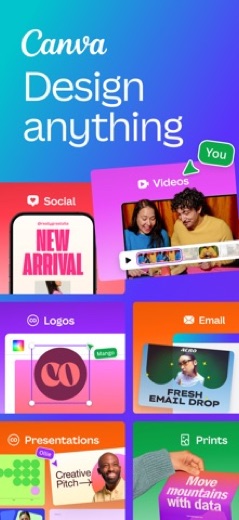
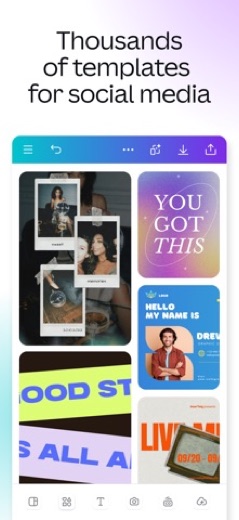
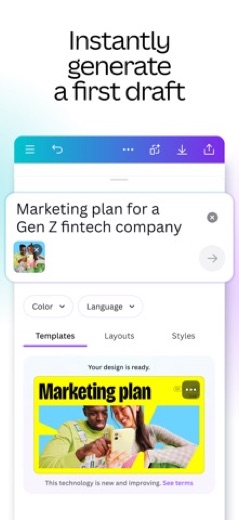
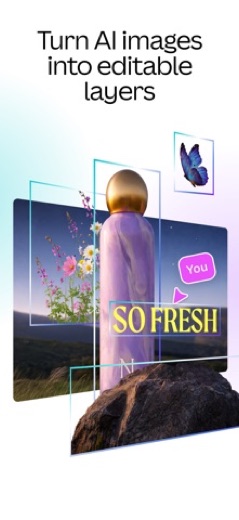
Canva is a versatile creative platform designed for graphic design, photo editing, and video creation. It offers a comprehensive suite of tools, including AI-powered features and a vast template library, making it suitable for individuals and teams who need to produce professional-quality visual content for various purposes, such as social media, presentations, resumes, and marketing materials.
What is Canva?
Canva is a comprehensive creative platform that enables users to engage in graphic design, photo editing, and video creation. The application supports a wide array of creative tasks, ranging from crafting presentations and constructing visual spreadsheets to designing resumes and generating content for social media platforms. It aims to empower users to achieve professional-level designs.
The application is published by Canva and is accessible on multiple platforms. Users can find it on Google Play under the title "Canva: AI Photo & Video Editor" and on the App Store as "Canva AI Photo & Video Editor." The Google Play listing indicates an update date of 2025-12-10 and a release date of 2017-11-27, while the App Store version was updated on 2026-10-07 and released on 2014-10-15.
Latest on Canva
Is this the real Canva app?
- Verified publisher infoSame developer on Google Play and the App Store (Canva), and the developer website canva.com matches the publisher.
- Established since 2014Listed since Oct 15, 2014, 500,000,000+ installs on Google Play.
| Developer on Google Play | Canva |
|---|---|
| Developer on the App Store | Canva |
| Same developer on both stores | Yes |
| Android package name | com.canva.editor |
| iOS bundle ID | com.canva.canvaeditor |
| On the stores since | Oct 15, 2014 |
| Installs on Google Play | 500,000,000+ |
| Developer website | canva.com |
| Content rating | Google Play: Everyone 10+ / App Store: 12+ |
These details come from the public store listings. LookedApp doesn't host downloads: install from the Google Play or App Store buttons on this page.
Key features
- Revolutionary AI video creation with Veo 3 allows for generating videos with sound from simple text prompts.
- An advanced photo editor provides tools for effortless background removal, applying filters, and adjusting lighting and contrast.
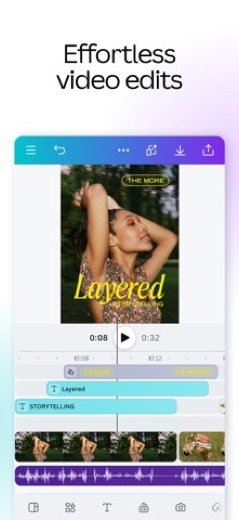
- A professional video editor enables crafting engaging videos with captions, cinematic effects like slow motion, and mobile optimization.
- Dynamic presentations and slideshows can be built using a selection of professional templates to visualize data effectively.
- A standout resume maker and CV builder offers hundreds of professionally designed templates for creating impressive documents.
- Visual spreadsheets and Bulk Create automation facilitate converting data into compelling visuals and generating thousands of design variations for campaigns.
More Tools & Utilities reviews



More news
- RoundupLookedApp's Guide to Free Shopping Apps for Everyday BuysThis LookedApp roundup explores a selection of free-to-download shopping applications that cater to various everyday purchasing needs, providing convenience and value.
- RoundupLookedApp's Roundup: Top Free Travel and Navigation AppsLookedApp presents a curated list of free-to-download travel and navigation applications. These apps provide essential tools for diverse travel needs, from daily commutes to international journeys. This selection focuses on applications assessed by LookedApp.
- RoundupTop Free Music Apps for Listening and Playing: A LookedApp RoundupLookedApp presents a roundup of eight music applications available without initial cost, providing diverse functionalities from streaming to rhythm games and utility tools. This selection helps users discover new ways to engage with music on their devices.















Privacy and permissions
On Google Play, the application requests several permission groups, which include Photos/Media/Files, Storage, Camera, Microphone, and Wi-Fi connection information. These permissions are necessary for the app to access and manage media, capture images and audio, and utilize network connectivity for its functions.
The App Store listing for Canva does not explicitly detail specific permission groups required by the application. Both the Google Play and App Store listings direct users to a privacy policy available on the developer's website at canva.com/policies/privacy-policy/ for more information regarding data handling and privacy practices.
Canva publishes its privacy policy at about.canva.com.
Canva permissions in plain English
The Google Play listing shows 5 permission groups. Google Play also lists 7 other permissions, such as “view network connections”. That is about as many as most tools & utilities apps LookedApp reviews (typical: 5).
- CameraCan take photos and record video
- MicrophoneCan record audio
- Photos/Media/FilesCan read and change your photos, media and files
- StorageCan read and change files in shared storage
- Wi-Fi connection informationCan see Wi-Fi connection details
The App Store privacy label lists these data types:
- Used to track you: Identifiers
- Linked to you: Purchases, Financial Info, Location, Contact Info, User Content, Search History, Identifiers, Usage Data, Diagnostics
Permission names come from Google Play; the plain-English lines describe what each permission group allows, not how this app uses it.
Canva at a glance
| Developer | Canva |
|---|---|
| Category | Photo & Video |
| Rating on App Store | 4.9 out of 5 (3.6M ratings) |
| Rating on Google Play | 4.8 out of 5 (27M ratings) |
| Installs on Google Play | 500M+ |
| Price | Free |
| Age rating | 12+ |
What changed in the latest Canva version
App Store · Version 4.231.0, released Oct 14, 2026
The release notes say:
“We’re working on bigger and better features. Meanwhile, we freshened up the app with new content and minor bug fixes. Got a question in mind? Let us know at canva.com/help Happy designing!”
Quoted from the store listings' release notes.
Pricing
The Canva app is listed with a price of 0 on Google Play, and the App Store indicates its price as "Free." Both platforms also mention the availability of in-app purchases, suggesting that while the core application can be accessed without an upfront cost, additional features or content may require payment.
Furthermore, the App Store description highlights that "Canva for Education" is offered without charge for eligible K-12 teachers and students, providing a specialized experience for educational environments with built-in moderation and age-appropriate controls.
Canva compared with similar apps
| App | Rating | Installs | Price |
|---|---|---|---|
 Canva Canva | 4.8 | 500M+ | Free |
 Zoom Workplace Zoom Workplace | 4.1 | 1B+ | Free |
 Yahoo Mail Yahoo Mail | 4.2 | 100M+ | Free |
 Gemini Notebook (NotebookLM) Gemini Notebook (NotebookLM) | 4.7 | 10M+ | Free |
Popular reviews
 Local Weather Forecast - Radar reviewLocal Weather Forecast - Radar is a weather application developed by Vitality App Studios, available on Google Play. It…Tools & Utilities
 Proton VPN reviewProton VPN is an application developed by Proton AG, designed to provide private and encrypted internet access. It is…Tools & Utilities
 Merriam-Webster Dictionary reviewThe Merriam-Webster Dictionary application provides comprehensive English language reference and vocabulary building…Tools & Utilities
 Whitepages reviewThe Whitepages app is designed for users seeking to find people and information related to contacts. It serves as a…Tools & Utilities
 Currency Converter Offline reviewCurrency Converter Offline is an application designed for converting global currencies, notably featuring offline…Tools & Utilities
 Weather Forecast - Live Radar reviewWeather Forecast - Live Radar is an application developed by KUCO Apps, designed to provide users with weather…Tools & Utilities
How to get Canva safely
To ensure a safe installation, users should only obtain the Canva application from reputable sources such as the Google Play Store or the Apple App Store. It is important to verify that the developer listed on these platforms is indeed "Canva" to avoid unofficial versions.
Users are advised to refrain from downloading the app from third-party APK mirrors or modified versions, as these sources may compromise device security or app functionality. Before completing the installation, reviewing the requested permissions, such as access to Photos/Media/Files, Camera, Microphone, and Storage on Android devices, is a recommended step to understand the app's access to device resources.
How to install Canva
On Android (Google Play)
- Open the Google Play Store app on your Android phone or tablet.
- Search for Canva, or use the Google Play button on this page to open the listing directly.
- Check that the developer under the app name is Canva.
- Check that your device meets the listing's requirement: Android 8.0 and up.
- Tap Install (or the price, for a paid app) and wait for the download to finish, then open the app from your home screen.
- The listing shows in-app purchases, so review any purchase prompts before you confirm.
On iPhone and iPad (App Store)
- Open the App Store on your iPhone or iPad.
- Search for Canva, or use the App Store button on this page to open the listing directly.
- Check that the developer under the app name is Canva.
- Make sure your device has iOS 15.0 or later and about 192 MB of free space, as the listing states.
- Tap Get (or the price), confirm the download, then open the app from your home screen.
- The listing shows in-app purchases, so review any purchase prompts before you confirm.
Canva version and app details
| Google Play | App Store | |
|---|---|---|
| Latest version | – | 4.231.0 |
| Last updated | Oct 14, 2026 | Oct 14, 2026 |
| First released | Nov 27, 2017 | Oct 15, 2014 |
| Package name | com.canva.editor | – |
| Bundle ID | – | com.canva.canvaeditor |
| Requires | Android 8.0 and up | iOS 15.0 or later |
| Download size | – | 192 MB |
| Content rating | Everyone 10+ (Diverse Content: Discretion Advised; Users Interact, In-App Purchases) | 12+ (Infrequent/Mild Sexual Content and Nudity; Infrequent/Mild Horror/Fear Themes; Infrequent/Mild Mature/Suggestive Themes; Infrequent/Mild Medical/Treatment Information; Infrequent/Mild Profanity or Crude Humor; Infrequent/Mild Cartoon or Fantasy Violence; Infrequent/Mild Alcohol, Tobacco, or Drug Use or References; Infrequent/Mild Realistic Violence) |
| In-app purchases | Yes ($1.49 - $300.00 per item) | Yes |
| Contains ads | No | – |
| Languages | – | 82 (including English) |
| Developer | Canva | Canva |
Who Canva is for
Canva is designed for a broad spectrum of users, including individuals, small business owners, educators, and creative teams, who need accessible yet powerful tools for visual content creation. It serves those looking to design anything from personal social media graphics and invitations to professional marketing materials and presentations. The platform's emphasis on user-friendly design and extensive template library makes it suitable for users with varying levels of design experience.
Additionally, the App Store listing specifically mentions "Canva for Education," which caters to K-12 teachers and students by offering a managed experience tailored for classroom use. This indicates its utility for educational purposes, enabling the creation of engaging visual learning materials with features like built-in moderation and age-appropriate controls.
Canva for kids and families
Pros
- Offers a comprehensive suite for graphic design, photo editing, and video creation.
- Includes advanced AI-powered features such as Veo 3 for video generation and Bulk Create automation.
- Provides an extensive and customizable template library for a wide range of design needs.
- Facilitates real-time collaboration, allowing teams to work together on projects seamlessly.
- Maintains high user ratings on both Google Play (4.8 with 23.7M ratings) and the App Store (4.9 with 3.6M ratings).
Cons
- The presence of in-app purchases on both Google Play and the App Store might limit access to some features or content without additional cost.
- The Google Play version requires various permissions, including access to Photos/Media/Files, Camera, and Microphone, which some users might find extensive.
- The App Store listing indicates a minimum iOS version of 15.0 is required, potentially excluding users with older devices.
Canva: frequently asked questions
Is Canva free to use?
The app is listed with a price of 0 on Google Play and as "Free" on the App Store. However, both listings indicate that in-app purchases are available. "Canva for Education" is free for eligible K-12 teachers and students.
On which devices can Canva be used?
Canva is available for devices that support Google Play and the App Store. For iOS devices, a minimum iOS version of 15.0 is required.
Who developed the Canva app?
The Canva app was developed and published by Canva.
What are some of the key features for video creation and editing?
Key features include the revolutionary AI video with Veo 3, which generates videos with sound from text prompts. It also offers a professional video editor for adding captions, cinematic effects like slow motion, and optimizing content for mobile viewing.
What permissions does the app require on Android devices?
On Google Play, the app requests permission groups such as Photos/Media/Files, Storage, Camera, Microphone, and Wi-Fi connection information.
When was the Canva app initially released?
The Canva app was first released on Google Play on 2017-11-27 and on the App Store on 2014-10-15.
Canva
- Category
- Photo & Video
- Version
- 4.231.0
Download
Looking for the Canva website or sign-in? Go to canva.com →The developer's website, as given on the store listing.
Canva ratings breakdown
Google Play 4.8 average from 27,395,967 ratings
- 588%
- 48%
- 32%
- 21%
- 12%
App Store 4.9 average from 3,575,307 ratings
- 593%
- 45%
- 31%
- 20%
- 11%
Share of ratings for each star level, as shown on the listings, as of Oct 15, 2026.








































