Canvas Student
EducationScreenshots
Analysis by LookedApp · Published · Updated
Canvas Student is an education application developed by Instructure, designed to help learners manage their academic life on the go. It allows users to stay connected to their courses, track assignments, and engage with learning materials from mobile devices. The app is suitable for students who utilize the Canvas Learning Management System to facilitate their studies.
What is Canvas Student?
Canvas Student is an education application developed by Instructure. It is available for mobile devices through Google Play, where it is listed as 'Canvas By Instructure', and on the App Store, listed as 'Canvas by Instructure'. This application serves as a mobile companion for learners using the Canvas Learning Management System.
The application provides tools for students to manage their coursework, participate in class activities, and access educational content. It supports various learning environments, including career-focused skill development programs and AI-powered learning experiences, aiming to support continuous learning for its users. The application is utilized by over 40 million learners globally.
For instructors seeking teaching and grading functionalities, the developer indicates that the Canvas Teacher app should be used instead of Canvas Student.
Latest on Canvas Student





Is this the real Canvas Student app?
- Listed on Google Play & App StoreStore listings on both Google Play and the App Store.
- Established since 2011Listed since Dec 8, 2011, 10,000,000+ installs on Google Play.
| Developer on Google Play | Instructure |
|---|---|
| Developer on the App Store | Instructure Inc. |
| Same developer on both stores | Yes |
| Android package name | com.instructure.candroid |
| iOS bundle ID | com.instructure.icanvas |
| On the stores since | Dec 8, 2011 |
| Installs on Google Play | 10,000,000+ |
| Content rating | Google Play: Everyone / App Store: 4+ |
These details come from the public store listings. LookedApp doesn't host downloads: install from the Google Play or App Store buttons on this page.
Key features
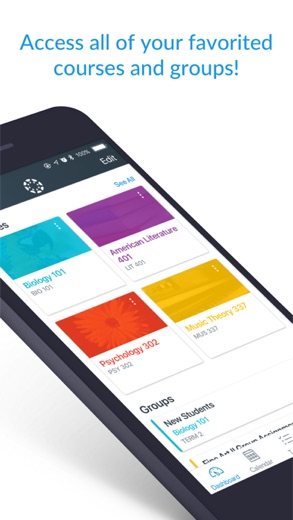
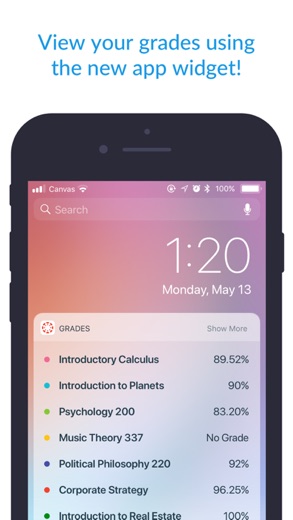
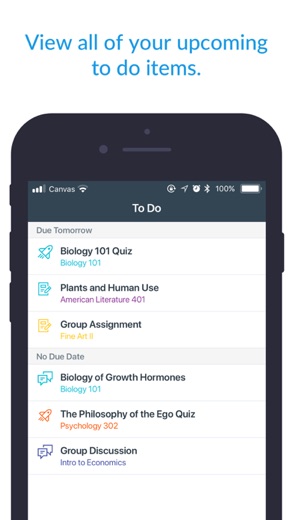
- Users can view grades, track assignments, homework, and schoolwork.
- The application provides reminders, push notifications, and customizable widgets for quick access.
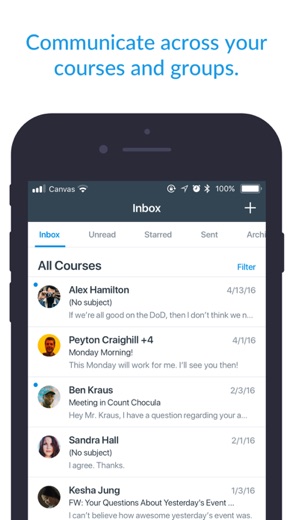
- It enables sending messages, joining class discussions, and collaborating with classmates in real time.
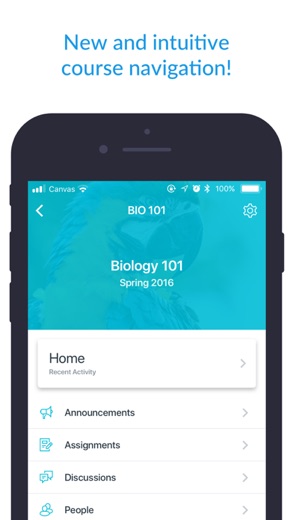
- Students can submit assignments, PDFs, documents, and media files for teacher annotation, take quizzes, and watch videos.
- Full courses can be downloaded, allowing for continued study even without internet access.
- Integrated classroom tools (LTIs), dark mode, and built-in accessibility (VPAT 2.2 compliant) are included.
- The application supports continuous learning, career-focused skill-based learning programs, and AI-powered learning experiences via Career experience.
More Games & Learning reviews




More news
- RoundupTop Free Sports Apps for Live Scores and StreamsLookedApp presents a roundup of eight free-to-download sports applications, providing real-time scores, streams, and comprehensive sports content to enthusiasts.
- RoundupLookedApp's Guide to Free Weather Apps: A Side-by-Side ReviewLookedApp explores eight leading weather applications available at no initial cost. This comparison details their features, costs, and target audiences to help users find the ideal tool for their needs.
- RoundupTop News Apps for Following the Headlines: A LookedApp RoundupLookedApp reviews a selection of news applications available at no cost, providing insights into their features, costs, and target audiences for staying informed on daily headlines.


















Privacy and permissions
On Google Play, Canvas Student requests access to several permission groups: Identity, Contacts, Photos/Media/Files, Storage, Camera, and Microphone. These permissions suggest the app may interact with user identity, access contacts, manage files on the device, and utilize the device's camera and microphone for educational activities.
The store listings do not provide further details regarding specific data collection practices, data sharing with third parties, or a comprehensive privacy policy within the application description itself.
Instructure Inc. publishes its privacy policy at www.instructure.com.
Canvas Student permissions in plain English
The Google Play listing shows 6 permission groups. Google Play also lists 9 other permissions, such as “view network connections”. That is more than most games & learning apps LookedApp reviews (typical: 1).
- CameraCan take photos and record video
- ContactsCan read your contacts
- IdentityCan find accounts on the device
- MicrophoneCan record audio
- Photos/Media/FilesCan read and change your photos, media and files
- StorageCan read and change files in shared storage
The App Store privacy label lists these data types:
- Linked to you: Contact Info, User Content, Identifiers, Diagnostics, Other Data
- Not linked to you: Usage Data, Diagnostics
Permission names come from Google Play; the plain-English lines describe what each permission group allows, not how this app uses it.
Canvas Student at a glance
| Developer | Instructure Inc. |
|---|---|
| Category | Education |
| Rating on App Store | 4.7 out of 5 (2.8M ratings) |
| Rating on Google Play | 4.5 out of 5 (225K ratings) |
| Installs on Google Play | 10M+ |
| Price | Free |
| Age rating | 4+ |
What changed in the latest Canvas Student version
App Store · Version 8.13.0, released Oct 12, 2026
The release notes say:
“Added IgniteAI Study Tools for Tier Next Institutions. Added support for Notebook. Added a loading indicator to the Syllabus Summary page. Added offline sync support for Syllabus content. Improved file list ordering. Display assignment unlock date on Assignment List and Assignment Details. Show an alert in more places when content isn't available offline.”
Google Play · Listing updated Oct 12, 2026
The release notes say:
“Canvas Career now supports offline submissions. Fixed Studio videos not playing in course content when the RCE Studio Embed Improvements feature is enabled. Fixed What-If grade totals on the Grades screen differing from the web calculation. Discussion and Announcement links inside a Discussion or Announcement now open the native screen instead of the full web view. Various bug fixes and stability improvements.”
Quoted from the store listings' release notes.
Pricing
Canvas Student is available at no cost to users. The Google Play listing indicates a price of 0, while the App Store listing explicitly states 'Free'.
The store listings for Canvas Student do not mention any in-app purchases or subscription models for additional features or content.
Canvas Student compared with similar apps
| App | Rating | Installs | Price |
|---|---|---|---|
 Canvas Student Canvas Student | 4.7 | 10M+ | Free |
 Canva Canva | 4.8 | 500M+ | Free |
 Zoom Workplace Zoom Workplace | 4.1 | 1B+ | Free |
 Yahoo Mail Yahoo Mail | 4.2 | 100M+ | Free |
Popular reviews
 Among Us reviewAmong Us is a social deduction game where players work together to prepare a spaceship for departure while identifying…Games & Learning
 Solitaire.com reviewSolitaire.com, developed by Tripledot Studios Limited, offers a classic Solitaire card game experience for mobile…Games & Learning
 Google Classroom reviewGoogle Classroom serves as a digital platform designed to streamline educational processes for learners and…Games & Learning
 ClassDojo reviewClassDojo functions as a communication and learning platform designed to connect teachers, parents, and students. It…Games & Learning
 Type Sprint: Typing Games reviewType Sprint: Typing Games is an application designed for individuals seeking to engage with typing challenges in a game…Games & Learning
 Fortnite reviewFortnite is an expansive action game from Epic Games Inc. that provides a diverse range of multiplayer experiences,…Games & Learning
How to get Canvas Student safely
To acquire Canvas Student, users should obtain it exclusively from reputable application marketplaces such as Google Play or the App Store. It is important to verify that the application's developer is 'Instructure' on Google Play or 'Instructure Inc.' on the App Store to ensure authenticity.
Users are advised to review the permissions requested by the application before proceeding with installation. Avoiding unofficial sources, third-party APK mirrors, or modified versions of the application is recommended to prevent potential security risks and ensure the integrity of the software.
How to install Canvas Student
On Android (Google Play)
- Open the Google Play Store app on your Android phone or tablet.
- Search for Canvas Student, or use the Google Play button on this page to open the listing directly.
- Check that the developer under the app name is Instructure.
- Check that your device meets the listing's requirement: Android 9 and up.
- Tap Install (or the price, for a paid app) and wait for the download to finish, then open the app from your home screen.
On iPhone and iPad (App Store)
- Open the App Store on your iPhone or iPad.
- Search for Canvas Student, or use the App Store button on this page to open the listing directly.
- Check that the developer under the app name is Instructure Inc..
- Make sure your device has iOS 18.0 or later and about 216 MB of free space, as the listing states.
- Tap Get (or the price), confirm the download, then open the app from your home screen.
Canvas Student version and app details
| Google Play | App Store | |
|---|---|---|
| Latest version | – | 8.13.0 |
| Last updated | Oct 12, 2026 | Oct 12, 2026 |
| First released | Dec 22, 2012 | Dec 8, 2011 |
| Package name | com.instructure.candroid | – |
| Bundle ID | – | com.instructure.icanvas |
| Requires | Android 9 and up | iOS 18.0 or later |
| Download size | – | 216 MB |
| Content rating | Everyone (Users Interact) | 4+ |
| In-app purchases | No | – |
| Contains ads | No | – |
| Languages | – | 29 (including English) |
| Developer | Instructure | Instructure Inc. |
Who Canvas Student is for
Canvas Student is designed for learners who are enrolled in educational institutions or programs that utilize the Canvas Learning Management System. It caters to students who need a mobile solution to stay organized, access course materials, and participate in academic activities from various locations.
The application is suitable for students who require features such as assignment tracking, grade viewing, participation in discussions, and the ability to submit coursework through their mobile devices. With content ratings of 'Everyone' on Google Play and '4+' on the App Store, it is broadly accessible to a wide range of student ages and learning levels. It particularly benefits individuals engaged in continuous learning, career-focused skill development, and those seeking AI-powered learning experiences.
Canvas Student for kids and families
- Age rating: Google Play rates it Everyone (Users Interact); the App Store rates it 4+.
- In-app purchases: Google Play: no.
- Ads: the Google Play listing says the app does not contain ads.
- Data safety (Google Play): The developer says the app may share these data types with third parties: Location, App activity and 2 others and may collect Location, Personal info and 7 others. Data is encrypted in transit. You can request that data be deleted.
Store age ratings describe content, not whether an app suits a particular child. To limit downloads and purchases on a child's phone, see how to set up parental controls for app downloads.
Pros
- Provides comprehensive tools for managing coursework and academic engagement.
- Enables offline learning by allowing users to download full courses.
- Facilitates collaboration and communication through messaging and discussion features.
- Includes accessibility features and a dark mode for enhanced user experience.
- Supports modern learning approaches, including AI-powered experiences and skill-based programs.
Cons
- Requires an existing Canvas LMS account to utilize its full functionalities.
- There is a version discrepancy between platforms, with Google Play offering version 8.7.1 and the App Store offering version 8.12.1.
- The App Store version has a size of 219 MB, which might consume significant device storage.
- The store listings do not provide detailed information about advanced privacy settings or data handling policies.
Canvas Student: frequently asked questions
Is Canvas Student a cost-free application?
Yes, the Google Play listing states the price as 0, and the App Store listing states 'Free'.
Which devices can use Canvas Student?
It is available on Google Play for Android devices and on the App Store for iOS devices running a minimum iOS 18.0.
Who developed Canvas Student?
Instructure developed the application.
What are some core functionalities of Canvas Student?
Users can view grades, submit assignments, participate in discussions, and access course materials, including offline content.
What permissions does Canvas Student request on Android?
On Android, it requests permissions for Identity, Contacts, Photos/Media/Files, Storage, Camera, and Microphone.
What is the content rating for Canvas Student?
The content rating is 'Everyone' on Google Play and '4+' on the App Store.
Canvas Student
- Category
- Education
- Version
- 8.13.0
Download
Canvas Student ratings breakdown
Google Play 4.5 average from 224,783 ratings
- 581%
- 46%
- 33%
- 22%
- 18%
App Store 4.7 average from 2,768,010 ratings
- 584%
- 48%
- 32%
- 21%
- 15%
Share of ratings for each star level, as shown on the listings, as of Oct 15, 2026.