Google Classroom
EducationScreenshots
Analysis by LookedApp · Published · Updated
Google Classroom serves as a digital platform designed to streamline educational processes for learners and instructors. It facilitates class creation, assignment distribution, communication, and organization, aiming to reduce paper usage and save time. The service is available without charge for schools, non-profits, and individuals with a personal Google account.
What is Google Classroom?
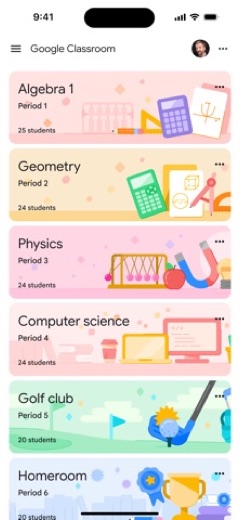
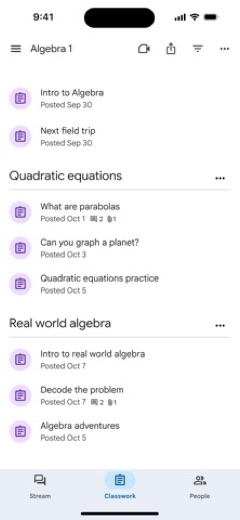
Google Classroom is an application developed by Google, serving as a comprehensive service for educational environments. It is engineered to simplify the connection between students and educators, both within and outside traditional school settings. The platform helps manage various aspects of a class, from creating assignments to facilitating communication.
The application is accessible across multiple platforms, being available on Google Play for Android devices and the App Store for iOS devices. It functions as a centralized hub where teachers can distribute materials and collect student work, while students can track their assignments and engage with class content. The service is provided at no cost, catering to educational institutions, non-profit organizations, and individuals using a personal Google account.
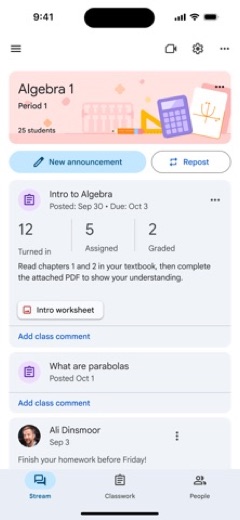
Google Classroom aims to enhance organization by automatically creating dedicated folders in Google Drive for each assignment and student. It also offers features that allow teachers to efficiently review and grade submissions. Students can view all their assignments on a dedicated page, making it easier to stay informed about their academic responsibilities.
Latest on Google Classroom





Is this the real Google Classroom app?
- Verified publisher infoSame developer on Google Play and the App Store (Google LLC), and the developer website classroom.google.com matches the publisher.
- Established since 2015Listed since Jan 13, 2015, 100,000,000+ installs on Google Play.
| Developer on Google Play | Google LLC |
|---|---|
| Developer on the App Store | |
| Same developer on both stores | Yes |
| Android package name | com.google.android.apps.classroom |
| iOS bundle ID | com.google.Classroom |
| On the stores since | Jan 13, 2015 |
| Installs on Google Play | 100,000,000+ |
| Developer website | classroom.google.com |
| Content rating | Google Play: Everyone / App Store: 4+ |
These details come from the public store listings. LookedApp doesn't host downloads: install from the Google Play or App Store buttons on this page.
Key features
- The application makes it simple for instructors to create classes, distribute assignments, and communicate with learners.
- It supports a paperless workflow for creating, collecting, and grading assignments, including automatic copying of Google Documents for each student.
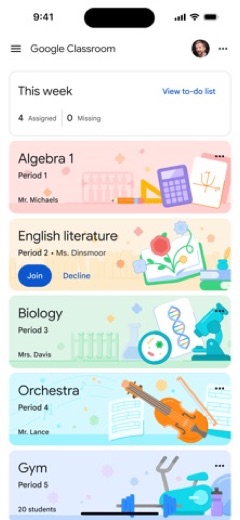
- Students can monitor their assignments on a dedicated page and initiate work with a single interaction.
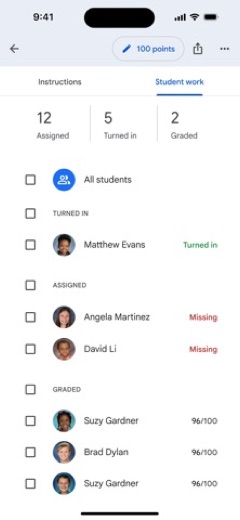
- Instructors can quickly identify who has submitted work and provide direct feedback and grades within the application.
- The mobile app allows students and teachers to view classes, communicate with classmates, and work on assignments on the go.
- Notifications keep users updated on new content and assignments within the Classroom environment.
More Games & Learning reviews



More news
- RoundupTop Free Sports Apps for Live Scores and StreamsLookedApp presents a roundup of eight free-to-download sports applications, providing real-time scores, streams, and comprehensive sports content to enthusiasts.
- RoundupLookedApp's Guide to Free Weather Apps: A Side-by-Side ReviewLookedApp explores eight leading weather applications available at no initial cost. This comparison details their features, costs, and target audiences to help users find the ideal tool for their needs.
- RoundupTop News Apps for Following the Headlines: A LookedApp RoundupLookedApp reviews a selection of news applications available at no cost, providing insights into their features, costs, and target audiences for staying informed on daily headlines.


















Privacy and permissions
Regarding privacy, the Google Classroom application states that it contains no advertisements and does not utilize user content or student data for advertising purposes, consistent with other Google Workspace for Education services. This commitment applies to all users of the platform.
The app requests several permissions to function. It needs access to the Camera to enable users to capture and post photos or videos. Microphone access is required for recording videos that are to be uploaded to Classroom. Additionally, Photos permission is necessary to allow users to attach existing photos or videos, which will be stored on Google servers for display within the application.
Google Classroom permissions in plain English
The Google Play listing shows no permission groups, only 8 basic permissions such as “view network connections”.
The App Store privacy label lists these data types:
- Linked to you: Location, Contact Info, Contacts, User Content, Search History, Identifiers, Usage Data, Diagnostics, Other Data
- Not linked to you: Diagnostics
Permission names come from Google Play; the plain-English lines describe what each permission group allows, not how this app uses it.
Google Classroom at a glance
| Developer | |
|---|---|
| Category | Education |
| Rating on App Store | 2.1 out of 5 (37K ratings) |
| Rating on Google Play | 2.8 out of 5 (2.1M ratings) |
| Installs on Google Play | 100M+ |
| Price | Free |
| Age rating | 4+ |
What changed in the latest Google Classroom version
App Store and Google Play · Version 3.68.300052585, released Oct 5, 2026; Google Play listing updated Oct 2, 2026
The release notes are general and don't list specific changes:
“Bug fixes and performance improvements”
Quoted from the store listings' release notes.
Pricing
Google Classroom is described as a service that is free of charge. This applies to schools, non-profit organizations, and any individual possessing a personal Google account. The listing does not mention any in-app purchases or subscription fees associated with its use.
The developer explicitly states that the application's price is "Free" on its store listing. There are no indications of varying price tiers or premium features that require payment.
Google Classroom compared with similar apps
| App | Rating | Installs | Price |
|---|---|---|---|
 Google Classroom Google Classroom | 2.8 | 100M+ | Free |
 Roblox Roblox | 4.2 | 1B+ | Free |
 PBS KIDS Games PBS KIDS Games | 4.4 | 10M+ | Free |
 Kahoot! Kahoot! | 4.7 | 100M+ | Free |
Popular reviews
 Type Sprint: Typing Games reviewType Sprint: Typing Games is an application designed for individuals seeking to engage with typing challenges in a game…Games & Learning
 Fortnite reviewFortnite is an expansive action game from Epic Games Inc. that provides a diverse range of multiplayer experiences,…Games & Learning
 Minecraft Education Edition reviewMinecraft Education Edition is a game-based learning platform designed for use in schools and organizations. It…Games & Learning
 Toca Boca World reviewToca Boca World is an educational application designed for open-ended, imaginative play, allowing users to create…Games & Learning
 Duolingo reviewDuolingo is a widely used education application primarily known for language learning, expanding its offerings to…Games & Learning
 Khan Academy reviewKhan Academy is an education application providing a vast library of interactive exercises, videos, and articles across…Games & Learning
How to get Google Classroom safely
To acquire Google Classroom safely, individuals should only download the application from recognized distribution platforms such as Google Play or the App Store. Verifying that the developer listed on these platforms is "Google" is an important step before installation to ensure authenticity.
Users are advised to avoid downloading the application from unofficial sources, third-party websites, or modified versions, as these might not be reliable or could pose risks. Reviewing the permissions requested by the application during installation is also recommended to understand what data the app can access on a device.
How to install Google Classroom
On Android (Google Play)
- Open the Google Play Store app on your Android phone or tablet.
- Search for Google Classroom, or use the Google Play button on this page to open the listing directly.
- Check that the developer under the app name is Google LLC.
- Check that your device meets the listing's requirement: Android 8.1 and up.
- Tap Install (or the price, for a paid app) and wait for the download to finish, then open the app from your home screen.
On iPhone and iPad (App Store)
- Open the App Store on your iPhone or iPad.
- Search for Google Classroom, or use the App Store button on this page to open the listing directly.
- Check that the developer under the app name is Google.
- Make sure your device has iOS 17.0 or later and about 202 MB of free space, as the listing states.
- Tap Get (or the price), confirm the download, then open the app from your home screen.
Google Classroom version and app details
| Google Play | App Store | |
|---|---|---|
| Latest version | – | 3.68.300052585 |
| Last updated | Oct 2, 2026 | Oct 5, 2026 |
| First released | Jan 14, 2015 | Jan 13, 2015 |
| Package name | com.google.android.apps.classroom | – |
| Bundle ID | – | com.google.Classroom |
| Requires | Android 8.1 and up | iOS 17.0 or later |
| Download size | – | 202 MB |
| Content rating | Everyone (Users Interact) | 4+ |
| In-app purchases | No | – |
| Contains ads | No | – |
| Languages | – | 67 (including English) |
| Developer | Google LLC |
Who Google Classroom is for
Google Classroom is intended for a broad educational audience, specifically designed for learners and instructors to facilitate their connection and collaboration. It is particularly useful for schools and non-profit organizations seeking a streamlined digital solution for managing classes and assignments. Individuals with a personal Google account can also utilize the service for their educational needs.
The platform helps teachers create, distribute, and grade assignments efficiently, while assisting students in tracking their academic progress and accessing class materials. Its features support improved organization and communication, making it suitable for anyone involved in an educational setting who wishes to enhance their digital learning or teaching experience.
Google Classroom for kids and families
- Age rating: Google Play rates it Everyone (Users Interact); the App Store rates it 4+.
- In-app purchases: Google Play: no.
- Ads: the Google Play listing says the app does not contain ads.
- Data safety (Google Play): The developer says the app may collect Location, Personal info and 9 others. No data shared with third parties. Data is encrypted in transit. You can request that data be deleted. Committed to follow the Play Families Policy.
Store age ratings describe content, not whether an app suits a particular child. To limit downloads and purchases on a child's phone, see how to set up parental controls for app downloads.
Pros
- The setup process is described as easy, allowing teachers to add students quickly.
- It offers a paperless assignment workflow, which saves time for educators.
- Organization is improved through automatic filing of materials in Google Drive.
- Communication is enhanced via announcements and class discussions.
- The service does not contain ads and avoids using student data for advertising.
- It supports multiple languages, with 68 available options.
Cons
- The App Store rating of 2.1 suggests that a significant number of users have had negative experiences.
- A minimum iOS version of 17.0 is required, which may exclude users with older Apple devices.
- The application size is 212 MB, which is relatively large and may consume considerable storage space.
- The content rating of 4+ is quite broad and may not specifically address different age group suitability beyond basic content.
Google Classroom: frequently asked questions
Is Google Classroom available for free?
Yes, Google Classroom is a free service for schools, non-profit organizations, and anyone with a personal Google account.
On which platforms can Google Classroom be used?
Google Classroom is available on Google Play for Android devices and the App Store for iOS devices.
Who developed the Google Classroom application?
Google Classroom was developed by Google.
What are the main functions of Google Classroom?
Its main functions include creating classes, distributing assignments, facilitating communication between learners and instructors, and helping to organize educational content.
Does Google Classroom display advertisements?
No, Google Classroom contains no ads and does not use user content or student data for advertising purposes.
What is the minimum iOS version required for Google Classroom?
The minimum iOS version required to run Google Classroom is 17.0.
Google Classroom
- Category
- Education
- Version
- 3.68.300052585
Download
Looking for the Google Classroom website or sign-in? Go to classroom.google.com →The developer's website, as given on the store listing.
Google Classroom ratings breakdown
Google Play 2.8 average from 2,092,876 ratings
- 538%
- 47%
- 35%
- 23%
- 147%
App Store 2.1 average from 36,797 ratings
- 522%
- 43%
- 32%
- 22%
- 170%
Share of ratings for each star level, as shown on the listings, as of Oct 8, 2026.