Wayfair
ShoppingScreenshots

Analysis by LookedApp · Published · Updated
The Wayfair app is a dedicated shopping platform for home furnishings and decor, providing users with tools to browse, discover deals, and manage orders. It caters to individuals seeking to outfit their living spaces with a wide array of products. The application aims to streamline the home shopping experience from product discovery to delivery tracking.
What is Wayfair?
The Wayfair app functions as a mobile shopping application designed for purchasing home goods. It allows users to explore a vast catalog of furniture, decor, and other items for their residences. The application is developed by Wayfair, LLC, for Android devices and Wayfair LLC for iOS devices, operating as a direct extension of the Wayfair retail experience.
This application is widely accessible, being available for download and use on both Google Play for Android devices and the App Store for Apple devices. It consolidates many functionalities of the Wayfair website into a mobile format, providing a convenient way for consumers to engage with the brand's offerings. The app offers various features to assist users in finding and acquiring products for their homes.
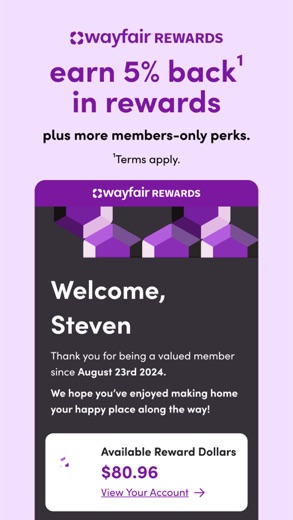
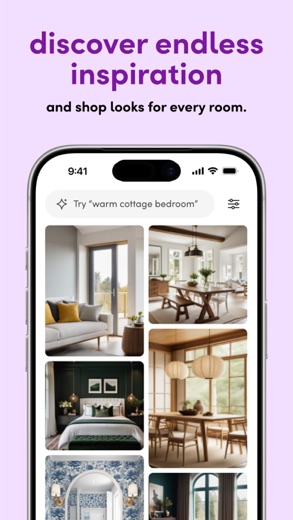
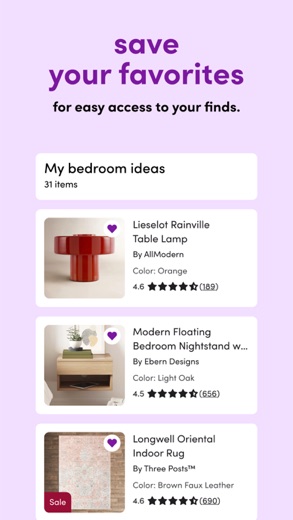
The Wayfair app is characterized by its focus on enhancing the home shopping journey. It provides app-exclusive deals, early access to sales events, and notifications regarding price reductions on desired products. The application also includes personalized recommendations, order status updates, and real-time delivery tracking, aiming to offer a comprehensive shopping experience. Users can also create 'Lists' to organize and share their favorite finds with others.
Latest on Wayfair





Is this the real Wayfair app?
- Verified publisher infoSame developer on Google Play and the App Store (Wayfair, LLC), and the developer website wayfair.com matches the publisher.
- Established since 2014Listed since Mar 30, 2014, 10,000,000+ installs on Google Play.
| Developer on Google Play | Wayfair, LLC |
|---|---|
| Developer on the App Store | Wayfair LLC |
| Same developer on both stores | Yes |
| Android package name | com.wayfair.wayfair |
| iOS bundle ID | com.wayfair.WayfairApp |
| On the stores since | Mar 30, 2014 |
| Installs on Google Play | 10,000,000+ |
| Developer website | wayfair.com |
| Content rating | Google Play: Everyone / App Store: 4+ |
These details come from the public store listings. LookedApp doesn't host downloads: install from the Google Play or App Store buttons on this page.
Key features
- Users can access app-only deals and receive early access to sales events.
- Notifications are provided for price drops on selected furniture, decor, and other items.
- The app generates personalized product recommendations for its users.
- Order updates and real-time delivery tracking are available within the application.
- A 'Lists' feature allows users to save, organize, and share their favorite finds.
- The application offers a wide selection of home products suitable for various styles, spaces, and budgets.
More Shopping & Local reviews




More news
- RoundupTop Free Sports Apps for Live Scores and StreamsLookedApp presents a roundup of eight free-to-download sports applications, providing real-time scores, streams, and comprehensive sports content to enthusiasts.
- RoundupLookedApp's Guide to Free Weather Apps: A Side-by-Side ReviewLookedApp explores eight leading weather applications available at no initial cost. This comparison details their features, costs, and target audiences to help users find the ideal tool for their needs.
- RoundupTop News Apps for Following the Headlines: A LookedApp RoundupLookedApp reviews a selection of news applications available at no cost, providing insights into their features, costs, and target audiences for staying informed on daily headlines.


















Privacy and permissions
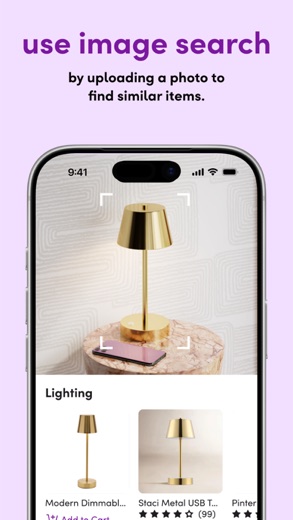
On Google Play, the Wayfair app requests several permissions from the device. These permission groups include access to Location, Photos/Media/Files, Storage, Camera, and Wi-Fi connection information. These permissions enable various functionalities within the application, such as uploading images or determining location for relevant services.
The App Store listing for the Wayfair app does not explicitly detail the specific permissions it requests from iOS devices. Additionally, neither the Google Play nor the App Store listing provides information regarding the app's data collection practices or privacy policies beyond the requested permissions.
Wayfair LLC publishes its privacy policy at www.wayfair.ca.
Wayfair permissions in plain English
The Google Play listing shows 3 permission groups. Google Play also lists 8 other permissions, such as “view network connections”. That is fewer than most shopping & local apps LookedApp reviews (typical: 5).
- CameraCan take photos and record video
- LocationCan use your precise location
- Wi-Fi connection informationCan see Wi-Fi connection details
The App Store privacy label lists these data types:
- Used to track you: Location, Identifiers
- Linked to you: Purchases, Financial Info, Location, Contact Info, Contacts, User Content, Search History, Browsing History, Identifiers, Usage Data, Diagnostics, Other Data
Permission names come from Google Play; the plain-English lines describe what each permission group allows, not how this app uses it.
Wayfair at a glance
| Developer | Wayfair LLC |
|---|---|
| Category | Shopping |
| Rating on App Store | 4.9 out of 5 (2.5M ratings) |
| Rating on Google Play | 4.8 out of 5 (461K ratings) |
| Installs on Google Play | 10M+ |
| Price | Free |
| Age rating | 4+ |
What changed in the latest Wayfair version
App Store · Version 7.40, released Oct 12, 2026
The release notes are general and don't list specific changes:
“Thank you for updating the Wayfair app! This version has more performance improvements and bug fixes than ever before!”
Google Play · Listing updated Oct 12, 2026
The release notes say:
“Thanks for using the Wayfair app! We regularly bring updates to our app that make shopping easier and more fun than ever. As exciting new features become available, we'll let you know right in the app.”
Quoted from the store listings' release notes.
Pricing
The Wayfair app is available to users at no cost. On Google Play, the price is stated as 0, indicating it is a free application. Similarly, the App Store listing specifies the price as "Free."
The app's store descriptions do not mention any in-app purchases or subscription models. While the application itself is free to download and use, it facilitates the purchase of home goods, and those products carry their respective prices. The app highlights features like "best prices" and notifications about "price drops" related to the retail products sold through the platform.
Wayfair compared with similar apps
| App | Rating | Installs | Price |
|---|---|---|---|
 Wayfair Wayfair | 4.9 | 10M+ | Free |
 Zillow Zillow | 4.8 | 50M+ | Free |
 Vinted Vinted | 4.9 | 100M+ | Free |
 Great Clips Online Check-in Great Clips Online Check-in | 4.9 | 10M+ | Free |
Popular reviews
 Ring - Always Home reviewThe Ring - Always Home application serves as a central control hub for various Ring smart home security devices,…Shopping & Local
 FlightAware Flight Tracker reviewThe FlightAware Flight Tracker application provides real-time aircraft tracking capabilities for users interested in…Shopping & Local
 Uber reviewUber is a comprehensive mobile application developed by Uber Technologies, Inc. that facilitates a wide array of…Shopping & Local
 Whatnot reviewWhatnot is a live shopping platform that connects buyers and sellers across a wide array of categories. It offers…Shopping & Local
 Poshmark Sell Shop Online reviewThe Poshmark Sell Shop Online app serves as a vibrant marketplace for fashion enthusiasts, enabling users to both…Shopping & Local
 TP-Link Tapo reviewThe TP-Link Tapo app provides a centralized platform for setting up and managing a range of Tapo smart home devices,…Shopping & Local
How to get Wayfair safely
To acquire the Wayfair app safely, it is recommended to download it exclusively from reputable application stores such as Google Play or the App Store. When downloading, users should verify that the developer listed is "Wayfair, LLC" for Android devices or "Wayfair LLC" for iOS devices. This ensures the authenticity of the application and helps avoid unauthorized versions.
Users should exercise caution and avoid downloading the Wayfair app from third-party websites, unofficial app stores, or through APK mirrors, as these sources may distribute modified or potentially harmful versions of the application. Before completing the installation, it is advisable to review the permissions the app requests to understand what device functionalities it intends to access, such as location or camera.
How to install Wayfair
On Android (Google Play)
- Open the Google Play Store app on your Android phone or tablet.
- Search for Wayfair, or use the Google Play button on this page to open the listing directly.
- Check that the developer under the app name is Wayfair, LLC.
- Check that your device meets the listing's requirement: Android 10 and up.
- Tap Install (or the price, for a paid app) and wait for the download to finish, then open the app from your home screen.
On iPhone and iPad (App Store)
- Open the App Store on your iPhone or iPad.
- Search for Wayfair, or use the App Store button on this page to open the listing directly.
- Check that the developer under the app name is Wayfair LLC.
- Make sure your device has iOS 18.0 or later and about 285 MB of free space, as the listing states.
- Tap Get (or the price), confirm the download, then open the app from your home screen.
Wayfair version and app details
| Google Play | App Store | |
|---|---|---|
| Latest version | – | 7.40 |
| Last updated | Oct 12, 2026 | Oct 12, 2026 |
| First released | Feb 20, 2015 | Mar 30, 2014 |
| Package name | com.wayfair.wayfair | – |
| Bundle ID | – | com.wayfair.WayfairApp |
| Requires | Android 10 and up | iOS 18.0 or later |
| Download size | – | 285 MB |
| Content rating | Everyone (Users Interact) | 4+ |
| In-app purchases | No | – |
| Contains ads | No | – |
| Languages | – | 2 (including English) |
| Developer | Wayfair, LLC | Wayfair LLC |
Who Wayfair is for
The Wayfair app is designed for individuals who are actively shopping for home furnishings, decor, and other related products. It is particularly suitable for those who appreciate the convenience of browsing extensive product catalogs and managing their purchases from a mobile device. The app caters to users seeking a broad selection of items to match different interior design styles and budget considerations.
It also serves consumers who wish to stay informed about sales, exclusive deals, and price changes on items they are interested in. With features like personalized recommendations and order tracking, the app is useful for anyone looking to streamline their home improvement or decoration projects. The content rating of "Everyone" on Google Play and "4+" on the App Store suggests its suitability for a wide audience.
Wayfair for kids and families
Pros
- Offers app-exclusive deals and early access to sales events.
- Provides real-time order updates and delivery tracking for purchases.
- Features personalized recommendations to help users discover relevant products.
- Includes a 'Lists' function for saving, organizing, and sharing favorite items.
- Provides access to a diverse selection of home goods for various styles and budgets.
Cons
- The app on Android devices requests multiple permissions, including location and camera access.
- The iOS version of the app has a relatively large file size of 296 MB.
- The store listings do not provide details on specific data handling practices or privacy policies.
Wayfair: frequently asked questions
Is the Wayfair app free to use?
Yes, the Wayfair app is listed as free on both Google Play and the App Store, with no initial cost to download or use the application.
On which devices can the Wayfair app be installed?
The Wayfair app is available for installation on devices compatible with Google Play, such as Android smartphones and tablets, and on iOS devices like iPhones and iPads via the App Store.
Who is the developer of the Wayfair app?
The Wayfair app is developed by Wayfair, LLC, for the Google Play platform, and by Wayfair LLC for the App Store platform.
What are some key features of the Wayfair app?
Key features include app-only deals, early access to sales, price drop notifications, personalized recommendations, order updates, real-time delivery tracking, and the ability to create and share product lists.
When was the Wayfair app last updated?
The Wayfair app on the App Store was last updated on 2026-10-05, while the Google Play version was updated on 2025-09-16.
What permissions does the Wayfair app request on Android?
On Android, the Wayfair app requests permissions related to Location, Photos/Media/Files, Storage, Camera, and Wi-Fi connection information.
Wayfair
- Category
- Shopping
- Version
- 7.40
Download
Looking for the Wayfair website or sign-in? Go to wayfair.com →The developer's website, as given on the store listing.
Wayfair ratings breakdown
Google Play 4.8 average from 461,000 ratings
- 587%
- 48%
- 32%
- 21%
- 12%
App Store 4.9 average from 2,549,720 ratings
- 591%
- 47%
- 31%
- 20%
- 11%
Share of ratings for each star level, as shown on the listings, as of Oct 12, 2026.