Gmail
ProductivityScreenshots
Analysis by LookedApp · Published · Updated
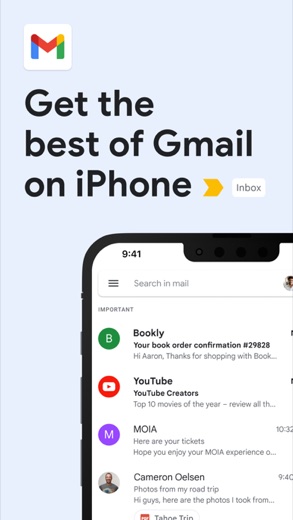
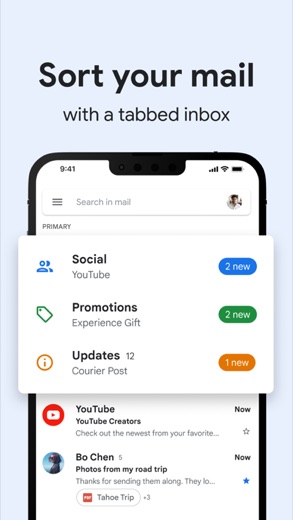
Gmail provides a comprehensive email management experience with advanced artificial intelligence capabilities and robust spam protection. It is suitable for individuals and teams seeking efficient communication tools, multi-account support, and integration within the Google Workspace ecosystem. The application is designed to streamline inbox management and enhance productivity for a wide range of users.
What is Gmail?
Gmail is an email application developed by Google LLC. It offers a platform for sending, receiving, and organizing electronic mail. The application is widely available for mobile users, accessible on both the Google Play Store for Android devices and the App Store for iOS devices, including iPhone and iPad.
The application serves as a central hub for communication, integrating various tools and features to manage email efficiently. It aims to provide users with a streamlined experience for their personal and professional correspondence. The application is part of the broader Google Workspace suite, facilitating connection and collaboration among users.
Latest on Gmail



Is this the real Gmail app?
- Verified publisher infoSame developer on Google Play and the App Store (Google LLC), and the developer website support.google.com matches the publisher.
- Established since 2010Listed since Sep 21, 2010, 10,000,000,000+ installs on Google Play.
| Developer on Google Play | Google LLC |
|---|---|
| Developer on the App Store | |
| Same developer on both stores | Yes |
| Android package name | com.google.android.gm |
| iOS bundle ID | com.google.Gmail |
| On the stores since | Sep 21, 2010 |
| Installs on Google Play | 10,000,000,000+ |
| Developer website | support.google.com |
| Content rating | Google Play: Everyone / App Store: 4+ |
These details come from the public store listings. LookedApp doesn't host downloads: install from the Google Play or App Store buttons on this page.
Key features
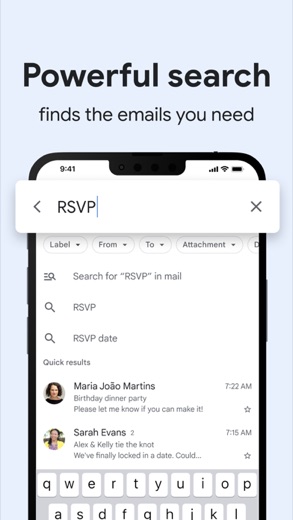
- Gemini in Gmail can summarize lengthy emails, craft or refine responses, or search the inbox for specific information.
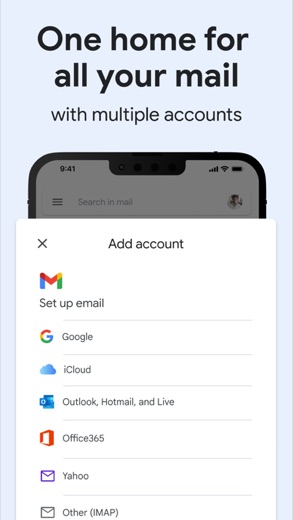
- The application supports connecting and switching between multiple email accounts from various providers.
- It automatically blocks more than 99.9% of spam, phishing, and malware from reaching the inbox.
- Users can undo send for up to 30 seconds to prevent unintended email transmissions.
- Google Meet and Google Chat are accessible directly within the Gmail application interface.
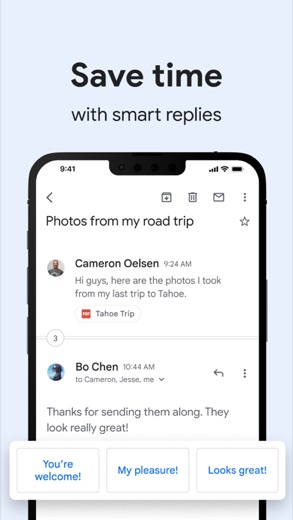
- AI-powered Suggested Replies help users respond to emails faster by understanding context and matching their tone.
More Productivity & Email reviews




More news
- GuideUnderstanding App Permissions and Privacy Sections on Store ListingsThis guide explains what app permission requests and privacy sections on store listings mean, using concrete examples from various applications and insights from LookedApp's reviews.
- RoundupLookedApp's Guide to Free Shopping Apps for Everyday BuysThis LookedApp roundup explores a selection of free-to-download shopping applications that cater to various everyday purchasing needs, providing convenience and value.
- RoundupLookedApp's Roundup: Top Free Travel and Navigation AppsLookedApp presents a curated list of free-to-download travel and navigation applications. These apps provide essential tools for diverse travel needs, from daily commutes to international journeys. This selection focuses on applications assessed by LookedApp.
















Privacy and permissions
The Google Play version of the Gmail application requests access to several permission groups. These include Identity, Calendar, Contacts, Phone, Photos/Media/Files, Storage, Camera, Microphone, Wi-Fi connection information, and Device ID & call information. These permissions enable various functionalities within the app, such as managing contacts, accessing device storage for attachments, and utilizing the camera or microphone for integrated services.
The App Store listing for Gmail does not explicitly detail permission groups in the same manner as Google Play. However, it mentions features like real-time notifications and intelligent search, which inherently require certain data access to function. The store description does not specify how user data is collected, processed, or shared beyond the scope of necessary application functionalities.
Google publishes its privacy policy at www.google.com.
Gmail permissions in plain English
The Google Play listing shows 10 permission groups. Google Play also lists 24 other permissions, such as “view network connections”. That is more than most productivity & email apps LookedApp reviews (typical: 7).
- CalendarCan read or change your calendar
- CameraCan take photos and record video
- ContactsCan read your contacts
- Device ID & call informationCan read your device ID and call status
- IdentityCan find accounts on the device
- MicrophoneCan record audio
- PhoneCan read phone status or make calls
- Photos/Media/FilesCan read and change your photos, media and files
- StorageCan read and change files in shared storage
- Wi-Fi connection informationCan see Wi-Fi connection details
Permission names come from Google Play; the plain-English lines describe what each permission group allows, not how this app uses it.
Gmail at a glance
| Developer | |
|---|---|
| Category | Productivity |
| Rating on App Store | 4.7 out of 5 (2.4M ratings) |
| Rating on Google Play | 4.1 out of 5 (14M ratings) |
| Installs on Google Play | 10B+ |
| Price | Free |
| Age rating | 4+ |
What changed in the latest Gmail version
App Store · Version 6.0.261005, released Oct 12, 2026
The release notes are general and don't list specific changes:
“Bug fixes and performance improvements.”
Quoted from the store listings' release notes.
Pricing
The Gmail application is available without a direct purchase cost. On Google Play, the price is stated as 0. Similarly, on the App Store, the application is listed as "Free". This means users can download and utilize the core email services without an upfront payment.
It is noted that some advanced Gemini features, which are integrated into Gmail, may require a Google One AI subscription. This indicates that while the base application is provided at no cost, certain enhanced artificial intelligence functionalities might involve an additional subscription fee for access. The store listings do not specify other in-app purchases or subscription tiers beyond this mention related to Gemini.
Gmail compared with similar apps
| App | Rating | Installs | Price |
|---|---|---|---|
 Gmail Gmail | 4.1 | 10B+ | Free |
 Canva Canva | 4.8 | 500M+ | Free |
 Zoom Workplace Zoom Workplace | 4.1 | 1B+ | Free |
 Yahoo Mail Yahoo Mail | 4.2 | 100M+ | Free |
Popular reviews
 Google Authenticator reviewGoogle Authenticator is an application designed to provide an additional layer of security for online accounts by…Productivity & Email
 Google Sheets reviewGoogle Sheets is a productivity application designed for creating, editing, and collaborating on spreadsheets across…Productivity & Email
 Workday reviewThe Workday app serves as a comprehensive mobile solution designed to enhance workplace productivity, offering…Productivity & Email
 UKG Pro reviewThe UKG Pro app functions as a mobile platform designed to provide employees and people managers with access to human…Productivity & Email
 Messenger - SMS Text Messages reviewMessenger, developed by Meta Platforms, Inc., is a comprehensive communication application designed for Android users.…Productivity & Email
 ChatGPT reviewChatGPT for Android brings OpenAI's advanced AI capabilities to mobile devices, enabling users to generate images,…Productivity & Email
How to get Gmail safely
To obtain the Gmail application safely, users should exclusively download it from reputable digital storefronts. For Android devices, this means using Google Play, and for iOS devices, the App Store is the appropriate source. It is crucial to verify that the application is published by the stated developer, Google LLC on Google Play, and Google on the App Store, to ensure authenticity.
Users should exercise caution and avoid downloading the application from unofficial sources, such as third-party APK mirror sites or websites offering modified versions. Such alternative sources may distribute compromised or malicious software. Before installation, reviewing the requested permissions is advisable to understand the access the application will have on the device.
How to install Gmail
On Android (Google Play)
- Open the Google Play Store app on your Android phone or tablet.
- Search for Gmail, or use the Google Play button on this page to open the listing directly.
- Check that the developer under the app name is Google LLC.
- Tap Install (or the price, for a paid app) and wait for the download to finish, then open the app from your home screen.
On iPhone and iPad (App Store)
- Open the App Store on your iPhone or iPad.
- Search for Gmail, or use the App Store button on this page to open the listing directly.
- Check that the developer under the app name is Google.
- Make sure your device has iOS 18.0 or later and about 725 MB of free space, as the listing states.
- Tap Get (or the price), confirm the download, then open the app from your home screen.
- The listing shows in-app purchases, so review any purchase prompts before you confirm.
Gmail version and app details
| Google Play | App Store | |
|---|---|---|
| Latest version | – | 6.0.261005 |
| Last updated | Oct 14, 2026 | Oct 12, 2026 |
| First released | Sep 21, 2010 | Nov 2, 2011 |
| Package name | com.google.android.gm | – |
| Bundle ID | – | com.google.Gmail |
| Requires | – | iOS 18.0 or later |
| Download size | – | 725 MB |
| Content rating | Everyone (Users Interact) | 4+ |
| In-app purchases | No | Yes |
| Contains ads | Yes | – |
| Languages | – | 56 (including English) |
| Developer | Google LLC |
Who Gmail is for
Gmail is designed for individuals and professionals who require a robust and feature-rich email client for managing their daily communications. It caters to users who need to handle multiple email accounts from various providers within a single interface, offering tools for organization and productivity. The integration of artificial intelligence features, such as email summarization and suggested replies, makes it suitable for those looking to streamline their workflow and improve efficiency in handling correspondence.
The application also benefits users who are part of the Google Workspace ecosystem, as it provides seamless integration with services like Google Meet and Google Chat. It is intended for an audience that values strong spam and phishing protection, real-time notifications, and intelligent search capabilities to quickly find information across their emails. The application is not designed for a kids audience.
Gmail for kids and families
Pros
- Automatically blocks more than 99.9% of spam, phishing, and malware.
- Offers advanced AI features like Gemini for summaries and response drafting.
- Supports multiple email accounts from different providers within one interface.
- Integrates seamlessly with Google Meet and Google Chat directly within the app.
- Provides an undo send option for up to 30 seconds to correct mistakes.
Cons
- Some advanced Gemini features may require a Google One AI subscription.
- The Google Play version requests access to multiple permission groups for functionality.
- The iOS version has a size of 756 MB, which can be substantial for device storage.
Gmail: frequently asked questions
Is the Gmail app available at no cost?
Yes, the Gmail application is available at no cost on both Google Play and the App Store.
On which devices can the Gmail app be installed?
The Gmail app is available on devices running Android (via Google Play) and iOS (via the App Store).
Who developed the Gmail application?
The Gmail application was developed by Google LLC for Google Play and Google for the App Store.
Does the Gmail app offer features to manage multiple email accounts?
Yes, the application supports connecting and switching between multiple email accounts from different providers.
What kind of security features does Gmail include?
Gmail automatically blocks more than 99.9% of spam, phishing, and malware from reaching the inbox.
Are there any advanced features that might require a separate subscription?
Yes, some Gemini features within Gmail may require a Google One AI subscription.
Gmail
- Category
- Productivity
- Version
- 6.0.261005
Download
Looking for the Gmail website or sign-in? Go to support.google.com →The developer's website, as given on the store listing.
Gmail ratings breakdown
Google Play 4.1 average from 14,489,479 ratings
- 566%
- 49%
- 36%
- 24%
- 115%
App Store 4.7 average from 2,445,286 ratings
- 586%
- 47%
- 33%
- 21%
- 13%
Share of ratings for each star level, as shown on the listings, as of Oct 14, 2026.