Spectrum TV
EntertainmentScreenshots
Analysis by LookedApp · Published · Updated
The Spectrum TV app enables users to stream live television and On Demand content directly on their mobile devices. Developed by Charter/Spectrum, it is designed for existing Spectrum TV subscribers seeking to access their programming on various screens. The app also offers functionalities such as creating personalized viewing guides and managing DVR services for compatible setups.
What is Spectrum TV?
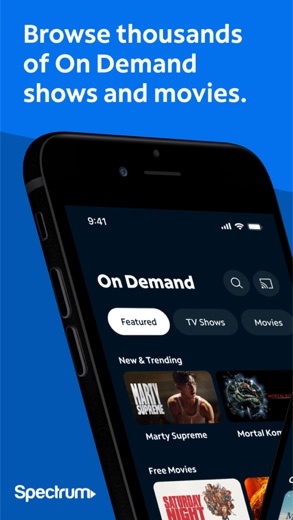
The Spectrum TV app functions as a mobile platform that allows users to transform their devices into a television. It provides access to live TV and a library of On Demand shows and movies, with content availability dependent on the user's existing Spectrum TV package.
Charter/Spectrum and Charter Communications are the developers behind the app. It is accessible for download across major app distribution platforms.
On Google Play, the app is listed as "Spectrum TV" by Charter/Spectrum, with a version of 10.10.0.291093679.release, updated on 2026-08-31. For Apple users, the App Store offers "Spectrum TV" by Charter Communications, with version 9.75.1, updated on 2026-10-05 and released on 2011-03-15. It requires a minimum iOS version of 15.0 and has a size of 79 MB.
Is this the real Spectrum TV app?
- Listed on Google Play & App StoreStore listings on both Google Play and the App Store.
- Established since 2011Listed since Mar 15, 2011, 10,000,000+ installs on Google Play.
| Developer on Google Play | Charter/Spectrum |
|---|---|
| Developer on the App Store | Charter Communications |
| Same developer on both stores | Names differ; compare them on each listing |
| Android package name | com.TWCableTV |
| iOS bundle ID | com.timewarnercable.simulcast |
| On the stores since | Mar 15, 2011 |
| Installs on Google Play | 10,000,000+ |
| Developer website | charter.net |
| Content rating | Google Play: Teen / App Store: 12+ |
These details come from the public store listings. LookedApp doesn't host downloads: install from the Google Play or App Store buttons on this page.
Key features
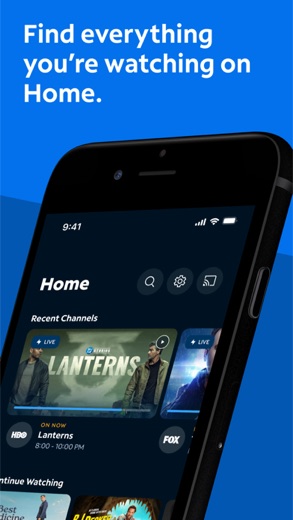
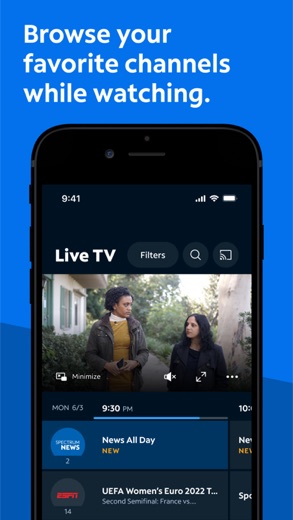
- Users can stream live TV from any location where they have an internet connection.
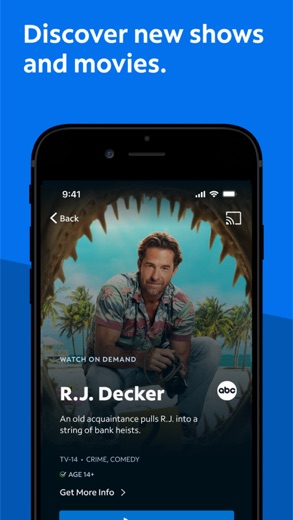
- The app provides access to thousands of On Demand shows and movies.
- Content can be cast from a phone or tablet to a compatible television using Chromecast.
- A personalized guide can be created by marking favorite channels.
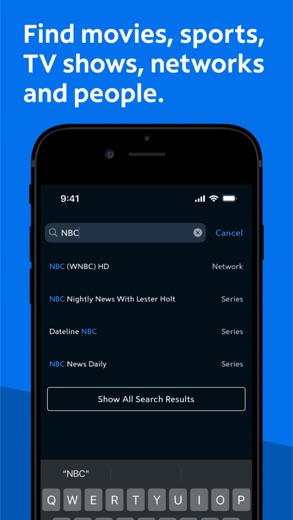
- Programs are searchable by title, network, actor, or sports team from within the app.
- Users are able to change TV channels on their Spectrum Receiver and manage DVR recordings with optional services.
More Streaming, TV & News reviews



More news
- GuideIn-App Purchases and Subscriptions: Reading the Price LineUnderstanding the different pricing models for mobile applications, from no initial cost to up-front purchases, helps users navigate the digital marketplace effectively. This guide explains how to interpret price lines and pricing sections on app store listings.
- GuideUnderstanding Shopping Apps: Permissions, Payments, and Safe InstallationShopping applications provide convenience, but understanding their permissions, payment structures, and how to install them safely is crucial for user privacy and device security.
- RoundupTop Free Sports Apps for Live Scores and StreamsLookedApp presents a roundup of eight free-to-download sports applications, providing real-time scores, streams, and comprehensive sports content to enthusiasts.












Privacy and permissions
The Google Play listing indicates that the Spectrum TV app requests several permission groups, which include Location, Phone, Wi-Fi connection information, and Device ID & call information.
The App Store description states that the app incorporates Nielsen’s proprietary measurement software. This software contributes to market research, specifically Nielsen’s TV Ratings, and information regarding opting out of this measurement is provided via a designated URL. The store listing does not specify other data collection practices beyond the use of Nielsen's software.
Charter Communications publishes its privacy policy at www.charter.com.
Spectrum TV permissions in plain English
The Google Play listing shows 4 permission groups. Google Play also lists 8 other permissions, such as “view network connections”. That is fewer than most streaming, tv & news apps LookedApp reviews (typical: 5).
- Device ID & call informationCan read your device ID and call status
- LocationCan use your precise location
- PhoneCan read phone status or make calls
- Wi-Fi connection informationCan see Wi-Fi connection details
The App Store privacy label lists these data types:
- Used to track you: Purchases, Location, Identifiers, Usage Data
- Linked to you: Purchases, Location, Contact Info, User Content, Search History, Identifiers, Usage Data, Diagnostics
Permission names come from Google Play; the plain-English lines describe what each permission group allows, not how this app uses it.
Spectrum TV at a glance
| Developer | Charter Communications |
|---|---|
| Category | Entertainment |
| Rating on App Store | 4.7 out of 5 (570K ratings) |
| Rating on Google Play | 4.7 out of 5 (370K ratings) |
| Installs on Google Play | 10M+ |
| Price | Free |
| Age rating | 12+ |
Pricing
The Spectrum TV app is available without cost; it is listed with a price of 0 on Google Play and is designated as "Free" on the App Store.
The store listings do not provide information regarding any in-app purchases. While optional DVR services are mentioned as a feature, these would entail separate subscription costs outside of the app itself.
Spectrum TV compared with similar apps
| App | Rating | Installs | Price |
|---|---|---|---|
 Spectrum TV | 4.7 | 10M+ | Free |
 YouTube | 3.8 | 10B+ | Free |
 Tubi | 4.9 | 100M+ | Free |
 YouTube Music | 4.5 | 5B+ | Free |
Popular reviews
 PBS reviewThe PBS app provides a streaming service for educational, cultural, and public affairs programming, offering access to…Streaming, TV & News
 Yahoo News reviewYahoo News is a news aggregation application developed by Yahoo, providing users with a personalized feed of stories…Streaming, TV & News
 Hulu reviewHulu is a comprehensive streaming application that provides a wide array of TV shows, movies, and exclusive Originals.…Streaming, TV & News
 Disney+ reviewDisney+ is a streaming service developed by Disney, offering a comprehensive collection of movies, series, and…Streaming, TV & News
 The Roku App (Official) reviewThe Roku App (Official) transforms a smartphone or tablet into a versatile remote control for Roku streaming devices…Streaming, TV & News
 Epic Games reviewThe Epic Games app functions as a companion tool for users within the Epic Ecosystem, focusing on communication and…Streaming, TV & News
How to get Spectrum TV safely
To ensure a safe installation, individuals should only obtain the Spectrum TV app from established app marketplaces such as Google Play or the App Store. It is advisable to confirm that the developer name, which is Charter/Spectrum or Charter Communications, matches the listing.
Users should avoid downloading the app from unofficial sources, including third-party APK mirrors or modified versions, as these might contain altered or potentially harmful software. Before installation, reviewing the permissions the app requests, such as access to Location and Phone information on Android, is a recommended practice to understand its capabilities.
How to install Spectrum TV
On Android (Google Play)
- Open the Google Play Store app on your Android phone or tablet.
- Search for Spectrum TV, or use the Google Play button on this page to open the listing directly.
- Check that the developer under the app name is Charter/Spectrum.
- Check that your device meets the listing's requirement: Android 6.0 and up.
- Tap Install (or the price, for a paid app) and wait for the download to finish, then open the app from your home screen.
On iPhone and iPad (App Store)
- Open the App Store on your iPhone or iPad.
- Search for Spectrum TV, or use the App Store button on this page to open the listing directly.
- Check that the developer under the app name is Charter Communications.
- Make sure your device has iOS 15.0 or later and about 76 MB of free space, as the listing states.
- Tap Get (or the price), confirm the download, then open the app from your home screen.
Spectrum TV version and app details
| Google Play | App Store | |
|---|---|---|
| Latest version | – | 9.76 |
| Last updated | Oct 9, 2026 | Oct 14, 2026 |
| First released | Nov 29, 2011 | Mar 15, 2011 |
| Package name | com.TWCableTV | – |
| Bundle ID | – | com.timewarnercable.simulcast |
| Requires | Android 6.0 and up | iOS 15.0 or later |
| Download size | – | 76 MB |
| Content rating | Teen (Diverse Content: Discretion Advised) | 12+ (Infrequent/Mild Horror/Fear Themes; Infrequent/Mild Cartoon or Fantasy Violence; Infrequent/Mild Sexual Content and Nudity; Infrequent/Mild Profanity or Crude Humor; Infrequent/Mild Medical/Treatment Information; Infrequent/Mild Realistic Violence; Infrequent/Mild Alcohol, Tobacco, or Drug Use or References; Infrequent/Mild Mature/Suggestive Themes) |
| In-app purchases | No | – |
| Contains ads | Yes | – |
| Languages | – | 1 (including English) |
| Developer | Charter/Spectrum | Charter Communications |
Who Spectrum TV is for
The Spectrum TV app is intended for current Spectrum TV subscribers who wish to extend their television viewing to their mobile devices. It serves individuals who desire to stream live programming and On Demand content from their Spectrum package, whether they are at home or away.
It also caters to users who benefit from controlling their Spectrum Receiver and managing their DVR recordings directly from their smartphone or tablet. With a content rating of "Teen" on Google Play and "12+" on the App Store, the app is suitable for a broad audience including teenagers.
Pros
- Allows streaming of live television and On Demand content on mobile devices.
- Offers a selection of thousands of On Demand shows and movies.
- Supports casting to compatible televisions using Chromecast functionality.
- Provides the ability to create a personalized guide with favorite channels.
- Enables control over the Spectrum Receiver and management of DVR recordings.
Cons
- Requires an active Spectrum TV subscription, along with a username and password, for access.
- Certain programming is exclusively available when connected to the user's Home Spectrum Internet service.
- The Google Play version requests permission groups such as Location and Phone.
- The app includes Nielsen's proprietary measurement software for market research purposes.
Spectrum TV: frequently asked questions
Is the Spectrum TV app available without cost?
Yes, the Spectrum TV app is listed as having a price of 0 on Google Play and is designated as "Free" on the App Store.
On which devices can the Spectrum TV app be used?
The app is available on devices that support Google Play and the App Store, with Apple devices requiring iOS 15.0 or later.
Who is the developer of the Spectrum TV app?
The app is developed by Charter/Spectrum or Charter Communications.
What kind of content can be watched using the Spectrum TV app?
Users can stream live television and thousands of On Demand shows and movies, depending on their specific Spectrum TV package.
Does the app offer DVR management capabilities?
Yes, with optional DVR services and compatible DVRs, users can access showtimes, record, delete, modify, and play DVR recordings.
Are there parental controls within the app?
Yes, parental controls can be activated with a PIN to block shows based on channel or rating across all devices in a household.
Spectrum TV
- Category
- Entertainment
- Version
- 9.76
Download
Looking for the Spectrum TV website or sign-in? Go to charter.net →The developer's website, as given on the store listing.
Spectrum TV ratings breakdown
Google Play 4.7 average from 370,491 ratings
- 581%
- 413%
- 33%
- 21%
- 12%
App Store 4.7 average from 569,703 ratings
- 582%
- 412%
- 33%
- 21%
- 12%
Share of ratings for each star level, as shown on the listings, as of Oct 15, 2026.