Currency Converter Offline
TravelScreenshots
Analysis by LookedApp · Published · Updated
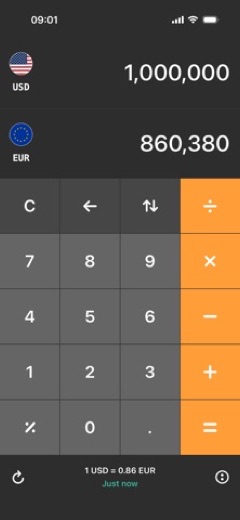
Currency Converter Offline is an application designed for converting global currencies, notably featuring offline functionality. It caters to individuals who require real-time or customizable exchange rates, particularly useful for travelers or those without constant internet access. The application is available on both Google Play and the App Store, provided by developer Mezhevikin Aleksei.
What is Currency Converter Offline?
Currency Converter Offline is a mobile application developed by Mezhevikin Aleksei for Google Play and Aleksei Mezhevikin for the App Store. It functions as a tool for converting various world currencies. The application is designed to operate even without an internet connection, providing a practical solution for currency conversion in diverse situations.
The application is accessible to a wide audience, being available on both Google Play for Android devices and the App Store for iOS devices. On Google Play, it is listed under the name "Currency converter offline" within the Travel & Local category. The App Store listing, titled "Currency converter calculator!", places it in the Travel category.
The Google Play listing indicates the application has received a rating of 4.7 based on 427.6K ratings. It saw approximately 200K downloads in the last month according to the Google Play listing. On the App Store, the application also holds a rating of 4.7 from 72K ratings. The developer, Mezhevikin Aleksei, consistently provides updates, with the Google Play version 3.2.0 last updated on 2026-09-08 and the App Store version 3.1.9 updated on 2026-10-11.
Latest on Currency Converter Offline





Is this the real Currency Converter Offline app?
- Listed on Google Play & App StoreStore listings on both Google Play and the App Store.
- Established since 2019Listed since Aug 9, 2019, 10,000,000+ installs on Google Play.
| Developer on Google Play | Mezhevikin Aleksei |
|---|---|
| Developer on the App Store | Aleksei Mezhevikin |
| Same developer on both stores | Names differ; compare them on each listing |
| Android package name | com.mezhevikin.converter |
| iOS bundle ID | com.mezhevikin.converter |
| On the stores since | Aug 9, 2019 |
| Installs on Google Play | 10,000,000+ |
| Developer website | getconverter.org |
| Content rating | Google Play: Everyone / App Store: 4+ |
These details come from the public store listings. LookedApp doesn't host downloads: install from the Google Play or App Store buttons on this page.
Key features
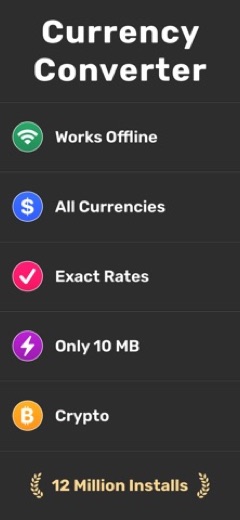
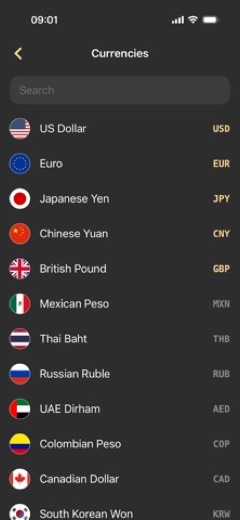
- The application supports all world currencies for conversion.
- It is capable of functioning without an active internet connection.
- Users can search for specific currencies by country.
- The application provides mid-market exchange rates.
- There is a feature allowing users to set their own custom exchange rates.
- Exchange rates within the application are updated every hour.
- An exchange rates widget is available for quick access.
- On the App Store, the application size is 10 MB.
More Tools & Utilities reviews




More news
- RoundupLookedApp's Insights on Top Free Learning Apps for Kids and FamiliesExplore a selection of free-to-download educational applications for children and families, analyzed by LookedApp, designed to support learning and engagement across various subjects and age groups.
- GuideStreaming Apps and Your Data: Understanding PermissionsLookedApp examines the permissions popular streaming applications request and what their privacy policies indicate about user data handling.
- GuideKids' Apps: What Parents Can Check Before InstallingThis guide provides parents with essential information to review a child-directed app's store listing. It covers key aspects such as content ratings, pricing structures, in-app purchases, and privacy practices, using examples from apps LookedApp covers.















Privacy and permissions
The Google Play listing for Currency Converter Offline does not provide explicit details regarding the specific permissions the application requires to function. Similarly, information regarding how user data is collected, processed, or shared is not detailed within the Google Play listing description itself.
The App Store listing for "Currency converter calculator!" refers to a Privacy Policy and Terms of Use via external links. However, the App Store listing description does not explicitly state the specific data collection practices, user permissions, or data sharing policies directly within its content. Users interested in these details would need to consult the linked policy documents.
Aleksei Mezhevikin publishes its privacy policy at getconverter.org.
Currency Converter Offline permissions in plain English
The Google Play listing shows no permission groups, only 4 basic permissions such as “view network connections”.
Permission names come from Google Play; the plain-English lines describe what each permission group allows, not how this app uses it.
Currency Converter Offline at a glance
| Developer | Aleksei Mezhevikin |
|---|---|
| Category | Travel |
| Rating on App Store | 4.7 out of 5 (72K ratings) |
| Rating on Google Play | 4.7 out of 5 (435K ratings) |
| Installs on Google Play | 10M+ |
| Price | Free |
| Age rating | 4+ |
What changed in the latest Currency Converter Offline version
App Store · Version 3.1.9, released Oct 11, 2026
The release notes are general and don't list specific changes:
“Bug fixes”
Google Play · Listing updated Sep 16, 2026
The release notes are general and don't list specific changes:
“Fixed a bug with ads: no more than one ad per day, as intended.”
Quoted from the store listings' release notes.
Pricing
The Currency Converter Offline application is available at no initial cost on both major platforms. The Google Play listing indicates a price of 0, while the App Store listing states it is "Free."
Despite being available without an upfront charge, the Google Play listing explicitly mentions the presence of in-app purchases. This implies that while the core functionality might be available, certain features, content, or an ad-free experience could be accessible through additional purchases made within the application. The App Store listing does not explicitly mention in-app purchases in its description, though its "Free" designation often implies the possibility of such offerings.
Currency Converter Offline compared with similar apps
| App | Rating | Installs | Price |
|---|---|---|---|
 Currency Converter Offline Currency Converter Offline | 4.7 | 10M+ | Free |
 Google Play Store Google Play Store | – | – | Free |
 MapQuest MapQuest | 4.4 | 10M+ | Free |
 Speedtest by Ookla Speedtest by Ookla | 4.6 | 100M+ | Free |
Popular reviews
 Whitepages reviewThe Whitepages app is designed for users seeking to find people and information related to contacts. It serves as a…Tools & Utilities
 Weather Forecast - Live Radar reviewWeather Forecast - Live Radar is an application developed by KUCO Apps, designed to provide users with weather…Tools & Utilities
 Medal reviewMedal is an application designed for gamers to capture, view, and share their gameplay moments from both PC and mobile…Tools & Utilities
 Calculator: Simple Calculator reviewCalculator: Simple Calculator is a basic utility application developed by Efficient Tools, designed for users seeking a…Tools & Utilities
 ComEd reviewThe ComEd app provides a dedicated platform for residential and business customers to manage their electricity…Tools & Utilities
 Logo Maker And Logo Creator 3D reviewLogo Maker And Logo Creator 3D is an application by developer Firehawk, designed for users seeking to create logos with…Tools & Utilities
How to get Currency Converter Offline safely
To install Currency Converter Offline safely, individuals should always obtain it directly from the legitimate App Store or Google Play platforms. It is important to verify that the application is published by "Mezhevikin Aleksei" on Google Play or "Aleksei Mezhevikin" on the App Store to ensure authenticity.
Users should avoid downloading the application from unofficial sources, such as third-party websites offering APK files or modified versions, as these may contain malicious software or be outdated. Before installation, reviewing any requested permissions, if detailed by the store listing, can help users understand what aspects of their device the application might access, although the current store listings do not explicitly detail specific permissions.
How to install Currency Converter Offline
On Android (Google Play)
- Open the Google Play Store app on your Android phone or tablet.
- Search for Currency Converter Offline, or use the Google Play button on this page to open the listing directly.
- Check that the developer under the app name is Mezhevikin Aleksei.
- Check that your device meets the listing's requirement: Android 8.0 and up.
- Tap Install (or the price, for a paid app) and wait for the download to finish, then open the app from your home screen.
- The listing shows in-app purchases, so review any purchase prompts before you confirm.
On iPhone and iPad (App Store)
- Open the App Store on your iPhone or iPad.
- Search for Currency Converter Offline, or use the App Store button on this page to open the listing directly.
- Check that the developer under the app name is Aleksei Mezhevikin.
- Make sure your device has iOS 16.0 or later and about 9 MB of free space, as the listing states.
- Tap Get (or the price), confirm the download, then open the app from your home screen.
- The listing shows in-app purchases, so review any purchase prompts before you confirm.
Currency Converter Offline version and app details
| Google Play | App Store | |
|---|---|---|
| Latest version | – | 3.1.9 |
| Last updated | Sep 16, 2026 | Oct 11, 2026 |
| First released | Jan 18, 2020 | Aug 9, 2019 |
| Package name | com.mezhevikin.converter | – |
| Bundle ID | – | com.mezhevikin.converter |
| Requires | Android 8.0 and up | iOS 16.0 or later |
| Download size | – | 9 MB |
| Content rating | Everyone | 4+ |
| In-app purchases | Yes ($0.49 - $4.99 per item) | Yes |
| Contains ads | Yes | – |
| Languages | – | 34 (including English) |
| Developer | Mezhevikin Aleksei | Aleksei Mezhevikin |
Who Currency Converter Offline is for
Currency Converter Offline is suitable for a broad range of users who require efficient and reliable currency conversion. It particularly benefits travelers who may find themselves in areas with limited or no internet access, as the application's offline functionality ensures currency rates are always available.
The application also caters to individuals who need to quickly convert currencies for personal finance management, shopping, or business purposes. Its ability to provide mid-market rates and allow users to set their own exchange rates makes it useful for those who need precise or customized conversion tools.
Currency Converter Offline for kids and families
Pros
- Operates fully without an internet connection.
- Supports a comprehensive range of global currencies.
- Offers the flexibility to customize exchange rates.
- Provides timely hourly updates for exchange rates.
- Includes a convenient exchange rates widget.
- Features a compact size of 10 MB on the App Store.
Cons
- The Google Play listing indicates the presence of in-app purchases.
- Specific permission requirements are not detailed on the Google Play listing.
- Comprehensive privacy and data collection details are not explicitly stated in either store listing description.
Currency Converter Offline: frequently asked questions
Is Currency Converter Offline available at no cost?
The Google Play listing indicates the application is available at no cost, and the App Store listing states it is Free, though the Google Play listing mentions in-app purchases.
On which devices can Currency Converter Offline be installed?
The application is available for Android devices on Google Play and for iOS devices (minimum iOS 16.0) on the App Store.
Who is the developer of Currency Converter Offline?
The application is developed by Mezhevikin Aleksei, also listed as Aleksei Mezhevikin on the App Store.
Does the application work without an internet connection?
Yes, a key feature of Currency Converter Offline is its ability to function without an active internet connection.
How often are the exchange rates updated?
The exchange rates within the application are updated every hour.
What is the content rating for Currency Converter Offline?
The Google Play listing rates the content as "Everyone," and the App Store listing rates it as "4+."
Currency Converter Offline
- Category
- Travel
- Version
- 3.1.9
Download
Looking for the Currency Converter Offline website or sign-in? Go to getconverter.org →The developer's website, as given on the store listing.
Currency Converter Offline ratings breakdown
Google Play 4.7 average from 435,322 ratings
- 585%
- 49%
- 32%
- 21%
- 13%
App Store 4.7 average from 72,136 ratings
- 587%
- 47%
- 32%
- 21%
- 13%
Share of ratings for each star level, as shown on the listings, as of Oct 11, 2026.







































