My Verizon
UtilitiesScreenshots
Analysis by LookedApp · Published · Updated
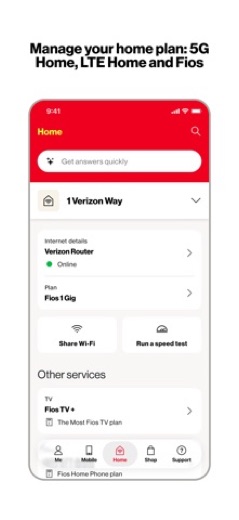
The My Verizon app provides a comprehensive platform for Verizon customers to manage their mobile and home internet services. It offers tools for account oversight, bill payments, and customer support, consolidating various functions into a single mobile application. This utility is designed for individuals who subscribe to Verizon services and prefer to handle their account details digitally.
What is My Verizon?
The My Verizon application serves as a central hub for customers of Verizon, allowing them to oversee and interact with their Verizon accounts. This utility is published by Verizon Consumer Group on Google Play and by Verizon Wireless on the App Store. It functions as a digital gateway to various Verizon services, streamlining the management of both mobile and home internet accounts.
The application is accessible across different mobile ecosystems, being available for users to obtain from both the Google Play Store and the App Store. It aims to provide a personalized experience by presenting account information, billing details, and service options in an integrated format.
Latest on My Verizon
Is this the real My Verizon app?
- Listed on Google Play & App StoreStore listings on both Google Play and the App Store.
- Established since 2011Listed since Feb 3, 2011, 100,000,000+ installs on Google Play.
| Developer on Google Play | Verizon Consumer Group |
|---|---|
| Developer on the App Store | Verizon Wireless |
| Same developer on both stores | Names differ; compare them on each listing |
| Android package name | com.vzw.hss.myverizon |
| iOS bundle ID | com.vzw.hss.myverizon |
| On the stores since | Feb 3, 2011 |
| Installs on Google Play | 100,000,000+ |
| Developer website | verizonwireless.com |
| Content rating | Google Play: Mature 17+ / App Store: 4+ |
These details come from the public store listings. LookedApp doesn't host downloads: install from the Google Play or App Store buttons on this page.
Key features
- A personalized view featuring customizable shortcuts is presented upon launching the application.
- The latest balance and bill savings are displayed for user convenience.
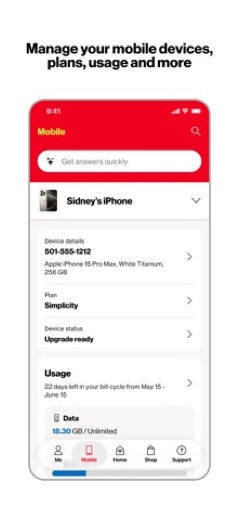
- Management capabilities extend to both Mobile and Home Internet accounts.
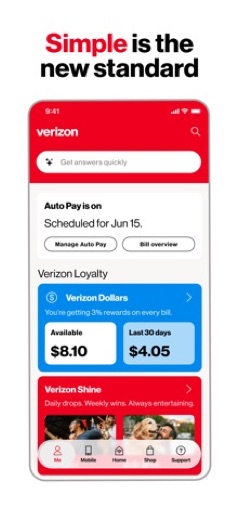
- Users can view a simplified bill, schedule AutoPay, and make payments.
- The application facilitates shopping and upgrading services directly.
- Support is available 24/7 through the Verizon Assistant for answering questions and troubleshooting.
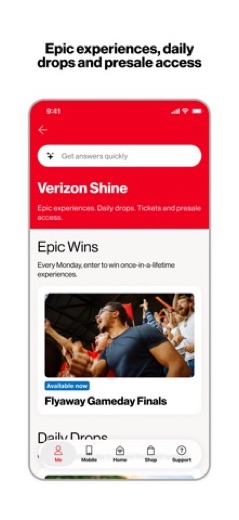
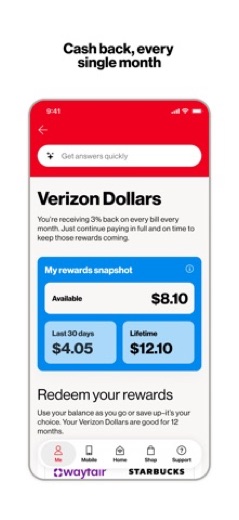
- Verizon Shine offers daily drops and experiences, while Verizon Dollars provides 3% cash back monthly.
More Tools & Utilities reviews




More news
- What's newLords Mobile: The Space Bridge Opens in Latest UpdateThe popular strategy game Lords Mobile recently updated its content, bringing the third part of its Transformers collaboration event to players. This update introduces new ways to engage with iconic characters and acquire special in-game items.
- What's newCar Simulator 2: Recent Updates Bring New Features and Enhanced RealismCar Simulator 2 has received a series of notable updates across both the App Store and Google Play, introducing new features, enhanced realism, and expanded content for players to explore in its open-world driving simulation.
- What's newWhat's New in UNO! Mobile: A Look at the Latest UpdateMattel Game Studios HK Limited has released an update for UNO! that introduces new game modes, a seasonal event, and upcoming personalization options. LookedApp explores what these changes mean for players.



Privacy and permissions
On the Google Play Store, the My Verizon application requests access to several permission groups. These include Device & app history, Calendar, Contacts, Location, SMS, Phone, Photos/Media/Files, Storage, Camera, Microphone, Wi-Fi connection information, and Device ID & call information. These permissions allow the application to perform its functions, such as accessing device information or making calls.
The App Store listing for My Verizon does not state the specific permissions the application requests on iOS devices. Furthermore, the developer does not explicitly detail the overall data handling or privacy practices beyond the listed permissions in either store description.
Verizon Wireless publishes its privacy policy at www.verizon.com.
My Verizon permissions in plain English
The Google Play listing shows 12 permission groups. Google Play also lists 25 other permissions, such as “view network connections”. That is more than most tools & utilities apps LookedApp reviews (typical: 5).
- CalendarCan read or change your calendar
- CameraCan take photos and record video
- ContactsCan read your contacts
- Device & app historyCan see recent apps and activity
- Device ID & call informationCan read your device ID and call status
- LocationCan use your precise location
- MicrophoneCan record audio
- PhoneCan read phone status or make calls
- Photos/Media/FilesCan read and change your photos, media and files
- SMSCan read or send text messages
- StorageCan read and change files in shared storage
- Wi-Fi connection informationCan see Wi-Fi connection details
The App Store privacy label lists these data types:
- Linked to you: Financial Info, Location, Contact Info, Search History, Identifiers
- Not linked to you: Purchases, Contacts, User Content, Usage Data, Diagnostics, Surroundings
Permission names come from Google Play; the plain-English lines describe what each permission group allows, not how this app uses it.
My Verizon at a glance
| Developer | Verizon Wireless |
|---|---|
| Category | Utilities |
| Rating on App Store | 4.7 out of 5 (5.5M ratings) |
| Rating on Google Play | 4.5 out of 5 (1.3M ratings) |
| Installs on Google Play | 100M+ |
| Price | Free |
| Age rating | 4+ |
What changed in the latest My Verizon version
App Store · Version 22.2.1, released Oct 13, 2026
The release notes are general and don't list specific changes:
“Bug Fixes and Improvements”
Google Play · Listing updated Oct 14, 2026
The release notes say:
“Verizon Shine: Get instant access to free gift cards, merchandise and giveaways all week long, plus a shot at once-in-a-lifetime experiences every Monday. Verizon Dollars: Opt in to earn 3% cash back every month, just for being a customer. Use your Dollars to shop with us, grab gift cards for your favorite brands, or enjoy hotel and ticket rewards.”
Quoted from the store listings' release notes.
Pricing
The My Verizon application is available at no cost. On the Google Play Store, its price is listed as 0. Similarly, on the App Store, the application is indicated as "Free".
The store listings do not state any information regarding in-app purchases for the My Verizon application.
My Verizon compared with similar apps
| App | Rating | Installs | Price |
|---|---|---|---|
 My Verizon My Verizon | 4.7 | 100M+ | Free |
 Google Play Store Google Play Store | – | – | Free |
 MapQuest MapQuest | 4.4 | 10M+ | Free |
 Speedtest by Ookla Speedtest by Ookla | 4.6 | 100M+ | Free |
Popular reviews
 Currency Converter Offline reviewCurrency Converter Offline is an application designed for converting global currencies, notably featuring offline…Tools & Utilities
 Weather Forecast - Live Radar reviewWeather Forecast - Live Radar is an application developed by KUCO Apps, designed to provide users with weather…Tools & Utilities
 Medal reviewMedal is an application designed for gamers to capture, view, and share their gameplay moments from both PC and mobile…Tools & Utilities
 Calculator: Simple Calculator reviewCalculator: Simple Calculator is a basic utility application developed by Efficient Tools, designed for users seeking a…Tools & Utilities
 ComEd reviewThe ComEd app provides a dedicated platform for residential and business customers to manage their electricity…Tools & Utilities
 Logo Maker And Logo Creator 3D reviewLogo Maker And Logo Creator 3D is an application by developer Firehawk, designed for users seeking to create logos with…Tools & Utilities
How to get My Verizon safely
To ensure the authenticity and integrity of the My Verizon application, it is recommended that users obtain it exclusively from reputable application marketplaces such as the Google Play Store or the App Store. When obtaining the application, users should verify that the developer listed is Verizon Consumer Group on Google Play or Verizon Wireless on the App Store.
Users should exercise caution and avoid obtaining the application from unofficial sources, third-party websites, or through modified versions, as these may pose security risks or contain malicious software. Before installation, it is advisable to review the permissions the application requests, especially those detailed on the Google Play Store, to understand what device functionalities the app will access.
How to install My Verizon
On Android (Google Play)
- Open the Google Play Store app on your Android phone or tablet.
- Search for My Verizon, or use the Google Play button on this page to open the listing directly.
- Check that the developer under the app name is Verizon Consumer Group.
- Check that your device meets the listing's requirement: Android 10 and up.
- Tap Install (or the price, for a paid app) and wait for the download to finish, then open the app from your home screen.
On iPhone and iPad (App Store)
- Open the App Store on your iPhone or iPad.
- Search for My Verizon, or use the App Store button on this page to open the listing directly.
- Check that the developer under the app name is Verizon Wireless.
- Make sure your device has iOS 16.0 or later and about 168 MB of free space, as the listing states.
- Tap Get (or the price), confirm the download, then open the app from your home screen.
My Verizon version and app details
| Google Play | App Store | |
|---|---|---|
| Latest version | – | 22.2.1 |
| Last updated | Oct 14, 2026 | Oct 13, 2026 |
| First released | – | Feb 3, 2011 |
| Package name | com.vzw.hss.myverizon | – |
| Bundle ID | – | com.vzw.hss.myverizon |
| Requires | Android 10 and up | iOS 16.0 or later |
| Download size | – | 168 MB |
| Content rating | Mature 17+ (Cash Rewards) | 4+ (Infrequent/Mild Contests) |
| In-app purchases | No | – |
| Contains ads | No | – |
| Languages | – | 2 (including English) |
| Developer | Verizon Consumer Group | Verizon Wireless |
Who My Verizon is for
The My Verizon application is intended for individuals who are current subscribers to Verizon's mobile and/or home internet services. It caters to customers who wish to efficiently manage their accounts, monitor usage, handle billing, and access customer support directly from their mobile devices.
The application is particularly useful for those who prefer a self-service approach to their telecommunication needs, offering a centralized platform to interact with various aspects of their Verizon services. It allows users to stay informed about their account status, explore new plans, and make changes as needed.
My Verizon for kids and families
Pros
- Provides centralized management for Verizon mobile and home internet services.
- Facilitates convenient bill viewing, payment scheduling, and payments.
- Offers direct access to customer support through a Verizon Assistant.
- Enables shopping for new devices and upgrading existing services within the app.
- Includes loyalty features such as Verizon Shine and Verizon Dollars for customer benefits.
Cons
- Requires a broad range of permissions on Android devices, as indicated by the Google Play listing.
- Specific details regarding comprehensive data handling practices are not available in the store descriptions.
- The App Store listing does not specify the permissions required for iOS devices.
- Its utility is limited exclusively to Verizon customers.
My Verizon: frequently asked questions
Is the My Verizon application free to use?
Yes, the My Verizon application is available at no cost. Its price is listed as 0 on the Google Play Store and as "Free" on the App Store.
Which devices can use the My Verizon app?
The application is available for Apple devices running iOS 16.0 or later. For Android devices, it is available on the Google Play Store.
Who develops the My Verizon application?
The My Verizon application is developed by Verizon Consumer Group for Google Play and by Verizon Wireless for the App Store.
Is it safe to install the My Verizon app?
To ensure safety and authenticity, it is recommended that users obtain the My Verizon app exclusively from the Google Play Store or the App Store.
What are the main features of the My Verizon application?
The primary features include managing Verizon mobile and home internet accounts, viewing bills, scheduling and making payments, shopping for services, and accessing 24/7 support via the Verizon Assistant.
Does the My Verizon app include in-app purchases?
The store listings for the My Verizon application do not state information regarding in-app purchases.
My Verizon
- Category
- Utilities
- Version
- 22.2.1
Download
Looking for the My Verizon website or sign-in? Go to verizonwireless.com →The developer's website, as given on the store listing.
My Verizon ratings breakdown
Google Play 4.5 average from 1,298,967 ratings
- 578%
- 412%
- 33%
- 21%
- 16%
App Store 4.7 average from 5,541,093 ratings
- 582%
- 410%
- 33%
- 21%
- 13%
Share of ratings for each star level, as shown on the listings, as of Oct 15, 2026.