Link to Windows
ProductivityScreenshots
Analysis by LookedApp · Published · Updated
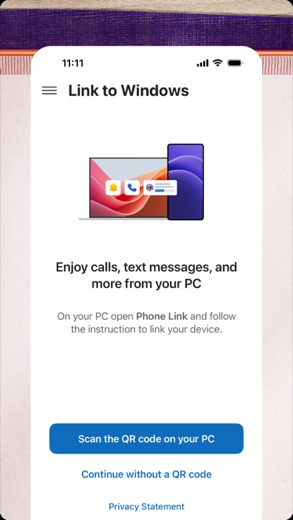
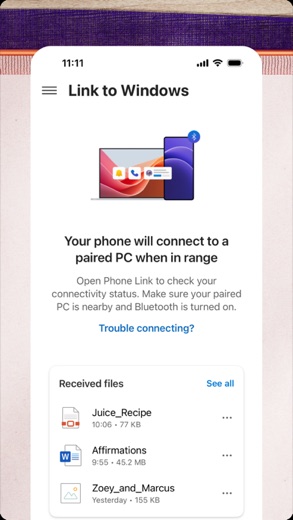
Link to Windows is an application designed to integrate a user's mobile phone with their Windows PC. It enables various phone functionalities, such as calls, messages, and notifications, to be managed directly from the computer. This tool is suitable for users seeking to streamline their digital interactions across their compatible devices.
What is Link to Windows?
"Link to Windows" is an application developed by Microsoft Corporation that serves as a bridge between a user's mobile phone and their Windows personal computer. It is designed to provide seamless integration, allowing users to access and manage several phone features directly from their PC, thereby enhancing productivity and convenience.
The application is widely available for users of both Android and iOS devices. It can be found on Google Play for Android users and on the App Store for iPhone users.
Latest on Link to Windows
Is this the real Link to Windows app?
- Verified publisher infoSame developer on Google Play and the App Store (Microsoft Corporation), and the developer website microsoft.com matches the publisher.
- Established since 2015Listed since Dec 16, 2015, 1,000,000,000+ installs on Google Play.
| Developer on Google Play | Microsoft Corporation |
|---|---|
| Developer on the App Store | Microsoft Corporation |
| Same developer on both stores | Yes |
| Android package name | com.microsoft.appmanager |
| iOS bundle ID | com.microsoft.LinkToWindows |
| On the stores since | Dec 16, 2015 |
| Installs on Google Play | 1,000,000,000+ |
| Developer website | microsoft.com |
| Content rating | Google Play: Everyone / App Store: 4+ |
These details come from the public store listings. LookedApp doesn't host downloads: install from the Google Play or App Store buttons on this page.
Key features
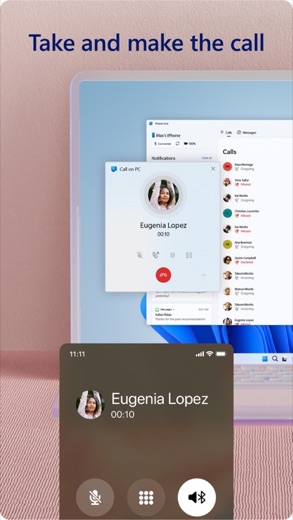
- Users can make and receive calls directly from their PC.
- The app enables management of phone notifications on the computer.
- Reading and replying to text messages is possible through the PC interface.
- Users can view their phone contacts on their computer.
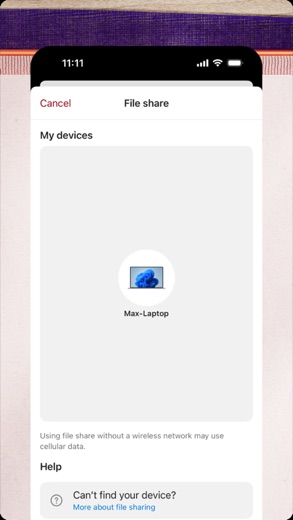
- File sharing capabilities are supported between the phone and the PC.
- For iPhone users, the App Store listing specifies compatibility with iOS 16 or higher, and requires a PC with Bluetooth Low Energy support running Windows 10 (with the May 2019 Update or later) or Windows 11.
More Productivity & Email reviews




More news
- RoundupLookedApp's Guide to Free Weather Apps: A Side-by-Side ReviewLookedApp explores eight leading weather applications available at no initial cost. This comparison details their features, costs, and target audiences to help users find the ideal tool for their needs.
- RoundupTop News Apps for Following the Headlines: A LookedApp RoundupLookedApp reviews a selection of news applications available at no cost, providing insights into their features, costs, and target audiences for staying informed on daily headlines.
- RoundupFree Mobile Games with Big Followings: A LookedApp RoundupLookedApp explores eight free-to-download mobile games that boast significant player communities and provide diverse experiences, from creative platforms to competitive sports simulations.


















Privacy and permissions
On Google Play, "Link to Windows" requests a broad range of permissions to operate. These permission groups include Identity, Contacts, Location, SMS, Phone, Photos/Media/Files, Storage, Camera, Microphone, Wi-Fi connection information, and Device ID & call information. These permissions are necessary for the application to perform its functions, such as accessing messages or making calls.
The App Store listing provides links to Microsoft's Terms of Use and Privacy Statement, which users can consult for detailed information regarding data handling. However, the App Store description itself does not explicitly list the specific permission groups that the application requests on iOS devices.
Microsoft Corporation publishes its privacy policy at go.microsoft.com.
Link to Windows permissions in plain English
The Google Play listing shows 11 permission groups. Google Play also lists 19 other permissions, such as “view network connections”. That is more than most productivity & email apps LookedApp reviews (typical: 7).
- CameraCan take photos and record video
- ContactsCan read your contacts
- Device ID & call informationCan read your device ID and call status
- IdentityCan find accounts on the device
- LocationCan use your precise location
- MicrophoneCan record audio
- PhoneCan read phone status or make calls
- Photos/Media/FilesCan read and change your photos, media and files
- SMSCan read or send text messages
- StorageCan read and change files in shared storage
- Wi-Fi connection informationCan see Wi-Fi connection details
The App Store privacy label lists these data types:
- Linked to you: Identifiers
- Not linked to you: Contact Info, Contacts, User Content, Usage Data, Diagnostics
Permission names come from Google Play; the plain-English lines describe what each permission group allows, not how this app uses it.
Link to Windows at a glance
| Developer | Microsoft Corporation |
|---|---|
| Category | Productivity |
| Rating on App Store | 4.0 out of 5 (16K ratings) |
| Rating on Google Play | 3.9 out of 5 (1.3M ratings) |
| Installs on Google Play | 1B+ |
| Price | Free |
| Age rating | 4+ |
What changed in the latest Link to Windows version
App Store · Version 1.26092.10.0, released Oct 8, 2026
The release notes are general and don't list specific changes:
“Bug fixes and performance improvements”
Quoted from the store listings' release notes.
Pricing
The "Link to Windows" application is offered at no cost on Google Play, with its price explicitly stated as 0.
Similarly, on the App Store, the application is listed as "Free," indicating that there is no upfront purchase price for the application itself. The store listings do not contain any information regarding potential in-app purchases or subscription models associated with the application's use.
Link to Windows compared with similar apps
| App | Rating | Installs | Price |
|---|---|---|---|
 Link to Windows Link to Windows | 3.9 | 1B+ | Free |
 Google Play Store Google Play Store | – | – | Free |
 MapQuest MapQuest | 4.4 | 10M+ | Free |
 Speedtest by Ookla Speedtest by Ookla | 4.6 | 100M+ | Free |
Popular reviews
 Microsoft Authenticator reviewThe Microsoft Authenticator app offers a streamlined approach to enhancing online account security through multi-factor…Productivity & Email
 Microsoft Excel reviewMicrosoft Excel is a comprehensive mobile spreadsheet application designed for creating, editing, and analyzing data.…Productivity & Email
 Google Calendar reviewGoogle Calendar is a productivity application developed by Google LLC, designed to help users manage their schedules…Productivity & Email
 Google Authenticator reviewGoogle Authenticator is an application designed to provide an additional layer of security for online accounts by…Productivity & Email
 Google Sheets reviewGoogle Sheets is a productivity application designed for creating, editing, and collaborating on spreadsheets across…Productivity & Email
 Workday reviewThe Workday app serves as a comprehensive mobile solution designed to enhance workplace productivity, offering…Productivity & Email
How to get Link to Windows safely
To install "Link to Windows" safely, users are advised to download the application exclusively from its designated listings on Google Play or the App Store. It is crucial for users to verify that the developer is indeed Microsoft Corporation, as this information is clearly provided in both store listings.
Users should exercise caution and avoid obtaining the application from third-party sources, such as unofficial APK mirrors or modified versions, as these might compromise the device's security or the application's integrity. Additionally, reviewing the requested permissions before completing the installation process can help users understand the extent of the app's access to device functions and data.
How to install Link to Windows
On Android (Google Play)
- Open the Google Play Store app on your Android phone or tablet.
- Search for Link to Windows, or use the Google Play button on this page to open the listing directly.
- Check that the developer under the app name is Microsoft Corporation.
- Check that your device meets the listing's requirement: Android 10 and up.
- Tap Install (or the price, for a paid app) and wait for the download to finish, then open the app from your home screen.
On iPhone and iPad (App Store)
- Open the App Store on your iPhone or iPad.
- Search for Link to Windows, or use the App Store button on this page to open the listing directly.
- Check that the developer under the app name is Microsoft Corporation.
- Make sure your device has iOS 16.6 or later and about 103 MB of free space, as the listing states.
- Tap Get (or the price), confirm the download, then open the app from your home screen.
Link to Windows version and app details
| Google Play | App Store | |
|---|---|---|
| Latest version | – | 1.26092.10.0 |
| Last updated | Sep 23, 2026 | Oct 8, 2026 |
| First released | Dec 16, 2015 | Feb 28, 2023 |
| Package name | com.microsoft.appmanager | – |
| Bundle ID | – | com.microsoft.LinkToWindows |
| Requires | Android 10 and up | iOS 16.6 or later |
| Download size | – | 103 MB |
| Content rating | Everyone | 4+ |
| In-app purchases | No | – |
| Contains ads | No | – |
| Languages | – | 32 (including English) |
| Developer | Microsoft Corporation | Microsoft Corporation |
Who Link to Windows is for
"Link to Windows" is designed for individuals who seek a more integrated experience between their mobile phone and their Windows PC. It is particularly beneficial for users of an iPhone running iOS 16 or higher, or an Android phone, who also operate a Windows 10 (May 2019 Update or later) or Windows 11 PC equipped with Bluetooth Low Energy support.
The application caters to those who frequently manage communications, such as calls and messages, and notifications directly from their computer, or who regularly need to transfer files between their phone and PC without relying on cables or email attachments. Given its "Everyone" content rating on Google Play and "4+" on the App Store, it is broadly accessible to a wide range of users looking for enhanced device synergy.
Link to Windows for kids and families
Pros
- Enables making and receiving calls directly from a PC, improving workflow.
- Facilitates comprehensive management of phone notifications on the computer screen.
- Allows for efficient reading and replying to text messages from the PC keyboard.
- Supports viewing and accessing phone contacts directly on the computer.
- Provides a convenient method for file sharing between a compatible phone and PC.
Cons
- Requires specific operating system versions for both mobile (iOS 16 or higher) and PC (Windows 10 with May 2019 Update or later, or Windows 11).
- The application is not compatible with iPad (iPadOS) or MacOS devices, limiting its ecosystem reach.
- The Google Play rating of 3.8 suggests that some users may encounter areas for improvement.
- The App Store rating of 4.0, while respectable, indicates there might be aspects that could be enhanced for a perfect user experience.
Link to Windows: frequently asked questions
Is Link to Windows a no-cost application?
Yes, Link to Windows is available at no cost on both Google Play and the App Store.
Which devices are compatible with Link to Windows?
For iPhone, it requires iOS 16 or higher. For PC, it needs Windows 10 (with the May 2019 Update or later) or Windows 11, and Bluetooth Low Energy support. It is not available for iPad (iPadOS) or MacOS.
Who developed Link to Windows?
Link to Windows was developed by Microsoft Corporation.
What are some key features of Link to Windows?
Key features include making and receiving calls, managing notifications, reading and replying to text messages, viewing phone contacts, and sharing files between the phone and PC.
What permissions does Link to Windows request on Android?
On Google Play, it requests permissions for Identity, Contacts, Location, SMS, Phone, Photos/Media/Files, Storage, Camera, Microphone, Wi-Fi connection information, and Device ID & call information.
When was Link to Windows last updated?
On Google Play, it was updated on 2026-03-24. On the App Store, it was updated on 2026-10-08.
Link to Windows
- Category
- Productivity
- Version
- 1.26092.10.0
Download
Looking for the Link to Windows website or sign-in? Go to microsoft.com →The developer's website, as given on the store listing.
Link to Windows ratings breakdown
Google Play 3.9 average from 1,306,503 ratings
- 560%
- 411%
- 36%
- 24%
- 119%
App Store 4.0 average from 16,434 ratings
- 559%
- 413%
- 39%
- 26%
- 112%
Share of ratings for each star level, as shown on the listings, as of Oct 10, 2026.