Microsoft Outlook
ProductivityScreenshots
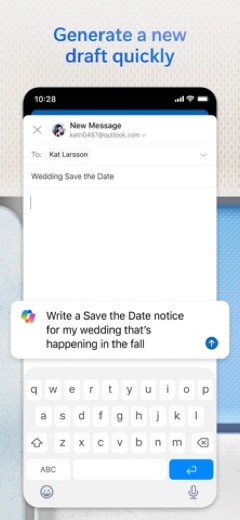
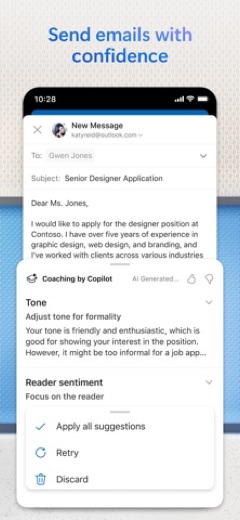
Analysis by LookedApp · Published · Updated
Microsoft Outlook is a comprehensive mobile application designed for email and calendar management, enabling users to consolidate various accounts into a single interface. It caters to individuals seeking an organized approach to communication and scheduling, offering tools to manage their digital correspondence and appointments efficiently.
What is Microsoft Outlook?
Microsoft Outlook is a productivity application focused on email and calendar management. It is developed by Microsoft Corporation, a well-known software company.
The application is available for mobile users on both major platforms. It can be found on Google Play for Android devices and on the App Store for iOS devices.
First released in January 2015, the app provides a unified platform for handling electronic mail and scheduling events, aiming to streamline daily digital interactions for its users.
Latest on Microsoft Outlook



Is this the real Microsoft Outlook app?
- Listed on Google Play & App StoreStore listings on both Google Play and the App Store.
- Established since 2015Listed since Jan 28, 2015, 1,000,000,000+ installs on Google Play.
| Developer on Google Play | Microsoft Corporation |
|---|---|
| Developer on the App Store | Microsoft Corporation |
| Same developer on both stores | Yes |
| Android package name | com.microsoft.office.outlook |
| iOS bundle ID | com.microsoft.Office.Outlook |
| On the stores since | Jan 28, 2015 |
| Installs on Google Play | 1,000,000,000+ |
| Content rating | Google Play: Everyone / App Store: 4+ |
These details come from the public store listings. LookedApp doesn't host downloads: install from the Google Play or App Store buttons on this page.
Key features
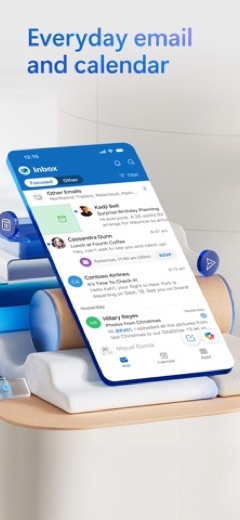
- A smart inbox helps users sort between immediate action messages and others.
- Swipe gestures allow for quick scheduling, deletion, and archiving of messages.
- Meeting availability can be shared with a single tap, simplifying scheduling with others.
- The app enables users to find files, contacts, and upcoming travel information.
- Users can view and attach files directly from email, OneDrive, Dropbox, and other services without local downloads.
- Attachments like Word, Excel, or PowerPoint files can be opened for editing in their respective applications and then reattached to emails.
More Productivity & Email reviews




More news
- What's newWhat's New in EA SPORTS FC Soccer Mobile 26: The Latest Season UpdateElectronic Arts has rolled out significant updates for EA SPORTS FC Soccer Mobile 26, introducing new tactical depth, game modes, and enhanced visuals. These changes aim to refresh the mobile soccer experience for players.
- GuideIn-App Purchases and Subscriptions: Reading the Price LineUnderstanding the different pricing models for mobile applications, from no initial cost to up-front purchases, helps users navigate the digital marketplace effectively. This guide explains how to interpret price lines and pricing sections on app store listings.
- GuideUnderstanding Shopping Apps: Permissions, Payments, and Safe InstallationShopping applications provide convenience, but understanding their permissions, payment structures, and how to install them safely is crucial for user privacy and device security.













Privacy and permissions
When installed on Android devices, Microsoft Outlook requests access to several permission groups. These include Identity, Calendar, Contacts, Location, Photos/Media/Files, Storage, Camera, and Microphone. These permissions allow the app to function across various aspects of device usage.
The developer provides links to various policies concerning user data. These include a Privacy and Cookies policy, Terms of Use, a Contract Summary, and a Consumer Health Data Privacy Policy, indicating the ways user information might be handled.
Microsoft Corporation publishes its privacy policy at www.microsoft.com.
Microsoft Outlook permissions in plain English
The Google Play listing shows 8 permission groups. Google Play also lists 16 other permissions, such as “view network connections”. That is more than most productivity & email apps LookedApp reviews (typical: 7).
- CalendarCan read or change your calendar
- CameraCan take photos and record video
- ContactsCan read your contacts
- IdentityCan find accounts on the device
- LocationCan use your precise location
- MicrophoneCan record audio
- Photos/Media/FilesCan read and change your photos, media and files
- StorageCan read and change files in shared storage
The App Store privacy label lists these data types:
- Used to track you: Usage Data
- Linked to you: Contact Info, Contacts, User Content, Search History, Identifiers, Usage Data, Diagnostics
- Not linked to you: Location
Permission names come from Google Play; the plain-English lines describe what each permission group allows, not how this app uses it.
Microsoft Outlook at a glance
| Developer | Microsoft Corporation |
|---|---|
| Category | Productivity |
| Rating on App Store | 4.8 out of 5 (9.3M ratings) |
| Rating on Google Play | 4.3 out of 5 (11M ratings) |
| Installs on Google Play | 1B+ |
| Price | Free |
| Age rating | 4+ |
What changed in the latest Microsoft Outlook version
App Store · Version 5.2640.0, released Oct 12, 2026
The release notes are general and don't list specific changes:
“This update includes performance improvements and bug fixes to make Outlook better for you. Feel free to send us any comments or questions by going to Settings > Help & Feedback – we’d love to hear from you.”
Google Play · Listing updated Oct 11, 2026
The release notes say:
“Copilot helps you prepare for your meeting in minutes by summarizing key documents, tasks, and past meetings.”
Quoted from the store listings' release notes.
Pricing
Microsoft Outlook is available at no cost on both Google Play and the App Store. However, the application includes in-app purchases, which unlock additional functionalities.
Users can subscribe to Microsoft 365 Family or Personal directly within the app. Subscriptions start at $6.99 a month in the US, with prices potentially varying by region. A Microsoft 365 subscription provides 1TB of storage for each user, full feature access to Word, Excel, and PowerPoint on iPad, iPhone, and iPod touch, and the ability to install Word, Excel, PowerPoint, Outlook, and OneNote on PCs or Macs. Subscriptions purchased through the app are managed via the respective app store accounts and will automatically renew unless disabled.
Microsoft Outlook compared with similar apps
| App | Rating | Installs | Price |
|---|---|---|---|
 Microsoft Outlook Microsoft Outlook | 4.3 | 1B+ | Free |
 Canva Canva | 4.8 | 500M+ | Free |
 Zoom Workplace Zoom Workplace | 4.1 | 1B+ | Free |
 Yahoo Mail Yahoo Mail | 4.2 | 100M+ | Free |
Popular reviews
 Google Authenticator reviewGoogle Authenticator is an application designed to provide an additional layer of security for online accounts by…Productivity & Email
 Google Sheets reviewGoogle Sheets is a productivity application designed for creating, editing, and collaborating on spreadsheets across…Productivity & Email
 Workday reviewThe Workday app serves as a comprehensive mobile solution designed to enhance workplace productivity, offering…Productivity & Email
 UKG Pro reviewThe UKG Pro app functions as a mobile platform designed to provide employees and people managers with access to human…Productivity & Email
 Messenger - SMS Text Messages reviewMessenger, developed by Meta Platforms, Inc., is a comprehensive communication application designed for Android users.…Productivity & Email
 ChatGPT reviewChatGPT for Android brings OpenAI's advanced AI capabilities to mobile devices, enabling users to generate images,…Productivity & Email
How to get Microsoft Outlook safely
To help ensure the integrity of the application, users are advised to obtain Microsoft Outlook exclusively from trusted distribution platforms. These include Google Play for Android devices and the App Store for iOS devices. It is important to verify that the developer listed is 'Microsoft Corporation' on these platforms.
Users should avoid downloading the application from unofficial sources, such as third-party APK mirrors or websites offering modified versions, as these may pose risks. Before installation, it is prudent to review the permissions requested by the app to understand what device functionalities it will access.
How to install Microsoft Outlook
On Android (Google Play)
- Open the Google Play Store app on your Android phone or tablet.
- Search for Microsoft Outlook, or use the Google Play button on this page to open the listing directly.
- Check that the developer under the app name is Microsoft Corporation.
- Tap Install (or the price, for a paid app) and wait for the download to finish, then open the app from your home screen.
- The listing shows in-app purchases, so review any purchase prompts before you confirm.
On iPhone and iPad (App Store)
- Open the App Store on your iPhone or iPad.
- Search for Microsoft Outlook, or use the App Store button on this page to open the listing directly.
- Check that the developer under the app name is Microsoft Corporation.
- Make sure your device has iOS 26.0 or later and about 472 MB of free space, as the listing states.
- Tap Get (or the price), confirm the download, then open the app from your home screen.
- The listing shows in-app purchases, so review any purchase prompts before you confirm.
Microsoft Outlook version and app details
| Google Play | App Store | |
|---|---|---|
| Latest version | – | 5.2640.0 |
| Last updated | Oct 11, 2026 | Oct 12, 2026 |
| First released | Jan 28, 2015 | Jan 29, 2015 |
| Package name | com.microsoft.office.outlook | – |
| Bundle ID | – | com.microsoft.Office.Outlook |
| Requires | – | iOS 26.0 or later |
| Download size | – | 472 MB |
| Content rating | Everyone | 4+ |
| In-app purchases | Yes ($1.99 - $12.99 per item) | Yes |
| Contains ads | Yes | – |
| Languages | – | 46 (including English) |
| Developer | Microsoft Corporation | Microsoft Corporation |
Who Microsoft Outlook is for
Microsoft Outlook is designed for individuals who manage multiple email accounts and calendars and seek to consolidate them into a single, unified interface. It is suitable for those who need to maintain organization across various digital communication channels and schedules.
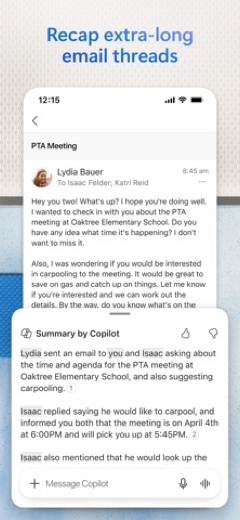
The app also benefits users who frequently work with Microsoft Office documents on their mobile devices, offering integrated viewing and editing capabilities for Word, Excel, and PowerPoint attachments. Individuals interested in leveraging AI-powered features for email assistance, such as summarization, drafting, and writing suggestions, may also find value, provided they have the necessary Microsoft 365 subscription.
Microsoft Outlook for kids and families
Pros
- Consolidates various email and calendar accounts into one application.
- Integrates with cloud storage services and Microsoft Office applications for file management.
- Features a smart inbox and swipe gestures for efficient message handling.
- Offers AI-powered Copilot features for enhanced productivity with a Microsoft 365 subscription.
- Supports a wide range of email providers including Outlook.com, Gmail, and iCloud.
Cons
- Advanced features like Copilot require a separate Microsoft 365 subscription.
- The application includes in-app purchases for full access to certain functionalities.
- Requires access to several device permissions, including camera and microphone.
- The iOS version has a size of 493 MB, which may be substantial for some devices.
Microsoft Outlook: frequently asked questions
Is Microsoft Outlook available without cost?
Yes, Microsoft Outlook is available at no cost on both Google Play and the App Store, though it offers in-app purchases for additional features.
On which devices can Microsoft Outlook be installed?
Microsoft Outlook can be installed on Android devices via Google Play and on iOS devices (iPhone, iPad, iPod touch) via the App Store, requiring a minimum iOS version of 26.0.
Who is the developer of Microsoft Outlook?
Microsoft Outlook is developed by Microsoft Corporation.
What types of email accounts does Microsoft Outlook support?
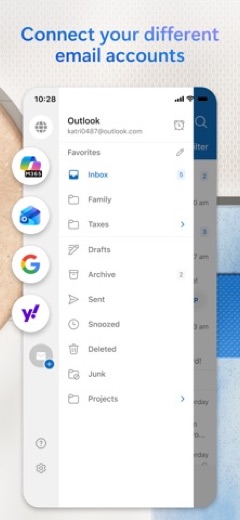
The app works with Microsoft Exchange, Office 365, Outlook.com (including Hotmail and MSN), Gmail, Yahoo Email, and iCloud.
What are some key features of Microsoft Outlook?
Key features include a smart inbox for message sorting, swipe gestures for quick management, the ability to share meeting availability, and integrated access to files from various cloud services and Microsoft Office attachments.
What is the cost of a Microsoft 365 subscription for use with Outlook?
A Microsoft 365 Family or Personal subscription, which enhances Outlook features, starts at $6.99 a month in the US.
Microsoft Outlook
- Category
- Productivity
- Version
- 5.2640.0
Download
Microsoft Outlook ratings breakdown
Google Play 4.3 average from 10,684,153 ratings
- 572%
- 412%
- 34%
- 22%
- 110%
App Store 4.8 average from 9,320,351 ratings
- 584%
- 412%
- 32%
- 20%
- 11%
Share of ratings for each star level, as shown on the listings, as of Oct 14, 2026.