NFHS Network
SportsScreenshots
Analysis by LookedApp · Published
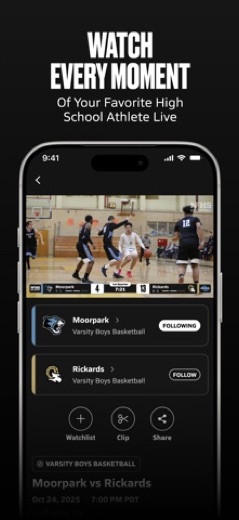
The NFHS Network streams high school games, from regular-season broadcasts produced by schools to state playoff and championship events. The app is free to install, but watching live events needs a paid pass, and on a computer there is nothing to install: the service plays in a web browser at nfhsnetwork.com.
What is NFHS Network?
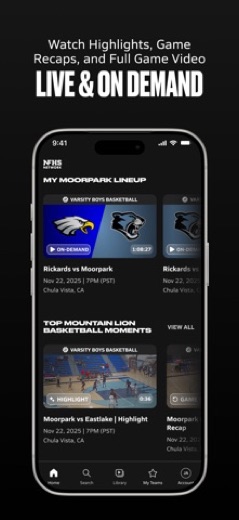
NFHS Network is a streaming service for high school sports and activities in the United States. Schools in its School Broadcast Program produce their own regular-season broadcasts, and the network itself carries postseason games for more than 44 state associations and sections, according to the store listings. Football, basketball, volleyball, wrestling, soccer, baseball, ice hockey, and cheer and dance are among the 30+ sports covered.
The service is run by NFHS Network LLC, which its website describes as a product of PlayOn Sports and MaxPreps. The app has been on the App Store since 2016 and on Google Play since 2019, and the iOS version includes an Apple TV app.
Is this the real NFHS Network app?
- Verified publisher infoSame developer on Google Play and the App Store (NFHS Network), and the developer website nfhsnetwork.com matches the publisher.
| Developer on Google Play | NFHS Network |
|---|---|
| Developer on the App Store | NFHS Network |
| Same developer on both stores | Yes |
| Android package name | com.playon.nfhslive |
| iOS bundle ID | com.2048media.nfhsnetwork |
| On the stores since | May 23, 2016 |
| Installs on Google Play | 500,000+ |
| Developer website | nfhsnetwork.com |
| Content rating | Google Play: Everyone / App Store: 4+ |
These details come from the public store listings. LookedApp doesn't host downloads: install from the Google Play or App Store buttons on this page.
Key features
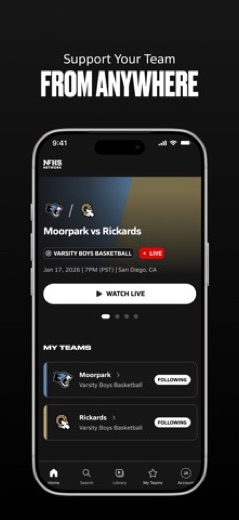
- Live streams of regular-season games from participating schools, plus state playoffs and championships.
- Full replays, game recaps and highlights after the final whistle.
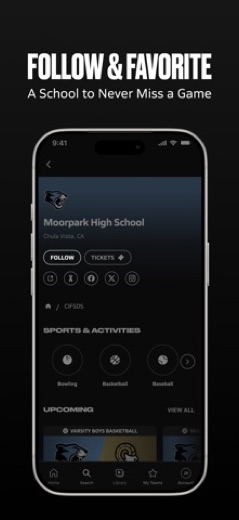
- Follow favorite schools and get a notification when they have a game scheduled.
- Coverage across fall, winter and spring seasons and 30+ sports.
- Casting to a TV from the mobile app or browser, and AirPlay from Apple devices.
- Saved favorite moments that stay with the account.
More Sports reviews




More news
- What's newGoogle Photos Update: Enhanced Search and Smarter Storage ManagementRecent updates to Google Photos bring a more powerful search experience to users and introduce a new tool to manage storage more efficiently, according to recent store listings.
- What's newWells Fargo Mobile: October 2026 Update Enhances Credit Card InsightsThe Wells Fargo Mobile app has received an update in October 2026, focusing on enhanced accessibility for personalized insights within credit card account details. LookedApp examines what this means for users and provides a refresher on the app's comprehensive banking functionalities.
- What's newWhat's New in Microsoft OneDrive: A Look at Recent UpdatesMicrosoft OneDrive has received significant updates across both iOS and Android platforms, enhancing file management, photo organization, and app stability. These changes reflect an ongoing commitment to providing a comprehensive cloud storage solution for users.



Platforms and editions
On a laptop or desktop, no Windows or Mac program is needed: NFHS Network says any modern desktop or mobile browser can play streams at nfhsnetwork.com. The same account works there and in the apps.
On phones and tablets, the app is on the App Store (iOS 16.4 or later) and Google Play. For the living room, NFHS Network lists apps for Roku, Apple TV, Amazon Fire TV and Google TV; the Apple TV version needs tvOS 14.0 or later. Phones can also cast to a TV or use AirPlay instead of a TV app.
NFHS Network permissions in plain English
The Google Play listing shows 3 permission groups. Google Play also lists 8 other permissions, such as “view network connections”. That is fewer than most sports apps LookedApp reviews (typical: 6).
- LocationCan use your precise location
- Photos/Media/FilesCan read and change your photos, media and files
- StorageCan read and change files in shared storage
The App Store privacy label lists these data types:
- Used to track you: Identifiers, Usage Data
- Linked to you: Contact Info, Identifiers, Usage Data
- Not linked to you: Diagnostics
Permission names come from Google Play; the plain-English lines describe what each permission group allows, not how this app uses it.
NFHS Network at a glance
| Developer | NFHS Network |
|---|---|
| Category | Sports |
| Rating on App Store | 4.2 out of 5 (26K ratings) |
| Rating on Google Play | 3.9 out of 5 (9.7K ratings) |
| Installs on Google Play | 500K+ |
| Price | Free |
| Age rating | 4+ |
What changed in the latest NFHS Network version
App Store · Version 3.6.14, released Sep 30, 2026
The release notes say:
“We are building the app around one idea: every game matters to someone. Behind the scenes: We resolved a rare issue that could lead to some users being unable to access the app. Now go catch tonight's game.”
Google Play · Listing updated Sep 30, 2026
The release notes say:
“We are building the app around one idea: every game matters to someone. Behind the scenes: We resolved a rare issue that could lead to some users being unable to access the app. Now go catch tonight's game!”
Quoted from the store listings' release notes.
Pricing
Installing the app costs nothing, but unlimited live viewing requires a subscription. On the NFHS Network subscribe page, annual plans are Basic at $79.99 a year (one school, up to three sports, one viewer), Family at $89.99 a year (one school, all sports, up to six devices) and All-Access at $99.99 a year (all schools and sports, up to six devices). Every plan includes regular-season and postseason games, live streams, full replays and highlights.
Inside the iPhone app, the App Store lists a Monthly Pass at $13.99 and an Annual Pass at $79.99. Passes renew automatically each month or year. A pass bought through the App Store is managed in the Apple account; one bought on the website is managed in the NFHS Network account settings. The listings do not mention promo codes.
NFHS Network compared with similar apps
| App | Rating | Installs | Price |
|---|---|---|---|
 NFHS Network | 4.2 | 500K+ | Free |
 FOX One | 4.7 | 1M+ | Free |
 OBS Studio | – | – | – |
 PineDrama | 4.6 | 50M+ | Free |
Popular reviews
 Break Speed reviewBreak Speed is a specialized mobile application designed to accurately measure the speed of a break shot in billiards,…Sports
 FishAngler reviewFishAngler is an AI-powered mobile application designed to assist anglers in planning and executing fishing trips. It…Sports
 Hawk Central reviewHawk Central is an application designed to deliver comprehensive coverage of the University of Iowa Hawkeyes. It…Sports
 MLB Ballpark reviewThe MLB Ballpark application serves as a mobile companion for individuals visiting Major League Baseball ballparks,…Sports
 NHL reviewThe NHL app offers a comprehensive platform for hockey enthusiasts to stay updated with live scores, in-depth player…Sports
 PGA TOUR reviewThe PGA TOUR app offers comprehensive golf tournament coverage, delivering real-time leaderboards, player scorecards,…Sports
How to get NFHS Network safely
Get the app only from the App Store or Google Play listing published by NFHS Network, or watch at nfhsnetwork.com. Avoid modified or unlocked versions offered on APK sites, including so-called mod builds that promise free streams; they are not from the developer and can carry malware.
On Android, the listing shows permission groups for Location, Photos/Media/Files and Storage. The listing does not say what location is used for.
How to install NFHS Network
On Android (Google Play)
- Open the Google Play Store app on your Android phone or tablet.
- Search for NFHS Network, or use the Google Play button on this page to open the listing directly.
- Check that the developer under the app name is NFHS Network.
- Check that your device meets the listing's requirement: Android 7.0 and up.
- Tap Install (or the price, for a paid app) and wait for the download to finish, then open the app from your home screen.
On iPhone and iPad (App Store)
- Open the App Store on your iPhone or iPad.
- Search for NFHS Network, or use the App Store button on this page to open the listing directly.
- Check that the developer under the app name is NFHS Network.
- Make sure your device has iOS 16.4 or later and about 90 MB of free space, as the listing states.
- Tap Get (or the price), confirm the download, then open the app from your home screen.
- The listing shows in-app purchases, so review any purchase prompts before you confirm.
NFHS Network version and app details
| Google Play | App Store | |
|---|---|---|
| Latest version | – | 3.6.14 |
| Last updated | Sep 30, 2026 | Sep 30, 2026 |
| First released | Jul 1, 2019 | May 23, 2016 |
| Package name | com.playon.nfhslive | – |
| Bundle ID | – | com.2048media.nfhsnetwork |
| Requires | Android 7.0 and up | iOS 16.4 or later |
| Download size | – | 90 MB |
| Content rating | Everyone (In-App Purchases) | 4+ |
| In-app purchases | No | Yes |
| Contains ads | Yes | – |
| Languages | – | 1 (including English) |
| Developer | NFHS Network | NFHS Network |
Who NFHS Network is for
The NFHS Network is aimed at parents, grandparents, students and alumni who cannot make it to the stands, and at fans who follow state tournaments. Families following one school get the most from the Family plan, since it covers every sport at that school on up to six devices.
Anyone who follows several schools, such as a recruiter or a local sports writer, would need All-Access.
Pros
- Regular-season and state playoff games in one service
- Plays in any modern browser, so no PC download is needed
- TV apps for Roku, Apple TV, Fire TV and Google TV
- Replays and highlights included in every plan
Cons
- Live viewing requires a paid pass
- The Basic plan is limited to one school and up to three sports
- Ratings are mixed on Android: 3.9 on Google Play versus 4.2 on the App Store
- Whether a game streams depends on the school or association producing it
NFHS Network: frequently asked questions
Can NFHS Network be watched on a PC?
Yes. It plays in a desktop web browser at nfhsnetwork.com, so there is no Windows or Mac app to download.
How much does NFHS Network cost?
Annual plans on the NFHS Network website are $79.99, $89.99 and $99.99 a year. The App Store also lists a Monthly Pass at $13.99 and an Annual Pass at $79.99.
Is the NFHS Network app free?
The app is free to install. Watching live events without limits requires a subscription.
Which TV devices are supported?
NFHS Network lists Roku, Apple TV, Amazon Fire TV and Google TV. Casting and AirPlay from a phone also work.
Is this the NFHS Network sign-in page?
No. Accounts are opened in the NFHS Network app or on nfhsnetwork.com; this page only reviews the service.
Does NFHS Network show every high school game?
No. Regular-season games appear when a school in the broadcast program streams them, and postseason coverage depends on the more than 44 state associations and sections that partner with the network.
NFHS Network
- Category
- Sports
- Version
- 3.6.14
Download
Looking for the NFHS Network website or sign-in? Go to nfhsnetwork.com →The developer's website, as given on the store listing.
NFHS Network ratings breakdown
Google Play 3.9 average from 9,721 ratings
- 563%
- 49%
- 34%
- 23%
- 120%
App Store 4.2 average from 25,987 ratings
- 573%
- 47%
- 33%
- 22%
- 114%
Share of ratings for each star level, as shown on the listings, as of Nov 7, 2026.