OP Auto Clicker
ToolsScreenshots
Analysis by LookedApp · Published
OP Auto Clicker is a small, no-cost tool that repeats mouse clicks on a Windows PC, with an Android version that repeats taps and swipes. It suits gamers, testers and anyone stuck with repetitive clicking, as long as they get it from the developer's own links and not from one of the many lookalikes.
What is OP Auto Clicker?
OP Auto Clicker started as a Windows program that clicks the mouse automatically. The user sets how often it clicks, which mouse button it uses and where on the screen the clicks land, then starts it with a hotkey. The developer site at opautoclicker.com now also points to an Android app, a macOS build and a Chrome extension.
The Android app appears on Google Play as OP Auto Clicker - Auto Tap from a publisher called mouse tool, and the listing links back to opautoclicker.com. It has a 4.3 rating from about 14.7K ratings, sits in the Tools category and was last updated on January 14, 2026. The Windows program is on the Microsoft Store under the developer name mousetool, where it holds a 4.7 rating from 4,893 ratings.
The name is widely copied. Several phone apps use OP in their titles but come from unrelated companies, so the publisher name matters more than the icon when choosing which one to install.
Is this the real OP Auto Clicker app?
- Established since 2021Listed since Jun 28, 2021, 5,000,000+ installs on Google Play.
| Developer on Google Play | mouse tool |
|---|---|
| Android package name | com.opautoclicker.autoclicker |
| On the stores since | Jun 28, 2021 |
| Installs on Google Play | 5,000,000+ |
| Developer website | opautoclicker.com |
| Content rating | Google Play: Everyone |
These details come from the public store listings. LookedApp doesn't host downloads: install from the Google Play or App Store buttons on this page.
Key features
- Two ways to aim: clicks can follow the current cursor position or hit one fixed spot on the screen.
- Clicks can run for a set count or keep going until stopped.
- Left, right and middle buttons are supported, with single, double or triple clicks.
- On Windows, F6 starts clicking by default, and the hotkeys can be changed and keep working while other windows are in front.
- Settings, including the last fixed location, are remembered between sessions.
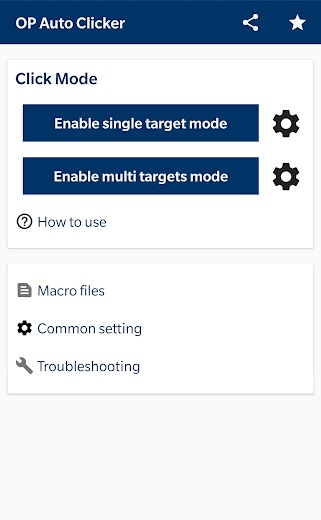
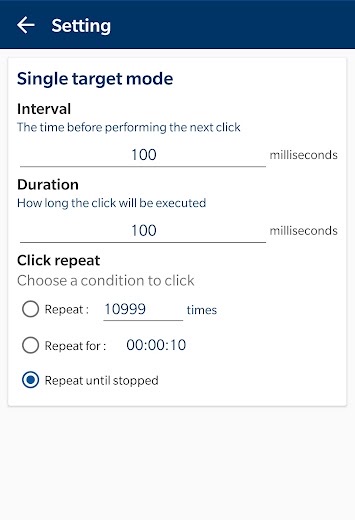
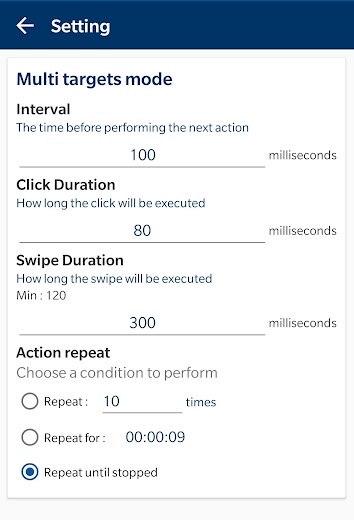
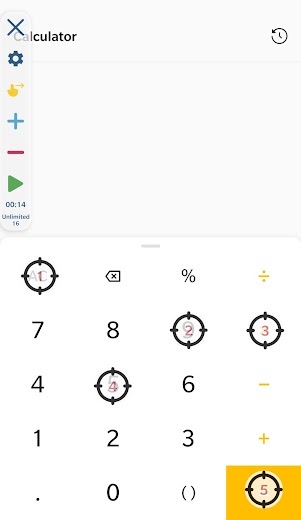
- On Android, the Google Play listing describes single-target and multi-target modes, swipes, adjustable delay and touch time, and saved scripts.
More Tools & Utilities reviews




More news
- What's newGoogle Photos Update: Enhanced Search and Smarter Storage ManagementRecent updates to Google Photos bring a more powerful search experience to users and introduce a new tool to manage storage more efficiently, according to recent store listings.
- What's newWells Fargo Mobile: October 2026 Update Enhances Credit Card InsightsThe Wells Fargo Mobile app has received an update in October 2026, focusing on enhanced accessibility for personalized insights within credit card account details. LookedApp examines what this means for users and provides a refresher on the app's comprehensive banking functionalities.
- What's newWhat's New in Microsoft OneDrive: A Look at Recent UpdatesMicrosoft OneDrive has received significant updates across both iOS and Android platforms, enhancing file management, photo organization, and app stability. These changes reflect an ongoing commitment to providing a comprehensive cloud storage solution for users.



Platforms and editions
Windows is the main version. The Microsoft Store listing asks for Windows 10 or later on x86 or x64 PCs and lists installer version V4.0, last updated on October 8, 2022. The developer site also links a Windows build hosted on SourceForge. Many people search for a version three release, but the developer pages reviewed here do not mention one.
Mac users have two routes from the developer's download page: a DMG at version 1.5, or a Mac App Store listing named OP Auto Clicker from MERIDIAN FLOW LTD at version 1.4. That seller name differs from the Windows and Android publisher, which is worth knowing before installing. On a Chromebook, the developer says only the Android app can click; the Chrome extension works on specific web pages only. The Google Play listing says the Android app needs Android 7.0 or above.
OP Auto Clicker at a glance
| Developer | mouse tool |
|---|---|
| Category | Tools |
| Rating on Google Play | 4.3 out of 5 (15K ratings) |
| Installs on Google Play | 5M+ |
| Price | Free |
| Age rating | Everyone |
What changed in the latest OP Auto Clicker version
Google Play · Listing updated Jan 14, 2026
The release notes say:
“Some new features have been added. Some bugs have been fixed.”
Quoted from the store listings' release notes.
Pricing
Every version is listed at no cost. The Microsoft Store shows the Windows program as free, and the Google Play listing shows a price of zero with no in-app purchases. The developer describes the program as open source and without ads.
Some unrelated phone apps that borrow the OP Auto Clicker name charge weekly subscriptions, so a paywall is a sign of a different product.
OP Auto Clicker compared with similar apps
| App | Rating | Installs | Price |
|---|---|---|---|
 OP Auto Clicker | 4.3 | 5M+ | Free |
 Amtrak | 4.7 | 5M+ | Free |
 Apple Devices | – | – | – |
 Audacity | – | – | – |
Popular reviews
 Tolls NY (E-ZPass NY) reviewTolls NY (E-ZPass NY) is a mobile application designed for E-ZPass NY and Tolls by Mail customers to manage their…Tools & Utilities
 Wells Fargo Mobile reviewThe Wells Fargo Mobile app offers a comprehensive suite of banking and financial management tools for customers with…Tools & Utilities
 MyHumana reviewMyHumana is Humana's member app for coverage details, claims, drug prices and ID cards. It only works with an active…Tools & Utilities
- Baby Buddy for Android reviewBaby Buddy for Android is a companion application designed for caregivers to track a baby's activities, including…Tools & Utilities
 MyChart reviewMyChart is an application designed to provide users with direct access to their personal health information and…Tools & Utilities
 Kaiser Permanente reviewThe Kaiser Permanente app reaches past insurance into day-to-day care: members message their doctor's office, book…Tools & Utilities
How to get OP Auto Clicker safely
Start from opautoclicker.com or the store listings: the Microsoft Store entry from mousetool for Windows and the Google Play listing from mouse tool for Android. Repackaged installers on file-hosting sites and modified APKs are not from the developer and can carry unwanted software.
On Android, the app needs Accessibility Service permission to perform taps and swipes. That access is powerful, so grant it only to the listing from mouse tool and switch it off when the clicker is not in use. Questions about data handling go to the privacy policy linked from the Microsoft Store listing or to support@opautoclicker.com.
How to install OP Auto Clicker
On Android (Google Play)
- Open the Google Play Store app on your Android phone or tablet.
- Search for OP Auto Clicker, or use the Google Play button on this page to open the listing directly.
- Check that the developer under the app name is mouse tool.
- Check that your device meets the listing's requirement: Android 7.0 and up.
- Tap Install (or the price, for a paid app) and wait for the download to finish, then open the app from your home screen.
OP Auto Clicker version and app details
| Google Play | |
|---|---|
| Last updated | Jan 14, 2026 |
| First released | Jun 28, 2021 |
| Package name | com.opautoclicker.autoclicker |
| Requires | Android 7.0 and up |
| Content rating | Everyone |
| In-app purchases | No |
| Contains ads | No |
| Developer | mouse tool |
Who OP Auto Clicker is for
It fits people who need many identical clicks: idle and clicker games, repeated form buttons, simple UI testing or refreshing a page. The fixed-location mode and adjustable count cover most of these jobs without any scripting on Windows.
Players should check the rules of the game or site first. Many online games treat automated clicking as cheating.
Pros
- No cost on every platform, with no ads according to the developer.
- Simple setup: interval, button, click type, repeat and location.
- Remappable hotkeys that work in the background, F6 by default.
- Strong store ratings: 4.7 on the Microsoft Store and 4.3 on Google Play.
- Available for Windows, Android and macOS.
Cons
- The Windows store listing has not been updated since October 8, 2022.
- The Mac App Store version comes from a different seller than the Windows and Android apps.
- No iPhone version is linked from the developer site, and many copycat apps use the name.
- On a Chromebook, only the Android app can click.
OP Auto Clicker: frequently asked questions
Is OP Auto Clicker free?
Yes. The Microsoft Store lists the Windows program as free, and the Google Play listing shows no price and no in-app purchases. The developer also says it has no ads.
Where can OP Auto Clicker for PC be found?
Use the Microsoft Store listing for Windows 10 or later, or the SourceForge build linked from opautoclicker.com. Skip third-party download sites.
Does it work on a Mac or Chromebook?
The developer offers a macOS DMG at version 1.5 and links a Mac App Store version. On a Chromebook, the developer says only the Android app can perform clicks.
What is the hotkey to start clicking?
F6 by default on Windows, according to the developer's getting-started guide. The hotkeys can be changed in the program.
Is it safe to install?
The versions on the Microsoft Store and Google Play come from the publisher the developer site links to. The risk lies in repackaged installers on mirror sites and in unrelated apps using the same name. On Android it needs Accessibility Service access, which the listing says is used only for clicks and swipes.
Is there an OP Auto Clicker version three?
The developer pages do not mention a release by that number. The current Microsoft Store installer is listed as V4.0.
OP Auto Clicker
- Category
- Tools
- Version
- Varies with device
Download
Looking for the OP Auto Clicker website or sign-in? Go to opautoclicker.com →The developer's website, as given on the store listing.
OP Auto Clicker ratings breakdown
Google Play 4.3 average from 14,725 ratings
- 576%
- 48%
- 32%
- 21%
- 113%
Share of ratings for each star level, as shown on the listings, as of Nov 11, 2026.