Dayforce
BusinessScreenshots
Analysis by LookedApp · Published · Updated
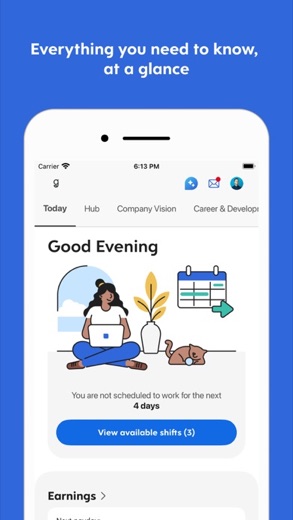
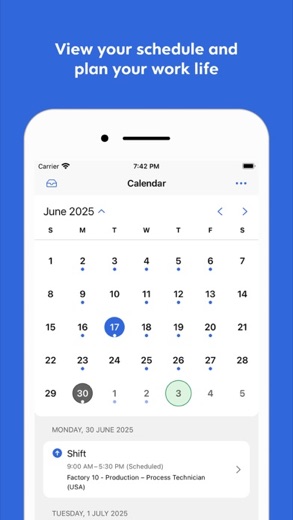
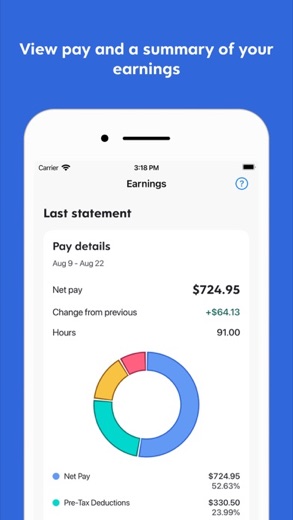
Dayforce is the employee app for companies that run payroll, HR and scheduling on Dayforce. Staff use it to clock in, check and swap shifts, ask for time off and look at pay and benefits. It is free and very well rated, but it only works when an employer uses Dayforce and has turned on mobile access.
What is Dayforce?
Dayforce Corporation publishes the app. Until January 31, 2024 the company was Ceridian HCM Holding Inc., which is why many people still search for Ceridian Dayforce. Thoma Bravo completed its purchase of Dayforce on February 4, 2026, in a deal worth about $12.3 billion that was announced in August 2025. The company is based in Minneapolis, Minnesota.
The full Dayforce system covers payroll, tax filing, benefits, HR, talent tools, workforce management and recruiting. The app is the employee and manager side of it, and what each person sees depends on how the employer has configured Dayforce.
This review is independent. It is not a Dayforce sign-in page and is not run by Dayforce or by any employer.
Is this the real Dayforce app?
- Verified publisher infoSame developer on Google Play and the App Store (Dayforce), and the developer website dayforce.com matches the publisher.
- Established since 2011Listed since Aug 17, 2011, 5,000,000+ installs on Google Play.
| Developer on Google Play | Dayforce |
|---|---|
| Developer on the App Store | Dayforce Corporation |
| Same developer on both stores | Yes |
| Android package name | com.dayforce.mobile |
| iOS bundle ID | com.dayforce.Dayforce |
| On the stores since | Aug 17, 2011 |
| Installs on Google Play | 5,000,000+ |
| Developer website | dayforce.com |
| Content rating | Google Play: Everyone / App Store: 9+ |
These details come from the public store listings. LookedApp doesn't host downloads: install from the Google Play or App Store buttons on this page.
Key features
- Clock in and out from the phone.
- Check the work schedule, swap shifts and plan time off.
- Review pay and benefits details.
- Follow earnings as they build up and, where the employer offers Dayforce Wallet, take pay before payday.
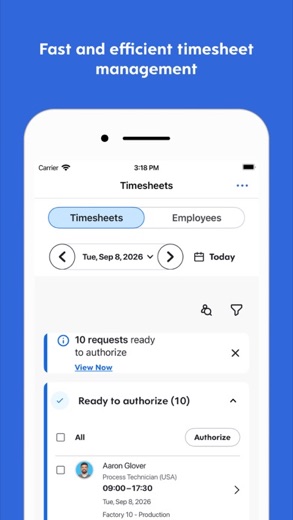
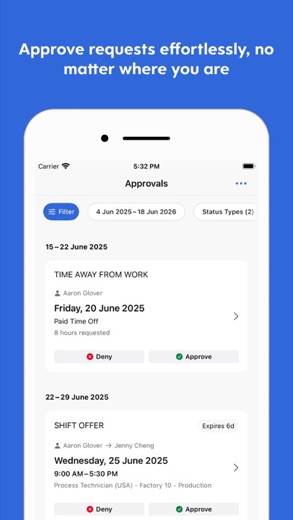
- Manager tools for approving timesheets and responding to requests.
More Productivity & Email reviews


More news
- What's newGoogle Photos Update: Enhanced Search and Smarter Storage ManagementRecent updates to Google Photos bring a more powerful search experience to users and introduce a new tool to manage storage more efficiently, according to recent store listings.
- What's newWells Fargo Mobile: October 2026 Update Enhances Credit Card InsightsThe Wells Fargo Mobile app has received an update in October 2026, focusing on enhanced accessibility for personalized insights within credit card account details. LookedApp examines what this means for users and provides a refresher on the app's comprehensive banking functionalities.
- What's newWhat's New in Microsoft OneDrive: A Look at Recent UpdatesMicrosoft OneDrive has received significant updates across both iOS and Android platforms, enhancing file management, photo organization, and app stability. These changes reflect an ongoing commitment to providing a comprehensive cloud storage solution for users.



Privacy and permissions
Google Play lists permission groups for Calendar, Contacts, Identity, Location, Microphone, Photos/Media/Files, Storage and Wi-Fi connection information. The listings do not explain what each one is used for, so it is worth reviewing them in the phone's settings after installing, location in particular.
Pay, tax and benefits records belong to the employer's Dayforce account, and the store listings do not describe how the app handles that data on the device.
Dayforce Corporation publishes its privacy policy at help.dayforce.com.
Dayforce permissions in plain English
The Google Play listing shows 8 permission groups. Google Play also lists 9 other permissions, such as “view network connections”. That is more than most productivity & email apps LookedApp reviews (typical: 7).
- CalendarCan read or change your calendar
- ContactsCan read your contacts
- IdentityCan find accounts on the device
- LocationCan use your precise location
- MicrophoneCan record audio
- Photos/Media/FilesCan read and change your photos, media and files
- StorageCan read and change files in shared storage
- Wi-Fi connection informationCan see Wi-Fi connection details
The App Store privacy label lists these data types:
- Linked to you: Financial Info, Contact Info, Contacts, User Content, Identifiers
- Not linked to you: Location, Usage Data, Diagnostics
Permission names come from Google Play; the plain-English lines describe what each permission group allows, not how this app uses it.
Dayforce at a glance
| Developer | Dayforce Corporation |
|---|---|
| Category | Business |
| Rating on App Store | 4.7 out of 5 (522K ratings) |
| Rating on Google Play | 4.5 out of 5 (184K ratings) |
| Installs on Google Play | 5M+ |
| Price | Free |
| Age rating | 9+ |
What changed in the latest Dayforce version
App Store and Google Play · Version 2026.12.1, released Nov 17, 2026; Google Play listing updated Nov 13, 2026
The release notes are general and don't list specific changes:
“We update the Dayforce app as often as possible to ensure the most reliable and enjoyable experience for our users. This release contains the following updates: Bug fixes, performance enhancements, and usability improvements.”
Quoted from the store listings' release notes.
Pricing
Both stores list Dayforce as free, and Google Play shows no in-app purchases. On-demand pay through Dayforce Wallet is an extra that not every employer offers, and the listing notes blackout dates and limits tied to the employer's pay cycle. The partner banks involved are not responsible for that on-demand pay, according to the listing.
Dayforce compared with similar apps
| App | Rating | Installs | Price |
|---|---|---|---|
 Dayforce | 4.7 | 5M+ | Free |
 Amazon A to Z | 4.7 | 5M+ | Free |
 AOL | 4.6 | 10M+ | Free |
 BurlingtonEnglish | 4.4 | 1M+ | Free |
Popular reviews
 Email for Outlook, Hotmail reviewEmail for Outlook, Hotmail is a third-party Android mail client for Outlook.com and Hotmail addresses. Microsoft does…Productivity & Email
 DYMO Connect reviewDYMO Connect is DYMO's label design software, and the version most people need is DYMO Connect for Desktop on Windows…Productivity & Email
 Microsoft Teams reviewMicrosoft Teams is a comprehensive communication and collaboration application designed to bring individuals together…Productivity & Email
 Microsoft Outlook reviewMicrosoft Outlook is a comprehensive mobile application designed for email and calendar management, enabling users to…Productivity & Email
 Epson DocumentScan reviewEpson DocumentScan sends scans from a supported Epson document scanner straight to an iPhone, iPad or Android phone,…Productivity & Email
 Email App reviewEmail App is an application designed for managing email communication, published by All Email Connect -Fast & Secure…Productivity & Email
How to get Dayforce safely
Use the App Store listing from Dayforce Corporation or the Google Play listing from Dayforce. More than one Dayforce-branded app exists, including Dayforce Wallet, and the plain Dayforce app is the one for schedules, time off and pay.
Since the app shows pay and tax details, an APK from a mirror site or a modified copy is not worth the risk. If the app installs but shows nothing useful, the employer's setup is the likely reason: mobile access only works for organizations that use Dayforce and have enabled it.
How to install Dayforce
On Android (Google Play)
- Open the Google Play Store app on your Android phone or tablet.
- Search for Dayforce, or use the Google Play button on this page to open the listing directly.
- Check that the developer under the app name is Dayforce.
- Check that your device meets the listing's requirement: Android 11 and up.
- Tap Install (or the price, for a paid app) and wait for the download to finish, then open the app from your home screen.
On iPhone and iPad (App Store)
- Open the App Store on your iPhone or iPad.
- Search for Dayforce, or use the App Store button on this page to open the listing directly.
- Check that the developer under the app name is Dayforce Corporation.
- Make sure your device has iOS 17.0 or later and about 231 MB of free space, as the listing states.
- Tap Get (or the price), confirm the download, then open the app from your home screen.
Dayforce version and app details
| Google Play | App Store | |
|---|---|---|
| Latest version | – | 2026.12.1 |
| Last updated | Nov 13, 2026 | Nov 17, 2026 |
| First released | Sep 15, 2011 | Aug 17, 2011 |
| Package name | com.dayforce.mobile | – |
| Bundle ID | – | com.dayforce.Dayforce |
| Requires | Android 11 and up | iOS 17.0 or later |
| Download size | – | 231 MB |
| Content rating | Everyone | 9+ |
| In-app purchases | No | – |
| Contains ads | No | – |
| Languages | – | 38 (including English) |
| Developer | Dayforce | Dayforce Corporation |
Who Dayforce is for
Hourly and salaried employees at organizations that use Dayforce, plus the managers who approve their time and requests. Shift workers get the most out of clocking in, swapping shifts and checking schedules from the phone. Managers can approve timesheets and answer requests without going back to a desk.
People whose employer does not use Dayforce, or has not enabled mobile access, cannot do anything with it.
Pros
- Free, with no in-app purchases
- Clock-in, schedules, time off and pay in one app
- Rated 4.7 on the App Store from 521.8K ratings and 4.5 on Google Play
- Manager approvals from the phone
Cons
- Works only if the employer uses Dayforce and enables mobile access
- Available features vary from one employer to another
- On-demand pay is not offered by every employer
- Long Android permission list with little explanation
Dayforce: frequently asked questions
Can anyone use the Dayforce app?
No. Mobile access is limited to employees of organizations that use Dayforce and have enabled the mobile experience.
Is Dayforce the same as Ceridian?
Yes. Ceridian HCM Holding Inc. became Dayforce, Inc. on January 31, 2024.
Is there a Dayforce app for PC?
The App Store and Google Play listings cover phones and tablets. Neither mentions a Windows or Mac app, so the employer is the one to ask about computer access.
Is the Dayforce app free?
Yes. Both stores list it as free, and Google Play shows no in-app purchases.
What is Dayforce Wallet?
An on-demand pay option some employers offer through Dayforce, letting workers take earned pay before payday. Not every employer provides it.
Is this the Dayforce sign-in page?
No. This is an independent review with no connection to Dayforce or any employer.
Dayforce
- Category
- Business
- Version
- 2026.12.1
Download
Looking for the Dayforce website or sign-in? Go to dayforce.com →The developer's website, as given on the store listing.
Dayforce ratings breakdown
Google Play 4.5 average from 184,467 ratings
- 578%
- 410%
- 34%
- 22%
- 16%
App Store 4.7 average from 521,817 ratings
- 584%
- 48%
- 33%
- 21%
- 14%
Share of ratings for each star level, as shown on the listings, as of Nov 18, 2026.