Etsy Seller
ShoppingScreenshots
Analysis by LookedApp · Published
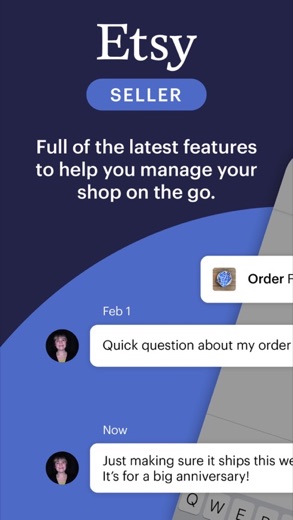
Etsy Seller is Etsy's free companion app for people who already run a shop on Etsy. It covers the daily work of answering buyers, shipping orders and editing listings from a phone. Opening a new shop, though, still has to happen in a desktop browser.
What is Etsy Seller?
Etsy Seller is not the app shoppers use to buy on Etsy. It exists only for sellers, and both store listings say plainly that an Etsy shop is required to use it. New sellers start at etsy.com/sell.
Etsy, Inc. publishes it on both stores. It launched in September 2021 and has 4.7 stars from 63.7K ratings on the App Store and 4.6 from 57.6K on Google Play, and both versions were last updated on November 17, 2026.
Is this the real Etsy Seller app?
- Verified publisher infoSame developer on Google Play and the App Store (Etsy, Inc), and the developer website etsy.com matches the publisher.
- Established since 2021Listed since Sep 10, 2021, 5,000,000+ installs on Google Play.
| Developer on Google Play | Etsy, Inc |
|---|---|
| Developer on the App Store | Etsy, Inc. |
| Same developer on both stores | Yes |
| Android package name | com.etsy.butter.sell_on_etsy |
| iOS bundle ID | com.etsy.sellonetsy.butter |
| On the stores since | Sep 10, 2021 |
| Installs on Google Play | 5,000,000+ |
| Developer website | etsy.com |
| Content rating | Google Play: Everyone / App Store: 12+ |
These details come from the public store listings. LookedApp doesn't host downloads: install from the Google Play or App Store buttons on this page.
Key features
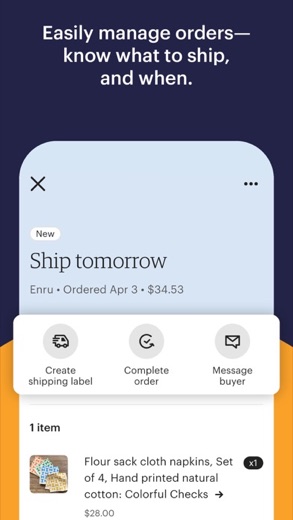
- An orders screen that shows what to ship and when, with shipment tracking.
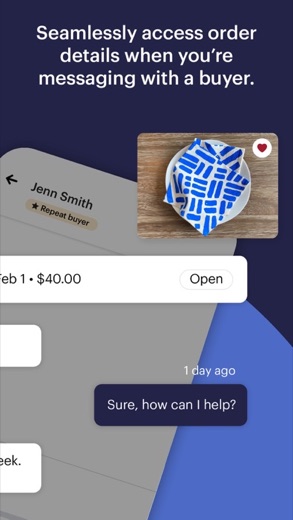
- Order details open right inside a conversation with a buyer.
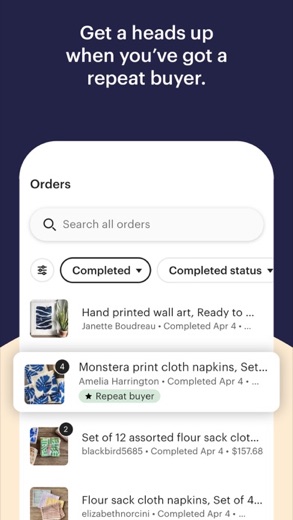
- Repeat buyers get a tag in Messages, which helps when replying.
- Listings can be created and edited, with photos and videos shot on the phone.
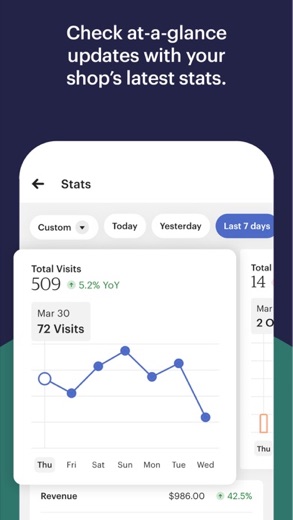
- A listing overview reports views, sales and revenue.
- A feedback option lets sellers suggest changes to the app.
More Shopping & Local reviews



More news
- What's newGoogle Photos Update: Enhanced Search and Smarter Storage ManagementRecent updates to Google Photos bring a more powerful search experience to users and introduce a new tool to manage storage more efficiently, according to recent store listings.
- What's newWells Fargo Mobile: October 2026 Update Enhances Credit Card InsightsThe Wells Fargo Mobile app has received an update in October 2026, focusing on enhanced accessibility for personalized insights within credit card account details. LookedApp examines what this means for users and provides a refresher on the app's comprehensive banking functionalities.
- What's newWhat's New in Microsoft OneDrive: A Look at Recent UpdatesMicrosoft OneDrive has received significant updates across both iOS and Android platforms, enhancing file management, photo organization, and app stability. These changes reflect an ongoing commitment to providing a comprehensive cloud storage solution for users.



Platforms and editions
Setting up a shop is a desktop job. Etsy's help center says it must be done in a desktop web browser; the steps include choosing a shop name, connecting a bank account, verifying identity with a government ID and a selfie, turning on two-factor authentication and paying a one-time setup fee that varies by location. Only after that can the shop be run from the app.
On a computer, the full toolset is Shop Manager on Etsy.com, reached from the You menu. There is no separate Windows program; on a PC or Mac the browser is the desktop counterpart to the app.
On phones, the iPhone app needs iOS 15.0 or later. The App Store version is offered in 10 languages.
Etsy Seller permissions in plain English
The Google Play listing shows 4 permission groups. Google Play also lists 7 other permissions, such as “view network connections”. That is fewer than most shopping & local apps LookedApp reviews (typical: 5).
- CameraCan take photos and record video
- MicrophoneCan record audio
- Photos/Media/FilesCan read and change your photos, media and files
- StorageCan read and change files in shared storage
The App Store privacy label lists these data types:
- Used to track you: Purchases, Contact Info, Identifiers, Usage Data
- Linked to you: Purchases, Financial Info, Location, Contact Info, User Content, Search History, Identifiers, Usage Data, Diagnostics
Permission names come from Google Play; the plain-English lines describe what each permission group allows, not how this app uses it.
Etsy Seller at a glance
| Developer | Etsy, Inc. |
|---|---|
| Category | Shopping |
| Rating on App Store | 4.7 out of 5 (64K ratings) |
| Rating on Google Play | 4.6 out of 5 (58K ratings) |
| Installs on Google Play | 5M+ |
| Price | Free |
| Age rating | 12+ |
What changed in the latest Etsy Seller version
App Store · Version 2.11, released Nov 17, 2026
The release notes are general and don't list specific changes:
“We made some bug fixes and performance improvements to make selling with our app even better.”
Quoted from the store listings' release notes.
Pricing
The app itself is free and Google Play lists no in-app purchases. Costs come from selling. Etsy's help center lists a listing fee of $0.20 per item, with each listing running 4 months, a 6.5% transaction fee on the order total including shipping and gift wrap, and payment processing of 3% + $0.25 per order for a US bank account.
Offsite Ads add a fee on orders that come through Etsy's ads elsewhere: 15% of the order for shops under $10,000 in yearly sales, or 12% for shops at or above $10,000, never more than $100 per order. Fees can change, so the help center remains the place for current numbers.
Etsy Seller compared with similar apps




Popular reviews
 eBay reviewThe eBay app functions as a comprehensive online marketplace for buying and selling a wide array of items, from vintage…Shopping & Local
 Menards reviewThe Menards app offers a comprehensive mobile platform for shoppers to manage their accounts, track orders, and browse…Shopping & Local
 OfferUp reviewOfferUp serves as a comprehensive mobile marketplace designed for buying and selling a wide range of items locally and…Shopping & Local
 Weee! reviewThe Weee! app is a grocery delivery service specializing in a wide variety of Asian and global food products. It…Shopping & Local
 Amazon Alexa reviewThe Amazon Alexa app serves as a central hub for managing Alexa-enabled devices, enabling users to set up new devices,…Shopping & Local
 Google Home reviewThe Google Home app functions as a central hub for managing smart home devices, designed to integrate with Gemini for…Shopping & Local
How to get Etsy Seller safely
Install Etsy Seller only from Google Play or the App Store and confirm Etsy, Inc. as the developer. A seller account connects to a bank account and payouts, so third-party copies, APK files and look-alike seller tools are a real risk.
On Android the app requests Camera, Microphone, Photos/Media/Files and Storage, which line up with its photo and video tools for listings. This review is not a sign-in page; sellers reach their account through the app or Shop Manager on Etsy.com.
How to install Etsy Seller
On Android (Google Play)
- Open the Google Play Store app on your Android phone or tablet.
- Search for Etsy Seller, or use the Google Play button on this page to open the listing directly.
- Check that the developer under the app name is Etsy, Inc.
- Check that your device meets the listing's requirement: Android 8.0 and up.
- Tap Install (or the price, for a paid app) and wait for the download to finish, then open the app from your home screen.
On iPhone and iPad (App Store)
- Open the App Store on your iPhone or iPad.
- Search for Etsy Seller, or use the App Store button on this page to open the listing directly.
- Check that the developer under the app name is Etsy, Inc..
- Make sure your device has iOS 15.0 or later and about 160 MB of free space, as the listing states.
- Tap Get (or the price), confirm the download, then open the app from your home screen.
Etsy Seller version and app details
| Google Play | App Store | |
|---|---|---|
| Latest version | – | 2.11 |
| Last updated | Nov 17, 2026 | Nov 17, 2026 |
| First released | Sep 10, 2021 | Sep 14, 2021 |
| Package name | com.etsy.butter.sell_on_etsy | – |
| Bundle ID | – | com.etsy.sellonetsy.butter |
| Requires | Android 8.0 and up | iOS 15.0 or later |
| Download size | – | 160 MB |
| Content rating | Everyone (Users Interact) | 12+ (Infrequent/Mild Profanity or Crude Humor; Infrequent/Mild Cartoon or Fantasy Violence; Infrequent/Mild Horror/Fear Themes; Infrequent/Mild Sexual Content and Nudity; Infrequent/Mild Alcohol, Tobacco, or Drug Use or References) |
| In-app purchases | No | – |
| Contains ads | No | – |
| Languages | – | 10 (including English) |
| Developer | Etsy, Inc | Etsy, Inc. |
Who Etsy Seller is for
Etsy sellers who want to reply to buyers quickly and keep orders moving while away from a desk will get the most from it. Small shops that photograph products on a phone can list and update items in one place.
It is not for shoppers, and it is not where a shop gets created. Anyone still asking how to sell on Etsy needs the desktop setup first, then the app.
Pros
- Free, with no in-app purchases
- Messages, orders and listings in one phone app
- Photo and video editing for listings on the go
- Well rated: 4.7 on the App Store and 4.6 on Google Play
Cons
- A shop must already exist; setup requires a desktop browser
- Selling carries listing, transaction and processing fees
- Offsite Ads can take up to 15% of an order
- Full shop tools still live in Shop Manager on Etsy.com
Etsy Seller: frequently asked questions
Is Etsy Seller free?
The app is free on both stores. Selling on Etsy is not: Etsy lists a $0.20 listing fee, a 6.5% transaction fee and US payment processing of 3% + $0.25 per order.
Can a new Etsy shop be opened in the app?
No. Etsy's help center says shop setup must be done in a desktop web browser. After that, the shop can be managed in Etsy Seller.
Is there an Etsy Seller app for PC?
Etsy's desktop tool is Shop Manager on Etsy.com, which runs in a web browser. Etsy Seller itself is a phone and tablet app.
Who makes Etsy Seller?
Etsy, Inc. publishes it on Google Play and the App Store.
Where do sellers sign in?
In the Etsy Seller app or on Etsy.com. This review is not a sign-in page and cannot reach any account.
What does a new seller need?
An Etsy account, a shop name, a bank account for payouts, a photo of a government ID with a selfie, two-factor authentication and the one-time setup fee for their location, all set up in a desktop browser.
Etsy Seller
- Category
- Shopping
- Version
- 2.11
Download
Looking for the Etsy Seller website or sign-in? Go to etsy.com →The developer's website, as given on the store listing.
Etsy Seller ratings breakdown
Google Play 4.6 average from 57,631 ratings
- 581%
- 411%
- 32%
- 21%
- 15%
App Store 4.7 average from 63,662 ratings
- 588%
- 46%
- 31%
- 21%
- 14%
Share of ratings for each star level, as shown on the listings, as of Nov 19, 2026.