Apple Devices
Tools & UtilitiesScreenshots
Analysis by LookedApp · Published
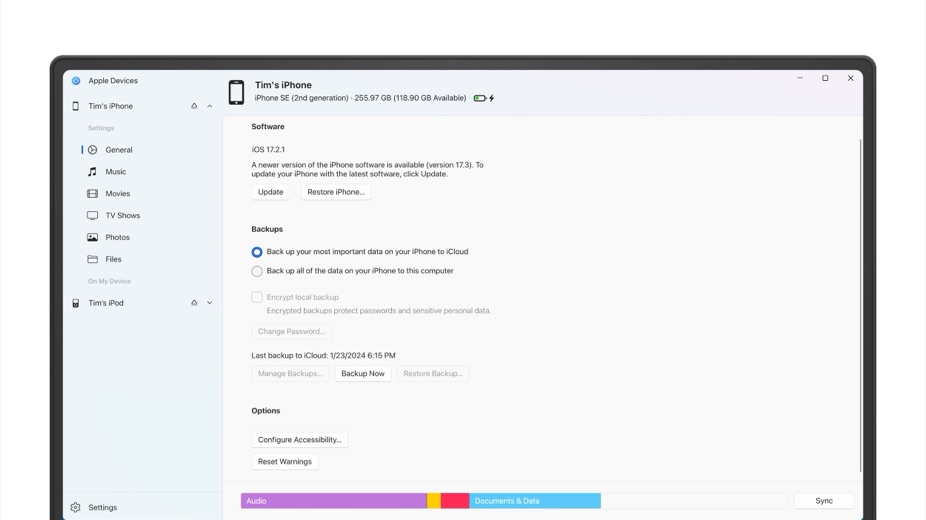
Apple Devices is Apple's Windows app for looking after an iPhone, iPad or iPod from a PC: backups, restores, software updates and syncing photos, music and movies. Since February 2024 it has done the device work that iTunes used to do on Windows. It is free on the Microsoft Store, though a 2.2-star rating shows plenty of users are not happy with it.
What is Apple Devices?
Apple Inc. publishes Apple Devices for Windows only, through the Microsoft Store. It first appeared there on September 20, 2022 while still labeled a preview. On February 7, 2024 Apple dropped the preview label and split iTunes for Windows into three apps: Apple Devices, Apple Music and Apple TV.
Once the new apps are in place, iTunes on that PC is left with podcasts and audiobooks. The iTunes library should be kept rather than deleted.
There is no Mac version to download: Apple lists the app only on the Microsoft Store, and its user guide treats it purely as a Windows app.
Key features
- Backs up an iPhone, iPad or iPod to the PC and restores the device from that backup later.
- Installs software updates on a connected Apple device.
- Moves photos, music, movies and other content between Windows and the device.
- Hands media syncing to Apple Music and Apple TV for Windows, which need to be installed first.
- Runs on both x64 and ARM64 Windows PCs.
More Tools & Utilities reviews




More news
- What's newMyChart Update: Syncing Health Data, Streamlined Visits, and Prepay DetailsLookedApp's news desk reports on the latest MyChart application update, detailing new features for syncing health data, managing appointments, and viewing billing information, alongside a refresher on the app's core functions and costs.
- What's newLords Mobile: The Space Bridge Opens in Latest UpdateThe popular strategy game Lords Mobile recently updated its content, bringing the third part of its Transformers collaboration event to players. This update introduces new ways to engage with iconic characters and acquire special in-game items.
- What's newCar Simulator 2: Recent Updates Bring New Features and Enhanced RealismCar Simulator 2 has received a series of notable updates across both the App Store and Google Play, introducing new features, enhanced realism, and expanded content for players to explore in its open-world driving simulation.


PC requirements
The Microsoft Store listing requires Windows 10 version 19045.0 or higher, and the new Apple apps need Windows 10 or later in general. The app is built for x64 and ARM64 processors.
The download is about 483 MB. To sync music and video, Apple Music and Apple TV have to be installed before Apple Devices can work with them, so a full setup means three Apple apps on the PC.
Apple Devices at a glance
| Developer | Apple Inc. |
|---|---|
| Category | Tools & Utilities |
Pricing
Apple Devices is listed as free on the Microsoft Store. The listing does not describe any paid features or purchases inside the app. Apple Music and Apple TV, which it works with for media, are separate apps with their own listings.
Apple Devices compared with similar apps
| App | Rating | Installs | Price |
|---|---|---|---|
 Apple Devices | – | – | – |
 Amtrak | 4.7 | 5M+ | Free |
 Audacity | – | – | – |
 Creality Cloud | 4.3 | 5M+ | Free |
Popular reviews
 Tolls NY (E-ZPass NY) reviewTolls NY (E-ZPass NY) is a mobile application designed for E-ZPass NY and Tolls by Mail customers to manage their…Tools & Utilities
 Wells Fargo Mobile reviewThe Wells Fargo Mobile app offers a comprehensive suite of banking and financial management tools for customers with…Tools & Utilities
 MyHumana reviewMyHumana is Humana's member app for coverage details, claims, drug prices and ID cards. It only works with an active…Tools & Utilities
- Baby Buddy for Android reviewBaby Buddy for Android is a companion application designed for caregivers to track a baby's activities, including…Tools & Utilities
 MyChart reviewMyChart is an application designed to provide users with direct access to their personal health information and…Tools & Utilities
 Kaiser Permanente reviewThe Kaiser Permanente app reaches past insurance into day-to-day care: members message their doctor's office, book…Tools & Utilities
How to get Apple Devices safely
Apple's instructions are short: open the Microsoft Store, search for Apple Devices and select Get. The listing should show Apple Inc. as the publisher. Pages offering an Apple Devices APK or a standalone setup file are not Apple, and an Android package is not the Windows app in any case.
The app handles full device backups and restores, so the PC it runs on will hold a copy of the phone's data. It makes sense to install it only on a computer the owner controls.
Who Apple Devices is for
Windows users with an iPhone or iPad who want a local backup on their PC, need to restore or update a device from the computer, or still keep a music and movie collection on the PC that they sync to the phone.
People who have relied on iTunes on Windows for these jobs will find them in Apple Devices once it is installed. Anyone who mainly wants iPhone photos on a PC, rather than whole-device backups, can look at iCloud for Windows instead.
Pros
- Free, published by Apple Inc. on the Microsoft Store
- Runs on both x64 and ARM64 PCs
- Takes device management out of the old iTunes app
- Backups, restores, updates and sync in one place
Cons
- Rated 2.2 stars from 1,956 ratings on the Microsoft Store
- Windows only, with no Mac version listed
- Media sync depends on two more Apple apps
- Large download of about 483 MB
Apple Devices: frequently asked questions
Is Apple Devices available for Mac?
Apple lists it only on the Microsoft Store for Windows, and Apple's guide covers it as a Windows app.
Does Apple Devices replace iTunes?
For managing devices on Windows, yes. Since February 7, 2024, iTunes on a PC with the new apps installed handles only podcasts and audiobooks.
Which Windows version does Apple Devices need?
Windows 10 version 19045.0 or higher, according to the Microsoft Store listing, on an x64 or ARM64 PC.
Is Apple Devices free?
Yes. The Microsoft Store lists it as free.
Why doesn't Apple Devices sync music or movies?
Apple Music and Apple TV for Windows have to be installed first; Apple Devices works with them for media.
Where should Apple Devices be downloaded from?
From the Microsoft Store listing published by Apple Inc. Apple's own instructions are to search the store for Apple Devices and select Get.
Apple Devices
- Category
- Tools & Utilities
- Version