Tinkercad
EducationScreenshots
Analysis by LookedApp · Published
Tinkercad is Autodesk's free tool for simple 3D design, electronics circuits and block coding, and it runs in a web browser rather than as a PC download. Students, teachers and hobbyists use it to make models for 3D printing, and the iPad app is far better rated than the Android one.
What is Tinkercad?
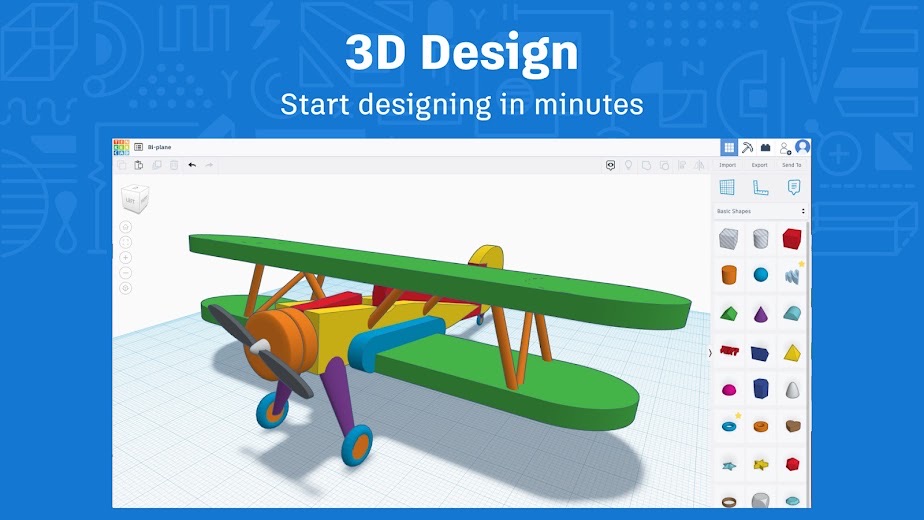
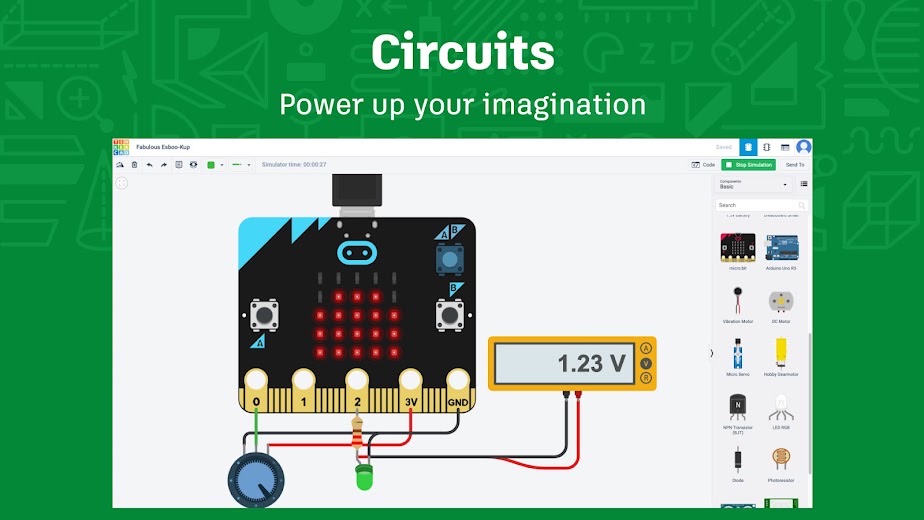
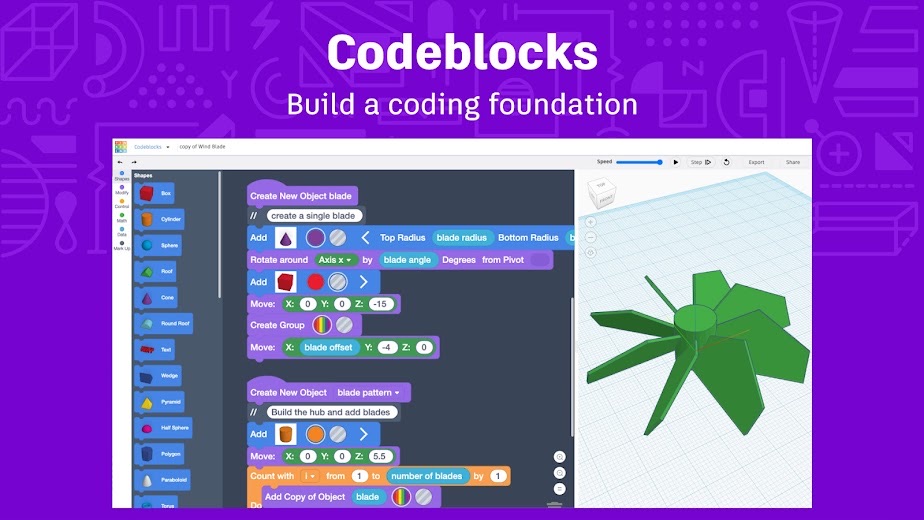
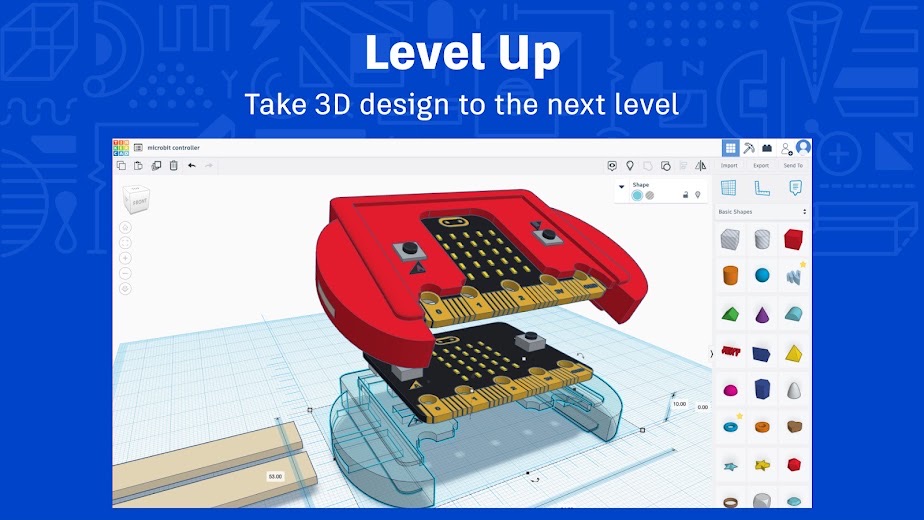
Tinkercad lets people build 3D objects by combining and cutting basic shapes, wire up virtual circuits, and generate designs from code blocks. The developer splits it into three workspaces, 3D Design, Circuits and Codeblocks, and says more than 100 million people use it, in 15 languages.
Kai Backman and Mikko Mononen launched it in 2011, and Autodesk bought it in May 2013. The Circuits workspace came from Autodesk's 123D Circuits, which merged into Tinkercad in 2017.
Most use happens at tinkercad.com. The App Store app from Autodesk Inc. and the Google Play app published under the Tinkercad name bring the same tool to tablets.
Is this the real Tinkercad app?
- Listed on Google Play & App StoreStore listings on both Google Play and the App Store.
- Established since 2019Listed since Dec 17, 2019, 1,000,000+ installs on Google Play.
| Developer on Google Play | Tinkercad |
|---|---|
| Developer on the App Store | Autodesk Inc. |
| Same developer on both stores | Names differ; compare them on each listing |
| Android package name | com.tinkercad.www.twa |
| iOS bundle ID | com.autodesk.tinkercad |
| On the stores since | Dec 17, 2019 |
| Installs on Google Play | 1,000,000+ |
| Developer website | tinkercad.com |
| Content rating | Google Play: Everyone / App Store: 4+ |
These details come from the public store listings. LookedApp doesn't host downloads: install from the Google Play or App Store buttons on this page.
Key features
- 3D modeling from basic shapes, with STL, OBJ and SVG import and export for use in other programs and 3D printing.
- A Circuits workspace for building and simulating electronics, with Arduino and micro:bit boards on iPad.
- Codeblocks for making 3D designs with block-based code.
- Tinkercad Classrooms, where teachers assign activities and follow student progress, without needing student email addresses.
- Google Classroom integration for sending and grading assignments.
- Apple Pencil support and an AR viewer in the iPad app.
More Games & Learning reviews


More news
- What's newGoogle Photos Update: Enhanced Search and Smarter Storage ManagementRecent updates to Google Photos bring a more powerful search experience to users and introduce a new tool to manage storage more efficiently, according to recent store listings.
- What's newWells Fargo Mobile: October 2026 Update Enhances Credit Card InsightsThe Wells Fargo Mobile app has received an update in October 2026, focusing on enhanced accessibility for personalized insights within credit card account details. LookedApp examines what this means for users and provides a refresher on the app's comprehensive banking functionalities.
- What's newWhat's New in Microsoft OneDrive: A Look at Recent UpdatesMicrosoft OneDrive has received significant updates across both iOS and Android platforms, enhancing file management, photo organization, and app stability. These changes reflect an ongoing commitment to providing a comprehensive cloud storage solution for users.



Platforms and editions
There is no Tinkercad program to install on a PC. The developer lists Windows 10 and 11, macOS High Sierra 10.13.2 or later, and Chrome OS as working, in Chrome 50 or newer, Safari 13 or newer, or the Chromium-based Microsoft Edge. The one strict hardware need is a graphics card that supports WebGL; the developer says most computers from the last 6 years qualify.
On tablets, the iPad app needs iPadOS 13 or higher according to the developer, while the App Store listing now names 15.6 as the minimum, at version 1.6. The editors need a screen at least 864px wide, so phones are not supported for design work. The Google Play app, rated 2.9, is the weaker of the two.
Tinkercad permissions in plain English
The Google Play listing shows no permission groups, only 1 basic permission such as “Google Play license check”.
The App Store privacy label lists these data types:
- Linked to you: Contact Info, User Content, Identifiers
- Not linked to you: Identifiers, Usage Data, Diagnostics
Permission names come from Google Play; the plain-English lines describe what each permission group allows, not how this app uses it.
Tinkercad at a glance
| Developer | Autodesk Inc. |
|---|---|
| Category | Education |
| Rating on App Store | 4.6 out of 5 (21K ratings) |
| Rating on Google Play | 2.9 out of 5 (1.5K ratings) |
| Installs on Google Play | 1M+ |
| Price | Free |
| Age rating | 4+ |
What changed in the latest Tinkercad version
App Store · Version 1.6, released Oct 9, 2026
The release notes say:
“We’ve updated the Tinkercad iPad app with security and reliability improvements to help protect your account and keep the app running smoothly on the latest iPadOS. What’s improved: Privacy Policy and Terms of Service in Settings now open the current documents on tinkercad.com Better compatibility with supported iPadOS versions Updated security for app data and network connections”
Google Play · Listing updated Aug 3, 2026
The release notes are general and don't list specific changes:
“Update app for stability and performance fixes”
Quoted from the store listings' release notes.
Pricing
Tinkercad is free for everyone. The App Store and Google Play list it at no cost, the Google Play listing shows no in-app purchases, and the developer describes it as a free web app.
Tinkercad compared with similar apps
| App | Rating | Installs | Price |
|---|---|---|---|
 Tinkercad | 4.6 | 1M+ | Free |
 Amazon A to Z | 4.7 | 5M+ | Free |
 AOL | 4.6 | 10M+ | Free |
 BurlingtonEnglish | 4.4 | 1M+ | Free |
Popular reviews
 Campus Parent reviewThe Campus Parent application provides a direct connection for parents and guardians to their student's academic…Games & Learning
 Scratch reviewScratch is a block-based programming environment available through a web browser and as a downloadable computer…Games & Learning
 Memrise reviewMemrise is a language learning application designed for individuals with diverse learning objectives, ranging from exam…Games & Learning
 ABCya! Games reviewABCya! Games is an educational application designed for children from pre-kindergarten through sixth grade and beyond,…Games & Learning
 Among Us reviewAmong Us is a social deduction game where players work together to prepare a spaceship for departure while identifying…Games & Learning
 Solitaire.com reviewSolitaire.com, developed by Tripledot Studios Limited, offers a classic Solitaire card game experience for mobile…Games & Learning
How to get Tinkercad safely
Use tinkercad.com in a browser, the App Store listing from Autodesk Inc., or the Google Play listing published as Tinkercad with tinkercad.com as its website. Sites offering a Tinkercad download for PC are not needed, since there is no desktop installer to download.
Sign-up asks for a date of birth, and accounts can be made with email or with Google, Apple, Microsoft or Facebook. The developer says Tinkercad complies with FERPA, COPPA and GDPR, does not sell user information and shows no advertising.
How to install Tinkercad
On Android (Google Play)
- Open the Google Play Store app on your Android phone or tablet.
- Search for Tinkercad, or use the Google Play button on this page to open the listing directly.
- Check that the developer under the app name is Tinkercad.
- Tap Install (or the price, for a paid app) and wait for the download to finish, then open the app from your home screen.
On iPhone and iPad (App Store)
- Open the App Store on your iPhone or iPad.
- Search for Tinkercad, or use the App Store button on this page to open the listing directly.
- Check that the developer under the app name is Autodesk Inc..
- Make sure your device has iOS 15.6 or later and about 12 MB of free space, as the listing states.
- Tap Get (or the price), confirm the download, then open the app from your home screen.
Tinkercad version and app details
| Google Play | App Store | |
|---|---|---|
| Latest version | – | 1.6 |
| Last updated | Aug 3, 2026 | Oct 9, 2026 |
| First released | Feb 28, 2022 | Dec 17, 2019 |
| Package name | com.tinkercad.www.twa | – |
| Bundle ID | – | com.autodesk.tinkercad |
| Requires | – | iOS 15.6 or later |
| Download size | – | 12 MB |
| Content rating | Everyone | 4+ |
| In-app purchases | No | – |
| Contains ads | No | – |
| Languages | – | 1 (including English) |
| Developer | Tinkercad | Autodesk Inc. |
Who Tinkercad is for
It suits beginners of any age: students meeting 3D design for the first time, teachers running maker or STEM classes, and hobbyists who want a quick printable part without learning professional CAD. Educator, Student and Personal accounts are available.
Engineers who need detailed technical modeling will likely move on to fuller CAD software. Tinkercad keeps things simple on purpose.
Tinkercad for kids and families
- Age rating: Google Play rates it Everyone; the App Store rates it 4+.
- In-app purchases: Google Play: no.
- Ads: the Google Play listing says the app does not contain ads.
- Data safety (Google Play): No data shared with third parties. No data collected. Committed to follow the Play Families Policy.
Store age ratings describe content, not whether an app suits a particular child.
Pros
- Free, with no in-app purchases on Google Play.
- Runs in a browser on Windows, Mac and Chromebook, so nothing to install.
- 3D design, circuits and code blocks in one place.
- Strong classroom tools and Google Classroom support.
- iPad app rated 4.6 from 20.5K ratings.
Cons
- The Android app is rated only 2.9.
- Phones are too small for the editors.
- Needs an internet connection and a WebGL-capable graphics card.
- Too basic for detailed engineering work.
Tinkercad: frequently asked questions
Is Tinkercad free?
Yes. It is free for everyone, and the store listings show no price.
Can Tinkercad be downloaded for PC?
No installer is needed. Tinkercad runs in Chrome, Safari or Edge on Windows 10 and 11, macOS and Chromebooks.
Does Tinkercad work on an iPad or phone?
There is an iPad app from Autodesk and an Android app. The editors need a screen at least 864px wide, so phones are not supported.
Who makes Tinkercad?
Autodesk, which acquired Tinkercad in May 2013. It was started in 2011 by Kai Backman and Mikko Mononen.
Can Tinkercad designs be 3D printed?
Yes. Designs can be exported as STL or OBJ files for slicing software, and SVG for flat outlines.
Is this the Tinkercad sign-in page?
No. Accounts are created and opened at tinkercad.com.
Tinkercad
- Category
- Education
- Version
- 1.6
Download
Looking for the Tinkercad website or sign-in? Go to tinkercad.com →The developer's website, as given on the store listing.
Tinkercad ratings breakdown
Google Play 2.9 average from 1,518 ratings
- 533%
- 413%
- 36%
- 29%
- 139%
App Store 4.6 average from 20,509 ratings
- 580%
- 410%
- 34%
- 21%
- 14%
Share of ratings for each star level, as shown on the listings, as of Nov 8, 2026.