ID.me Authenticator
ProductivityScreenshots
Analysis by LookedApp · Published
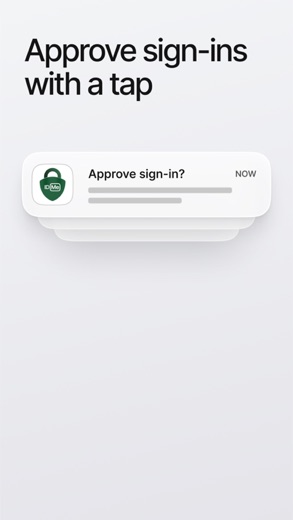
ID.me Authenticator is a free phone app that adds a second step when signing in to an ID.me account: approve a push alert or type a 6-digit code. It does one job and has no desktop version, and ID.me recommends pairing it with a second sign-in method in case the phone is lost.
What is ID.me Authenticator?
The app comes from ID.me, the identity verification company founded in 2010 by Blake Hall and Matt Thompson and based in McLean, Virginia. Both app stores now list it as IDMe Authenticator, the spelling the company uses in its help pages, while most people still search for ID.me or id me.
ID.me checks identity for many public services. IRS.gov names IDMe as one of two sign-in providers for IRS accounts, and the company has worked with the Social Security Administration since 2020 and Veterans Affairs since 2019. The authenticator does not show tax or benefit records; it only confirms sign-ins to the ID.me account.
Is this the real ID.me Authenticator app?
- Listed on Google Play & App StoreStore listings on both Google Play and the App Store.
- Established since 2018Listed since Dec 11, 2018, 5,000,000+ installs on Google Play.
| Developer on Google Play | IDMe |
|---|---|
| Developer on the App Store | ID.me |
| Same developer on both stores | Yes |
| Android package name | me.id.auth |
| iOS bundle ID | me.id.auth |
| On the stores since | Dec 11, 2018 |
| Installs on Google Play | 5,000,000+ |
| Content rating | Google Play: Everyone / App Store: 4+ |
These details come from the public store listings. LookedApp doesn't host downloads: install from the Google Play or App Store buttons on this page.
Key features
- Push approvals: a sign-in request appears on the phone and is approved with a tap.
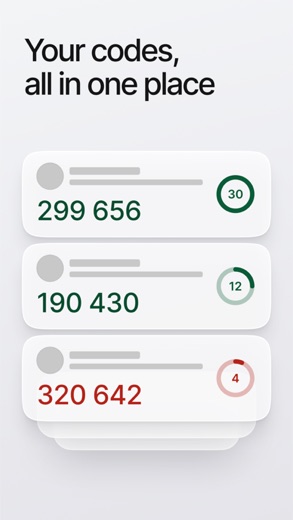
- Code generator: rotating 6-digit codes that work without a network or cellular connection.
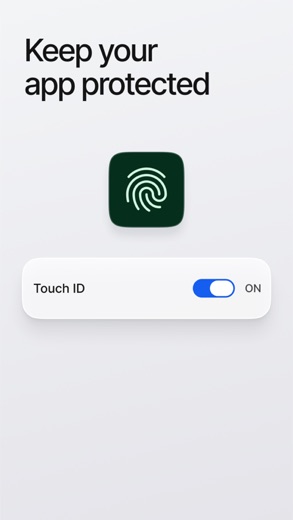
- NFC security keys: a YubiKey 5 NFC tapped against the phone works through the app.
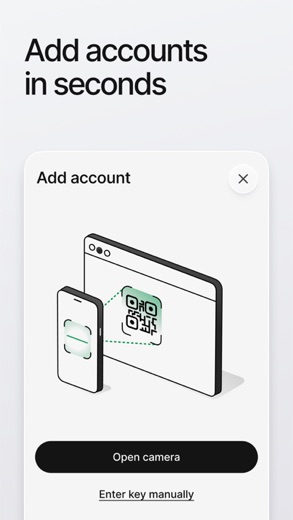
- QR-code enrollment that links the phone to the account during setup.
- On iPhone it needs iOS 17.0 or later.
More Productivity & Email reviews


More news
- What's newGoogle Photos Update: Enhanced Search and Smarter Storage ManagementRecent updates to Google Photos bring a more powerful search experience to users and introduce a new tool to manage storage more efficiently, according to recent store listings.
- What's newWells Fargo Mobile: October 2026 Update Enhances Credit Card InsightsThe Wells Fargo Mobile app has received an update in October 2026, focusing on enhanced accessibility for personalized insights within credit card account details. LookedApp examines what this means for users and provides a refresher on the app's comprehensive banking functionalities.
- What's newWhat's New in Microsoft OneDrive: A Look at Recent UpdatesMicrosoft OneDrive has received significant updates across both iOS and Android platforms, enhancing file management, photo organization, and app stability. These changes reflect an ongoing commitment to providing a comprehensive cloud storage solution for users.



Privacy and permissions
The Google Play listing shows one permission group, Camera, which the setup QR code requires. That is a short list for an app of this kind.
ID.me grades its own sign-in methods: passkeys and security keys as very strong, the code generator as strong, push approvals one level lower and text or phone-call codes below that. Its help center recommends setting up at least two methods, so a lost or replaced phone does not lock someone out. The store listings do not describe what account data the app keeps on the phone.
ID.me publishes its privacy policy at www.id.me.
ID.me Authenticator permissions in plain English
The Google Play listing shows 1 permission group. Google Play also lists 6 other permissions, such as “view network connections”. That is fewer than most productivity & email apps LookedApp reviews (typical: 7).
- CameraCan take photos and record video
Permission names come from Google Play; the plain-English lines describe what each permission group allows, not how this app uses it.
ID.me Authenticator at a glance
| Developer | ID.me |
|---|---|
| Category | Productivity |
| Rating on App Store | 4.3 out of 5 (100K ratings) |
| Rating on Google Play | 3.5 out of 5 (73K ratings) |
| Installs on Google Play | 5M+ |
| Price | Free |
| Age rating | 4+ |
What changed in the latest ID.me Authenticator version
App Store · Version 2.2.0, released Nov 2, 2026
The release notes are general and don't list specific changes:
“Bug Fixes and Performance Improvements”
Google Play · Listing updated Oct 21, 2026
The release notes are general and don't list specific changes:
“Bug fixes and performance improvements”
Quoted from the store listings' release notes.
Pricing
Both stores list the app as free, and Google Play shows no in-app purchases. Neither listing mentions a paid version.
ID.me Authenticator compared with similar apps
| App | Rating | Installs | Price |
|---|---|---|---|
 ID.me Authenticator | 4.3 | 5M+ | Free |
 Amtrak | 4.7 | 5M+ | Free |
 Apple Devices | – | – | – |
 Audacity | – | – | – |
Popular reviews
 Manage My Wedding reviewManage My Wedding is a free, compact wedding planner from wedding planner Yvette Sitters, covering checklists, budget…Productivity & Email
 Gmail reviewGmail provides a comprehensive email management experience with advanced artificial intelligence capabilities and…Productivity & Email
 Email for Outlook, Hotmail reviewEmail for Outlook, Hotmail is a third-party Android mail client for Outlook.com and Hotmail addresses. Microsoft does…Productivity & Email
 Citrix Workspace reviewCitrix Workspace, the app once called Citrix Receiver, is the free client that opens an organization's virtual desktops…Productivity & Email
 DYMO Connect reviewDYMO Connect is DYMO's label design software, and the version most people need is DYMO Connect for Desktop on Windows…Productivity & Email
 Microsoft Teams reviewMicrosoft Teams is a comprehensive communication and collaboration application designed to bring individuals together…Productivity & Email
How to get ID.me Authenticator safely
Install it from the App Store, where the seller is ID.me, or from Google Play, where the publisher appears as IDMe. Since the app guards an identity account, a copy from an APK mirror or a modified version is a real risk, and there is no reason to take it: the genuine app is free in both stores.
ID.me describes push setup in five steps: choose Push Notification on the account, install the app, select Continue in the browser, send the request or scan the QR code, then approve it in the app. If codes are rejected, the fix ID.me gives is to turn on automatic date and time on the phone, switching it off for 15 seconds and back on if it was already enabled.
How to install ID.me Authenticator
On Android (Google Play)
- Open the Google Play Store app on your Android phone or tablet.
- Search for ID.me Authenticator, or use the Google Play button on this page to open the listing directly.
- Check that the developer under the app name is IDMe.
- Check that your device meets the listing's requirement: Android 7.0 and up.
- Tap Install (or the price, for a paid app) and wait for the download to finish, then open the app from your home screen.
On iPhone and iPad (App Store)
- Open the App Store on your iPhone or iPad.
- Search for ID.me Authenticator, or use the App Store button on this page to open the listing directly.
- Check that the developer under the app name is ID.me.
- Make sure your device has iOS 17.0 or later and about 16 MB of free space, as the listing states.
- Tap Get (or the price), confirm the download, then open the app from your home screen.
ID.me Authenticator version and app details
| Google Play | App Store | |
|---|---|---|
| Latest version | – | 2.2.0 |
| Last updated | Oct 21, 2026 | Nov 2, 2026 |
| First released | Dec 11, 2018 | Dec 13, 2018 |
| Package name | me.id.auth | – |
| Bundle ID | – | me.id.auth |
| Requires | Android 7.0 and up | iOS 17.0 or later |
| Download size | – | 16 MB |
| Content rating | Everyone | 4+ |
| In-app purchases | No | – |
| Contains ads | No | – |
| Languages | – | 1 (including English) |
| Developer | IDMe | ID.me |
Who ID.me Authenticator is for
People who verified their identity with ID.me for a tax, benefits or veterans service and want something stronger than text-message codes. The offline code generator also helps anyone with patchy phone signal.
Users who cannot run the app still have other ID.me options, such as passkeys or a USB security key, so the authenticator is a choice rather than a requirement.
Pros
- Free, with no in-app purchases on Google Play
- Codes work offline
- Asks only for camera access on Android
- Rated 4.3 on the App Store from 99.5K ratings
Cons
- Phone only; there is no desktop app
- Google Play rating of 3.5 trails the App Store
- Codes fail when the phone's clock drifts
- Push approvals rank below passkeys and security keys in ID.me's own grading
ID.me Authenticator: frequently asked questions
Is there an ID.me Authenticator for PC?
No. It runs on iPhone and Android. A computer is used only to start setup and display the QR code.
Is ID.me Authenticator free?
Yes, in both the App Store and Google Play.
Why are the codes not accepted?
Usually the phone's time is off. ID.me says to turn on automatic date and time, toggling it off for 15 seconds and back on if it was already on.
Is ID.me used for IRS accounts?
IRS.gov lists IDMe as one of two sign-in providers, and one account covers most IRS accounts and services. The authenticator only protects the ID.me account; it is not an IRS app.
Is this an ID.me sign-in page?
No. This is an independent review with no link to ID.me or any agency.
Who makes the app?
ID.me, founded in 2010 and based in McLean, Virginia.
ID.me Authenticator
- Category
- Productivity
- Version
- 2.2.0
Download
ID.me Authenticator ratings breakdown
Google Play 3.5 average from 72,985 ratings
- 552%
- 49%
- 36%
- 24%
- 129%
App Store 4.3 average from 99,511 ratings
- 577%
- 45%
- 33%
- 22%
- 113%
Share of ratings for each star level, as shown on the listings, as of Nov 12, 2026.