Google Gemini
ProductivityScreenshots
Analysis by LookedApp · Published · Updated
Google Gemini is Google's AI assistant, free on Android, iPhone, the web and, since September 10, 2026, as a desktop app for Windows. A Mac app exists too, for Apple silicon. It makes the most sense for people who already keep their mail, calendar and photos with Google; paid Google AI plans add higher limits and a lot of storage.
What is Google Gemini?
Gemini started life as Bard, which Google announced on February 6, 2023 and renamed Gemini on February 8, 2024, when the Android app arrived. The publisher is Google (Google LLC on Google Play), and both stores file it under Productivity.
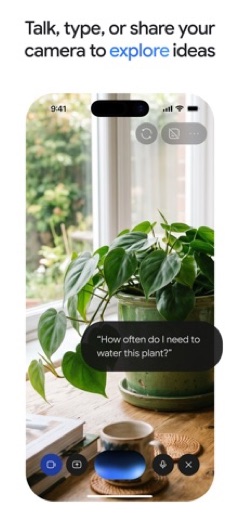
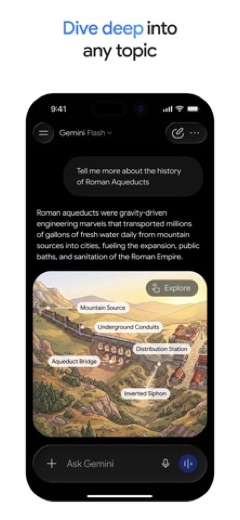
It answers questions, writes and edits text, reads uploaded files and creates images, video and music. Gemini Live, which arrived in August 2024, turns it into a spoken conversation and can look through the phone's camera or at a shared screen.
Gemini is not the same product as NotebookLM, Google's research notebook, though the two connect: Gemini can answer from the sources saved in a NotebookLM notebook.
Is this the real Google Gemini app?
- Verified publisher infoSame developer on Google Play and the App Store (Google LLC), and the developer website gemini.google.com matches the publisher.
- Established since 2024Listed since Feb 5, 2024, 1,000,000,000+ installs on Google Play.
| Developer on Google Play | Google LLC |
|---|---|
| Developer on the App Store | |
| Same developer on both stores | Yes |
| Android package name | com.google.android.apps.bard |
| iOS bundle ID | com.google.gemini |
| On the stores since | Feb 5, 2024 |
| Installs on Google Play | 1,000,000,000+ |
| Developer website | gemini.google.com |
| Content rating | Google Play: Teen / App Store: 12+ |
These details come from the public store listings. LookedApp doesn't host downloads: install from the Google Play or App Store buttons on this page.
Key features
- Gemini Live for real-time voice chats with camera and screen sharing.
- Connections to Gmail, Calendar, Google Photos, YouTube and Search for answers that use a person's own content.
- Uploads of documents, spreadsheets, photos and videos for summaries and follow-up questions.
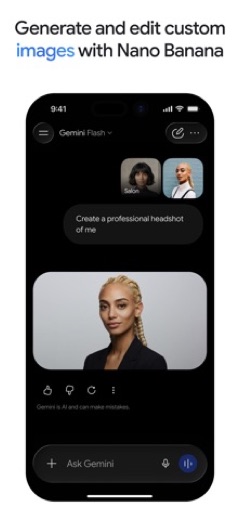
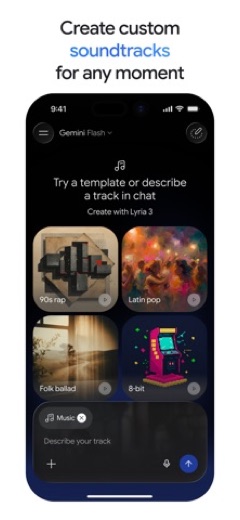
- Image creation and editing with Nano Banana 2, and custom soundtracks with Lyria 3.
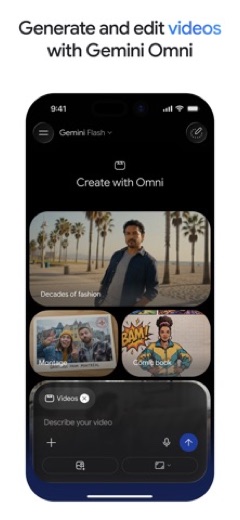
- Video generation with Gemini Omni for Google AI Plus, Pro, Ultra and Workspace subscribers.
- A Daily Brief on iPhone that pulls together a personal morning summary.
More Productivity & Email reviews


More news
- What's newGoogle Photos Update: Enhanced Search and Smarter Storage ManagementRecent updates to Google Photos bring a more powerful search experience to users and introduce a new tool to manage storage more efficiently, according to recent store listings.
- What's newWells Fargo Mobile: October 2026 Update Enhances Credit Card InsightsThe Wells Fargo Mobile app has received an update in October 2026, focusing on enhanced accessibility for personalized insights within credit card account details. LookedApp examines what this means for users and provides a refresher on the app's comprehensive banking functionalities.
- What's newWhat's New in Microsoft OneDrive: A Look at Recent UpdatesMicrosoft OneDrive has received significant updates across both iOS and Android platforms, enhancing file management, photo organization, and app stability. These changes reflect an ongoing commitment to providing a comprehensive cloud storage solution for users.



Privacy and permissions
The Google Play listing shows a long list of permission groups: Calendar, Camera, Contacts, Location, Microphone, Phone, Photos/Media/Files, Storage, Identity, Device & app history, Device ID & call information, Cellular data settings and Wi-Fi connection information. Several match features (camera and microphone for Gemini Live, files for uploads, calendar and contacts for the Google app connections), but it is a broad set for an assistant.
Each connected Google service feeds personal data into answers, so turning on only the ones that help is the cautious approach. The store listings do not say how long conversations are kept.
Google publishes its privacy policy at support.google.com.
Google Gemini permissions in plain English
The Google Play listing shows 13 permission groups. Google Play also lists 46 other permissions, such as “view network connections”. That is more than most productivity & email apps LookedApp reviews (typical: 7).
- CalendarCan read or change your calendar
- CameraCan take photos and record video
- Cellular data settingsCan change mobile data settings
- ContactsCan read your contacts
- Device & app historyCan see recent apps and activity
- Device ID & call informationCan read your device ID and call status
- IdentityCan find accounts on the device
- LocationCan use your precise location
- MicrophoneCan record audio
- PhoneCan read phone status or make calls
- Photos/Media/FilesCan read and change your photos, media and files
- StorageCan read and change files in shared storage
- Wi-Fi connection informationCan see Wi-Fi connection details
Permission names come from Google Play; the plain-English lines describe what each permission group allows, not how this app uses it.
Google Gemini at a glance
| Developer | |
|---|---|
| Category | Productivity |
| Rating on App Store | 4.7 out of 5 (2.4M ratings) |
| Rating on Google Play | 4.5 out of 5 (52M ratings) |
| Installs on Google Play | 1B+ |
| Price | Free |
| Age rating | 12+ |
What changed in the latest Google Gemini version
App Store · Version 1.2026.4570304, released Nov 18, 2026
The release notes say:
“Meet Gemini 4 Argon — our newest, most capable frontier model! Tackle Harder Problems: Solve complex, multi-step workflows end-to-end with deep, advanced reasoning. Advanced Coding & Analysis: Seamlessly write, debug, and execute code or analyze complex data in seconds. Turn Ideas into Projects: Move beyond simple chats. Go from a rough concept to a polished, ready-to-use project instantly.”
Google Play · Listing updated Nov 18, 2026
The release notes say:
“Meet Gemini 4 Argon — our newest, most capable frontier model! ⚡ Tackle Harder Problems: Solve complex, multi-step workflows end-to-end with deep, advanced reasoning. 💻 Advanced Coding & Analysis: Seamlessly write, debug, and execute code or analyze complex data in seconds. 🎨 Turn Ideas into Projects: Move beyond simple chats. Go from a rough concept to a polished, ready-to-use project instantly.”
Quoted from the store listings' release notes.
Pricing
The app costs nothing, and Google Play shows no in-app purchases; upgrades are sold as Google AI plans. Google's US prices are $4.99 a month for Google AI Plus, $19.99 for Google AI Pro and from $99.99 for Google AI Ultra, with a $199.99 tier that allows 20x the Pro usage.
Every plan bundles storage shared across Gmail, Drive and Photos: 15 GB free, 400 GB with Plus, 5 TB with Pro and from 20 TB with Ultra. Usage limits rise to 2x the free level on Plus and 4x on Pro. College students can get Pro free for one year, and businesses can buy Gemini with Google Workspace from $14 per seat per month.
Google Gemini compared with similar apps
| App | Rating | Installs | Price |
|---|---|---|---|
 Google Gemini | 4.5 | 1B+ | Free |
 Amazon A to Z | 4.7 | 5M+ | Free |
 AOL | 4.6 | 10M+ | Free |
 BurlingtonEnglish | 4.4 | 1M+ | Free |
Popular reviews
 Email for Outlook, Hotmail reviewEmail for Outlook, Hotmail is a third-party Android mail client for Outlook.com and Hotmail addresses. Microsoft does…Productivity & Email
 DYMO Connect reviewDYMO Connect is DYMO's label design software, and the version most people need is DYMO Connect for Desktop on Windows…Productivity & Email
 Microsoft Teams reviewMicrosoft Teams is a comprehensive communication and collaboration application designed to bring individuals together…Productivity & Email
 Microsoft Outlook reviewMicrosoft Outlook is a comprehensive mobile application designed for email and calendar management, enabling users to…Productivity & Email
 Epson DocumentScan reviewEpson DocumentScan sends scans from a supported Epson document scanner straight to an iPhone, iPad or Android phone,…Productivity & Email
 Email App reviewEmail App is an application designed for managing email communication, published by All Email Connect -Fast & Secure…Productivity & Email
Platforms and editions
Windows: the desktop app launched on September 10, 2026 for Windows 10 and 11 and downloads from gemini.google/desktop. Alt + Space opens it on top of whatever window is active.
Mac: Google's Mac app needs Apple silicon and macOS Sequoia (15.0) or later. Option + Space opens a small chat and Option + Shift + Space the full window.
Phones: the iPhone and iPad app needs iOS 18.2 or later; Android users install it from Google Play, where the publisher is Google LLC. Between Google's own pages and the two app stores, every platform is covered, so copies offered on APK sites or bundled with other installers are best skipped.
How to install Google Gemini
On Android (Google Play)
- Open the Google Play Store app on your Android phone or tablet.
- Search for Google Gemini, or use the Google Play button on this page to open the listing directly.
- Check that the developer under the app name is Google LLC.
- Check that your device meets the listing's requirement: Android 9 and up.
- Tap Install (or the price, for a paid app) and wait for the download to finish, then open the app from your home screen.
On iPhone and iPad (App Store)
- Open the App Store on your iPhone or iPad.
- Search for Google Gemini, or use the App Store button on this page to open the listing directly.
- Check that the developer under the app name is Google.
- Make sure your device has iOS 18.2 or later and about 387 MB of free space, as the listing states.
- Tap Get (or the price), confirm the download, then open the app from your home screen.
- The listing shows in-app purchases, so review any purchase prompts before you confirm.
Google Gemini version and app details
| Google Play | App Store | |
|---|---|---|
| Latest version | – | 1.2026.4570304 |
| Last updated | Nov 18, 2026 | Nov 18, 2026 |
| First released | Feb 5, 2024 | Nov 13, 2024 |
| Package name | com.google.android.apps.bard | – |
| Bundle ID | – | com.google.gemini |
| Requires | Android 9 and up | iOS 18.2 or later |
| Download size | – | 387 MB |
| Content rating | Teen (Diverse Content: Discretion Advised) | 12+ (Infrequent/Mild Profanity or Crude Humor; Infrequent/Mild Cartoon or Fantasy Violence; Infrequent/Mild Mature/Suggestive Themes; Infrequent/Mild Horror/Fear Themes; Infrequent/Mild Sexual Content and Nudity; Infrequent/Mild Medical/Treatment Information; Infrequent/Mild Realistic Violence; Infrequent/Mild Alcohol, Tobacco, or Drug Use or References) |
| In-app purchases | No | Yes |
| Contains ads | No | – |
| Languages | – | 69 (including English) |
| Developer | Google LLC |
Who Google Gemini is for
Gemini suits people whose mail, calendar and photos already live with Google, and students, who get a free year of Pro. It also fits Windows and Mac users who want an assistant one keyboard shortcut away.
Someone who mainly wants a writing or coding partner and does not use Google services gains less from the integrations, although the free tier is enough to compare it with other assistants.
Pros
- Free on Android, iPhone, Windows, Mac and the web
- Tight links to Gmail, Calendar, Photos, YouTube and Search
- Paid plans include large Google storage, from 400 GB on Plus
- Rated 4.7 on the App Store from 2.4M ratings
Cons
- The Mac app requires Apple silicon and macOS 15.0 or later
- Long list of Android permissions
- Video generation and higher limits need a paid Google AI plan
Google Gemini: frequently asked questions
Can Gemini be installed on Windows 11?
Yes. The desktop app for Windows 10 and 11 launched on September 10, 2026 and downloads from gemini.google/desktop.
Is Google Gemini free?
The app and the basic tier are free. In the US, Google AI Plus costs $4.99 a month, Pro $19.99 and Ultra starts at $99.99.
Do students get Gemini Pro free?
Google's subscriptions page says college students get a free Pro plan for one year.
Is Gemini the same as Bard?
Yes. Google renamed Bard to Gemini on February 8, 2024.
Does the Gemini Mac app run on Intel Macs?
Google's Mac page lists Apple silicon and macOS Sequoia (15.0) or later and does not mention Intel. On other computers, Gemini still works in a browser at gemini.google.com.
Who publishes the Gemini app?
Google. On Google Play the publisher is shown as Google LLC.
Google Gemini
- Category
- Productivity
- Version
- 1.2026.4570304
Download
Looking for the Google Gemini website or sign-in? Go to gemini.google.com →The developer's website, as given on the store listing.
Google Gemini ratings breakdown
Google Play 4.5 average from 52,262,320 ratings
- 581%
- 48%
- 33%
- 21%
- 17%
App Store 4.7 average from 2,442,332 ratings
- 588%
- 46%
- 32%
- 21%
- 14%
Share of ratings for each star level, as shown on the listings, as of Nov 19, 2026.