Amazon A to Z
BusinessScreenshots

Analysis by LookedApp · Published
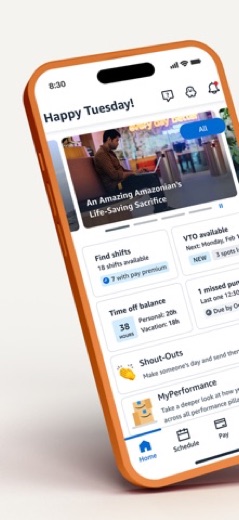
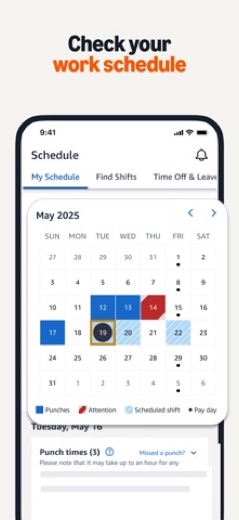
Amazon A to Z is Amazon's app for its own workforce: schedules, shift changes, missed punches, time off, benefits and pay, plus job listings for people who want to join or come back. It is free, well rated, and has a browser version at atoz.amazon.work for anyone on a PC.
What is Amazon A to Z?
AMZN Mobile LLC publishes Amazon A to Z on the App Store, and Google Play shows the publisher as Amazon Mobile LLC. The app is meant for current Amazon employees, former employees and job seekers, not for shoppers.
The Android version has been on Google Play since August 29, 2018 and the iPhone version on the App Store since April 30, 2020. Both were updated in November 2026.
The store descriptions keep to routine work tasks (the next shift, a forgotten punch, time off, pay) plus job listings and upskilling options. There is nothing in it for shopping.
No Windows app is listed. Amazon's web address for A to Z is atoz.amazon.work, which leads to Amazon's own sign-in page. This review is not that page and has no connection to Amazon.
Is this the real Amazon A to Z app?
- Listed on Google Play & App StoreStore listings on both Google Play and the App Store.
- Established since 2018Listed since Aug 29, 2018, 5,000,000+ installs on Google Play.
| Developer on Google Play | Amazon Mobile LLC |
|---|---|
| Developer on the App Store | AMZN Mobile LLC |
| Same developer on both stores | Names differ; compare them on each listing |
| Android package name | com.amazon.atozm |
| iOS bundle ID | com.amazon.EmployeeSelfServiceMobileIOS |
| On the stores since | Aug 29, 2018 |
| Installs on Google Play | 5,000,000+ |
| Developer website | atoz.amazon.work |
| Content rating | Google Play: Everyone / App Store: 4+ |
These details come from the public store listings. LookedApp doesn't host downloads: install from the Google Play or App Store buttons on this page.
Key features
- Shows the work schedule and lets employees request shift changes.
- Records missed punches.
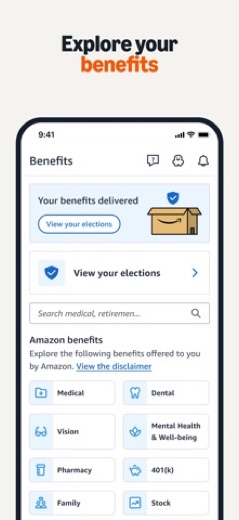
- Keeps time off and benefits in one place.
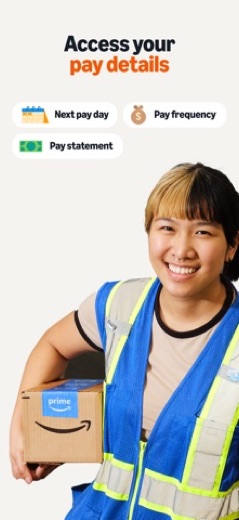
- Shows pay details.
- Suggests jobs, sends personal updates and lists upskilling and cross-training options.
- Keeps documents available even after someone leaves Amazon.
More Productivity & Email reviews


More news
- What's newGoogle Photos Update: Enhanced Search and Smarter Storage ManagementRecent updates to Google Photos bring a more powerful search experience to users and introduce a new tool to manage storage more efficiently, according to recent store listings.
- What's newWells Fargo Mobile: October 2026 Update Enhances Credit Card InsightsThe Wells Fargo Mobile app has received an update in October 2026, focusing on enhanced accessibility for personalized insights within credit card account details. LookedApp examines what this means for users and provides a refresher on the app's comprehensive banking functionalities.
- What's newWhat's New in Microsoft OneDrive: A Look at Recent UpdatesMicrosoft OneDrive has received significant updates across both iOS and Android platforms, enhancing file management, photo organization, and app stability. These changes reflect an ongoing commitment to providing a comprehensive cloud storage solution for users.



Privacy and permissions
The Google Play listing shows a wide set of permission groups: Camera, Contacts, Device ID & call information, Identity, Location, Microphone, Phone, Photos/Media/Files, Storage and Wi-Fi connection information. The listing does not explain them one by one.
Using the app means accepting Amazon's Conditions of Use and Privacy Notice for the user's country, which both store listings link to. Those documents, not the app pages, describe how Amazon handles the data.
AMZN Mobile LLC publishes its privacy policy at www.amazon.com.
Amazon A to Z permissions in plain English
The Google Play listing shows 10 permission groups. Google Play also lists 12 other permissions, such as “view network connections”. That is more than most productivity & email apps LookedApp reviews (typical: 7).
- CameraCan take photos and record video
- ContactsCan read your contacts
- Device ID & call informationCan read your device ID and call status
- IdentityCan find accounts on the device
- LocationCan use your precise location
- MicrophoneCan record audio
- PhoneCan read phone status or make calls
- Photos/Media/FilesCan read and change your photos, media and files
- StorageCan read and change files in shared storage
- Wi-Fi connection informationCan see Wi-Fi connection details
Permission names come from Google Play; the plain-English lines describe what each permission group allows, not how this app uses it.
Amazon A to Z at a glance
| Developer | AMZN Mobile LLC |
|---|---|
| Category | Business |
| Rating on App Store | 4.7 out of 5 (804K ratings) |
| Rating on Google Play | 4.1 out of 5 (100K ratings) |
| Installs on Google Play | 5M+ |
| Price | Free |
| Age rating | 4+ |
What changed in the latest Amazon A to Z version
App Store and Google Play · Version 6.0.4768, released Nov 11, 2026; Google Play listing updated Nov 13, 2026
The release notes are general and don't list specific changes:
“Stability improvements”
Quoted from the store listings' release notes.
Pricing
Amazon A to Z is free on both stores, and Google Play shows no in-app purchases. Neither listing mentions a premium tier or subscription.
Amazon A to Z compared with similar apps
| App | Rating | Installs | Price |
|---|---|---|---|
 Amazon A to Z | 4.7 | 5M+ | Free |
 AOL | 4.6 | 10M+ | Free |
 BurlingtonEnglish | 4.4 | 1M+ | Free |
 Citrix Workspace | 4.0 | 10M+ | Free |
Popular reviews
 Email for Outlook, Hotmail reviewEmail for Outlook, Hotmail is a third-party Android mail client for Outlook.com and Hotmail addresses. Microsoft does…Productivity & Email
 DYMO Connect reviewDYMO Connect is DYMO's label design software, and the version most people need is DYMO Connect for Desktop on Windows…Productivity & Email
 Microsoft Teams reviewMicrosoft Teams is a comprehensive communication and collaboration application designed to bring individuals together…Productivity & Email
 Microsoft Outlook reviewMicrosoft Outlook is a comprehensive mobile application designed for email and calendar management, enabling users to…Productivity & Email
 Epson DocumentScan reviewEpson DocumentScan sends scans from a supported Epson document scanner straight to an iPhone, iPad or Android phone,…Productivity & Email
 Email App reviewEmail App is an application designed for managing email communication, published by All Email Connect -Fast & Secure…Productivity & Email
How to get Amazon A to Z safely
Install it from the App Store, where the seller is AMZN Mobile LLC, or from Google Play, where it is Amazon Mobile LLC. The app holds pay and employment details, so APK mirrors and modified copies are a poor idea.
On an iPhone it needs iOS 15.8 or later. Account access problems are for Amazon to solve; no download site or review page can reset an A to Z account.
On a PC nothing needs installing: Amazon's web version opens in a browser at atoz.amazon.work. A file sold or offered as an A to Z download for Windows does not come from Amazon's store listings and is best avoided.
How to install Amazon A to Z
On Android (Google Play)
- Open the Google Play Store app on your Android phone or tablet.
- Search for Amazon A to Z, or use the Google Play button on this page to open the listing directly.
- Check that the developer under the app name is Amazon Mobile LLC.
- Check that your device meets the listing's requirement: Android 7.0 and up.
- Tap Install (or the price, for a paid app) and wait for the download to finish, then open the app from your home screen.
On iPhone and iPad (App Store)
- Open the App Store on your iPhone or iPad.
- Search for Amazon A to Z, or use the App Store button on this page to open the listing directly.
- Check that the developer under the app name is AMZN Mobile LLC.
- Make sure your device has iOS 15.8 or later and about 203 MB of free space, as the listing states.
- Tap Get (or the price), confirm the download, then open the app from your home screen.
Amazon A to Z version and app details
| Google Play | App Store | |
|---|---|---|
| Latest version | – | 6.0.4768 |
| Last updated | Nov 13, 2026 | Nov 11, 2026 |
| First released | Aug 29, 2018 | Apr 30, 2020 |
| Package name | com.amazon.atozm | – |
| Bundle ID | – | com.amazon.EmployeeSelfServiceMobileIOS |
| Requires | Android 7.0 and up | iOS 15.8 or later |
| Download size | – | 203 MB |
| Content rating | Everyone | 4+ |
| In-app purchases | No | – |
| Contains ads | No | – |
| Languages | – | 20 (including English) |
| Developer | Amazon Mobile LLC | AMZN Mobile LLC |
Who Amazon A to Z is for
Current Amazon employees who manage shifts, time off and pay from their phone get daily use out of it. Being able to request a shift change or record a missed punch without finding a manager or a terminal is the main draw, and benefits and pay details sit in the same place.
Former Amazonians can keep reaching their documents, and job seekers can browse openings and get recommendations at Amazon. For anyone outside those three groups the app has no use.
Pros
- Free, with no in-app purchases
- Schedules, time off, pay and benefits in one app
- Rated 4.7 on the App Store from 804.3K ratings
- Also works in a browser at atoz.amazon.work
Cons
- Only useful to Amazon employees, former staff and applicants
- Long Android permission list
- Google Play rating of 4.1 trails the App Store's 4.7
Amazon A to Z: frequently asked questions
Can Amazon A to Z be used on a PC?
No Windows app is listed. Amazon's web version is at atoz.amazon.work and opens in any desktop browser, where it leads to Amazon's own sign-in page.
Is Amazon A to Z free?
Yes. Both stores list it as free, with no in-app purchases on Google Play.
Can former employees use the app?
Yes. The store listings say documents stay available after leaving Amazon, and the app also serves job seekers.
Can missed punches or shift changes be handled in the app?
Yes. Both listings say employees can record missed punches and request shift changes, alongside viewing the schedule.
Which iPhones can run it?
iPhones on iOS 15.8 or later.
Is this the A to Z sign-in page?
No. This is an independent review with no connection to Amazon. Sign-in and password problems go to Amazon or the site's HR team.
Amazon A to Z
- Category
- Business
- Version
- 6.0.4768
Download
Looking for the Amazon A to Z website or sign-in? Go to atoz.amazon.work →The developer's website, as given on the store listing.
Amazon A to Z ratings breakdown
Google Play 4.1 average from 100,478 ratings
- 570%
- 46%
- 33%
- 23%
- 117%
App Store 4.7 average from 804,344 ratings
- 588%
- 46%
- 32%
- 21%
- 13%
Share of ratings for each star level, as shown on the listings, as of Nov 17, 2026.