Logitech G
EntertainmentScreenshots
Analysis by LookedApp · Published · Updated
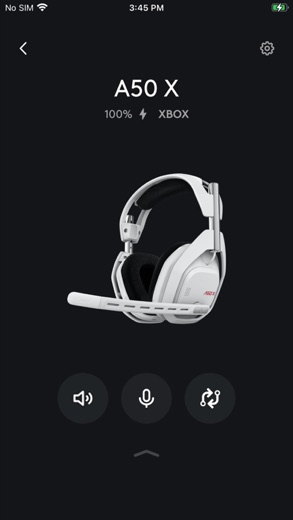
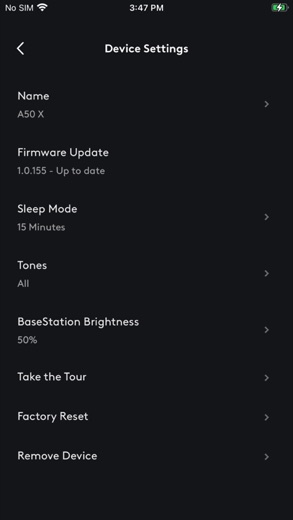
The Logitech G app is a phone remote for a handful of Logitech G and Astro wireless headsets, covering EQ, mic settings and game-chat mix. It does not configure mice or keyboards; on a PC or Mac, that job belongs to Logitech G HUB, the software most searches for Logitech G software are really after.
What is Logitech G?
Logitech publishes the Logitech G app on the App Store, as Logitech Inc., and on Google Play, as Logitech Europe S.A. The Android version dates from September 21, 2022, and the App Store version from a week later. It controls supported headsets from a phone and saves the settings to the headset itself, so they stay put when the headset moves to a console or PC.
The supported list is short: PRO X3 Wireless, G522, G325, A50 X, A50, A30 and A20 X. Older Astro headsets use Astro Command Center instead, and Logitech G mice, keyboards and other headsets are set up in G HUB on a computer.
Is this the real Logitech G app?
- Verified publisher infoSame developer on Google Play and the App Store (Logitech Europe S.A.), and the developer website logitechg.com matches the publisher.
| Developer on Google Play | Logitech Europe S.A. |
|---|---|
| Developer on the App Store | Logitech Inc. |
| Same developer on both stores | Yes |
| Android package name | com.astrogaming.scorpius |
| iOS bundle ID | com.astrogaming.scorpiusMCC |
| On the stores since | Sep 21, 2022 |
| Installs on Google Play | 500,000+ |
| Developer website | logitechg.com |
| Content rating | Google Play: Everyone / App Store: 4+ |
These details come from the public store listings. LookedApp doesn't host downloads: install from the Google Play or App Store buttons on this page.
Key features
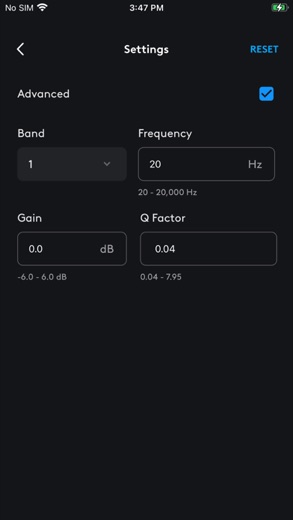
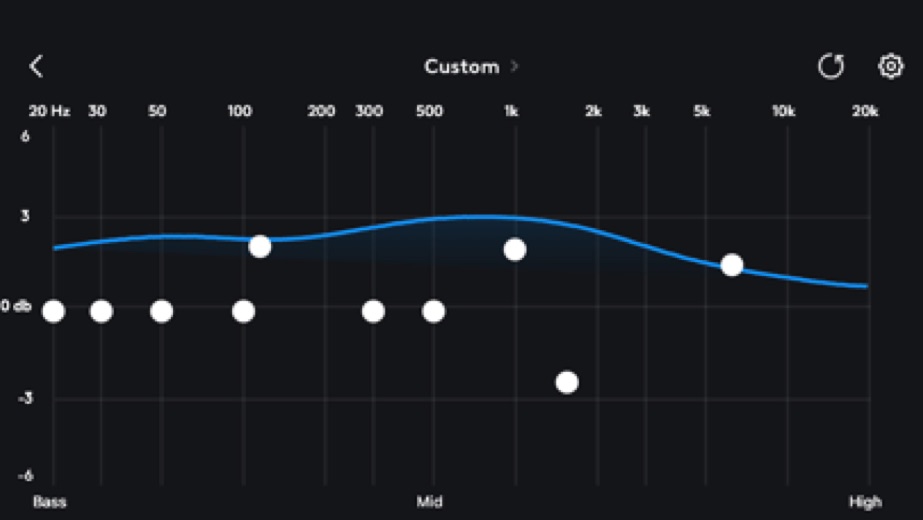
- A 10-band graphic EQ on most supported headsets, a parametric EQ on several, and a 5-band EQ on the A30.
- Microphone tuning, including a 10-band mic EQ on some models.
- A game and voice chat mixer for Xbox, PlayStation and PC.
- PLAYSYNC switching between Xbox, PlayStation and PC on the A50 X, A50 and A20 X.
- A volume limiter on the G325.
- Profiles that bundle mic, EQ and mix settings for quick changes.
More Streaming, TV & News reviews




More news
- What's newWhat's New in WhatsApp Messenger: Group History Sharing and Enhanced CallsThe latest WhatsApp Messenger update introduces new functionalities for group chats and calls on Android, while the iOS version receives general improvements. LookedApp's news desk provides a breakdown of these changes, alongside a refresher on the application's core features and pricing.
- What's newWhat's New in YouTube Music: Latest Updates and Features ExploredYouTube Music recently received updates across its platforms, introducing new discovery tools and general enhancements for a smoother listening experience. This analysis, informed by LookedApp's review, explores the changes and how they impact users.
- What's newCanvas Student Update: New AI Study Tools and Offline EnhancementsLookedApp's news desk reviews the latest Canvas Student update, focusing on new study tools, expanded offline capabilities, and various user experience improvements. This release builds upon the application's core provisions for learners.


Platforms and editions
The phone app needs iOS 15.6 or later on Apple devices, where it is version 1.8.1, and it is also on Android. There is no Logitech G app for Windows or Mac.
On computers, Logitech's software is G HUB, with downloads for Windows and macOS on logitechg.com. G HUB supports Windows 10 version 1809 and later and the latest three major releases of macOS. It handles DPI settings, button assignments, LIGHTSYNC RGB lighting, a games library and KEYCONTROL for G keyboards. The developer page does not state a price for G HUB.
Logitech G permissions in plain English
The Google Play listing shows 1 permission group. Google Play also lists 8 other permissions, such as “view network connections”. That is fewer than most streaming, tv & news apps LookedApp reviews (typical: 5).
- LocationCan use your precise location
Permission names come from Google Play; the plain-English lines describe what each permission group allows, not how this app uses it.
Logitech G at a glance
| Developer | Logitech Inc. |
|---|---|
| Category | Entertainment |
| Rating on App Store | 4.7 out of 5 (6.9K ratings) |
| Rating on Google Play | 4.3 out of 5 (3.7K ratings) |
| Installs on Google Play | 500K+ |
| Price | Free |
| Age rating | 4+ |
What changed in the latest Logitech G version
App Store · Version 1.8.1, released Oct 20, 2026
The release notes are general and don't list specific changes:
“Bug fixes and feature improvements”
Google Play · Listing updated Sep 21, 2026
The release notes say:
“Adding support for PRO X3 LIGHTSPEED Wireless Gaming Headset.”
Quoted from the store listings' release notes.
Pricing
The Logitech G app is free on both stores, and the Google Play listing shows no in-app purchases. The listing mentions shopping and support links inside the app, but no paid features.
Logitech G compared with similar apps
| App | Rating | Installs | Price |
|---|---|---|---|
 Logitech G | 4.7 | 500K+ | Free |
 Amtrak | 4.7 | 5M+ | Free |
 Apple Devices | – | – | – |
 Audacity | – | – | – |
Popular reviews
 Regal reviewThe Regal app allows users to find showtimes, discover new releases, and purchase movie tickets for Regal Cinemas. It…Streaming, TV & News
 YouTube Kids reviewYouTube Kids is a dedicated application designed to help children explore video content in an environment curated for…Streaming, TV & News
 Netflix reviewThe Netflix app provides a platform for streaming a wide variety of television shows and movies from around the world.…Streaming, TV & News
 MS NOW (formerly MSNBC) reviewThe MS NOW app, formerly MSNBC, provides users with a curated newsfeed, unlimited articles, and live streaming of news…Streaming, TV & News
 Fubo reviewThe Fubo app serves as a comprehensive live TV streaming service primarily catering to sports enthusiasts and those…Streaming, TV & News
 Spectrum TV reviewThe Spectrum TV app enables users to stream live television and On Demand content directly on their mobile devices.…Streaming, TV & News
How to get Logitech G safely
Install the phone app from the App Store listing by Logitech Inc. or the Google Play listing by Logitech Europe S.A. For G HUB, use the download buttons on logitechg.com. Driver bundles and G HUB installers on other sites are unnecessary and can be tampered with.
On Android, the only permission group listed is Location; the listing does not say what it is used for. The App Store version is rated 4+.
How to install Logitech G
On Android (Google Play)
- Open the Google Play Store app on your Android phone or tablet.
- Search for Logitech G, or use the Google Play button on this page to open the listing directly.
- Check that the developer under the app name is Logitech Europe S.A..
- Check that your device meets the listing's requirement: Android 9 and up.
- Tap Install (or the price, for a paid app) and wait for the download to finish, then open the app from your home screen.
On iPhone and iPad (App Store)
- Open the App Store on your iPhone or iPad.
- Search for Logitech G, or use the App Store button on this page to open the listing directly.
- Check that the developer under the app name is Logitech Inc..
- Make sure your device has iOS 15.6 or later and about 76 MB of free space, as the listing states.
- Tap Get (or the price), confirm the download, then open the app from your home screen.
Logitech G version and app details
| Google Play | App Store | |
|---|---|---|
| Latest version | – | 1.8.1 |
| Last updated | Sep 21, 2026 | Oct 20, 2026 |
| First released | Sep 21, 2022 | Sep 28, 2022 |
| Package name | com.astrogaming.scorpius | – |
| Bundle ID | – | com.astrogaming.scorpiusMCC |
| Requires | Android 9 and up | iOS 15.6 or later |
| Download size | – | 76 MB |
| Content rating | Everyone | 4+ |
| In-app purchases | No | – |
| Contains ads | No | – |
| Languages | – | 19 (including English) |
| Developer | Logitech Europe S.A. | Logitech Inc. |
Who Logitech G is for
Owners of the seven supported headsets who want to adjust sound from the couch, especially console players using an A50 X or A20 X across several systems. Because the latest settings are stored on the headset, they keep working when the headset is later used with an Xbox or PlayStation.
Anyone else, particularly people with a Logitech G mouse or keyboard, should skip the phone app and install G HUB on their computer.
Pros
- Free, with no in-app purchases on Google Play.
- Detailed EQ and mic controls for supported headsets.
- Settings saved to the headset carry over between devices.
- Well rated: 4.7 from 6.9K on the App Store and 4.3 on Google Play.
Cons
- Supports only seven headsets.
- No support for mice or keyboards; those need G HUB on a computer.
- Some features are limited to specific models.
Logitech G: frequently asked questions
Is the Logitech G app the same as G HUB?
No. The app is for phones and a few wireless headsets. G HUB is Logitech's Windows and macOS software for gaming mice, keyboards and other gear.
Where does Logitech G HUB for PC come from?
Download it from logitechg.com. It supports Windows 10 version 1809 and later and the latest three major macOS releases.
Which headsets does the Logitech G app support?
PRO X3 Wireless, G522, G325, A50 X, A50, A30 and A20 X.
Does the app work with a Logitech G mouse?
No. The app lists headsets only. Mouse DPI, buttons and lighting are set in G HUB on Windows or macOS.
Is the Logitech G app free?
Yes. G HUB is a separate download from logitechg.com, and its page does not state a price.
What about older Astro headsets?
Logitech points owners of older Astro headsets to Astro Command Center.
Logitech G
- Category
- Entertainment
- Version
- 1.8.1
Download
Looking for the Logitech G website or sign-in? Go to logitechg.com →The developer's website, as given on the store listing.
Logitech G ratings breakdown
Google Play 4.3 average from 3,677 ratings
- 563%
- 424%
- 35%
- 20%
- 18%
App Store 4.7 average from 6,924 ratings
- 586%
- 47%
- 33%
- 21%
- 13%
Share of ratings for each star level, as shown on the listings, as of Oct 23, 2026.