Creality Cloud
UtilitiesScreenshots
Analysis by LookedApp · Published · Updated
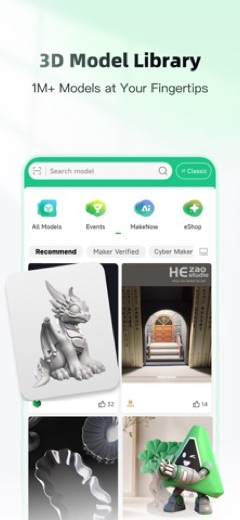
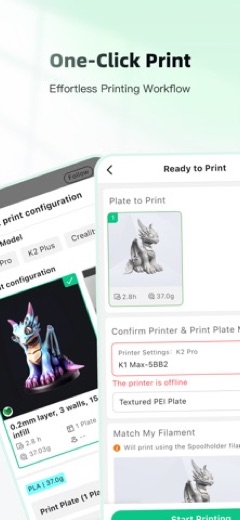
Creality Cloud is a phone app and web platform for finding 3D models, slicing them in the cloud and sending jobs to a networked printer. It is free to start, with a paid Premium membership, and people who want to print from a PC pair it with Creality Print, the company's desktop slicer.
What is Creality Cloud?
Creality Cloud comes from Creality, the 3D printer maker, and works as a model library, slicer and printer remote in one place. On the App Store it is published by CREALITY 3D (HK) TECHNOLOGY LIMITED; on Google Play the publisher is listed as Creality Cloud. The store listings claim a community of over 4 million users.
The app has been on Google Play since March 27, 2020 and on the App Store since July 25, 2021. Both were updated in mid-November 2026, with the App Store at version 7.3.36. Ratings are solid: 4.3 from 36.7K on Google Play and 4.6 from 7.2K on the App Store.
Is this the real Creality Cloud app?
- Listed on Google Play & App StoreStore listings on both Google Play and the App Store.
- Established since 2020Listed since Mar 27, 2020, 5,000,000+ installs on Google Play.
| Developer on Google Play | Creality Cloud |
|---|---|
| Developer on the App Store | CREALITY 3D (HK) TECHNOLOGY LIMITED |
| Same developer on both stores | Names differ; compare them on each listing |
| Android package name | com.cxsw.sdprinter |
| iOS bundle ID | com.creality.cxsw.global |
| On the stores since | Mar 27, 2020 |
| Installs on Google Play | 5,000,000+ |
| Developer website | crealitycloud.com |
| Content rating | Google Play: Everyone / App Store: 12+ |
These details come from the public store listings. LookedApp doesn't host downloads: install from the Google Play or App Store buttons on this page.
Key features
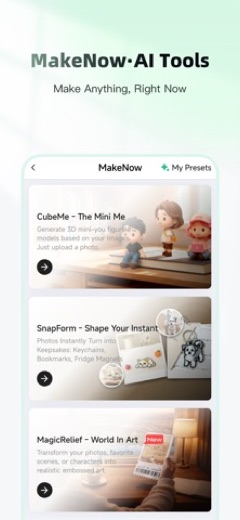
- A large model library with free and paid designs, plus image-based and semantic search.
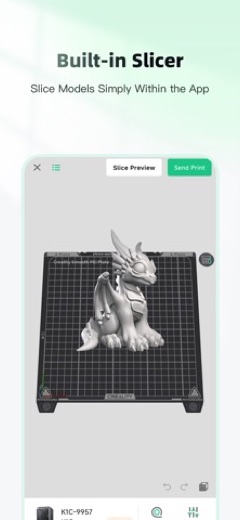
- Cloud slicing that turns STL files into G-code without desktop software, and direct printing of 3MF files.
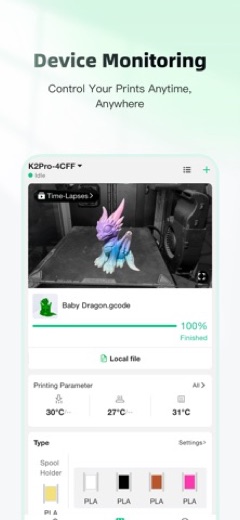
- Remote control of one or several printers, with live status and timelapse videos.
- Tools for designers who sell models: their own prices, discounts, and points that can be redeemed for rewards.
- A community area for sharing prints and asking for advice, plus guides and tutorials.
More Tools & Utilities reviews




More news
- What's newGoogle Photos Update: Enhanced Search and Smarter Storage ManagementRecent updates to Google Photos bring a more powerful search experience to users and introduce a new tool to manage storage more efficiently, according to recent store listings.
- What's newWells Fargo Mobile: October 2026 Update Enhances Credit Card InsightsThe Wells Fargo Mobile app has received an update in October 2026, focusing on enhanced accessibility for personalized insights within credit card account details. LookedApp examines what this means for users and provides a refresher on the app's comprehensive banking functionalities.
- What's newWhat's New in Microsoft OneDrive: A Look at Recent UpdatesMicrosoft OneDrive has received significant updates across both iOS and Android platforms, enhancing file management, photo organization, and app stability. These changes reflect an ongoing commitment to providing a comprehensive cloud storage solution for users.



Platforms and editions
The app runs on Android and on iPhone and iPad with iOS 15.5 or later, where it supports 18 languages. Cloud slicing also works in a web browser at crealitycloud.com, which is the closest thing to a Creality Cloud for PC.
For a full desktop setup, Creality offers Creality Print, an FFF slicer for Windows and for Macs with Intel or Apple chips. It signs in with the same Creality Cloud account and can send G-code over USB or Wi-Fi. The latest Windows release is V7.3.2.6412 from November 14, 2026. Minimum specs are a 64-bit system, 4GB RAM, 550 MB of disk space, a 1024 x 768 display and OpenGL 2 graphics (OpenGL 4.1 for the 3D layer view); 8GB RAM and a 1920 x 1080 screen are recommended.
Creality Cloud permissions in plain English
The Google Play listing shows 6 permission groups. Google Play also lists 15 other permissions, such as “view network connections”. That is more than most tools & utilities apps LookedApp reviews (typical: 5).
- CameraCan take photos and record video
- LocationCan use your precise location
- MicrophoneCan record audio
- Photos/Media/FilesCan read and change your photos, media and files
- StorageCan read and change files in shared storage
- Wi-Fi connection informationCan see Wi-Fi connection details
The App Store privacy label lists these data types:
- Used to track you: Identifiers
- Not linked to you: Contact Info, Search History, Identifiers, Diagnostics
Permission names come from Google Play; the plain-English lines describe what each permission group allows, not how this app uses it.
Creality Cloud at a glance
| Developer | CREALITY 3D (HK) TECHNOLOGY LIMITED |
|---|---|
| Category | Utilities |
| Rating on App Store | 4.6 out of 5 (7.2K ratings) |
| Rating on Google Play | 4.3 out of 5 (37K ratings) |
| Installs on Google Play | 5M+ |
| Price | Free |
| Age rating | 12+ |
What changed in the latest Creality Cloud version
App Store · Version 7.3.36, released Nov 14, 2026
The release notes say:
“1. Added feature support for K3 and SPARKX i8 printers. 2. Optimized large model scaling in FlowSlicer. 3. Added single-color and multi-color filters to All Models. 4. Improved Membership Center features and text. 5. Fixed known bugs and improved overall stability.”
Google Play · Listing updated Nov 13, 2026
The release notes say:
“V7.3.34 Release Notes 1. Renamed "My Models - Folders" to "Personal Collections". 2. Renamed "Folders" to "Collections" on other users' profiles and improved model organization and display. 3. Optimized the printer selection experience on the Prepare to Print page. 4. Improved printer selection and other interactions in FlowSlicer. 5. Fixed known bugs and improved overall stability.”
Quoted from the store listings' release notes.
Pricing
The app is free to install. Both stores note in-app purchases: Premium membership comes in Monthly and Annual plans, and the listings say it includes downloads of 400+ premium models and faster downloads and slicing. New accounts get 7 days of Premium. The store listings do not give prices; the plan screen inside the app shows them before any charge.
Some models in the library are sold by their designers, separately from Premium.
Creality Cloud compared with similar apps
| App | Rating | Installs | Price |
|---|---|---|---|
 Creality Cloud | 4.3 | 5M+ | Free |
 Amtrak | 4.7 | 5M+ | Free |
 Apple Devices | – | – | – |
 Audacity | – | – | – |
Popular reviews
 Tolls NY (E-ZPass NY) reviewTolls NY (E-ZPass NY) is a mobile application designed for E-ZPass NY and Tolls by Mail customers to manage their…Tools & Utilities
 Wells Fargo Mobile reviewThe Wells Fargo Mobile app offers a comprehensive suite of banking and financial management tools for customers with…Tools & Utilities
 MyHumana reviewMyHumana is Humana's member app for coverage details, claims, drug prices and ID cards. It only works with an active…Tools & Utilities
- Baby Buddy for Android reviewBaby Buddy for Android is a companion application designed for caregivers to track a baby's activities, including…Tools & Utilities
 MyChart reviewMyChart is an application designed to provide users with direct access to their personal health information and…Tools & Utilities
 Kaiser Permanente reviewThe Kaiser Permanente app reaches past insurance into day-to-day care: members message their doctor's office, book…Tools & Utilities
How to get Creality Cloud safely
Install from the App Store listing by CREALITY 3D (HK) TECHNOLOGY LIMITED or the Google Play listing by Creality Cloud, and get Creality Print from the downloads section of crealitycloud.com. Modified APKs and repackaged slicers from other sites can carry malware.
On Android, the app asks for Camera, Location, Microphone, Photos/Media/Files, Storage and Wi-Fi connection information. The listing does not explain each one, and any of them can be turned off in Android settings. Premium on iPhone renews automatically and is canceled in the Apple ID subscription settings.
How to install Creality Cloud
On Android (Google Play)
- Open the Google Play Store app on your Android phone or tablet.
- Search for Creality Cloud, or use the Google Play button on this page to open the listing directly.
- Check that the developer under the app name is Creality Cloud.
- Check that your device meets the listing's requirement: Android 7.0 and up.
- Tap Install (or the price, for a paid app) and wait for the download to finish, then open the app from your home screen.
- The listing shows in-app purchases, so review any purchase prompts before you confirm.
On iPhone and iPad (App Store)
- Open the App Store on your iPhone or iPad.
- Search for Creality Cloud, or use the App Store button on this page to open the listing directly.
- Check that the developer under the app name is CREALITY 3D (HK) TECHNOLOGY LIMITED.
- Make sure your device has iOS 15.5 or later and about 334 MB of free space, as the listing states.
- Tap Get (or the price), confirm the download, then open the app from your home screen.
- The listing shows in-app purchases, so review any purchase prompts before you confirm.
Creality Cloud version and app details
| Google Play | App Store | |
|---|---|---|
| Latest version | – | 7.3.36 |
| Last updated | Nov 13, 2026 | Nov 14, 2026 |
| First released | Mar 27, 2020 | Jul 25, 2021 |
| Package name | com.cxsw.sdprinter | – |
| Bundle ID | – | com.creality.cxsw.global |
| Requires | Android 7.0 and up | iOS 15.5 or later |
| Download size | – | 334 MB |
| Content rating | Everyone (Users Interact) | 12+ |
| In-app purchases | Yes ($0.99 - $399.99 per item) | Yes |
| Contains ads | Yes | – |
| Languages | – | 17 (including English) |
| Developer | Creality Cloud | CREALITY 3D (HK) TECHNOLOGY LIMITED |
Who Creality Cloud is for
Owners of Creality printers with Wi-Fi get the most value, since they can slice and start prints from a phone and watch progress remotely. Hobbyists looking for printable models will also find the library useful even without a Creality machine.
People who tune slicer settings in detail will still want Creality Print or another desktop slicer for that work.
Pros
- Free to start, with a large model library.
- Slicing without desktop software, on the phone or the web.
- Remote monitoring with timelapse capture.
- High store ratings: 4.6 on the App Store and 4.3 on Google Play.
- Pairs with Creality Print on Windows and Mac.
Cons
- Premium is a subscription, and prices are not shown in the store text.
- Broad Android permissions, including camera, microphone and location.
Creality Cloud: frequently asked questions
Is Creality Cloud free?
Yes, it is free to install and use, with optional Premium membership in Monthly and Annual plans. New accounts get 7 days of Premium.
Is there a Creality Cloud app for PC?
Cloud slicing works in a browser at crealitycloud.com. For desktop printing, Creality offers Creality Print for Windows and Mac, which uses the same account.
What does Creality Print need to run?
A 64-bit system with at least 4GB RAM, 550 MB of disk space, a 1024 x 768 display and OpenGL 2 graphics. Creality recommends 8GB RAM.
Can it control more than one printer?
Yes. The store listings describe a dashboard for running several printers remotely.
Who makes Creality Cloud?
Creality. The App Store lists CREALITY 3D (HK) TECHNOLOGY LIMITED as the developer.
Creality Cloud
- Category
- Utilities
- Version
- 7.3.36
Download
Looking for the Creality Cloud website or sign-in? Go to crealitycloud.com →The developer's website, as given on the store listing.
Creality Cloud ratings breakdown
Google Play 4.3 average from 36,686 ratings
- 575%
- 46%
- 34%
- 23%
- 112%
App Store 4.6 average from 7,219 ratings
- 583%
- 46%
- 32%
- 22%
- 17%
Share of ratings for each star level, as shown on the listings, as of Nov 16, 2026.