Chess.com
GamesScreenshots
Analysis by LookedApp · Published · Updated
Chess.com is a chess site with a very large player base, and its app lets anyone play unlimited games against people or computer bots for free, with puzzles, lessons and game review rationed on the free tier. Paid Gold, Platinum and Diamond memberships lift those limits. On a PC it runs in the browser or as an installable web app, so there is little reason to look for a separate download.
What is Chess.com?
Chess.com is a chess site and app published by Chess.com on both stores. The app has been on the App Store since 2009 and on Google Play since 2010, and its store pages describe a community of more than 280 million players with over 20 million games played each day.
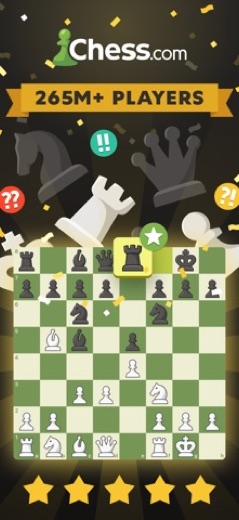
The app covers the whole game in one place: live games from bullet to long time controls, daily correspondence chess, puzzles, lessons, a coach mode and computer opponents. It is available on iPhone, iPad, Android, Mac computers with Apple silicon, Apple Watch and Apple Vision, and the full service also runs on the chess.com website.
Is this the real Chess.com app?
- Verified publisher infoSame developer on Google Play and the App Store (Chess.com), and the developer website chess.com matches the publisher.
- Established since 2009Listed since Oct 29, 2009, 100,000,000+ installs on Google Play.
| Developer on Google Play | Chess.com |
|---|---|
| Developer on the App Store | Chess.com |
| Same developer on both stores | Yes |
| Android package name | com.chess |
| iOS bundle ID | com.chess.iphone |
| On the stores since | Oct 29, 2009 |
| Installs on Google Play | 100,000,000+ |
| Developer website | chess.com |
| Content rating | Google Play: Everyone / App Store: 4+ |
These details come from the public store listings. LookedApp doesn't host downloads: install from the Google Play or App Store buttons on this page.
Key features
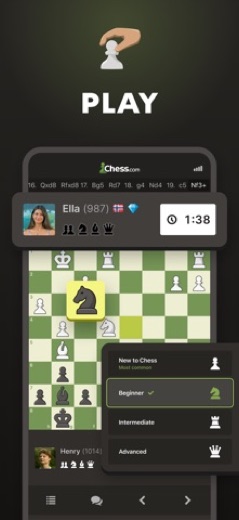
- Play people online at any speed, from one-minute games to 30 minutes or longer, or play friends in two-player mode.
- Computer opponents at a chosen level and with a timer, including offline; free accounts get a smaller set of bots, and the full 100-plus personalities come with Gold.
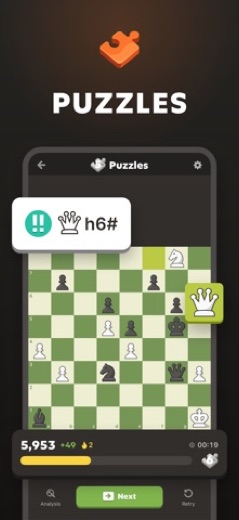
- Over 1,000,000 puzzles, with a rated mode that adjusts to skill, plus Puzzle Rush and Puzzle Battle.
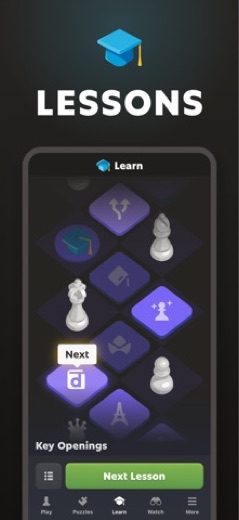
- Lessons and videos from masters arranged as a step-by-step course on openings, strategy and endgames.
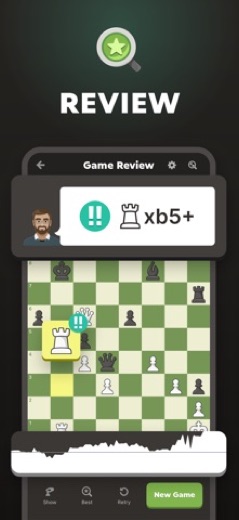
- Game review that points out the best moves and mistakes in finished games.
- Variants such as Chess960, blitz, bullet and blindfold, plus tournaments and clubs.
More Games & Learning reviews



More news
- What's newGoogle Photos Update: Enhanced Search and Smarter Storage ManagementRecent updates to Google Photos bring a more powerful search experience to users and introduce a new tool to manage storage more efficiently, according to recent store listings.
- What's newWells Fargo Mobile: October 2026 Update Enhances Credit Card InsightsThe Wells Fargo Mobile app has received an update in October 2026, focusing on enhanced accessibility for personalized insights within credit card account details. LookedApp examines what this means for users and provides a refresher on the app's comprehensive banking functionalities.
- What's newWhat's New in Microsoft OneDrive: A Look at Recent UpdatesMicrosoft OneDrive has received significant updates across both iOS and Android platforms, enhancing file management, photo organization, and app stability. These changes reflect an ongoing commitment to providing a comprehensive cloud storage solution for users.



Privacy and permissions
On Android, the Google Play listing shows permission groups for Contacts, Location, Photos/Media/Files, Storage and Wi-Fi connection information. The listing does not say what each permission is used for.
Chess.com accounts include a public profile, rating and game archive. The store listings do not detail privacy settings, so the account settings on chess.com and the developer's privacy policy are the places to check what is visible to other players.
Chess.com publishes its privacy policy at www.chess.com.
Chess.com permissions in plain English
The Google Play listing shows 5 permission groups. Google Play also lists 8 other permissions, such as “view network connections”. That is more than most games & learning apps LookedApp reviews (typical: 1).
- ContactsCan read your contacts
- LocationCan use your precise location
- Photos/Media/FilesCan read and change your photos, media and files
- StorageCan read and change files in shared storage
- Wi-Fi connection informationCan see Wi-Fi connection details
The App Store privacy label lists these data types:
- Used to track you: Browsing History, Usage Data
- Linked to you: Contact Info, Identifiers
- Not linked to you: Browsing History, Identifiers, Usage Data, Diagnostics
Permission names come from Google Play; the plain-English lines describe what each permission group allows, not how this app uses it.
Chess.com at a glance
| Developer | Chess.com |
|---|---|
| Category | Games |
| Rating on App Store | 4.8 out of 5 (899K ratings) |
| Rating on Google Play | 4.7 out of 5 (3.5M ratings) |
| Installs on Google Play | 100M+ |
| Price | Free |
| Age rating | 4+ |
What changed in the latest Chess.com version
App Store · Version 4.10.39, released Nov 17, 2026
The release notes say:
“Hi chess fans! Today's new version improves app quality, removing a couple of bugs that could cause the app to crash. We hope you enjoy it! Thank you.”
Google Play · Listing updated Nov 19, 2026
The release notes say:
“Hey, chess-lovers! This new version brings improvements and fixes throughout the app - and some great new features too! Level up your Puzzle practice by earning points for every correct move. Keep solving to advance and earn new scoring bonuses! Game Review now estimates your rating in that match - and shows how well you played at each stage of the game!”
Quoted from the store listings' release notes.
Pricing
A free Basic account allows unlimited games in every time control, but other tools are capped: 3 puzzles a day, 1 full game review a day, the New to Chess lessons plus 1 more lesson a day, and 1 Coach game a month. Gold removes ads and opens unlimited lessons and puzzles, more than 100 computer personalities and unlimited Coach games. Platinum adds unlimited game review and analysis, and Diamond adds coach explanations for every move, Insights stats and custom analysis settings. A Friends & Family plan lets up to six members share one yearly Diamond membership.
Prices vary by store and billing period. In the U.S. App Store, Gold appears at $4.99, $6.99 and $29.99, Platinum at $6.99, $10.99 and $79.99, and Diamond at $14.99, $16.99, $99.99 and $119.99; the store does not label which price is monthly or yearly. Chess.com offers a free trial on its paid plans and sends a reminder before it ends.
Chess.com compared with similar apps
| App | Rating | Installs | Price |
|---|---|---|---|
 Chess.com | 4.7 | 100M+ | Free |
 Delta Executor | 2.5 | 500K+ | Free |
 Mahjong 4 Friends | 4.9 | 100K+ | Free |
 The Sims FreePlay | 4.7 | 100M+ | Free |
Popular reviews
 Scratch reviewScratch is a block-based programming environment available through a web browser and as a downloadable computer…Games & Learning
 Memrise reviewMemrise is a language learning application designed for individuals with diverse learning objectives, ranging from exam…Games & Learning
 ABCya! Games reviewABCya! Games is an educational application designed for children from pre-kindergarten through sixth grade and beyond,…Games & Learning
 Among Us reviewAmong Us is a social deduction game where players work together to prepare a spaceship for departure while identifying…Games & Learning
 Solitaire.com reviewSolitaire.com, developed by Tripledot Studios Limited, offers a classic Solitaire card game experience for mobile…Games & Learning
 Canvas Student reviewCanvas Student is an education application developed by Instructure, designed to help learners manage their academic…Games & Learning
Platforms and editions
Searches for chess for PC, chess for Windows or chess on a laptop are covered by the website. Chess.com's help center describes installing it from Google Chrome: open chess.com, click the install icon at the right of the address bar, and the site opens in its own window that can be pinned to the taskbar. On a Mac with an M1 chip or later and macOS 14.0 or later, the App Store version also runs.
Phones and tablets use the store apps: iOS 17.0 or later on Apple devices, and Google Play on Android, where the publisher is Chess.com. Chess games offered as setup files on download sites are not needed and are not from Chess.com.
How to install Chess.com
On Android (Google Play)
- Open the Google Play Store app on your Android phone or tablet.
- Search for Chess.com, or use the Google Play button on this page to open the listing directly.
- Check that the developer under the app name is Chess.com.
- Tap Install (or the price, for a paid app) and wait for the download to finish, then open the app from your home screen.
- The listing shows in-app purchases, so review any purchase prompts before you confirm.
On iPhone and iPad (App Store)
- Open the App Store on your iPhone or iPad.
- Search for Chess.com, or use the App Store button on this page to open the listing directly.
- Check that the developer under the app name is Chess.com.
- Make sure your device has iOS 17.0 or later and about 473 MB of free space, as the listing states.
- Tap Get (or the price), confirm the download, then open the app from your home screen.
- The listing shows in-app purchases, so review any purchase prompts before you confirm.
Chess.com version and app details
| Google Play | App Store | |
|---|---|---|
| Latest version | – | 4.10.39 |
| Last updated | Nov 19, 2026 | Nov 17, 2026 |
| First released | Feb 1, 2010 | Oct 29, 2009 |
| Package name | com.chess | – |
| Bundle ID | – | com.chess.iphone |
| Requires | – | iOS 17.0 or later |
| Download size | – | 473 MB |
| Content rating | Everyone (Users Interact, In-Game Purchases) | 4+ |
| In-app purchases | Yes ($1.00 - $229.99 per item) | Yes |
| Contains ads | Yes | – |
| Languages | – | 51 (including English) |
| Developer | Chess.com | Chess.com |
Who Chess.com is for
Beginners get a clear path through lessons and an easy way to play the computer for free, while club players get rated games, tournaments and analysis. People who just want a quick free game against the computer can do that without paying anything.
Players who want to study seriously will feel the daily limits on the free tier, especially the single game review per day. For them, Gold or Platinum is the more practical setup.
Chess.com for kids and families
- Age rating: Google Play rates it Everyone (Users Interact, In-Game Purchases); the App Store rates it 4+.
- In-app purchases: Google Play: yes ($1.00 - $229.99 per item); App Store: yes.
- Ads: the Google Play listing says the app contains ads.
- Data safety (Google Play): The developer says the app may share these data types with third parties: Personal info, App activity and 2 others and may collect Location, Personal info and 6 others. Data is encrypted in transit. You can request that data be deleted.
Store age ratings describe content, not whether an app suits a particular child.
Pros
- Unlimited free games against people, plus free bot games
- More than 20 million games played each day, at every time control
- Strong learning tools: puzzles, lessons, coach and game review
- Works on phones, Mac, Apple Watch and any browser
Cons
- Free accounts get only 3 puzzles and 1 game review a day
- Ads on the free tier
- App Store prices do not show the billing period
Chess.com: frequently asked questions
Is Chess.com free?
Yes for playing: games against people and bots are unlimited on a free account. Puzzles, lessons, game review and Coach games are limited unless a paid membership is added.
Can Chess.com be played against the computer for free?
Yes. Free accounts can play bots at a chosen level, offline too. Gold opens the full set of more than 100 computer personalities.
How can Chess.com be installed on a PC?
Play at chess.com in any browser, or install it from Google Chrome using the install icon in the address bar, as the Chess.com help center describes.
What is the difference between Gold, Platinum and Diamond?
Gold removes ads and unlocks unlimited lessons and puzzles. Platinum adds unlimited game review. Diamond adds coach explanations on every move and Insights statistics.
Who makes the Chess.com app?
Chess.com, which is listed as the developer on both the App Store and Google Play.
Is this the Chess.com sign-in page?
No. This is an independent review. Accounts are reached through the Chess.com app or website.
Chess.com
- Category
- Games
- Version
- 4.10.39
Download
Looking for the Chess.com website or sign-in? Go to chess.com →The developer's website, as given on the store listing.
Chess.com ratings breakdown
Google Play 4.7 average from 3,535,076 ratings
- 586%
- 48%
- 32%
- 21%
- 13%
App Store 4.8 average from 899,352 ratings
- 590%
- 46%
- 32%
- 21%
- 12%
Share of ratings for each star level, as shown on the listings, as of Nov 19, 2026.