Gizmo AI
EducationScreenshots
Analysis by LookedApp · Published · Updated
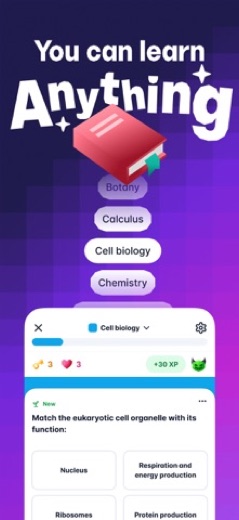
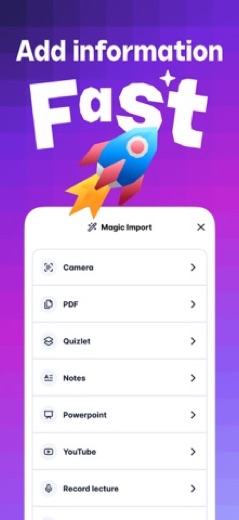
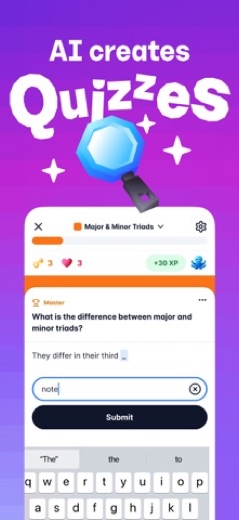
Gizmo is an AI study app that turns notes, PDFs, slides and YouTube videos into flashcards, then quizzes students on them with spaced repetition. It is free to start, with a paid Gizmo Unlimited tier, and it also runs in a web browser at app.gizmo.ai, which answers most searches for Gizmo AI on a PC.
What is Gizmo AI?
Gizmo is a flashcard and quiz app with an AI tutor built in. Students import material, and Gizmo builds decks and quizzes from it, then spaces out reviews so older cards keep coming back.
The App Store lists the seller as GIZMO AI LTD, and on Google Play the same product appears as Gizmo: AI Flashcards and Tutor from a publisher named Save All; the download link on gizmo.ai leads to that Android listing. The app has been in both stores since February 2022, and a browser version sits at app.gizmo.ai.
Is this the real Gizmo AI app?
- Listed on Google Play & App StoreStore listings on both Google Play and the App Store.
- Established since 2022Listed since Feb 17, 2022, 5,000,000+ installs on Google Play.
| Developer on Google Play | Save All |
|---|---|
| Developer on the App Store | GIZMO AI LTD |
| Same developer on both stores | Names differ; compare them on each listing |
| Android package name | ai.saveall.app |
| iOS bundle ID | io.gonative.ios.xqdyad |
| On the stores since | Feb 17, 2022 |
| Installs on Google Play | 5,000,000+ |
| Developer website | gizmo.ai |
| Content rating | Google Play: Everyone / App Store: 4+ |
These details come from the public store listings. LookedApp doesn't host downloads: install from the Google Play or App Store buttons on this page.
Key features
- AI import that converts YouTube videos, PDFs, PowerPoint files and typed notes into flashcards, and brings in existing Quizlet and Anki decks.
- A scanner that turns photos of handwritten notes into cards and quizzes.
- An AI tutor that explains topics and works through homework and exam-style questions.
- Spaced repetition and active recall quizzes, with multiple-choice and written answers.
- More than 1,000,000 public flashcards made by other students, plus shared decks.
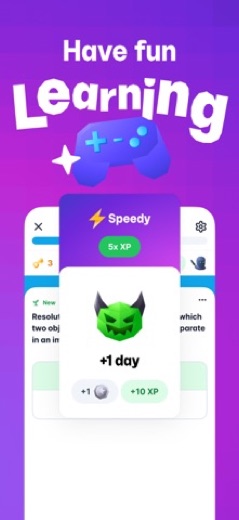
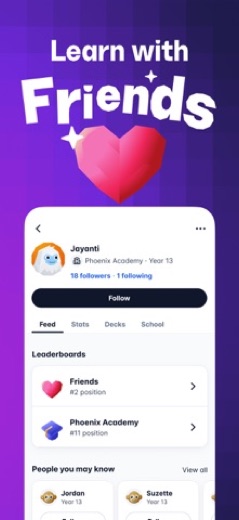
- Leaderboards and study games, with Gizmo Live listed on the website.
More Games & Learning reviews



More news
- What's newWhat's New in Zangi Private Messenger: Latest Updates DetailedZangi Private Messenger has rolled out new updates across its platforms, bringing enhanced user control, reporting features on Android, and general performance improvements and bug fixes for a more stable and user-friendly experience.
- What's newMyChart Update: Syncing Health Data, Streamlined Visits, and Prepay DetailsLookedApp's news desk reports on the latest MyChart application update, detailing new features for syncing health data, managing appointments, and viewing billing information, alongside a refresher on the app's core functions and costs.
- What's newLords Mobile: The Space Bridge Opens in Latest UpdateThe popular strategy game Lords Mobile recently updated its content, bringing the third part of its Transformers collaboration event to players. This update introduces new ways to engage with iconic characters and acquire special in-game items.

Privacy and permissions
The Google Play listing shows a long permission list: Camera, Contacts, Location, Microphone, Photos/Media/Files, Storage and Wi-Fi connection information. The camera fits the note scanner and file access fits imports; the listing does not explain why location or contacts are requested, so those can be declined.
The App Store listing notes that the app contains messaging and chat and user-generated content, which includes the public decks. Anything posted to a public deck can be seen by other students, so personal details are best left out.
GIZMO AI LTD publishes its privacy policy at gizmo.ai.
Gizmo AI permissions in plain English
The Google Play listing shows 7 permission groups. Google Play also lists 11 other permissions, such as “view network connections”. That is more than most games & learning apps LookedApp reviews (typical: 1).
- CameraCan take photos and record video
- ContactsCan read your contacts
- LocationCan use your approximate location
- MicrophoneCan record audio
- Photos/Media/FilesCan read and change your photos, media and files
- StorageCan read and change files in shared storage
- Wi-Fi connection informationCan see Wi-Fi connection details
Permission names come from Google Play; the plain-English lines describe what each permission group allows, not how this app uses it.
Gizmo AI at a glance
| Developer | GIZMO AI LTD |
|---|---|
| Category | Education |
| Rating on App Store | 4.8 out of 5 (18K ratings) |
| Rating on Google Play | 4.8 out of 5 (129K ratings) |
| Installs on Google Play | 5M+ |
| Price | Free |
| Age rating | 4+ |
What changed in the latest Gizmo AI version
App Store · Version 3.2.156, released Nov 16, 2026
The release notes say:
“Better ways to learn with your friends”
Google Play · Listing updated Nov 15, 2026
The release notes are general and don't list specific changes:
“Fixes and improvements to make learning more addictive”
Quoted from the store listings' release notes.
Pricing
Gizmo is free to install and use, with free flashcards and quizzes. The paid tier is called Gizmo Unlimited, and the U.S. App Store lists it at several price points: $6.99, $12.99, $14.99, $24.99, $51.00, $77.99 and $154.99. The store page does not say which of these are weekly, monthly or yearly, so the plan length shown in the app at checkout is the one to read.
The app also sells coin packs: 1,000 coins for $1.99, 5,000 coins for $4.99 and 12,500 coins for $9.99. Google Play shows in-app purchases as well. The store listings do not say exactly which features stay free once a student hits a limit.
Gizmo AI compared with similar apps
| App | Rating | Installs | Price |
|---|---|---|---|
 Gizmo AI | 4.8 | 5M+ | Free |
 Amazon A to Z | 4.7 | 5M+ | Free |
 AOL | 4.6 | 10M+ | Free |
 BurlingtonEnglish | 4.4 | 1M+ | Free |
Popular reviews
 Campus Parent reviewThe Campus Parent application provides a direct connection for parents and guardians to their student's academic…Games & Learning
 Scratch reviewScratch is a block-based programming environment available through a web browser and as a downloadable computer…Games & Learning
 Memrise reviewMemrise is a language learning application designed for individuals with diverse learning objectives, ranging from exam…Games & Learning
 ABCya! Games reviewABCya! Games is an educational application designed for children from pre-kindergarten through sixth grade and beyond,…Games & Learning
 Among Us reviewAmong Us is a social deduction game where players work together to prepare a spaceship for departure while identifying…Games & Learning
 Solitaire.com reviewSolitaire.com, developed by Tripledot Studios Limited, offers a classic Solitaire card game experience for mobile…Games & Learning
Platforms and editions
Gizmo has no separate Windows or Mac program. On a computer, the web app at app.gizmo.ai offers sign-up and study in the browser, which covers searches for Gizmo AI for PC, desktop or online. On phones, the iPhone and iPad app needs iOS 16.4 or later, and the Android app is on Google Play.
Install it only from those store pages or use the web app. Check the publisher name, GIZMO AI LTD on the App Store or Save All on Google Play, and skip APK copies on download sites.
How to install Gizmo AI
On Android (Google Play)
- Open the Google Play Store app on your Android phone or tablet.
- Search for Gizmo AI, or use the Google Play button on this page to open the listing directly.
- Check that the developer under the app name is Save All.
- Check that your device meets the listing's requirement: Android 8.0 and up.
- Tap Install (or the price, for a paid app) and wait for the download to finish, then open the app from your home screen.
- The listing shows in-app purchases, so review any purchase prompts before you confirm.
On iPhone and iPad (App Store)
- Open the App Store on your iPhone or iPad.
- Search for Gizmo AI, or use the App Store button on this page to open the listing directly.
- Check that the developer under the app name is GIZMO AI LTD.
- Make sure your device has iOS 16.4 or later and about 198 MB of free space, as the listing states.
- Tap Get (or the price), confirm the download, then open the app from your home screen.
- The listing shows in-app purchases, so review any purchase prompts before you confirm.
Gizmo AI version and app details
| Google Play | App Store | |
|---|---|---|
| Latest version | – | 3.2.156 |
| Last updated | Nov 15, 2026 | Nov 16, 2026 |
| First released | Feb 21, 2022 | Feb 17, 2022 |
| Package name | ai.saveall.app | – |
| Bundle ID | – | io.gonative.ios.xqdyad |
| Requires | Android 8.0 and up | iOS 16.4 or later |
| Download size | – | 198 MB |
| Content rating | Everyone | 4+ |
| In-app purchases | Yes ($4.99 - $155.22 per item) | Yes |
| Contains ads | No | – |
| Languages | – | 1 (including English) |
| Developer | Save All | GIZMO AI LTD |
Who Gizmo AI is for
Gizmo suits high school and college students who already have lecture slides, PDFs or video lessons and want flashcards without typing them. Students moving from Quizlet or Anki can bring their decks along.
It is less of a fit for anyone who wants a complete course rather than a review tool. Heavy users should expect to pay, and should read the plan length at checkout, since the store page does not show it.
Gizmo AI for kids and families
- Age rating: Google Play rates it Everyone; the App Store rates it 4+.
- In-app purchases: Google Play: yes ($4.99 - $155.22 per item); App Store: yes.
- Ads: the Google Play listing says the app does not contain ads.
- Data safety (Google Play): The developer says the app may collect Location, Personal info and 7 others. No data shared with third parties. Data is encrypted in transit. You can request that data be deleted.
Store age ratings describe content, not whether an app suits a particular child.
Pros
- Builds flashcards from PDFs, slides, videos and photos of notes
- Imports Quizlet and Anki decks
- Works in a browser as well as on phones
- Rated 4.8 on both the App Store and Google Play
Cons
- Unlimited use costs money, and plan lengths are not shown on the store page
- Separate coin packs on top of the subscription
- Long list of Android permissions
- Developer name differs between the two stores
Gizmo AI: frequently asked questions
Is Gizmo AI free?
Yes to start. Flashcards and quizzes are free, and Gizmo Unlimited is a paid upgrade with prices from $6.99 to $154.99 in the U.S. App Store.
Can Gizmo AI be used on a PC?
Yes, through the web app at app.gizmo.ai in a browser. There is no separate Windows or Mac download.
Who makes Gizmo?
GIZMO AI LTD on the App Store; the Android version is published under the name Save All and is linked from gizmo.ai.
Can Gizmo import Quizlet flashcards?
Yes. The App Store listing names Quizlet and Anki among the sources it can convert, along with YouTube, PDFs, notes and PowerPoint.
Is this the Gizmo sign-in page?
No. This is an independent review. Signing in happens in the Gizmo app or at app.gizmo.ai.
Gizmo AI
- Category
- Education
- Version
- 3.2.156
Download
Looking for the Gizmo AI website or sign-in? Go to gizmo.ai →The developer's website, as given on the store listing.
Gizmo AI ratings breakdown
Google Play 4.8 average from 128,890 ratings
- 586%
- 411%
- 32%
- 20%
- 10%
App Store 4.8 average from 18,292 ratings
- 588%
- 47%
- 32%
- 21%
- 12%
Share of ratings for each star level, as shown on the listings, as of Nov 18, 2026.