Citrix Workspace
BusinessScreenshots
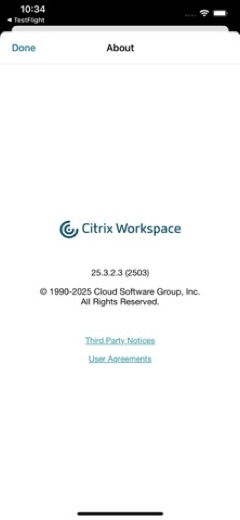
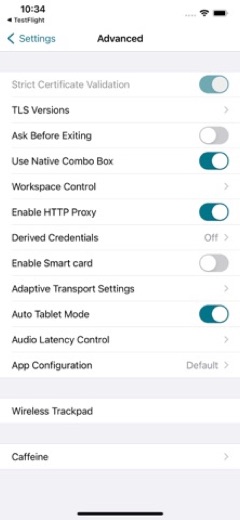
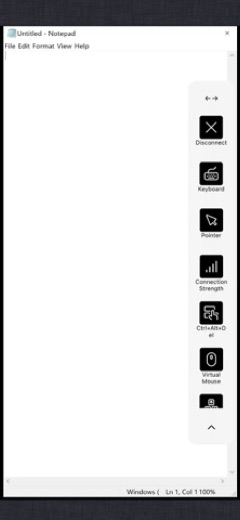
Analysis by LookedApp · Published · Updated
Citrix Workspace, the app once called Citrix Receiver, is the free client that opens an organization's virtual desktops and apps on a phone, tablet or computer. It only does something useful once IT supplies a server or email address. Windows, Mac and Linux versions come from citrix.com, while phones and tablets get it from the app stores.
What is Citrix Workspace?
Citrix Systems, Inc. makes Citrix Workspace. The company was founded in 1989, is based in Fort Lauderdale, Florida, and has belonged to Cloud Software Group since it was taken private on September 30, 2022 in a $16.5 billion deal. The app connects to a Citrix environment run by an employer and shows the virtual apps, desktops, SaaS and web apps and files assigned to that person.
Setup on a phone is short: tap Get Started, enter the server or email address from the IT help desk, add the username and password, and pick the apps to use. More accounts can be added from Settings.
Citrix publishes builds for every platform on its downloads page. In November 2026 those were Windows 2610 (October 21, 2026), the long-term service release 2607 Hotfix 1 for Windows, Mac 2609, Linux 2608, iOS 2609, and 2607 for Android, ChromeOS and HTML5. A Microsoft Store edition of the Windows app is listed as well.
Is this the real Citrix Workspace app?
- Verified publisher infoSame developer on Google Play and the App Store (Citrix Systems, Inc), and the developer website forums.citrix.com matches the publisher.
- Established since 2010Listed since Apr 1, 2010, 10,000,000+ installs on Google Play.
| Developer on Google Play | Citrix Systems, Inc |
|---|---|
| Developer on the App Store | Citrix Systems, Inc. |
| Same developer on both stores | Yes |
| Android package name | com.citrix.Receiver |
| iOS bundle ID | com.citrix.ReceiveriPad |
| On the stores since | Apr 1, 2010 |
| Installs on Google Play | 10,000,000+ |
| Developer website | forums.citrix.com |
| Content rating | Google Play: Everyone / App Store: 4+ |
These details come from the public store listings. LookedApp doesn't host downloads: install from the Google Play or App Store buttons on this page.
Key features
- Opens virtual desktops and apps hosted by the organization.
- One view of SaaS, web, mobile and virtual apps, plus files.
- Client drive mapping on Android, so USB storage plugged into the device can be used inside a session.
- A VPN service on Android for reaching internal company websites and SaaS apps.
- Several accounts, managed from Settings.
- Issue reports with log files that can be emailed to the company's IT team.
More Productivity & Email reviews


More news
- What's newGoogle Photos Update: Enhanced Search and Smarter Storage ManagementRecent updates to Google Photos bring a more powerful search experience to users and introduce a new tool to manage storage more efficiently, according to recent store listings.
- What's newWells Fargo Mobile: October 2026 Update Enhances Credit Card InsightsThe Wells Fargo Mobile app has received an update in October 2026, focusing on enhanced accessibility for personalized insights within credit card account details. LookedApp examines what this means for users and provides a refresher on the app's comprehensive banking functionalities.
- What's newWhat's New in Microsoft OneDrive: A Look at Recent UpdatesMicrosoft OneDrive has received significant updates across both iOS and Android platforms, enhancing file management, photo organization, and app stability. These changes reflect an ongoing commitment to providing a comprehensive cloud storage solution for users.



Privacy and permissions
Google Play lists permission groups for Camera, Microphone, Location, Phone, Device ID & call information, Photos/Media/Files, Storage and Wi-Fi connection information. Citrix explains two of them in the listing: location is needed only for the experimental workspace hub feature and can be refused when no hub is present, and the accessibility service exists for gesture and touch passthrough in sessions, with Citrix stating it collects no user data through it.
Whatever happens inside a virtual desktop is governed by the employer's own systems and policies, which the store listings do not cover.
Citrix Systems, Inc. publishes its privacy policy at www.cloud.com.
Citrix Workspace permissions in plain English
The Google Play listing shows 8 permission groups. Google Play also lists 12 other permissions, such as “view network connections”. That is more than most productivity & email apps LookedApp reviews (typical: 7).
- CameraCan take photos and record video
- Device ID & call informationCan read your device ID and call status
- LocationCan use your precise location
- MicrophoneCan record audio
- PhoneCan read phone status or make calls
- Photos/Media/FilesCan read and change your photos, media and files
- StorageCan read and change files in shared storage
- Wi-Fi connection informationCan see Wi-Fi connection details
The App Store privacy label lists these data types:
- Linked to you: Location, Contact Info, Identifiers
- Not linked to you: Usage Data, Diagnostics
Permission names come from Google Play; the plain-English lines describe what each permission group allows, not how this app uses it.
Citrix Workspace at a glance
| Developer | Citrix Systems, Inc. |
|---|---|
| Category | Business |
| Rating on App Store | 4.3 out of 5 (6.4K ratings) |
| Rating on Google Play | 4.0 out of 5 (66K ratings) |
| Installs on Google Play | 10M+ |
| Price | Free |
| Age rating | 4+ |
What changed in the latest Citrix Workspace version
App Store · Version 26.9.0, released Sep 17, 2026
The release notes say:
“Support for iOS/iPadOS 27 and general bug fixes”
Google Play · Listing updated Nov 5, 2026
The release notes say:
“Improved Session Toolbar Experience, Support for Two-Finger Horizontal Scrolling Improved Graphic Settings Usability and Automatic Synchronisation & Support for In-Session FIDO2 Passkeys for Password-less Sign-In”
Quoted from the store listings' release notes.
Pricing
Citrix Workspace is free on the App Store and Google Play, and Google Play shows no in-app purchases. Access comes from the employer: without a Citrix environment from an organization there is little to connect to. The Android listing mentions a "Try the demo" option inside the app for companies that do not use Citrix yet.
Citrix Workspace compared with similar apps
| App | Rating | Installs | Price |
|---|---|---|---|
 Citrix Workspace | 4.0 | 10M+ | Free |
 Amazon A to Z | 4.7 | 5M+ | Free |
 AOL | 4.6 | 10M+ | Free |
 BurlingtonEnglish | 4.4 | 1M+ | Free |
Popular reviews
 Email for Outlook, Hotmail reviewEmail for Outlook, Hotmail is a third-party Android mail client for Outlook.com and Hotmail addresses. Microsoft does…Productivity & Email
 DYMO Connect reviewDYMO Connect is DYMO's label design software, and the version most people need is DYMO Connect for Desktop on Windows…Productivity & Email
 Microsoft Teams reviewMicrosoft Teams is a comprehensive communication and collaboration application designed to bring individuals together…Productivity & Email
 Microsoft Outlook reviewMicrosoft Outlook is a comprehensive mobile application designed for email and calendar management, enabling users to…Productivity & Email
 Epson DocumentScan reviewEpson DocumentScan sends scans from a supported Epson document scanner straight to an iPhone, iPad or Android phone,…Productivity & Email
 Email App reviewEmail App is an application designed for managing email communication, published by All Email Connect -Fast & Secure…Productivity & Email
PC requirements
Windows version 2610 supports Windows 11, Windows 10 Enterprise, Home and Pro, and Windows Server 2019, 2022 and 2025. The minimum hardware is 2 GB of RAM and 1 GB of free disk space. It also needs .NET Framework 4.8, .NET Desktop Runtime 8.0.15 or later (the x86 build from version 2409 on) and Edge WebView2 Runtime 131 or later.
Windows Home works with limits: no domain pass-through authentication, Desktop Lock, FastConnect API or domain-joined setups. On ARM64 Windows the app runs only in emulation. Phones need iOS 17.0 or later on Apple devices.
For a safe install, computers should use citrix.com/downloads/workspace-app or the Microsoft Store edition, and phones the App Store or Google Play listing from Citrix Systems, Inc. Copies on download portals add nothing, since the client is free anyway.
How to install Citrix Workspace
On Android (Google Play)
- Open the Google Play Store app on your Android phone or tablet.
- Search for Citrix Workspace, or use the Google Play button on this page to open the listing directly.
- Check that the developer under the app name is Citrix Systems, Inc.
- Tap Install (or the price, for a paid app) and wait for the download to finish, then open the app from your home screen.
On iPhone and iPad (App Store)
- Open the App Store on your iPhone or iPad.
- Search for Citrix Workspace, or use the App Store button on this page to open the listing directly.
- Check that the developer under the app name is Citrix Systems, Inc..
- Make sure your device has iOS 17.0 or later and about 104 MB of free space, as the listing states.
- Tap Get (or the price), confirm the download, then open the app from your home screen.
Citrix Workspace version and app details
| Google Play | App Store | |
|---|---|---|
| Latest version | – | 26.9.0 |
| Last updated | Nov 5, 2026 | Sep 17, 2026 |
| First released | Apr 1, 2010 | Apr 1, 2010 |
| Package name | com.citrix.Receiver | – |
| Bundle ID | – | com.citrix.ReceiveriPad |
| Requires | – | iOS 17.0 or later |
| Download size | – | 104 MB |
| Content rating | Everyone (Users Interact) | 4+ |
| In-app purchases | No | – |
| Contains ads | No | – |
| Languages | – | 12 (including English) |
| Developer | Citrix Systems, Inc | Citrix Systems, Inc. |
Who Citrix Workspace is for
Staff at companies and other organizations that deliver apps and desktops through Citrix, especially people working from home on a personal PC, Mac or tablet.
Anyone without a Citrix account from an employer can skip it.
Pros
- Free, with no in-app purchases
- Clients for Windows, Mac, Linux, iOS, Android, ChromeOS and HTML5
- Frequent updates; Windows 2610 shipped on October 21, 2026
- Runs on Windows 10 Home and Pro, not just Enterprise
Cons
- Of little use without an organization's Citrix setup
- Windows install needs .NET and WebView2 components
- ARM64 Windows supported only in emulation
- Broad Android permission list
Citrix Workspace: frequently asked questions
Where can Citrix Workspace for Windows be downloaded?
From citrix.com/downloads/workspace-app, where the current release in November 2026 was 2610, or from the Microsoft Store edition Citrix lists on the same page.
Is Citrix Receiver the same as Citrix Workspace?
Yes. Citrix Workspace app is the new name for Citrix Receiver.
Does Citrix Workspace work on a Mac?
Yes. Citrix lists Mac version 2609, released on September 17, 2026.
Is Citrix Workspace free?
Yes. The app is free, but it needs an organization's Citrix environment to connect to.
What server address goes into the app?
The one supplied by the IT help desk or system administrator; it can also be an email address, as instructed.
Is this a Citrix sign-in page?
No. This is an independent review with no connection to Citrix or any employer.
Citrix Workspace
- Category
- Business
- Version
- 26.9.0
Download
Looking for the Citrix Workspace website or sign-in? Go to forums.citrix.com →The developer's website, as given on the store listing.
Citrix Workspace ratings breakdown
Google Play 4.0 average from 65,537 ratings
- 561%
- 412%
- 36%
- 25%
- 115%
App Store 4.3 average from 6,414 ratings
- 565%
- 420%
- 34%
- 22%
- 18%
Share of ratings for each star level, as shown on the listings, as of Nov 5, 2026.