Google Find Hub
ToolsScreenshots
Analysis by LookedApp · Published · Updated
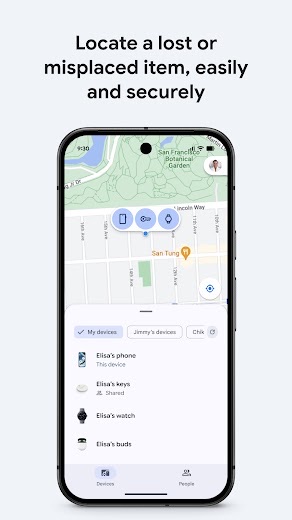
Google's Find Hub, the app once called "Find My Device", shows where an Android phone, tablet, watch or tagged item is, and can ring, lock or erase a lost device. It is free from Google LLC and works best when it is set up before anything goes missing.
What is Google Find Hub?
Find Hub is Google's service for tracking Android devices and Bluetooth accessories. It took over from the "Find My Device" name in 2025, and by June 2025 the new name had reached Android settings through Google Play services version 25.20.37. In settings it now sits under Security & privacy, then Device finders.
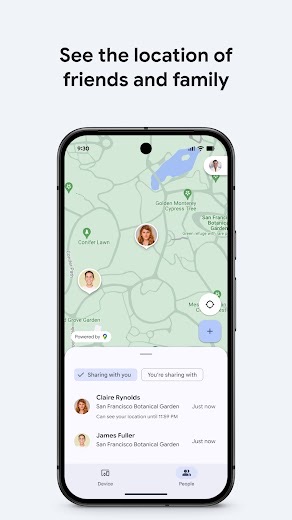
The Google Play app dates back to December 11, 2013, under its old name, and keeps getting updates; the latest arrived on November 16, 2026. Besides devices, it can share a live location with friends or family to plan a meetup or confirm someone got home.
The app is listed only on Google Play. From a computer, the same service opens in a web browser at google.com/android/find.
Is this the real Google Find Hub app?
- Established since 2013Listed since Dec 11, 2013, 1,000,000,000+ installs on Google Play.
| Developer on Google Play | Google LLC |
|---|---|
| Android package name | com.google.android.apps.adm |
| On the stores since | Dec 11, 2013 |
| Installs on Google Play | 1,000,000,000+ |
| Content rating | Google Play: Everyone |
These details come from the public store listings. LookedApp doesn't host downloads: install from the Google Play or App Store buttons on this page.
Key features
- A map of the user's phone, tablet, headphones and tagged items, including devices that are offline.
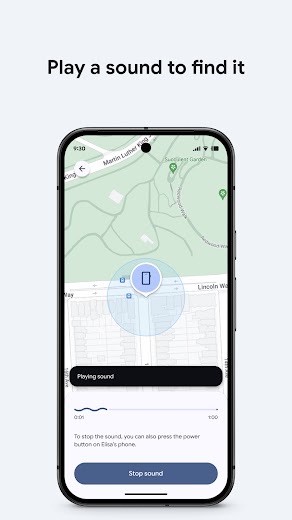
- A sound to ring a lost device that is somewhere nearby.
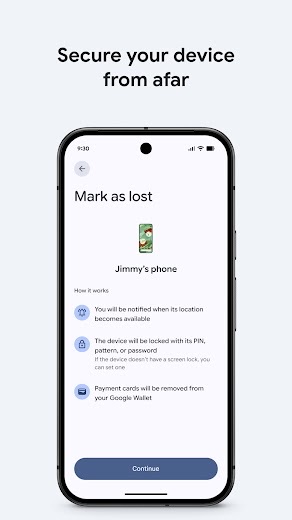
- Remote lock with a custom message on the lock screen, or a full remote erase.
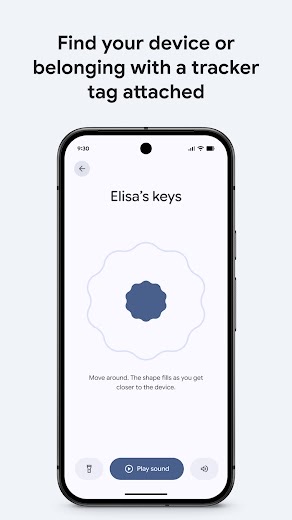
- The Find Hub network, a crowdsourced network of Android devices that helps locate lost items using end-to-end encrypted locations.
- Support for Wear OS watches, Android XR devices and locator tags attached to keys, bags and similar items.
- Live location sharing with friends and family.
More Tools & Utilities reviews



More news
- GuideIn-App Purchases and Subscriptions: Reading the Price LineUnderstanding the different pricing models for mobile applications, from no initial cost to up-front purchases, helps users navigate the digital marketplace effectively. This guide explains how to interpret price lines and pricing sections on app store listings.
- GuideUnderstanding Shopping Apps: Permissions, Payments, and Safe InstallationShopping applications provide convenience, but understanding their permissions, payment structures, and how to install them safely is crucial for user privacy and device security.
- RoundupTop Free Sports Apps for Live Scores and StreamsLookedApp presents a roundup of eight free-to-download sports applications, providing real-time scores, streams, and comprehensive sports content to enthusiasts.















Privacy and permissions
Google Play lists four permission groups: camera, contacts, identity and location. Google says location data in the Find Hub network is encrypted and not visible even to Google, and a phone needs a PIN, pattern or password before the network can help find its items.
Find Hub switches on by itself once a Google Account is added to an Android phone, and the phone then stores its recent locations, encrypted, with Google. Location sharing with people is a separate choice, and it is worth reviewing who can see a location from time to time.
Google LLC publishes its privacy policy at www.google.com.
Google Find Hub permissions in plain English
The Google Play listing shows 4 permission groups. Google Play also lists 11 other permissions, such as “view network connections”. That is fewer than most tools & utilities apps LookedApp reviews (typical: 5).
- CameraCan take photos and record video
- ContactsCan read your contacts
- IdentityCan find accounts on the device
- LocationCan use your precise location
Permission names come from Google Play; the plain-English lines describe what each permission group allows, not how this app uses it.
Google Find Hub at a glance
| Developer | Google LLC |
|---|---|
| Category | Tools |
| Rating on Google Play | 4.2 out of 5 (1.7M ratings) |
| Installs on Google Play | 1B+ |
| Price | Free |
| Age rating | Everyone |
What changed in the latest Google Find Hub version
Google Play · Listing updated Nov 16, 2026
The release notes say:
“You can now locate Find Hub network-compatible items even if your phone is offline. If the item is in Bluetooth range, you can ring it or find it nearby. In addition to finding lost devices and items, you can now stay connected to the people who matter to you. You can share your live location to coordinate a meetup with a friend or check that a family member got home safe—all in one app.”
Quoted from the store listings' release notes.
Pricing
Find Hub is free, and Google Play lists no in-app purchases. The service comes with an Android phone and a Google Account; the listing does not mention any paid tier.
Google Find Hub compared with similar apps
| App | Rating | Installs | Price |
|---|---|---|---|
 Google Find Hub | 4.2 | 1B+ | Free |
 Amtrak | 4.7 | 5M+ | Free |
 Apple Devices | – | – | – |
 Audacity | – | – | – |
Popular reviews
 Tolls NY (E-ZPass NY) reviewTolls NY (E-ZPass NY) is a mobile application designed for E-ZPass NY and Tolls by Mail customers to manage their…Tools & Utilities
 Wells Fargo Mobile reviewThe Wells Fargo Mobile app offers a comprehensive suite of banking and financial management tools for customers with…Tools & Utilities
 MyHumana reviewMyHumana is Humana's member app for coverage details, claims, drug prices and ID cards. It only works with an active…Tools & Utilities
- Baby Buddy for Android reviewBaby Buddy for Android is a companion application designed for caregivers to track a baby's activities, including…Tools & Utilities
 MyChart reviewMyChart is an application designed to provide users with direct access to their personal health information and…Tools & Utilities
 Kaiser Permanente reviewThe Kaiser Permanente app reaches past insurance into day-to-day care: members message their doctor's office, book…Tools & Utilities
Platforms and editions
The app is for Android, and many phones reach the service straight from settings. Some setup steps need Android 14 or later. For anyone searching for "Find My Device" on a PC or laptop, the answer is the web version at google.com/android/find, which works from a browser with the same Google Account; there is no desktop program.
Locking or erasing a device from afar only works when it has power, a mobile data or Wi-Fi connection, a signed-in Google Account, Find Hub turned on and visibility on Google Play. After an erase, the phone asks for the Google Account password before it can be used again, which stops a stranger from simply setting it up. The genuine app is the Google LLC listing on Google Play; versions from APK sites add risk for no gain.
How to install Google Find Hub
On Android (Google Play)
- Open the Google Play Store app on your Android phone or tablet.
- Search for Google Find Hub, or use the Google Play button on this page to open the listing directly.
- Check that the developer under the app name is Google LLC.
- Tap Install (or the price, for a paid app) and wait for the download to finish, then open the app from your home screen.
Google Find Hub version and app details
| Google Play | |
|---|---|
| Last updated | Nov 16, 2026 |
| First released | Dec 11, 2013 |
| Package name | com.google.android.apps.adm |
| Content rating | Everyone |
| In-app purchases | No |
| Contains ads | No |
| Developer | Google LLC |
Who Google Find Hub is for
Every Android owner with a Google Account, since the service only helps if it is on before a device goes missing. Families who share locations and people who carry locator tags on keys or luggage get extra use from it.
iPhone owners will not find it on the App Store, because the app is listed for Android only.
Pros
- Free, from Google LLC, with no in-app purchases
- Finds offline devices through the Find Hub network
- Remote ring, lock and erase
- Web version for use from any computer
Cons
- Android only
- Some setup steps need Android 14 or later
- Remote lock and erase need the device to have power and a connection
- 4.2 rating on Google Play from 1.7M ratings
Google Find Hub: frequently asked questions
Is Find Hub the same as "Find My Device"?
Yes. Google renamed "Find My Device" to Find Hub in 2025, and the change reached Android settings by June 2025.
Can Find Hub be used on a PC or laptop?
Yes, through a browser. The web version at google.com/android/find shows devices on a map and can ring, lock or erase them.
Is there a Find Hub app for iPhone?
The app is listed only on Google Play for Android devices.
Is Find Hub free?
Yes. Google Play lists it as free with no in-app purchases.
What does a phone need before it can be erased remotely?
Power, a mobile data or Wi-Fi connection, a signed-in Google Account, Find Hub turned on and visibility on Google Play.
Google Find Hub
- Category
- Tools
- Version
- Varies with device
Download
Google Find Hub ratings breakdown
Google Play 4.2 average from 1,704,531 ratings
- 569%
- 49%
- 36%
- 24%
- 112%
Share of ratings for each star level, as shown on the listings, as of Nov 18, 2026.