UnitedHealthcare
MedicalScreenshots
Analysis by LookedApp · Published · Updated
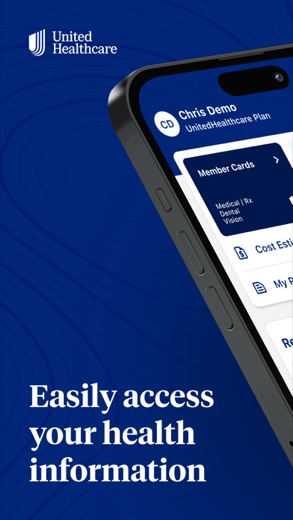
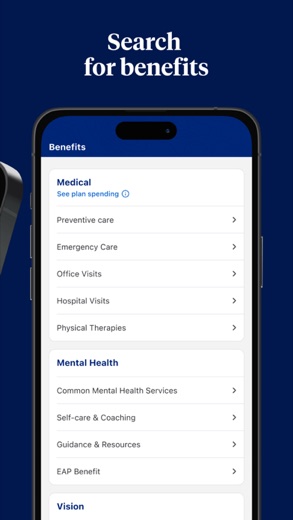
The UnitedHealthcare app puts a member's health plan on the phone: ID cards, claims, cost estimates, network doctors and account balances. It suits people already covered by a UnitedHealthcare plan, with one caveat both store listings repeat: some plans are not supported, and the features vary from plan to plan.
What is UnitedHealthcare?
UnitedHealthcare is the member app from United HealthCare Services, Inc., the company behind UnitedHealthcare health plans. It works alongside a plan someone already has; it is not a place to shop for coverage. Members use it to see what the plan pays for, follow claims and carry a digital member ID card.
The iPhone version reached the App Store on April 10, 2018, and the Android version followed on Google Play on September 26, 2018. Both listings were updated in November 2026. On a computer or tablet without the app, UnitedHealthcare sends members to its member website, myuhc.com, which covers the same plan details.
Members sign in inside the app or at myuhc.com with a HealthSafe ID, which UnitedHealthcare describes as one username and password for nearly all of its digital tools.
Is this the real UnitedHealthcare app?
- Listed on Google Play & App StoreStore listings on both Google Play and the App Store.
- Established since 2018Listed since Apr 10, 2018, 5,000,000+ installs on Google Play.
| Developer on Google Play | UNITED HEALTHCARE SERVICES, INC. |
|---|---|
| Developer on the App Store | United HealthCare Services, Inc. |
| Same developer on both stores | Yes |
| Android package name | com.mobile.uhc |
| iOS bundle ID | com.uhg.mobile.uhc |
| On the stores since | Apr 10, 2018 |
| Installs on Google Play | 5,000,000+ |
| Content rating | Google Play: Everyone / App Store: 12+ |
These details come from the public store listings. LookedApp doesn't host downloads: install from the Google Play or App Store buttons on this page.
Key features
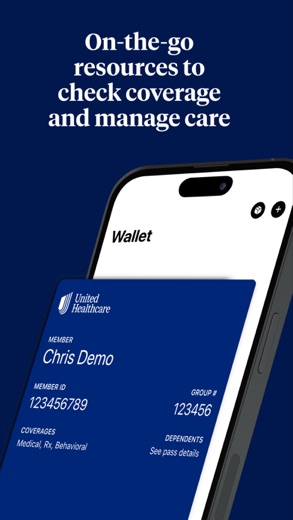
- A digital member ID card, plus the UnitedHealthcare UCard on plans that include it, which can be saved to Apple Wallet or Google Wallet.
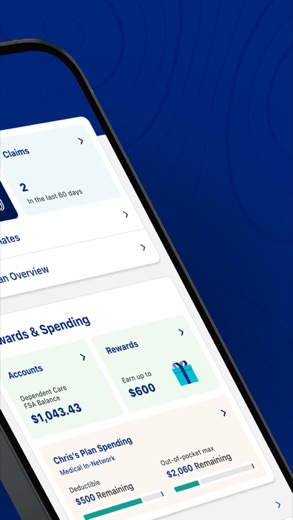
- Claims that can be sorted by member, provider, status or date, with the payment breakdown and the Explanation of Benefits.
- A nearby search for in-network doctors, specialists, hospitals and clinics, with favorites for the ones used most.
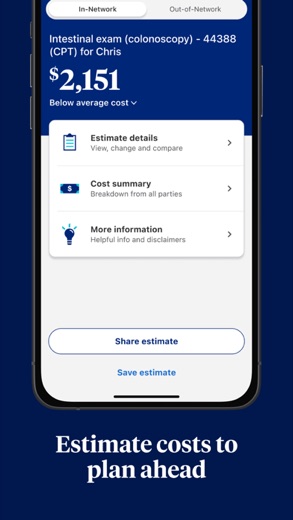
- Cost estimates for a treatment or service before the visit; UnitedHealthcare notes they are estimates, not a promise of the final bill.
- Balances for health reimbursement, flexible spending and Optum Bank health savings accounts, next to deductible and out-of-pocket totals.
- Prescription refills and drug pricing, plus virtual care and live chat with a UnitedHealthcare advocate where the plan offers them.
More Tools & Utilities reviews



More news
- What's newGoogle Photos Update: Enhanced Search and Smarter Storage ManagementRecent updates to Google Photos bring a more powerful search experience to users and introduce a new tool to manage storage more efficiently, according to recent store listings.
- What's newWells Fargo Mobile: October 2026 Update Enhances Credit Card InsightsThe Wells Fargo Mobile app has received an update in October 2026, focusing on enhanced accessibility for personalized insights within credit card account details. LookedApp examines what this means for users and provides a refresher on the app's comprehensive banking functionalities.
- What's newWhat's New in Microsoft OneDrive: A Look at Recent UpdatesMicrosoft OneDrive has received significant updates across both iOS and Android platforms, enhancing file management, photo organization, and app stability. These changes reflect an ongoing commitment to providing a comprehensive cloud storage solution for users.



Privacy and permissions
Google Play lists access to the calendar, camera, location, microphone, photos and files, storage and Wi-Fi connection information. The listing does not explain what each permission is for; location lines up with the near-me provider search.
The App Store version can also show records such as immunizations, lab results and procedures. Android users can sign in with a fingerprint instead of typing the HealthSafe ID password each time.
United HealthCare Services, Inc. publishes its privacy policy at www.healthsafe-id.com.
UnitedHealthcare permissions in plain English
The Google Play listing shows 7 permission groups. Google Play also lists 12 other permissions, such as “view network connections”. That is more than most tools & utilities apps LookedApp reviews (typical: 5).
- CalendarCan read or change your calendar
- CameraCan take photos and record video
- LocationCan use your precise location
- MicrophoneCan record audio
- Photos/Media/FilesCan read and change your photos, media and files
- StorageCan read and change files in shared storage
- Wi-Fi connection informationCan see Wi-Fi connection details
The App Store privacy label lists these data types:
- Linked to you: Health & Fitness, Location
- Not linked to you: Usage Data, Diagnostics
Permission names come from Google Play; the plain-English lines describe what each permission group allows, not how this app uses it.
UnitedHealthcare at a glance
| Developer | United HealthCare Services, Inc. |
|---|---|
| Category | Medical |
| Rating on App Store | 4.7 out of 5 (892K ratings) |
| Rating on Google Play | 4.6 out of 5 (256K ratings) |
| Installs on Google Play | 5M+ |
| Price | Free |
| Age rating | 12+ |
What changed in the latest UnitedHealthcare version
App Store and Google Play · Version 3.18.1, released Nov 14, 2026; Google Play listing updated Nov 13, 2026
The release notes say:
“We’ve rolled out some changes to make our UHC app easier and more reliable to use.”
Quoted from the store listings' release notes.
Pricing
The app is free on both stores, and Google Play lists no in-app purchases. What a member pays for care is set by the plan, not by the app. The cost estimate tool is for planning only: UnitedHealthcare says actual costs may vary.
UnitedHealthcare compared with similar apps
| App | Rating | Installs | Price |
|---|---|---|---|
 UnitedHealthcare | 4.7 | 5M+ | Free |
 Amtrak | 4.7 | 5M+ | Free |
 Apple Devices | – | – | – |
 Audacity | – | – | – |
Popular reviews
 Tolls NY (E-ZPass NY) reviewTolls NY (E-ZPass NY) is a mobile application designed for E-ZPass NY and Tolls by Mail customers to manage their…Tools & Utilities
 Wells Fargo Mobile reviewThe Wells Fargo Mobile app offers a comprehensive suite of banking and financial management tools for customers with…Tools & Utilities
 MyHumana reviewMyHumana is Humana's member app for coverage details, claims, drug prices and ID cards. It only works with an active…Tools & Utilities
- Baby Buddy for Android reviewBaby Buddy for Android is a companion application designed for caregivers to track a baby's activities, including…Tools & Utilities
 MyChart reviewMyChart is an application designed to provide users with direct access to their personal health information and…Tools & Utilities
 Kaiser Permanente reviewThe Kaiser Permanente app reaches past insurance into day-to-day care: members message their doctor's office, book…Tools & Utilities
Platforms and editions
UnitedHealthcare runs on Android phones through Google Play and on iPhone through the App Store, which asks for iOS 15.5 or later. There is no Windows or Mac program. Anyone searching for UnitedHealthcare for PC is better served by myuhc.com in a browser, the route UnitedHealthcare itself offers to desktop and tablet users.
Doctors' offices and billing staff use a different tool, the UnitedHealthcare Provider Portal at UHCprovider.com, which signs in with a One Healthcare ID; members who land there are pointed back to myuhc.com. To avoid look-alike apps, install only the listing published by United HealthCare Services, Inc.
How to install UnitedHealthcare
On Android (Google Play)
- Open the Google Play Store app on your Android phone or tablet.
- Search for UnitedHealthcare, or use the Google Play button on this page to open the listing directly.
- Check that the developer under the app name is UNITED HEALTHCARE SERVICES, INC..
- Check that your device meets the listing's requirement: Android 10 and up.
- Tap Install (or the price, for a paid app) and wait for the download to finish, then open the app from your home screen.
On iPhone and iPad (App Store)
- Open the App Store on your iPhone or iPad.
- Search for UnitedHealthcare, or use the App Store button on this page to open the listing directly.
- Check that the developer under the app name is United HealthCare Services, Inc..
- Make sure your device has iOS 15.5 or later and about 204 MB of free space, as the listing states.
- Tap Get (or the price), confirm the download, then open the app from your home screen.
UnitedHealthcare version and app details
| Google Play | App Store | |
|---|---|---|
| Latest version | – | 3.18.1 |
| Last updated | Nov 13, 2026 | Nov 14, 2026 |
| First released | Sep 26, 2018 | Apr 10, 2018 |
| Package name | com.mobile.uhc | – |
| Bundle ID | – | com.uhg.mobile.uhc |
| Requires | Android 10 and up | iOS 15.5 or later |
| Download size | – | 204 MB |
| Content rating | Everyone | 12+ (Infrequent/Mild Medical/Treatment Information) |
| In-app purchases | No | – |
| Contains ads | No | – |
| Languages | – | 2 (including English) |
| Developer | UNITED HEALTHCARE SERVICES, INC. | United HealthCare Services, Inc. |
Who UnitedHealthcare is for
Members of a supported UnitedHealthcare plan who want their ID card, claims and balances in one place will use it most, especially when one plan covers several people. Members whose plan the app does not support yet still have myuhc.com.
Families on one plan can sort claims by member, which keeps several people's bills apart.
Pros
- Rated 4.6 on Google Play from 256.3K ratings and 4.7 on the App Store from 891.6K
- ID card can sit in Apple Wallet or Google Wallet
- Claims, balances and cost estimates in one app
- Free, with no in-app purchases on Google Play
Cons
- Not every UnitedHealthcare plan is supported, and features differ by plan
- No desktop app; computers use myuhc.com
- Broad Android permission list, including microphone and calendar
- Cost estimates are not a guarantee
UnitedHealthcare: frequently asked questions
Is this the UnitedHealthcare sign-in page?
No. Members sign in inside the UnitedHealthcare app or on myuhc.com with a HealthSafe ID.
Can UnitedHealthcare be used on a PC?
There is no Windows or Mac app. On a computer, members use myuhc.com in a browser to see benefits, find network doctors and view or pay claims.
Is the UnitedHealthcare app free?
Yes. Members pay nothing for the app itself on either store.
Does the app include the UCard?
The App Store listing says members on eligible plans can open their UnitedHealthcare UCard in the app and use benefit credit or earned rewards for in-store or online purchases.
Where do providers sign in?
Health care professionals use the UnitedHealthcare Provider Portal at UHCprovider.com with a One Healthcare ID, not the member app.
Who makes the app?
United HealthCare Services, Inc. publishes it on Google Play and the App Store.
UnitedHealthcare
- Category
- Medical
- Version
- 3.18.1
Download
UnitedHealthcare ratings breakdown
Google Play 4.6 average from 256,297 ratings
- 580%
- 49%
- 33%
- 22%
- 16%
App Store 4.7 average from 891,577 ratings
- 585%
- 47%
- 32%
- 21%
- 14%
Share of ratings for each star level, as shown on the listings, as of Nov 19, 2026.