Manage My Wedding
ProductivityScreenshots
Analysis by LookedApp · Published
Manage My Wedding is a free, compact wedding planner from wedding planner Yvette Sitters, covering checklists, budget and guests in one place. It suits couples who want a simple organizer rather than a big wedding platform, but it is a small app and the iPhone version has not been updated since April 2023.
What is Manage My Wedding?
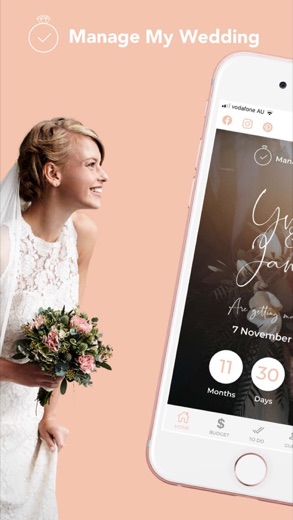
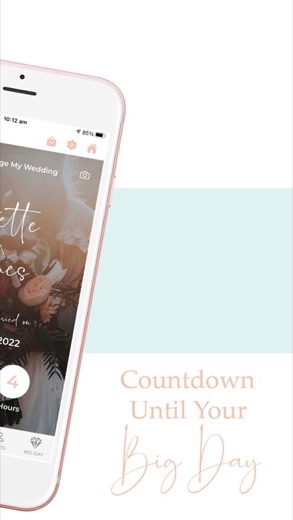
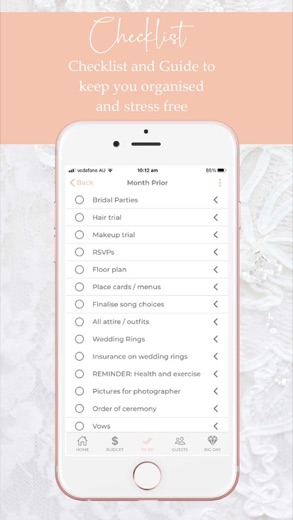
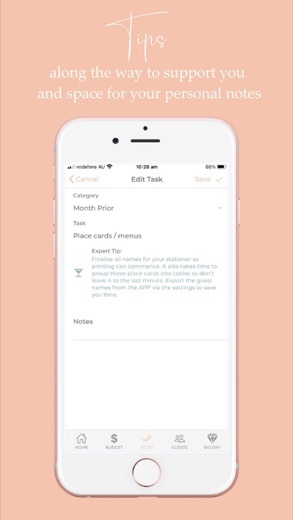
The app breaks wedding planning into a countdown, a budget, a guest list and to-do lists grouped by timing: the months ahead, the month before, the week before, the day before, the wedding day, the day after and the return from the honeymoon. Each task comes with a tip from the developer as it approaches.
It is made by Yvette Sitters, who describes herself as a specialist wedding planner and runs an online wedding store at managemywedding.com. Google Play lists the app as Manage My Wedding Planner under Yvette Sitters; the App Store calls it Manage My Wedding, from Yvette Louise Sitters.
Both stores carry it, but neither the listings nor the developer's site mention a web version. People searching for Manage My Wedding online or for PC will find only the phone apps.
Is this the real Manage My Wedding app?
- Listed on Google Play & App StoreStore listings on both Google Play and the App Store.
| Developer on Google Play | Yvette Sitters |
|---|---|
| Developer on the App Store | Yvette Louise Sitters |
| Same developer on both stores | Names differ; compare them on each listing |
| Android package name | com.sitters.managemywedding |
| iOS bundle ID | com.sitters.managemywedding |
| On the stores since | Oct 2, 2018 |
| Installs on Google Play | 10,000+ |
| Developer website | managemywedding.com |
| Content rating | Google Play: Everyone / App Store: 4+ |
These details come from the public store listings. LookedApp doesn't host downloads: install from the Google Play or App Store buttons on this page.
Key features
- A countdown to the wedding date.
- Timed to-do lists that can be ticked off, with suggestions for each task.
- An expense summary split into categories such as Bride, Ceremony, Reception and Bridal Parties, with essentials kept apart from wish-list items and a warning when spending goes over budget.
- A guest list that records RSVPs, addresses, dietary needs, table numbers and special requests, with import from the phone's contacts.
- Shared access so a partner or helper can plan too, with notifications when someone changes something.
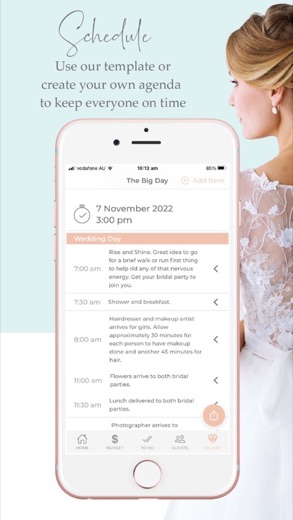
- A suggested agenda for the day before and the wedding day, plus a full data export.
More Productivity & Email reviews


More news
- What's newGoogle Photos Update: Enhanced Search and Smarter Storage ManagementRecent updates to Google Photos bring a more powerful search experience to users and introduce a new tool to manage storage more efficiently, according to recent store listings.
- What's newWells Fargo Mobile: October 2026 Update Enhances Credit Card InsightsThe Wells Fargo Mobile app has received an update in October 2026, focusing on enhanced accessibility for personalized insights within credit card account details. LookedApp examines what this means for users and provides a refresher on the app's comprehensive banking functionalities.
- What's newWhat's New in Microsoft OneDrive: A Look at Recent UpdatesMicrosoft OneDrive has received significant updates across both iOS and Android platforms, enhancing file management, photo organization, and app stability. These changes reflect an ongoing commitment to providing a comprehensive cloud storage solution for users.



Privacy and permissions
Google Play lists three permission groups: Contacts, Photos/Media/Files and Storage. Contacts access matches the option to import guests from the phone, though the listing does not say so directly. Guest details such as addresses and dietary needs end up in the app, so it is worth thinking about who gets shared access.
Neither listing describes where data is stored or how long it is kept.
Yvette Louise Sitters publishes its privacy policy at managemywedding.com.
Manage My Wedding permissions in plain English
The Google Play listing shows 3 permission groups. Google Play also lists 3 other permissions, such as “view network connections”. That is fewer than most productivity & email apps LookedApp reviews (typical: 7).
- ContactsCan read your contacts
- Photos/Media/FilesCan read and change your photos, media and files
- StorageCan read and change files in shared storage
The App Store privacy label lists these data types:
- Linked to you: Contact Info, Contacts, User Content
- Not linked to you: Usage Data, Diagnostics
Permission names come from Google Play; the plain-English lines describe what each permission group allows, not how this app uses it.
Manage My Wedding at a glance
| Developer | Yvette Louise Sitters |
|---|---|
| Category | Productivity |
| Rating on App Store | 4.0 out of 5 (60 ratings) |
| Rating on Google Play | 4.2 out of 5 (66 ratings) |
| Installs on Google Play | 10K+ |
| Price | Free |
| Age rating | 4+ |
What changed in the latest Manage My Wedding version
App Store · Version 3, released Apr 18, 2023
The release notes say:
“Changed virtual keyboard to include decimal points in currency fields. Enabled the "Go" button on virtual keyboards.”
Google Play · Listing updated Dec 8, 2025
The release notes are general and don't list specific changes:
“Bug fixes, and Android edge-to-edge support.”
Quoted from the store listings' release notes.
Pricing
The app is free on both stores, and Google Play lists no in-app purchases. The developer's site calls it a free planning hub.
The same site sells separate planning products, including wedding checklists, a seating guide, a pre-wedding parties guide and one-on-one wedding support. Those are optional and sit outside the app; the store listings show no prices for them.
Manage My Wedding compared with similar apps
| App | Rating | Installs | Price |
|---|---|---|---|
 Manage My Wedding | 4.2 | 10K+ | Free |
 Amazon A to Z | 4.7 | 5M+ | Free |
 AOL | 4.6 | 10M+ | Free |
 BurlingtonEnglish | 4.4 | 1M+ | Free |
Popular reviews
 Email for Outlook, Hotmail reviewEmail for Outlook, Hotmail is a third-party Android mail client for Outlook.com and Hotmail addresses. Microsoft does…Productivity & Email
 DYMO Connect reviewDYMO Connect is DYMO's label design software, and the version most people need is DYMO Connect for Desktop on Windows…Productivity & Email
 Microsoft Teams reviewMicrosoft Teams is a comprehensive communication and collaboration application designed to bring individuals together…Productivity & Email
 Microsoft Outlook reviewMicrosoft Outlook is a comprehensive mobile application designed for email and calendar management, enabling users to…Productivity & Email
 Epson DocumentScan reviewEpson DocumentScan sends scans from a supported Epson document scanner straight to an iPhone, iPad or Android phone,…Productivity & Email
 Email App reviewEmail App is an application designed for managing email communication, published by All Email Connect -Fast & Secure…Productivity & Email
How to get Manage My Wedding safely
Before installing, confirm the developer, since other planner apps use similar names: Yvette Sitters on Google Play or Yvette Louise Sitters on the App Store. Avoid APK copies from download sites.
This review is not a sign-in page. Planning data lives in the app, and shared access is set up from inside it.
How to install Manage My Wedding
On Android (Google Play)
- Open the Google Play Store app on your Android phone or tablet.
- Search for Manage My Wedding, or use the Google Play button on this page to open the listing directly.
- Check that the developer under the app name is Yvette Sitters.
- Check that your device meets the listing's requirement: Android 6.0 and up.
- Tap Install (or the price, for a paid app) and wait for the download to finish, then open the app from your home screen.
On iPhone and iPad (App Store)
- Open the App Store on your iPhone or iPad.
- Search for Manage My Wedding, or use the App Store button on this page to open the listing directly.
- Check that the developer under the app name is Yvette Louise Sitters.
- Make sure your device has iOS 13.0 or later and about 46 MB of free space, as the listing states.
- Tap Get (or the price), confirm the download, then open the app from your home screen.
- The listing shows in-app purchases, so review any purchase prompts before you confirm.
Manage My Wedding version and app details
| Google Play | App Store | |
|---|---|---|
| Latest version | – | 3 |
| Last updated | Dec 8, 2025 | Apr 18, 2023 |
| First released | Dec 6, 2021 | Oct 2, 2018 |
| Package name | com.sitters.managemywedding | – |
| Bundle ID | – | com.sitters.managemywedding |
| Requires | Android 6.0 and up | iOS 13.0 or later |
| Download size | – | 46 MB |
| Content rating | Everyone | 4+ |
| In-app purchases | No | Yes |
| Contains ads | No | – |
| Languages | – | 1 (including English) |
| Developer | Yvette Sitters | Yvette Louise Sitters |
Who Manage My Wedding is for
Couples who want a straightforward checklist, budget and guest tracker, and the parents or friends helping them, who can be given shared access, fit this app best. It reads as a planner's personal toolkit rather than a large service.
Anyone expecting wedding websites, vendor booking or a large community will not find those in the listings. It is also a small app: 60 ratings on the App Store and 66 on Google Play, with averages of 4.0 and 4.2.
Pros
- Free, with no in-app purchases
- Timeline-based to-do lists with tips
- Detailed guest tracking, including dietary needs and tables
- Shared planning with change notifications
- Data export
Cons
- The iPhone version was last updated in April 2023
- Very few ratings on either store
- No web or desktop version mentioned
- App Store version lists 1 language
Manage My Wedding: frequently asked questions
Is Manage My Wedding free?
Yes, on both stores. The developer sells planning guides and one-on-one support separately on its website.
Can Manage My Wedding be used on a computer?
Neither the store listings nor the developer's site mention a web or desktop version, so it is a phone app.
Can a partner plan along?
Yes. Account access can be shared with others, and the app sends a notification when another planner makes a change.
Who makes the app?
Yvette Sitters, a wedding planner who also runs managemywedding.com. The App Store lists her as Yvette Louise Sitters.
Is the app still updated?
Google Play shows an update in December 2025. The App Store version was last updated in April 2023.
What does the iPhone version need?
iOS 13.0 or later, according to the App Store listing.
Manage My Wedding
- Category
- Productivity
- Version
- 3
Download
Looking for the Manage My Wedding website or sign-in? Go to managemywedding.com →The developer's website, as given on the store listing.
Manage My Wedding ratings breakdown
Google Play 4.2 average from 66 ratings
- 560%
- 418%
- 312%
- 20%
- 19%
App Store 4.0 average from 60 ratings
- 568%
- 45%
- 37%
- 22%
- 118%
Share of ratings for each star level, as shown on the listings, as of Nov 6, 2026.