DYMO Connect
ProductivityScreenshots
Analysis by LookedApp · Published
DYMO Connect is DYMO's label design software, and the version most people need is DYMO Connect for Desktop on Windows or Mac, now at 1.6.4. The phone app exists too, but it has not been updated since February 2024 and is rated around 1.5 on both stores.
What is DYMO Connect?
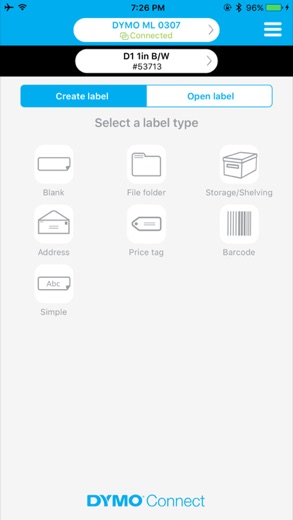
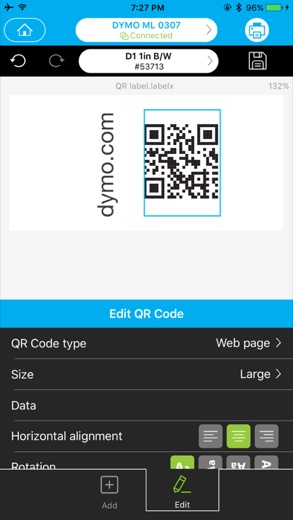
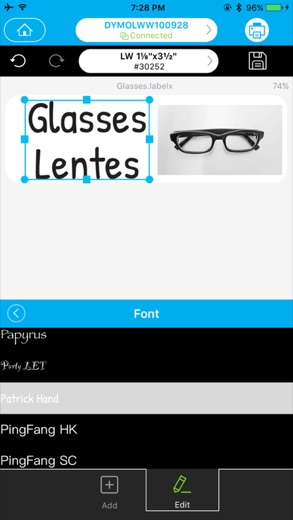
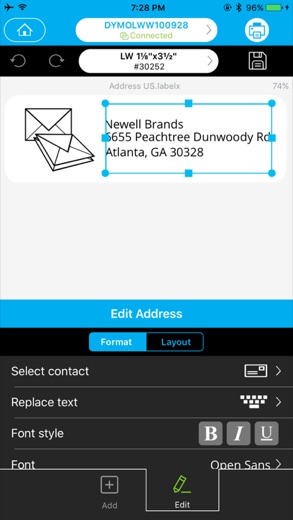
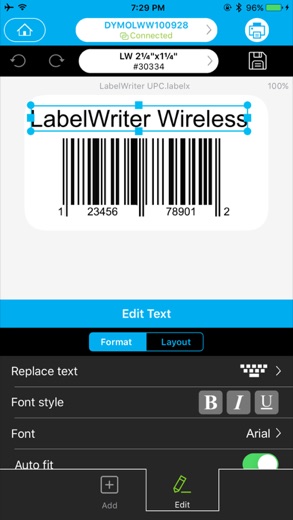
DYMO Connect lets people design and print labels on DYMO label printers: addresses, shipping labels, barcodes and similar jobs. DYMO lists two editions, DYMO Connect for Desktop and DYMO Connect Mobile.
The mobile edition has been on the stores since October 27, 2016, published by DYMO. Its last update on both Google Play and the App Store was February 23, 2024, and reviewers are unhappy: 1.6 from about 1K ratings on Google Play and 1.5 from 247 on the App Store. The desktop edition is updated separately through DYMO's support site.
Is this the real DYMO Connect app?
- Verified publisher infoSame developer on Google Play and the App Store (DYMO), and the developer website dymo.com matches the publisher.
| Developer on Google Play | DYMO |
|---|---|
| Developer on the App Store | DYMO |
| Same developer on both stores | Yes |
| Android package name | com.DYMO.Mobile |
| iOS bundle ID | com.DYMO.MLS |
| On the stores since | Oct 27, 2016 |
| Installs on Google Play | 100,000+ |
| Developer website | dymo.com |
| Content rating | Google Play: Everyone / App Store: 4+ |
These details come from the public store listings. LookedApp doesn't host downloads: install from the Google Play or App Store buttons on this page.
Key features
- Label design with borders, styles, fonts and images.
- Ready-made label types and templates.
- Address labels built from saved contacts.
- Barcode and QR Code objects.
- Spellcheck and voice-to-text in the mobile app.
- A Fix US Address check in the desktop app, which DYMO says can be briefly unavailable when USPS verification limits are hit.
More Productivity & Email reviews


More news
- What's newGoogle Photos Update: Enhanced Search and Smarter Storage ManagementRecent updates to Google Photos bring a more powerful search experience to users and introduce a new tool to manage storage more efficiently, according to recent store listings.
- What's newWells Fargo Mobile: October 2026 Update Enhances Credit Card InsightsThe Wells Fargo Mobile app has received an update in October 2026, focusing on enhanced accessibility for personalized insights within credit card account details. LookedApp examines what this means for users and provides a refresher on the app's comprehensive banking functionalities.
- What's newWhat's New in Microsoft OneDrive: A Look at Recent UpdatesMicrosoft OneDrive has received significant updates across both iOS and Android platforms, enhancing file management, photo organization, and app stability. These changes reflect an ongoing commitment to providing a comprehensive cloud storage solution for users.



Platforms and editions
DYMO Connect for Desktop 1.6.4 is the current version. On Windows 11 there are 32-bit, 64-bit and ARM builds, and older 1.5.1 and 1.4.6 releases remain available. On Macs running macOS Tahoe, there are Intel 64-bit and Apple Silicon ARM64 builds. DYMO's download selector covers macOS 10.14 Mojave through macOS Tahoe and Windows 7, 8.1, 10 and 11, though the available version can differ by system.
Older printers are a common snag. DYMO keeps the separate DYMO Label Software for the legacy LabelWriter 4 series and older models, so owners of those printers should check which program their model needs. The mobile app needs iOS 14.0 or later on Apple devices and is also on Android.
DYMO Connect permissions in plain English
The Google Play listing shows 5 permission groups. Google Play also lists 6 other permissions, such as “view network connections”. That is fewer than most productivity & email apps LookedApp reviews (typical: 7).
- CameraCan take photos and record video
- ContactsCan read your contacts
- Device & app historyCan see recent apps and activity
- Photos/Media/FilesCan read and change your photos, media and files
- StorageCan read and change files in shared storage
Permission names come from Google Play; the plain-English lines describe what each permission group allows, not how this app uses it.
DYMO Connect at a glance
| Developer | DYMO |
|---|---|
| Category | Productivity |
| Rating on App Store | 1.5 out of 5 (247 ratings) |
| Rating on Google Play | 1.6 out of 5 (1K ratings) |
| Installs on Google Play | 100K+ |
| Price | Free |
| Age rating | 4+ |
What changed in the latest DYMO Connect version
App Store and Google Play · Version 2.2.9, released Feb 23, 2024; Google Play listing updated Feb 23, 2024
The release notes are general and don't list specific changes:
“Fix issues and improve app performance Add Dark mode support”
Quoted from the store listings' release notes.
Pricing
The mobile app is free on both stores, and Google Play lists no in-app purchases. DYMO's download pages do not list a price for the desktop edition.
DYMO Connect compared with similar apps
| App | Rating | Installs | Price |
|---|---|---|---|
 DYMO Connect | 1.6 | 100K+ | Free |
 Amazon A to Z | 4.7 | 5M+ | Free |
 AOL | 4.6 | 10M+ | Free |
 BurlingtonEnglish | 4.4 | 1M+ | Free |
Popular reviews
 Gmail reviewGmail provides a comprehensive email management experience with advanced artificial intelligence capabilities and…Productivity & Email
 Email for Outlook, Hotmail reviewEmail for Outlook, Hotmail is a third-party Android mail client for Outlook.com and Hotmail addresses. Microsoft does…Productivity & Email
 Microsoft Teams reviewMicrosoft Teams is a comprehensive communication and collaboration application designed to bring individuals together…Productivity & Email
 Microsoft Outlook reviewMicrosoft Outlook is a comprehensive mobile application designed for email and calendar management, enabling users to…Productivity & Email
 Epson DocumentScan reviewEpson DocumentScan sends scans from a supported Epson document scanner straight to an iPhone, iPad or Android phone,…Productivity & Email
 Email App reviewEmail App is an application designed for managing email communication, published by All Email Connect -Fast & Secure…Productivity & Email
How to get DYMO Connect safely
Download DYMO Connect for Desktop from the Software Download Center on dymo.com: pick the software, then the operating system, then the version. For phones, use the listings published by DYMO on the App Store and Google Play. Driver download sites often bundle extra software, so they are best avoided.
On Android, the app asks for Camera, Contacts, Device and app history, Photos/Media/Files and Storage. The listing ties contacts to address labels and photos to label images; the rest is not explained.
How to install DYMO Connect
On Android (Google Play)
- Open the Google Play Store app on your Android phone or tablet.
- Search for DYMO Connect, or use the Google Play button on this page to open the listing directly.
- Check that the developer under the app name is DYMO.
- Check that your device meets the listing's requirement: Android 8.1 and up.
- Tap Install (or the price, for a paid app) and wait for the download to finish, then open the app from your home screen.
On iPhone and iPad (App Store)
- Open the App Store on your iPhone or iPad.
- Search for DYMO Connect, or use the App Store button on this page to open the listing directly.
- Check that the developer under the app name is DYMO.
- Make sure your device has iOS 14.0 or later and about 95 MB of free space, as the listing states.
- Tap Get (or the price), confirm the download, then open the app from your home screen.
DYMO Connect version and app details
| Google Play | App Store | |
|---|---|---|
| Latest version | – | 2.2.9 |
| Last updated | Feb 23, 2024 | Feb 23, 2024 |
| First released | Oct 27, 2016 | Oct 27, 2016 |
| Package name | com.DYMO.Mobile | – |
| Bundle ID | – | com.DYMO.MLS |
| Requires | Android 8.1 and up | iOS 14.0 or later |
| Download size | – | 95 MB |
| Content rating | Everyone | 4+ |
| In-app purchases | No | – |
| Contains ads | No | – |
| Languages | – | 14 |
| Developer | DYMO | DYMO |
Who DYMO Connect is for
Small offices, shops and home users with a current DYMO label printer, especially anyone printing shipping or address labels from a Windows PC or Mac.
Phone-only labeling is harder to recommend. The mobile app works with the right printer, but its low ratings and lack of updates since 2024 suggest the desktop edition is the safer bet.
Pros
- Desktop edition kept current at 1.6.4 for Windows and Mac.
- Builds for 32-bit, 64-bit, ARM and Apple Silicon.
- Address, barcode and QR Code label tools.
- Mobile app is free with no in-app purchases on Google Play.
Cons
- Mobile app rated 1.5 to 1.6 and last updated February 23, 2024.
- Legacy LabelWriter 4 series printers need different software.
- The Fix US Address feature can be temporarily unavailable.
- Android permission list is broad.
DYMO Connect: frequently asked questions
Where is DYMO Connect for PC downloaded?
Open the Software Download Center on dymo.com, choose DYMO Connect for Desktop, select Windows or macOS, then pick the version. The current release is 1.6.4.
Is DYMO Connect free?
The mobile app is free on both stores. DYMO's download pages do not list a price for the desktop edition.
Does DYMO Connect work on a Mac?
Yes. Version 1.6.4 has Intel and Apple Silicon builds, and DYMO's selector goes back to macOS 10.14 Mojave.
Why does an older LabelWriter not work with DYMO Connect?
DYMO keeps DYMO Label Software for the legacy LabelWriter 4 series and older printers, so those models may need that program rather than DYMO Connect.
Why does Fix US Address fail sometimes?
DYMO says USPS address-verification limits can make it unavailable for a while, sometimes up to an hour.
Is the DYMO Connect mobile app still updated?
Its last update on both stores was February 23, 2024.
DYMO Connect
- Category
- Productivity
- Version
- 2.2.9
Download
Looking for the DYMO Connect website or sign-in? Go to dymo.com →The developer's website, as given on the store listing.
DYMO Connect ratings breakdown
Google Play 1.6 average from 1,047 ratings
- 59%
- 43%
- 32%
- 27%
- 179%
App Store 1.5 average from 247 ratings
- 56%
- 42%
- 35%
- 29%
- 178%
Share of ratings for each star level, as shown on the listings, as of Nov 12, 2026.